• You've discovered RedGuides, an EverQuest multi-boxing and scripting community 🧙‍♀️⚙️. We want you to play several EQ characters at once, come join us and say hello! 👋

  • A TLP without truebox has thawed (Very Vanilla ready)
    Frostreaver
Magellan - Travel Utility

Release Magellan - Travel Utility 12-04-2025

No permission to download
Cannonballdex and I were discussing this yesterday.. I've noticed there are alot of zone connections missing from the ZoneConnections.yaml for the test compile..

I'm working on trying to add some of the missing ones.. I've started with some old zones.. but I can try adding those and paste them in here... You'd have to update your zone connections yaml manually, because my working version is quite customized now and alot of the entries wouldnt work for you (GH placement stuff)...
Yea, right after I posted and before your reply, I started working on them myself and fixed quite a few connections. I might go through the whole lot, but I have a ton of other things I am working on atm.
 
Just so folks know, this is not an issue with Magellan. This is broken zone connections. Also note, when you are editing your zone_connection.yaml file you will need to keep a backup, this file gets overwritten every time you update through the launcher.
 
I'm not sure why (I'm pretty dumb), but I can't seem to download/install the correct size file for zones.Lua or ladonzones.Lua - whether I download and install the version linked with the entire Magellan install, or download the files you have linked here, the files that install are only 50kb. I can run Magellan just fine, but in the couple of weeks I've been trying it I've only been able to nav using Magellan one time, from PoK to PoStorms. Everything else returns this message:

[Easyfind] Failed to generate path from XYZ to XYZ: Could not find path to target zone.

Can anyone give me some direction on how to fix this? Thx.

Edit: I'm on Test, btw.
 
I'm not sure why (I'm pretty dumb), but I can't seem to download/install the correct size file for zones.lua or ladonzones.lua - whether I download and install the version linked with the entire Magellan install, or download the files you have linked here, the files that install are only 50kb. I can run Magellan just fine, but in the couple of weeks I've been trying it I've only been able to nav using Magellan one time, from PoK to PoStorms. Everything else returns this message:

[Easyfind] Failed to generate path from XYZ to XYZ: Could not find path to target zone.

Can anyone give me some direction on how to fix this? Thx.

Edit: I'm on Test, btw.
The files you have are correct in reference to the size. The issue is not Magellan. Magellan only uses the files as a click point to zone and zone id, the problem is Test has issues with the zone connections in the path window and therefore not using the correct information for travel. A way to remedy this would be to add the zone connections to the (located in the resource folder) zone_connection.yaml with the missing the zone connections.
 
When in shadowhaven it cannot find a path to paludal. Any idea how to fix this?
live or test? And I'm assuming you are referring to the high-level versions of those zones?

On test, I dont see any entries in the Zone Connections yaml for anything related to either Shadowhaven or Paludal...
 
live or test? And I'm assuming you are referring to the high-level versions of those zones?

On test, I dont see any entries in the Zone Connections yaml for anything related to either Shadowhaven or Paludal...

On live, the current versions of the zones it cant find a path.
 
On live, the current versions of the zones it cant find a path.
ok thanks, I'll compare both live to test once I am able to get some entries added.. I would think they should be almost identical, as I dont think there's really any difference between the zones and navmeshes between regular live servers and the test server...
 
I believe It's the actual Test server itself. The zone path connections in the map window Zone Guide is broken.

what would be broken though?

I've gone and added all the NoS and ToL zone connections to the yaml now, and I am able to travel to them via the /travelto command or via the ctrl+click in the Find window, where it would work/sometimes not work before..

I'm working on older zones now.. then i can toss the file up here for anyone that wants..
 
what would be broken though?

I've gone and added all the NoS and ToL zone connections to the yaml now, and I am able to travel to them via the /travelto command or via the ctrl+click in the Find window, where it would work/sometimes not work before..

I'm working on older zones now.. then i can toss the file up here for anyone that wants..
Easyfind alters that window with your updated connections, they are the Green ones.

Travelto uses the in game connections through the zone guide. when they are broken then it uses your zone_yaml connections instead. So when you do not have the zone connections for a broken connection then that is when it can't find a connection.
 
Easyfind alters that window with your updated connections, they are the Green ones.

Travelto uses the in game connections through the zone guide. when they are broken then it uses your zone_yaml connections instead. So when you do not have the zone connections for a broken connection then that is when it can't find a connection.

ahh.. yes the ingame connections are broken all over the place LOL

well, at least with the manual ones added by us into the yaml, it'll make up for it.. I'm noticing as I add them in , when I do the CTRL+F, I'm getting those new entries in (Blue) for me... and their distance is based on the /loc i've put in for the entry in the yaml file..
 
ahh.. yes the ingame connections are broken all over the place LOL

well, at least with the manual ones added by us into the yaml, it'll make up for it.. I'm noticing as I add them in , when I do the CTRL+F, I'm getting those new entries in (Blue) for me... and their distance is based on the /loc i've put in for the entry in the yaml file..
Yah, some of the zones, can't remember the expansion off hand, but they have nothing in the find window 0 nothing. haha
 
@Jetanroth , Ok I've run through all the NoS, ToL, CoV, and ToV zones now and added the missing (lots) zone connections to the file..

I have to stop for the night now, but I'm planning on doing TBL, RoS, EOK, TBM tomorrow after work.. they should be a bit easier as I know those zones much better...

But so far, everything is working for my testing after adding them.. I can /travelto anyzone and it plots my path and runs me the shortest route... that also includes the new pok books added..
 
Something I do see is that it is trying to route thru paludal 2 rather than 1. I think Paludual 2 is the entrance under water rather than the normal zone line

Screenshot 2023-03-13 194455.jpg
 
Something I do see is that it is trying to route thru paludal 2 rather than 1. I think Paludual 2 is the entrance under water rather than the normal zone line

Not sure, but when there's multiple choices to go to a zone, it calculates the shortest path via nav and then uses that one..

Would that match what you're seeing? ie your closest to that one under the bridge and in the water?
 
Not sure, but when there's multiple choices to go to a zone, it calculates the shortest path via nav and then uses that one..

Would that match what you're seeing? ie your closest to that one under the bridge and in the water?

Yes, its definitley the closest one but I dont think there is any nav path that can take you under the water to that one. There is definitely a path to Paludial-1 becuase I can nav there and then from there let Magellan take me the rest of the way to SharVal.
 
Yes, its definitley the closest one but I dont think there is any nav path that can take you under the water to that one. There is definitely a path to Paludial-1 becuase I can nav there and then from there let Magellan take me the rest of the way to SharVal.

when i was testing these last night when I was adding them to the zone connections yaml, and I added that paludal 2 one (the one under the water) , from farther back in the zone, nav would take me onto that bridge, then fall off the side into the water below, and then into the underwater cave, eventually to the drop down to paludal -2 ..

I'm not sure how you could block the choice of one.. i'd definitely do that for paludal 2 though lol, that ones a bit sketchy , dropping you in the middle of the lake, mobs all around... eek..
 
when i was testing these last night when I was adding them to the zone connections yaml, and I added that paludal 2 one (the one under the water) , from farther back in the zone, nav would take me onto that bridge, then fall off the side into the water below, and then into the underwater cave, eventually to the drop down to paludal -2 ..

I'm not sure how you could block the choice of one.. i'd definitely do that for paludal 2 though lol, that ones a bit sketchy , dropping you in the middle of the lake, mobs all around... eek..
Yeah, exactly, super sketch. Blocking the Paludial-2 would be something in MQ2EasyFind so I will explore that option. I think I have a poor mesh as well because mine doesn't even drop me off the bridge, it simply cant find a nav route.
 
Yeah, exactly, super sketch. Blocking the Paludial-2 would be something in MQ2EasyFind so I will explore that option. I think I have a poor mesh as well because mine doesn't even drop me off the bridge, it simply cant find a nav route.

BTW i was on test when i did this.. not on any live servers.. but I dont think there should be any difference in navmesh between them... mine are just the ones downloaded via the launcher..

If you cant find something in mq2easyfind, you could always modify your navmesh for the zone and block that tunnel off so it cant "see" a path.. thats a pretty easy fix.. just need to remember if you ever update your navmeshes, that it might overwrite that file with a fresh one..
 
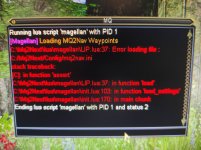
i get the following error message:
[2023/01/18 13:47:51] Running lua script 'magellan' with PID 1
[2023/01/18 13:47:51] [Magellan] Loading MQ2Nav Waypoints
[2023/01/18 13:47:51] C:\...\lua\lib\LIP.lua:58: attempt to index a nil valuestack traceback:
C:\...\lua\lib\LIP.lua: in function 'load'
C:\...\lua\magellan.lua:103: in function 'load_settings'
C:\...\lua\magellan.lua:170: in main chunk
[2023/01/18 13:47:51] Ending lua script 'magellan' with PID 1 and status 2
i tried to unload lua plugin, which didnt't help. i tried the /nav ui thing, and mq2nav works fine, so is easyfind as well.
to avoid that other lua scripts could affect the magellan, i just used a fresh and empty lua directory.
thanks a lot for helping

added: it works with the added version of magellan - but not with the new ones - strange enough
sadly magellan is still not working for me. (not even with the previous versions. i still get the same error messages)

update: even a complete new and empty mq2next gets me the same errors. what could i try, to get it to work? new eq install?
 
Last edited:
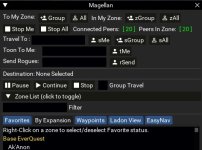
Just tried this today. Noticed that right clicking zone names under the expansion area adds to favorites, but clicking from the ladon view does not. Any way to make this also happen from ladon view as it's much easier than scrolling through by expansion. Also, purple is good. I know that many people love it, but any way to make a couple of color options like blue or red?

Otherwise, it's amazing! :D
 
Just tried this today. Noticed that right clicking zone names under the expansion area adds to favorites, but clicking from the ladon view does not. Any way to make this also happen from ladon view as it's much easier than scrolling through by expansion. Also, purple is good. I know that many people love it, but any way to make a couple of color options like blue or red?

Otherwise, it's amazing! :D
I'm sure a little bit of coding you could have the right-click Favorites from Ladon view.

for the color, you can edit this section, I made my theme a dark gray.
Code:
local function color_wrap()
   ImGui.PushStyleColor(ImGuiCol.WindowBg, .15, .15, .15, 1)
   ImGui.PushStyleColor(ImGuiCol.TitleBgActive, .00, .00, .00, 1)
   ImGui.PushStyleColor(ImGuiCol.FrameBg, .00, .00, .01, 1)
   ImGui.PushStyleColor(ImGuiCol.Button, .05, .05, .00, .50)
   ImGui.PushStyleColor(ImGuiCol.ButtonHovered, .45, .30, .20, 1)
   ImGui.PushStyleColor(ImGuiCol.ChildBg, .00, .00, .01, 1)
   ImGui.PushStyleColor(ImGuiCol.Header, .05, .05, .00, .50)
   ImGui.PushStyleColor(ImGuiCol.HeaderHovered, .45, .30, .20, 1)
   ImGui.PushStyleColor(ImGuiCol.HeaderActive, .23, .035, .12, .10)
   draw_main_window()
   ImGui.PopStyleColor(9)
end
 

Attachments

  • Untitled.jpg
    Untitled.jpg
    53.4 KB · Views: 5
I'm sure a little bit of coding you could have the right-click Favorites from Ladon view.
Working on that now actually...

for the color, you can edit this section, I made my theme a dark gray.
Thanks for the numbers. I like how that looks. Modded it for that color.

Also, I noticed that the group /travelto section sends the command to the entire group (which is obviously 99% of use cases). However, for my use case I wanted it only to send commands to a specific group channel instead, which I changed to accommodate also. 🙏
 
trying again: maybe someone can help me! i reinstalled mq2, reinstalled a new eq and still get those errors. (removed mq folder and eq folder - maybe there are some more folders to delete)
what can i do to get rid of them???
thanks a lot for your help!
 

Attachments

  • IMG_20230424_141938.jpg
    IMG_20230424_141938.jpg
    2.1 MB · Views: 6
trying again: maybe someone can help me! i reinstalled mq2, reinstalled a new eq and still get those errors. (removed mq folder and eq folder - maybe there are some more folders to delete)
what can i do to get rid of them???
thanks a lot for your help!
Do you have MQ2Nav.ini in your config folder?
 
there must be something else i am missing. i installed mq2 and eq on a totally fresh installed win10 machine and i am getting the same results....
 
trying again: maybe someone can help me! i reinstalled mq2, reinstalled a new eq and still get those errors. (removed mq folder and eq folder - maybe there are some more folders to delete)
what can i do to get rid of them???
thanks a lot for your help!
I just had the same problem. I first created an empty MQ2Nav.ini file, Magellan opened but didn't have a list of destinations. I had to open Nav by doing a Nav UI and poking around in the tabs until updated the ini file. I guess it's a lazy creation of the ini, you have to actively do something in the Nav UI before it loads is what it looks like.
 
I just had the same problem. I first created an empty MQ2Nav.ini file, Magellan opened but didn't have a list of destinations. I had to open Nav by doing a Nav UI and poking around in the tabs until updated the ini file. I guess it's a lazy creation of the ini, you have to actively do something in the Nav UI before it loads is what it looks like.
will try this next..
 
i found a Lua folder which works again for me (had it running on a different machine). but i still don't know why it works now....
 
The whole idea of the Redguides loader is to make this easy. I'm at a loss if there is something actually wrong here or just an operator error.
 
Release Magellan - Travel Utility

Users who are viewing this thread

Back
Top
Cart