• You've discovered RedGuides, an EverQuest multi-boxing and scripting community 🧙‍♀️⚙️. We want you to play several EQ characters at once, come join us and say hello! 👋

  • A TLP without truebox has thawed (Very Vanilla ready)
    Frostreaver
Magellan - Travel Utility

Release Magellan - Travel Utility 12-04-2025

No permission to download
I do...
Normally a zone short name is associated with a more human readable long name. So things like:

Code:
thuledream = 'Fear Itself'

But, in the case of those fancy guild halls, both are associated with same short name like this:
[CODE language=lua]
guildhalllrg = {
'Palatial Guildhall',
'Grand Guild Hall'
}
[/CODE]

So in this case guidhallrg is associated with a table that has two values, not a string value.

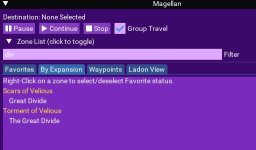
In the code for the Favorites tab, we compare the name of the zone and see if it's in the Favorites from your settings file here:
[CODE language=lua]
if ((#search_term > 2 and string.find(zone.name:lower(), search_term:lower())) and zone.favorite) or #search_term < 1 and zone.favorite then
[/CODE]
We're expecting zone.name to be a string, and in the case of these fancy Guild Halls, it's a table. So I need to change the comparison to take into account it could be a table and search thru the values in the table.
Regardless, there is a work around and you did a fine job with the script. Thanks again for your time and contributions.
 
I Have a PROBLEM !! My Guildhall is not working so I am moving it out of this Neighborhood!
Here is the messed up code:

Code:
      guildhalllrg = {
         'Palatial Squidlyhall',
         'Grand Guild Hall'
      }
It is SquidHall,
Regards......Redfrog SquarePantaloons
1664410375637.png
Yes I know my jokes are bad.. or worse.
 
When you use Ladon View and enter a name to filter a zone. If you minimize your game window it crashes eq with imgui error.

TableSetupColumn+0
 
Last edited:
@Cannonballdex : the very same happened to me today. Started typing the zone name, I wanted to go back to desktop to check in the browser which zone I wanted to go for the tradeskill stuff I wanted to go, but I the eq-client immediately crashed to desktop.
Also while traveling with Magellan and changing the focus to another eq-client I sometimes get a ctd.
Nevertheless the benefits of Magellan are so great, that I wont play anymore without it.
 
@Cannonballdex : the very same happened to me today. Started typing the zone name, I wanted to go back to desktop to check in the browser which zone I wanted to go for the tradeskill stuff I wanted to go, but I the eq-client immediately crashed to desktop.
Also while traveling with Magellan and changing the focus to another eq-client I sometimes get a ctd.
Nevertheless the benefits of Magellan are so great, that I wont play anymore without it.
Yah, I found out the same way :). Anyway if click off the Ladon tab before you minimize it doesn't crash.
 
Looked into the issue this morning. I don't have a permanent fix, but it appears that the problem is caused by putting the table inside the child area (which creates a nice inner scroll bar for overflow)...
I'll need to refactor this a bit and implement a clipper,

But, in the meantime, the fix is to remove the
Code:
ImGui.BeginChild('LadonZones')
around line 332 and it's corresponding end tag
Code:
ImGui.EndChild()
around line 370.
 
Coldblooded updated Magellan - Travel Utility with a new update entry:

Corrects CTD Condition

As reported by Cannonballdex and others, if you were on the Ladon View and minimized the EQ client, the result was a crash to desktop of EQ/MQ.

After a quick chat with Brainiac and Dannuic they discovered I was missing a required if condition around the BeginTable statement.

Should be all better now :)

Thanks to everyone for pointing this error out, and for the help fixing it.

Read the rest of this update entry...
 
I took @Cannonballdex files and it worked well. But with the next update the old files overwrote these new files.
@Coldblooded mind to import the new zone files into your ressources in order th avoid further "dopwndates" to the old files?
As a workaround I will temporarly "Unwatch".
 
quick question. When in Shadow Valley i selected Bloodfalls since I thought I could get there from where I was (now I know I have to go to MM). At any rate, it took me to BoA and then of course could not find a path. Why is it doing that? I would expect more of a "path can't be found" from Shadow Valley or Ka Vethan
 
quick question. When in Shadow Valley i selected Bloodfalls since I thought I could get there from where I was (now I know I have to go to MM). At any rate, it took me to BoA and then of course could not find a path. Why is it doing that? I would expect more of a "path can't be found" from Shadow Valley or Ka Vethan
Everquest had a glitch in the nav system. there is no connection from shadow valley / basilica to bloodfalls. This has been mentioned and the fix is ignoring basilica as a connection. Since there is no connections in basilica it will ignore that zone. remove:true

in your Zone_Connections.yaml in the EasyFind folder
Code:
basilica:
        -   type: ZoneConnection
            location: [1.14, 45.53, -20.30]
            switch: 1
            targetZone: shadowvalley
        -   type: ZoneConnection
            targetZone: bloodfalls
            remove: true
 
Last edited:
Okay, I just recently started using MQ2 and Magellan was recommended by a couple people. When I did my first installed Magellan and tried to run it, I received the following error:

[Magellan] Loading MQ2Nav Waypoints
...ata\Local\VeryVanilla\MacroQuest\Release\Lua\lib\LIP.Lua:37: Error loading file : C:/Users/****/AppData/Local/VeryVanilla/MacroQuest/Release/Config/mq2nav.ini
stack traceback:
[C]: in function 'assert'
...ata\Local\VeryVanilla\MacroQuest\Release\Lua\lib\LIP.Lua:37: in function 'load'
...ta\Local\VeryVanilla\MacroQuest\Release\Lua\magellan.Lua:103: in function 'load_settings'
...ta\Local\VeryVanilla\MacroQuest\Release\Lua\magellan.Lua:170: in main chunk
Ending Lua script 'magellan' with PID 5 and status 2

MQ2Nav was open, and I was able to use the /travelto zoneshortname command if I knew the short name. But the Magellan window wouldnt open.

After asking in the RG Discord, Sic and a couple others were able to get it fixed and it is really easy.

All we had to do was end/close the MQ2Nav and restart it, and then restart Magellan, or basically..

In the MQ window:
/nav ui
/nav ui
/Lua run magellan

What I was able to see was the MQ2 Nav window close, open, and then the Magellan tool opened right up.
I don't somehow my MQ2Nav didn't install correctly, wasn't loading correctly, or what. But this fixed it.

Hopefully this can help someone else if they get the same type of error in the future.
 
I havn't fiddled with the meshes yet. Does anyone have updated his mesh for umbral planes in order to add the zone to NOS and is willing to provide his update?
 
i get the following error message:
[2023/01/18 13:47:51] Running Lua script 'magellan' with PID 1
[2023/01/18 13:47:51] [Magellan] Loading MQ2Nav Waypoints
[2023/01/18 13:47:51] C:\...\Lua\lib\LIP.Lua:58: attempt to index a nil valuestack traceback:
C:\...\Lua\lib\LIP.Lua: in function 'load'
C:\...\Lua\magellan.Lua:103: in function 'load_settings'
C:\...\Lua\magellan.Lua:170: in main chunk
[2023/01/18 13:47:51] Ending Lua script 'magellan' with PID 1 and status 2
i tried to unload Lua plugin, which didnt't help. i tried the /nav ui thing, and mq2nav works fine, so is easyfind as well.
to avoid that other Lua scripts could affect the magellan, i just used a fresh and empty Lua directory.
thanks a lot for helping

added: it works with the added version of magellan - but not with the new ones - strange enough
 
Last edited:
Hmm...I am missing all NOS destinations after update. Anyone else?
 
Hmm...I am missing all NOS destinations after update. Anyone else?
Missing the NOS Zones as well, but can't fix it.
Copied zones.Lua and ladonzones.Lua mentioned into Lua/lib and Lua/lib/zones ... do they need to be copied anywhere else?

Edit: after running a search-programm I found them as well at Lua/magellan and copied them there as well, which fixed it.
 
Missing the NOS Zones as well, but can't fix it.
Copied zones.lua and ladonzones.lua mentioned into lua/lib and Lua/lib/zones ... do they need to be copied anywhere else?

Edit: after running a search-programm I found them as well at lua/magellan and copied them there as well, which fixed it.
One day I hope to see all of the Lua scripts contained in their own folders within the Lua folder. Makes it nice and easy.
 
New feature request
Could you add a /nav spawn option where we could paste in just the name of the Npc we want to nav to? I know I’m lazy and get tired of typing /nav spawn
 
I think this has something to do with a reorg of the code (I put everything in the /Lua/magellan folder) and at the same time, I set the resource up to auto-update with the git repository. The repository has the correct zone files that contain things like "Shar Vahl, Divided", so I'm not sure why these are not being correctly updated when you run the launcher. I'll "touch" the files again to see if I can set off another update. Sorry fellas - we'll get it worked out.
 
I'd sure like to see two more checkboxes in magellan:

all in zone
all in raid

running 24 on Riz, sometimes I've got 'em raided, sometimes not, but it's a bit tedious using magellan on each group leader, or all ungrouped toons. Many times i'll just /travelto, but some zones I just don't know what the shortname is offhand, and magellan is super handy for that. Just an Idea.
 
Issue found with route that is selected when choosing "Oceangreen Hills" or "Oceangreen Village" while in Crescent Reach. The route that it takes you through doesn't work. "Bixie Warfront" -> "Ethernere Tainted West Karana" -> "The Void (h)" is the incorrect Void zone. Can't reach SoD zones from "The Void (h)".

 
Issue found with route that is selected when choosing "Oceangreen Hills" or "Oceangreen Village" while in Crescent Reach. The route that it takes you through doesn't work. "Bixie Warfront" -> "Ethernere Tainted West Karana" -> "The Void (h)" is the incorrect Void zone. Can't reach SoD zones from "The Void (h)".

That is a nav issue. You can ignore bixie Warfront in the zone config file and it will route a different way.

Or If the issue is with Ethernere Tainted to Void(h) then ignore that connection in the zone config file.
Not sure, but I think you need flagged to use those portals from Ethernere.

Same issue with going from basilic to bloodfalls

I would think a good path from Crescent reach would be back to pok and then through Time using the Herald or whatever the guy is in pok.

Not sure if this would include all versions of the void or even what the are a-h ??
Yours Example Might Look Like:
Code:
ethernere:
        -   type: ZoneConnection
            targetZone: thevoida
            remove: true
        -   type: ZoneConnection
            targetZone: thevoidb
            remove: true
        -   type: ZoneConnection
            targetZone: thevoidc
            remove: true
        -   type: ZoneConnection
            targetZone: thevoidd
            remove: true
        -   type: ZoneConnection
            targetZone: thevoide
            remove: true
        -   type: ZoneConnection
            targetZone: thevoidf
            remove: true
        -   type: ZoneConnection
            targetZone: thevoidg
            remove: true
        -   type: ZoneConnection
            targetZone: thevoidh
            remove: true
Example:
Code:
basilica:
        -   type: ZoneConnection
            location: [1.14, 45.53, -20.30]
            switch: 1
            targetZone: shadowvalley
        -   type: ZoneConnection
            targetZone: bloodfalls
            remove: true
 
Last edited:
FYI - On Test, ToV Eastern Wastes and Great Divide connections are broken. I assume some others might be broken for ToL/NoS where they made changes with regards to adding books, different ways to port in/out.
 
FYI - On Test, ToV Eastern Wastes and Great Divide connections are broken. I assume some others might be broken for ToL/NoS where they made changes with regards to adding books, different ways to port in/out.

Cannonballdex and I were discussing this yesterday.. I've noticed there are alot of zone connections missing from the ZoneConnections.yaml for the test compile..

I'm working on trying to add some of the missing ones.. I've started with some old zones.. but I can try adding those and paste them in here... You'd have to update your zone connections yaml manually, because my working version is quite customized now and alot of the entries wouldnt work for you (GH placement stuff)...
 
Release Magellan - Travel Utility

Users who are viewing this thread

Back
Top
Cart