Ragnar2721
Member
On the Redbox screen it only gives me the option to login MQ, not MQ2



/ooc, /shout or other public channels. This has been an unwritten rule that's kept casino scripts off the site for decades, but we're now compelled to make it clear: keep automated communication private./target over impossible distances when /nav spawn would passively accomplish the same thing, a spawn search that fires 20+ times per second, and other pointless actions that are likely annoying GMs./lua run
That UI should have nothing to do with loading MQ. It may or may not cause an issue once you start up EQ with MQ loaded, but again you'll only know after.Still not loading. I have Darqui...maybe that is preventing it from loading?
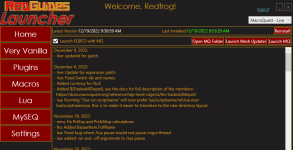
Yep. Exactly like that.
for the new folder it is c:\ProgramData\RedGuides\DesktopUtility its the same location as launcher installation location
MySec Directory is c:\users\owner\appdata\local
On the Redbox screen it only gives me the option to login MQ, not MQ2
It looks just like his...still cant log in. I haven't been able to log in at all, not in Mq, nor Mq2If your launcher screen looks like redfrogs, then you should be able to hit launch MQ and login since there is no more mq2.
If it looks like mine, then your letters are in green, and you can hit the Launch MQ button? What happens when you click it?It looks just like his...still cant log in. I haven't been able to log in at all, not in Mq, nor Mq2
 in your taskbar?
It looks just like his...still cant log in. I haven't been able to log in at all, not in Mq, nor Mq2
When I hit the button it states: EQBS(EQ BOX CHAT SERVER) 1.7If it looks like mine, then your letters are in green, and you can hit the Launch MQ button? What happens when you click it?
Do you see this View attachment 44452 in your taskbar?
Have you looked at Sic's link above?
ok, so you have not answered the other questions, its difficult to know what is preventing you from starting everything. It sounds like EQBCS service has started up fine, meaning, you SHOULD be seeing the little MQ icon in your taskbar, like I showed you above. That means its loaded. Right click on the MQ icon and go to Profiles. If you have a new install, create new Profiles. If its old info Migrated over, then you may have your logins and passwords still there. So....are you now playing EQ?When I hit the button it states: EQBS(EQ BOX CHAT SERVER) 1.7
Waiting for connections on port: 2112....
That is eqbc server. That is not mq or eq. That is supposed to do that.When I hit the button it states: EQBS(EQ BOX CHAT SERVER) 1.7
Waiting for connections on port: 2112....
That helped A LOT, Thanks brother!!. The profile WAS empty. I created a new one. It now says I can launch it from the Profiles windowok, so you have not answered the other questions, its difficult to know what is preventing you from starting everything. It sounds like EQBCS service has started up fine, meaning, you SHOULD be seeing the little MQ icon in your taskbar, like I showed you above. That means its loaded. Right click on the MQ icon and go to Profiles. If you have a new install, create new Profiles. If its old info Migrated over, then you may have your logins and passwords still there. So....are you now playing EQ?
Tried to launch....Windows cant find...path is correct, but there is no "eqgame.exe" fileThat helped A LOT, Thanks brother!!. The profile WAS empty. I created a new one. It now says I can launch it from the Profiles window
All that matters is you are able to play and learned something along the way. Welcome back to EQ, the way it should have always been. I highly encourage you to go look at @Sic profile above and watch a lot of his excellent videos. There is a lot more to learn and will increase your fun. Plus.. that's what this forum is for too. Go kill stuffs!That helped A LOT, Thanks brother!!. The profile WAS empty. I created a new one. It now says I can launch it from the Profiles window
so you installed Everquest in the map Everquest 2? correct? Or you dont know how to change the path to the correct location?If you are referring to the Executable file, I saw that too....no idea how to correct it.

The path IS correct
no idea how to correct it.
I ean aas far as the path to the corr4e ct file that runs the game, but as for the program itself listed as eq and not eq2...I have no idea how that happened. I have eq2maps and darqui and ACT all set up....posible one of those? I will try your suggestion regarding the defaultEQpath....TYTI think you can see our confusion. When you RClick the launcher in the menu, got to Profiles -> Open INI file. You setup your DefaultEQPath wrong and need to fix it
So..... are you trying to use this on EQ2?Also Im a bit confuses as to the Eq file. I have never had Eq set up, only eq2
Wonderful, Merry Christmas, your gift is to play EQROFL......That is EXACTLY the issue. Thanks for walking me through it brothers. Ill download EQ1 and give it a shot.


