• Hail, we're RedGuides. We want you to play six (yes, 6!) EverQuest characters at once. We have scripts and a friendly community to help, please join our playstyle and say hello! 👋
  • We've added LLM sections to our Terms & Rules and Resource Rules, for everyone's sanity & in-game safety.
    Read more
    a. Do not replace your voice with an LLM. This goes for your posts and your scripts. Drafting and editing with a tool is fine, but don't take you out of what you share.
    b. Do not replace your EQ character's voice with an LLM. We don't want scripts that speak over /ooc, /shout or other public channels. This has been an unwritten rule that's kept casino scripts off the site for decades, but we're now compelled to make it clear: keep automated communication private.

    Why Does RG Review Scripts?
    Nearly every LLM-written Lua script we see is making your character do impossible things, and rarely in a way that's beneficial to you. We've seen heavy server hammering, /target over impossible distances when /nav spawn would passively accomplish the same thing, a spawn search that fires 20+ times per second, and other pointless actions that are likely annoying GMs.

    You are welcome to use LLMs as a tool to structure, draft, and edit your work, but please read critically before hitting /lua run

Problem - "/Lua GUI" window wigging out

goatmaster

Active member
Everything was working fine until I tried moving the window and then it started flashing repeatedly--it looks like it's looping or something. I can't interact with the GUI at all when it does this. I renamed my Lua folder and did a fresh install, but that didn't help. Unfortunately, I did not check other characters to see if it was the same.
Suggestions?

My work day just started so I won't be able to check any potential solutions for a while.
Cheers
 
Honestly I did not get it resolved. I did all the same things you tried, reinstalling and more. The problem persisted for a week or more so I just stopped using that GUI.

I do all my Lua interaction with the command-line.

Just tested it again for the first time in months, and it still happens to me.


Regardless how I launch it: "/Lua gui" or the EQ->MacroQuest -> Lua button.
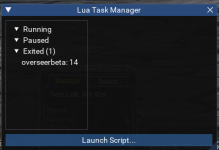
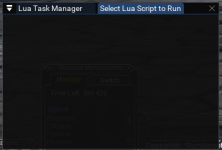
As soon as I click "Launch Script..." the window flashes very rapidly between the two views below.

No interaction with the window is possible, but can be re-cloed with the button or command-line.

Additionally, nothing else is affected. EQ, MQ, macros, Lua scripts... all work fine.
1675729841221.png
1675729822144.png

and
 
Honestly I did not get it resolved. I did all the same things you tried, reinstalling and more. The problem persisted for a week or more so I just stopped using that GUI.

I do all my LUA interaction with the command-line.

Just tested it again for the first time in months, and it still happens to me.


Regardless how I launch it: "/lua gui" or the EQ->MacroQuest -> LUA button.
As soon as I click "Launch Script..." the window flashes very rapidly between the two views below.

No interaction with the window is possible, but can be re-cloed with the button or command-line.

Additionally, nothing else is affected. EQ, MQ, macros, LUA scripts... all work fine.
View attachment 45892
View attachment 45891

and
Crap. Thanks for letting me know.
 
Video cut off the first part where all I did was
  • Open window
  • Click [Launch Script...] with the mouse
    • Screen flashes (faster when not recording)
  • Can't interact with it in any way
just for shits - can you make stop all running luas (guildclicky in this case) - just want to be sure i didn't do something bad in guildclicky and screwing you up
 
its hard to catch, but that looks like you put the launch script dialog window which is opened by lua gui into the lua gui window? Yep.. that recreates it easily enough lol.
Are you saying this is something I did somehow? Looking through the stuff now to see what it would be on my side.


EDIT: I see what you are saying.

Dagnabbit! I just edited MacroQuest_Overlay.ini to remove the [Docked] flag on that window and it's fixed.

Yeah, I feel like a goof here. Definitely not something I did on purpose or even knowingly.
 
Did and got the same result. I had done that previously. And honestly (sorry if blasphemy) I rarely run more than 1-2 LUA at any time.


Are you saying this is something I did somehow? Looking through the stuff now to see what it would be on my side.
try this:
1. /plugin Lua unload (because closing that flashing window is difficult)
2. /plugin Lua
3. /mqsettings
4. click clear saved settings on overlay tab (to undock the windows)
5. /Lua gui
6. click launch script
7. drag the new window over the Lua gui window
8. the windows are now docked, with the launch script window showing
9. click on the Lua gui window tab, and it starts going crazy.
 
try this:
1. /plugin lua unload (because closing that flashing window is difficult)
2. /plugin lua
3. /mqsettings
4. click clear saved settings on overlay tab (to undock the windows)
5. /lua gui
6. click launch script
7. drag the new window over the lua gui window
8. the windows are now docked, with the launch script window showing
9. click on the lua gui window tab, and it starts going crazy.

Worked like a charm for me! I had drug my TCN Info Window as a tab into my TCNGUI window and it bugged out like the two tabs were fighting for focus. Clicking the Clear Saved ImGui Window Settings resolved my issue. Thanks!
 
Problem - "/Lua GUI" window wigging out

Users who are viewing this thread

Back
Top
Cart