• Hail, we're RedGuides. We want you to play six (yes, 6!) EverQuest characters at once. We have scripts and a friendly community to help, please join our playstyle and say hello! 👋
  • We've added LLM sections to our Terms & Rules and Resource Rules, for everyone's sanity & in-game safety.
    Read more
    a. Do not replace your voice with an LLM. This goes for your posts and your scripts. Drafting and editing with a tool is fine, but don't take you out of what you share.
    b. Do not replace your EQ character's voice with an LLM. We don't want scripts that speak over /ooc, /shout or other public channels. This has been an unwritten rule that's kept casino scripts off the site for decades, but we're now compelled to make it clear: keep automated communication private.

    Why Does RG Review Scripts?
    Nearly every LLM-written Lua script we see is making your character do impossible things, and rarely in a way that's beneficial to you. We've seen heavy server hammering, /target over impossible distances when /nav spawn would passively accomplish the same thing, a spawn search that fires 20+ times per second, and other pointless actions that are likely annoying GMs.

    You are welcome to use LLMs as a tool to structure, draft, and edit your work, but please read critically before hitting /lua run
looted

Release looted 06/02/2024

grimmier

grimGUI
Creator
Commits
3
grimmier submitted a new resource:

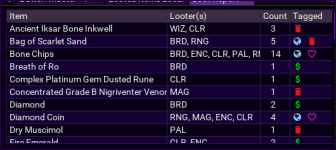
looted - loot output console window

Simple console window Dedicated to displaying who looted what in group, with item links.

Standalone Mode
* start in standalone mode
/lua run looted start

Standalone Commands
/looted show toggles show hide on window.
/looted stop exit sctipt.

Or you can Import into another lua.

Import Mode

1. place in your scripts folder name it looted.lua.
2. local guiLoot = require('looted')
3...

Read more about this resource...
 
grimmier updated looted with a new update entry:

v1.06

[1.06] - 2024-03-08​


Features ⛲​


- Menu items
* Added toggle for hide names to the menu.
* Added Exit to menu, Close Console will now only close the window but leave the script running.
* consolidated the events into one.
* imported and standalone windows can be run at the same time. Imported ones have a '*' in the title.
* you can have both running one showing names the other not if you choose.
...

Read the rest of this update entry...
 
grimmier updated looted with a new update entry:

v1.08

[1.08] - 2024-03-09​


Features ⛲​


- Reports
* You can now record data and report it after runs.
* Reported data is sorted by who looted what and qty.
* Report spits out clickable item links.

*Added drop down menu option to record data. default is off.
* All echos are now to our own console and not MQ console. with a few exceptions.

* Removed unused functions.
...

Read the rest of this update entry...
 
grimmier updated looted with a new update entry:

v1.09

[1.09] - 2024-03-09​


〰️Commits​


Menu

Adjusted the menu layout
Added menu item "View Report"

Added menu item Show Links. default is off
* this enables or disables using mq2linkdb to lookup items that we don't directly have a link for.
*** THIS WILL cause a stutter when issuing a report as it has to lookup each item in the DB.
Default is off. ***

removed unused functions.
...

Read the rest of this update entry...
 
grimmier updated looted with a new update entry:

v1.11

[1.11] - 2024-03-10​


〰️Commits​


- Import Menu's from Other Scripts
* You can export menu items from your lua into the console.
* Do this by passing your menu into guiLoot.importGUIElements table.

See Example function to include in your script Below:

Code:
	local function guiExport()
		-- Define a new menu element function
		local function myCustomMenuElement()
			if ImGui.BeginMenu('My Custom Menu') then
				-- Add menu items here
				_...

Read the rest of this update entry...
 
Release looted

Users who are viewing this thread

Back
Top
Cart