
-
 Hail, we're RedGuides. We want you to play six (yes, 6!) EverQuest characters at once. We have scripts and a friendly community to help, please join our playstyle and say hello! 👋
You are using an out of date browser. It may not display this or other websites correctly.
You should upgrade or use an alternative browser.
You should upgrade or use an alternative browser.
Resource icon
Legacy MacroQuest2 (Live Servers) (1 Viewer) 2022-01-19
- Thread starter Redbot
- Start date
- Status
- Not open for further replies.

Akatora
Well-known member
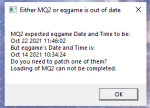
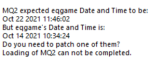
that typically happens when the game has been patched and MQ2 hasntI'm getting this message about dates not being the same, a little help to get them synced up, please. Does anyone else have this problem?

your image says that your mq2 date is oct 22, but your eq game is oct 14 - which means you need to patch eqI'm getting this message about dates not being the same, a little help to get them synced up, please. Does anyone else have this problem?
Nickabrick
Member
Copy,
Thankx for the help guys, patch work thankx again
Thankx for the help guys, patch work thankx again
Last edited:
Yes, after loading up 12 clients thru MQ2 it locks up my whole computer and i keep having to do a manual reboot, have not been able to figure this out. Have uninstalled and reinstalled redguides and that didnt even work. Have also tried MQ Next and that doesnt helpanyone else having issue with game locking up at character select?
as mentioned in the PM that you sent. that isn't a whole lot of information to go on - and just a "i hit the reinstall button on mq/mq2" is unlikely to resolve what appears to be a computer problem.Yes, after loading up 12 clients thru MQ2 it locks up my whole computer and i keep having to do a manual reboot, have not been able to figure this out. Have uninstalled and reinstalled redguides and that didnt even work. Have also tried MQ Next and that doesnt help
my first step would be completely forgetting mq2 and entirely go "next".
then i would try and figure out why my computer is freezing - "locks up my whole computer" isn't super descriptive - what do you mean locks up? your clients become unresponsive? your entire computer becomes responsive? are you getting crash windows with crash dumps?
is your eqclient.ini set in a way that you're core locking your instances and pegging your cpu?
are you running out of memory with 12 toons?
is your computer overheating? Is it filled with dust, doghair, sawdust, bird feathers, leaves, nail clippings, potato peels, bird's nests, lost foreign exchange students, or anything else that may be restricting air flow causing an issue when you load 12 toons?
on mq2 are you using eqwire?
on next did you set up framelimiter?
Considering you are having - I'm assuming based on little information, the same issue on mq2 and on mq "next", it doesn't appear to be specifically a macroquest issue, but likely an issue with your computer, or an issue with how you have your eq setup (like the aforementioned eqclient.ini)
First off I appreciate you responding but I dont appreciate you trolling and degrading me when I am looking for help on my problem.
Secondly what I said to you in my messages and comments were fairly straightforward questions And a pretty clear explanation of my problem I apologize for not going further in depth for you .
So to answer your questions about it crashing.... I have been running MQ2 for 7 months now with absolutely ZERO problems running 24 to 30 accounts. I got a couple crash dump windows here and there but nothing like what I'm experiencing .
So when I say my system completely locks up and I have to perform a hard reboot... that should be fairly straightforward for most people.
What I mean by this is that my entire system freezes up . It locks up... control alt delete do not work therefore a hard reset ...
There are no crash dump windows .
There is nothing wrong with my cooling for my PC...
Everything else is fine it is just when I run mq2 I can load up 6 toons and play for hours with no problem at all. As soon as I load up my second team it Freezes my computer entirely .
Ive updated my video drivers , uninstalled and then reinstalled redguides and mq2 manually that didnt work, then I tried reinstalling it from the redguides launcher and that didnt work either .
What I dont understand is I guess why it only happens with MQ2 and nothing else on my computer. I havent Even changed any of my settings to cause conflict with anything else so why is this happening all of a sudden ?
Secondly what I said to you in my messages and comments were fairly straightforward questions And a pretty clear explanation of my problem I apologize for not going further in depth for you .
So to answer your questions about it crashing.... I have been running MQ2 for 7 months now with absolutely ZERO problems running 24 to 30 accounts. I got a couple crash dump windows here and there but nothing like what I'm experiencing .
So when I say my system completely locks up and I have to perform a hard reboot... that should be fairly straightforward for most people.
What I mean by this is that my entire system freezes up . It locks up... control alt delete do not work therefore a hard reset ...
There are no crash dump windows .
There is nothing wrong with my cooling for my PC...
Everything else is fine it is just when I run mq2 I can load up 6 toons and play for hours with no problem at all. As soon as I load up my second team it Freezes my computer entirely .
Ive updated my video drivers , uninstalled and then reinstalled redguides and mq2 manually that didnt work, then I tried reinstalling it from the redguides launcher and that didnt work either .
What I dont understand is I guess why it only happens with MQ2 and nothing else on my computer. I havent Even changed any of my settings to cause conflict with anything else so why is this happening all of a sudden ?
trolling you? ok bud.First off I appreciate you responding but I dont appreciate you trolling and degrading me when I am looking for help on my problem.
Secondly what I said to you in my messages and comments were fairly straightforward questions And a pretty clear explanation of my problem I apologize for not going further in depth for you .
So to answer your questions about it crashing.... I have been running MQ2 for 7 months now with absolutely ZERO problems running 24 to 30 accounts. I got a couple crash dump windows here and there but nothing like what I'm experiencing .
So when I say my system completely locks up and I have to perform a hard reboot... that should be fairly straightforward for most people.
What I mean by this is that my entire system freezes up . It locks up... control alt delete do not work therefore a hard reset ...
There are no crash dump windows .
There is nothing wrong with my cooling for my PC...
Everything else is fine it is just when I run mq2 I can load up 6 toons and play for hours with no problem at all. As soon as I load up my second team it Freezes my computer entirely .
Ive updated my video drivers , uninstalled and then reinstalled redguides and mq2 manually that didnt work, then I tried reinstalling it from the redguides launcher and that didnt work either .
What I dont understand is I guess why it only happens with MQ2 and nothing else on my computer. I havent Even changed any of my settings to cause conflict with anything else so why is this happening all of a sudden ?
reguarding "pretty clear explaination[sic]" andyou said:Sic can you please help me out man ?
I manually went in and deleted redguides launcher and anything left behind by mq2 bc of my game keeping freezing on me when I load 12 accounts .
Went ahead and reinstalled redguides and everything along with it. It was working fine but then my computer is freezing again. I have all the updated drivers .
What else could this be ? It only freezes now with mq2 running . Any ideas man ?
"completely locks up" and "that should be fairly straightforward for most people."
in one response you say your computer is freezing, in others, you say your game keeps freezing.
so i guess i'm just some chump for taking time out of my day to try and clarify so i can best direct you towards something.
I hope you find a resolution to your issue, but i don't think i'll be able to help you.
Have a good one.
You're a jerk and a chump... how are you even a mod on this website going around trying to humiliate people and when you get Called out you want to bang your drums ?
You even got mad at me one time when I was asking you a simple question for another macro , I Told you it wasnt working the right way and memming the spells on random pages and you messaged me telling me I was right ..
You're funny
You even got mad at me one time when I was asking you a simple question for another macro , I Told you it wasnt working the right way and memming the spells on random pages and you messaged me telling me I was right ..
You're funny

- Commits
- 191
It's a process of elimination. The details are important. None of his suggestions appear to be trolling you in any way. All the requested information would assist in being able to try and narrow down the cause of your issue. If it makes him a troll/jerk/chump to try and assist you, then I don't blame him for not being interested in assisting you.
I will say that I've not had something MQ2 related cause my entire computer to lock up the way you're describing.
You say that you only experience the issue when running MQ2. But I have to ask if you've tried to log all your accounts in manually without MQ2 and tried running them? Maybe you have a bad memory module and you're hitting a speed bump on the bad memory that's locking up the computer.
I will say that I've not had something MQ2 related cause my entire computer to lock up the way you're describing.
You say that you only experience the issue when running MQ2. But I have to ask if you've tried to log all your accounts in manually without MQ2 and tried running them? Maybe you have a bad memory module and you're hitting a speed bump on the bad memory that's locking up the computer.

allandallis235
Well-known member
This happened to me once upon a time. Sometimes H/W issues are really a pain to diagnose.Maybe you have a bad memory module and you're hitting a speed bump on the bad memory that's locking up the computer.

Hey Guys.... Lets take a step back and a big deep breath... Inhale ...exhale... Now lets start with step 1. From what I have read in the posts everything works fine when you load up a group (yes or no?) this only happens when you load a second group (yes or no?)
Lets start there. Also have you tried (like mentioned above) and tried to log your two groups with just eq running. (yes or no?)
Zeb
Lets start there. Also have you tried (like mentioned above) and tried to log your two groups with just eq running. (yes or no?)
Zeb

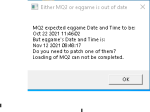
you can wait for mq2 and VeryVanilla to be patched.
today is a patch day. servers *just* came up.
patch days require MQ / MQ2 to be updated and then rebuiltI noticed I can not update or load Very Very Vanilla I am certain this is due to it being patch day any idea when this AMAZING tool will start working again or be updated?
Curious when Very Vanilla will be updated?
You can click one of the links below for your type and you'll get a web notification (if we have permission), site notification, and email (optional)
VeryVanilla MQ2 LIVE:
MacroQuest "Next":
VeryVanilla MQ2 TEST:
Depending on the particular patch and what is involved for the MQ/MQ2 devs to update and then for a rebuild to happen it can vary quite a bit. the "usual" is by 8pm est, but often times, recently, much earlier than that
Thanks for the reply!patch days require MQ / MQ2 to be updated and then rebuilt
Curious when Very Vanilla will be updated?
You can click one of the links below for your type and you'll get a web notification (if we have permission), site notification, and email (optional)
VeryVanilla MQ2 LIVE:
MacroQuest "Next":
VeryVanilla MQ2 TEST:
Depending on the particular patch and what is involved for the MQ/MQ2 devs to update and then for a rebuild to happen it can vary quite a bit. the "usual" is by 8pm est, but often times, recently, much earlier than that

Redbot updated Very Vanilla MQ2 (Live Servers) with a new update entry:
20211117
Read the rest of this update entry...
20211117
Nov 17 2021
- Updated for LIVE
Nov 10 2021
- Updated for BETA
Nov 09 2021
- Updated for TEST
- Updated for BETA
Nov 08 2021
- Updated for BETA
Nov 07 2021
- Updated for BETA
Nov 06 2021
- Updated for BETA
Nov 05 2021
- Updated for BETA
Nov 04 2021
- Updated for BETA
Nov 03 2021
- Updated for BETA
Nov 02 2021
- Updated for BETA
Nov 01 2021
- Updated for BETA
Oct 27 2021
- Updated for TEST
- Updated for BETA
Oct 26 2021
- Updated for BETA
Oct 24 2021
- Updated for BETA
Read the rest of this update entry...
Hey all recently new with MQ2 and just after patch today now it won't run. Says EQGame and MQ2 have different dates. Tried updating both but nothing seems to work? Any help would be greatly appreciated Thanks in Advance
it is a patch day.Hey all recently new with MQ2 and just after patch today now it won't run. Says EQGame and MQ2 have different dates. Tried updating both but nothing seems to work? Any help would be greatly appreciated Thanks in Advance
you need to patch (both eq and mq2) - if you look at the dates it will indicate which one needs to be updated
I just had this same issue last night. I uninstalled all of the files and than installed redguides launcher and used that to stall and update the MQ2 file n program than went on as a normal dayI got the same error SN13. I just signed up this afternoon.
It is now 8 est and still the same. I assume the update has to be pushed?
This is a really weird error!.
"MQ2 expected eqgame Date and Time to be:
Dec 19 2019 15:04:34
But eqgame's Date and Time is:
Jan 9 2020 13:39:57
Do you need to patch one of them?
Loading of MQ2 can not be completed."
 worked wonders. Also if you have your character ini files set the way you like them I'd suggest copying them and adding them after you've reinstalled.
you quoted a post from january of 2020.I just had this same issue last night. I uninstalled all of the files and than installed redguides launcher and used that to stall and update the MQ2 file n program than went on as a normal day
yesterday was a patch day, on patch days you have to patch both EQ AND macroquest (once macroquest is updated and available for a patch).
the date warning tells you that one is out of date. in the person you quoted from nearly two years ago, you can see that they had updated their EQ, but their MQ2 was not patched and updated yet, as the MQ2 was looking for the date of "Dec 19 2019" but was finding "Jan 9 2020"

*twiddles thumbs*
prolly gonna need another MQ build in 2 hours.
prolly gonna need another MQ build in 2 hours.

Yes, after loading up 12 clients thru MQ2 it locks up my whole computer
So I'm pretty curious about this now. I'm not trolling you but I do want to know if this statement is a generalization or if it's reproduceable.
Are you saying that if you load up exactly 12 clients simultaneously ten times, your whole PC will lock up all ten times? If so, is that immediate, is there a specific amount of time that passes first, or is there a random amount of time that passes (and if so, what's the upper limit to that amount of time that you've seen)?
Also, are you saying that if you load up exactly 11 clients, your PC will not lock up the way you're describing, even if you leave the clients open indefinitely, say 24+ hours? (and then if you wait for 24 hours running 11, then load up a 12th client, you lock up?)
This would be really interesting to know because if so something is definitely happening when you boot up client #12, and maybe we can dig into this deeper if this is the case.



- Commits
- 2
If it's an older computer and you have been running 20 plus accounts on it. I would guess one or two.First off I appreciate you responding but I dont appreciate you trolling and degrading me when I am looking for help on my problem.
Secondly what I said to you in my messages and comments were fairly straightforward questions And a pretty clear explanation of my problem I apologize for not going further in depth for you .
So to answer your questions about it crashing.... I have been running MQ2 for 7 months now with absolutely ZERO problems running 24 to 30 accounts. I got a couple crash dump windows here and there but nothing like what I'm experiencing .
So when I say my system completely locks up and I have to perform a hard reboot... that should be fairly straightforward for most people.
What I mean by this is that my entire system freezes up . It locks up... control alt delete do not work therefore a hard reset ...
There are no crash dump windows .
There is nothing wrong with my cooling for my PC...
Everything else is fine it is just when I run mq2 I can load up 6 toons and play for hours with no problem at all. As soon as I load up my second team it Freezes my computer entirely .
Ive updated my video drivers , uninstalled and then reinstalled redguides and mq2 manually that didnt work, then I tried reinstalling it from the redguides launcher and that didnt work either .
What I dont understand is I guess why it only happens with MQ2 and nothing else on my computer. I havent Even changed any of my settings to cause conflict with anything else so why is this happening all of a sudden ?
First guess would be something is overheating, processor or gpu
Second, memory issue
Third some type of auto windows update or driver update could cause a new issue.
Ok sorry You are 100 percent understanding what I was trying to explain. Gove me a few hours and will update with a better explanation my friend .So I'm pretty curious about this now. I'm not trolling you but I do want to know if this statement is a generalization or if it's reproduceable.
Are you saying that if you load up exactly 12 clients simultaneously ten times, your whole PC will lock up all ten times? If so, is that immediate, is there a specific amount of time that passes first, or is there a random amount of time that passes (and if so, what's the upper limit to that amount of time that you've seen)?
Also, are you saying that if you load up exactly 11 clients, your PC will not lock up the way you're describing, even if you leave the clients open indefinitely, say 24+ hours? (and then if you wait for 24 hours running 11, then load up a 12th client, you lock up?)
This would be really interesting to know because if so something is definitely happening when you boot up client #12, and maybe we can dig into this deeper if this is the case.
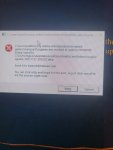
Eqgame crashes can be all sorts of stuff. and it being mq2 and not mq "next" it is really hard to say.Eq keeps crashing everytime I keep trying to load my berserker. I'm not quite sure why. Tried reinstalling mq2berserker updating redguides launcher. Still crashes. Anyone able to help?
I would do a file integrity check with your eq from the eq launchpad, and then i would definitely get setup with macroquest "next"
> next guide <
Thanks Sic going to try validating EQ files see if that works.Eqgame crashes can be all sorts of stuff. and it being mq2 and not mq "next" it is really hard to say.
I would do a file integrity check with your eq from the eq launchpad, and then i would definitely get setup with macroquest "next"
> next guide <
Ok i am trying to update the mq2 very vanilla redguides launcher. I was able to update the macros and plugins. However, when I try to update the MQ2 very vanilla ...I get this error:
quote:
"Sorry looks like there was an issue.
End of central directory was not found.
Please report this to management.
Unquote
I travel and sometimes have to use my cell phone as a mobile hotspot. My cell company (Xfinity Mobile) only allows me to havae a download connection speed of 600kb/sec. When I am at home and connect my laptop to my wifi I do not have this problem. Can someone help me with this problem. Thanks.
V/r
Stregg01
quote:
"Sorry looks like there was an issue.
End of central directory was not found.
Please report this to management.
Unquote
I travel and sometimes have to use my cell phone as a mobile hotspot. My cell company (Xfinity Mobile) only allows me to havae a download connection speed of 600kb/sec. When I am at home and connect my laptop to my wifi I do not have this problem. Can someone help me with this problem. Thanks.
V/r
Stregg01
unfortunately, the error isn't super helpful to you or to me! (not your fault).Ok i am trying to update the mq2 very vanilla redguides launcher. I was able to update the macros and plugins. However, when I try to update the MQ2 very vanilla ...I get this error:
quote:
"Sorry looks like there was an issue.
End of central directory was not found.
Please report this to management.
Unquote
I travel and sometimes have to use my cell phone as a mobile hotspot. My cell company (Xfinity Mobile) only allows me to havae a download connection speed of 600kb/sec. When I am at home and connect my laptop to my wifi I do not have this problem. Can someone help me with this problem. Thanks.
V/r
Stregg01
usually, that issue means there was an issue with the download, and the file didn't quite make it through - which i would ask "do you have a poor internet connection" which might be what you articulated as your issue.
you *can* directly download the zip outside of the launcher > here < and then you could unzip it and manually place it to where it needs to be
Thaks Sic...as usual you the man....Gonna try that and after a few hours downloading (slow internet) Jeesh....With today's technology you would think that the cell companies would get the internet connection thing figured out.....
So after I download (sometime tonight) and reinstall...Will it update the files that need to update or will I have to save the macros and plugins into a different directory znd then move them back when I have finished instlling the new MQ2 files?
So after I download (sometime tonight) and reinstall...Will it update the files that need to update or will I have to save the macros and plugins into a different directory znd then move them back when I have finished instlling the new MQ2 files?

Redbot updated Very Vanilla MQ2 (Live Servers) with a new update entry:
20211207
Read the rest of this update entry...
20211207
Dec 07 2021
- Updated for LIVE
Dec 01 2021 by RedGuides
- MQ2PortalSetter (Sic, Knightly) updated for "Terror of Luclin"
Dec 01 2021
- Updated for TEST
Read the rest of this update entry...
ty sir see yall tomorrow!!
- Status
- Not open for further replies.
Users who are viewing this thread
Total: 2 (members: 0, guests: 2)
Share: