
-
 Hail, we're RedGuides. We want you to play six (yes, 6!) EverQuest characters at once. We have scripts and a friendly community to help, please join our playstyle and say hello! 👋
 -
 We've added LLM sections to our Terms & Rules and Resource Rules, for everyone's sanity & in-game safety.
Read more
a. Do not replace your voice with an LLM. This goes for your posts and your scripts. Drafting and editing with a tool is fine, but don't take you out of what you share.
b. Do not replace your EQ character's voice with an LLM. We don't want scripts that speak over/ooc,/shoutor other public channels. This has been an unwritten rule that's kept casino scripts off the site for decades, but we're now compelled to make it clear: keep automated communication private.
Why Does RG Review Scripts?
Nearly every LLM-written Lua script we see is making your character do impossible things, and rarely in a way that's beneficial to you. We've seen heavy server hammering,/targetover impossible distances when/nav spawnwould passively accomplish the same thing, a spawn search that fires 20+ times per second, and other pointless actions that are likely annoying GMs.
You are welcome to use LLMs as a tool to structure, draft, and edit your work, but please read critically before hitting/lua run
You are using an out of date browser. It may not display this or other websites correctly.
You should upgrade or use an alternative browser.
You should upgrade or use an alternative browser.
Resource icon
Legacy MacroQuest2 (Live Servers) 2022-01-19
- Thread starter Redbot
- Start date
- Status
- Not open for further replies.

They are listed here: https://www.redguides.com/community/resources/mq2boxr.2036/I've scoured the forums but can't find the commands for MQ2Boxr. Did I miss something?

Redbot updated Very Vanilla MQ2 (Live Servers) with a new update entry:
20210316
Read the rest of this update entry...
20210316
Mar 16 2021 by RedGuides
- MQ2AutoForage (Jerk Chicken, Knightly) - Support per server INI files to reduce the management of multiple per character INI files. If the MQ2Forage_.ini exists it will continue to use that. Otherwise it will create and use MQ2Forage.ini
Mar 16 2021
- Added the eqlib namespace by Brainiac so we can free and allocate memory using eqs heap.
- Added a column sort fix by Brainiac
- Check bounds on notify select commands - Brainiac
- Misc Fixes
- Updated for TEST
Read the rest of this update entry...

Very disconcerting to find this morning there is an update to VVMQ2 without any patch notes or messages. Is it related to Mule's stuff? Bug fix? Feature release? My trust has been shaken by the Mule fiasco and undocumented releases don't give me a warm and fuzzy feeling.

@Redbot is rebuilding on Wednesdays now. for the "premium" plugins like mq2grind or the cwtn stuff - updates go in their individual plugin/update thread and aren't usually listed in the VV Change log patch note "redchanges.txt"Very disconcerting to find this morning there is an update to VVMQ2 without any patch notes or messages. Is it related to Mule's stuff? Bug fix? Feature release? My trust has been shaken by the Mule fiasco and undocumented releases don't give me a warm and fuzzy feeling.
Our update notes all go to their respective plugin update (CWTN Plugins - ALL goes to CWTN Commons update history)
03/24/20201
CWTN Plugins - ALL
- We have added additional logic to try and help stagger clickies that give group buffs or give you an aura.
-- Examples: Unified Phoenix Feather and Rage of Rolfron.
-- We still don't actively track or wait on another group member to do anything.
-- We still say "are we supposed to click our item, is it ready, am i missing the buff from it?"
--- if those are met, we click the item.
-- this additional logic will try and help stagger group members for specific items that give group buffs or drop an aura on the ground.
--- it will help, but its still possible for characters to end up meeting their conditions at the same time and cast at the same time.
- Fixed a Group need buff issue that would cause headache when trying to use a buff of Single Target type.
- We will now "unload noauto" MQ2Combat on characters using CWTN plugins.
-- This plugin causes undesired behavior.
- Clicky's will no longer need to be on your character at the time of loading the plugin in order to work.
MQ2Bst
- Fixed an unreported but possible crash at char select.
MQ2Cleric
- Fixed issue that could cause buffing problems if your Single Aegolism was higher lvl than your Group Aegolism.
MQ2Enchanter
- Added AutoMezImmune toggle.
-- Turning this off will no longer try and automatically add mobs to mez immune.
- Enchanter should no longer interrupt Tash spells/AAs when InterruptForMez and TashThenMez is both on.
- Fixed not remembering which aura's we had selected previously.
MQ2Eskay
- BYOS will no longer prevent you from using AutoSummonRemains AA.
MQ2Shaman
- Added a "GHBuffBot" Option
-- GHBuffBot - Turns on the "Guild Hall Buff Bot"
-- GHBuffSilent - if On will not ever output a reply with the buffme information
-- GHBuffGuildOnly - if On will require the person requesting buffs is ALSO a member of your guild. We already require them to be in the same zone as you, and within 50 range of you, but this adds an additional layer of protection/security.
-- BuffRequestPhrase=buffme - this can be changed to any single word - /shm buffrequestphrase gimmedagoods then you would /tell shaman gimmedagoods GroupFocus
-- Usage: /tell shaman buffme
--- shaman will reply with available buff types and information on how to request buffs
-- You can request a spell by mq2shaman spell group
--- Options are: STFocus, GroupFocus, Sow, Regen, GroupRegen, Haste, GroupHaste, STAgi, GSta, GStr, GAgi, STAc
---- Example: /tell shaman buffme GroupFocus
----- Shaman will add Group Focus and then buff them with those spells.
-- You can request GroupAll
---- Example: /tell shaman buffme GroupAll
----- Shaman will add Group Focus, Group Regen, and SoW for the requester, and then buff them with those spells.
-- You can also request a spell by name.
--- Example: /tell shaman buffme feet like cat
---- Shaman will verify that they have a spell "feet like cat", that it is a viable spell to cast on another, and then load it and cast upon the requester.
@Redbot is rebuilding on Wednesdays now. for the "premium" plugins like mq2grind or the cwtn stuff - updates go in their individual plugin/update thread and aren't usually listed in the VV Change log patch note "redchanges.txt"
I appreciate the response!
I keep getting this message:
MQ2 expected eqgame Date and Time to be: Nov 12 2020 11:39:17
But eqgames's Date and Time is:
Mar 4 2021 09:03:57
Do you need to patch one of them?
Loading MQ2 can not be completed.
I have logged completely off, shut down my computer for 4 hours, Started back up, Manually loaded all my characters: No difference, same message.
I launched RedGuides, and Very Vanilla: and updated, new date is 3/30/21 5:47:14 PM. Then launched MQ2. Same message.
Any suggestions? Please?
MQ2 expected eqgame Date and Time to be: Nov 12 2020 11:39:17
But eqgames's Date and Time is:
Mar 4 2021 09:03:57
Do you need to patch one of them?
Loading MQ2 can not be completed.
I have logged completely off, shut down my computer for 4 hours, Started back up, Manually loaded all my characters: No difference, same message.
I launched RedGuides, and Very Vanilla: and updated, new date is 3/30/21 5:47:14 PM. Then launched MQ2. Same message.
Any suggestions? Please?
MQ2 expected eqgame Date and Time to be: Nov 12 2020 11:39:17I keep getting this message:
MQ2 expected eqgame Date and Time to be: Nov 12 2020 11:39:17
But eqgames's Date and Time is:
Mar 4 2021 09:03:57
Do you need to patch one of them?
Loading MQ2 can not be completed.
I have logged completely off, shut down my computer for 4 hours, Started back up, Manually loaded all my characters: No difference, same message.
I launched RedGuides, and Very Vanilla: and updated, new date is 3/30/21 5:47:14 PM. Then launched MQ2. Same message.
Any suggestions? Please?
this means your everquest you are launching is not up to date
run the everquest launchpad
Redbot updated Very Vanilla MQ2 (Live Servers) with a new update entry:
20210402
Read the rest of this update entry...
20210402
Apr 02 2021 by RedGuides
- MQ2Boxr (Sidien, Knightly) added support for MuleAssist, removed the CampRadius command. Code made easier to extend.
- MQ2Melee (BigDorf, Knightly) Bash will now ensure equipped gear is appropriate for bashing, including a check for the worn effect "two hand bash", code cleanup
- Multiple plugins (Sic, ChatWithThisName, brainiac) had a small fix for a bug with CTextEntryWnd: MQ2AdvPath, MQ2ChatWnd, MQ2Say, MQ2Notepad, MQ2IRC, MQ2EQBC, MQ2DPSAdv, MQ2Gmail, MQ2Twitch
Read the rest of this update entry...
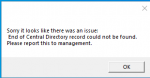
Redbot updated Very Vanilla MQ2 (Live Servers) with a new update entry:
20210415
Read the rest of this update entry...
20210415
Apr 14 2021 by RedGuides
- KissAssist (ctaylor22) Added code to reduce the Navigation spam when in combat. This version also has changes to help keep your character from running directly underneath Mobs before the initial attack is issued. MQ2DanNet syntax error fixed.
- MQ2Twist (Woobs) Fix Twist not using items
Apr 14 2021
- Updated for TEST
Read the rest of this update entry...

Fyrepheonix17
Well-known member
help i am having issues getting my live mq2 to sync with my live crew it works just fine for my test crew and i dont know how to fix it any ideas i keep getting the out of date error even if i renew the launchpad and try reinstalling mq2 when i reinstall mq2 it says there are locked files and can not be used or fixed?


Redbot updated Very Vanilla MQ2 (Live Servers) with a new update entry:
20210421
Read the rest of this update entry...
20210421
Apr 21 2021 by RedGuides
- MQ2Enchanter (ChatWithThisName) has been removed from beta and is now premium.
- RGMercs (morisato) TLP fixes for warrior/cleric/enchanter. Druids and Mages revamped, the help file is now split between "/rg help" and "/rg advanced"
- MQ2Rez (jimbob) Added option for /rez delay #, so rezzes can be delayed again
- MQ2CustomBinds (BigDorf) Now defaults to INI file format for bind name/up/down information. There will be a one-time conversion of your .txt files to .ini.
Read the rest of this update entry...
regular full version is live and ready to go@Redbot I am confused here.
I see that there is a build today, but I am not seeing it in the launcher, or getting an email.
Is that build the pre-release version?
might have to restart your launcher?
email server is down, I cannot replicate any other issue@Redbot I am confused here.
I see that there is a build today, but I am not seeing it in the launcher, or getting an email.
Is that build the pre-release version?
email server is down, I cannot replicate any other issue
I closed the launcher and reopened it and it recognized the new build.
Thanks
a very small handful of folks on the official discord/forum have mentioned connectivity issues - but mainly appears real solid outside of those outliers.The server seems to constantly keep disconnecting me - just boom I'm back at server select (not even character select). Is this happening to anybody else? Just wondering if maybe MQ2 could be doing anything to bring it on.
Redbot updated Very Vanilla MQ2 (Live Servers) with a new update entry:
20210421b
Read the rest of this update entry...
20210421b
Apr 21 2021 by RedGuides
- MQ2DPSAdv (Sic, ChatWithThisName) Update due to chat color changes
Read the rest of this update entry...
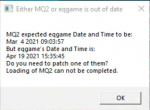
sorry i meant the VV patcheri have run the patcher and still gives me the same message.. please help
This says MQ2 thinks eq should be march 4th, but eq is april 19th. which means your mq2 isn't up to date
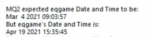
run your RedGuides launcher and hit that "Update" button

if you follow the instructions from the post above it would only update and run the one that you just updated.have done that.. and then it says path is not valid.. i think i have 2... how do i completely uninstall them both?
you can verify the location in the settings tab

you will need to take steps to ensure your antivirus or somesuch isn't blocking your mq2 filesyeah i have changed the directory to the specific location and it still gives me that up to date thing
because if mq2 is saying it is out of date - it is out of date

- Status
- Not open for further replies.
Users who are viewing this thread
Total: 1 (members: 0, guests: 1)
Share: