
-
 Hail, we're RedGuides. We want you to play six (yes, 6!) EverQuest characters at once. We have scripts and a friendly community to help, please join our playstyle and say hello! 👋
You are using an out of date browser. It may not display this or other websites correctly.
You should upgrade or use an alternative browser.
You should upgrade or use an alternative browser.
Resource icon
Legacy MacroQuest2 (Live Servers) (1 Viewer) 2022-01-19
- Thread starter Redbot
- Start date
- Status
- Not open for further replies.


Killertoxin
Well-known member
there are several bugs atm in the pre-release of mq2
if you're crashing on the cwtn plugins i posted > HERE <
Yes its the prelease but im not very good at this particual tech or coding so I have the files incase someone needed them.

Dunda
Member
Agree, we all appreciate the effort + the work you doJust wanted to say "THANK YOU" to all the coders, developers, and any other person that keeps RedGuides up and running faster than DGB could even dream of doing. Love you guys and stay safe. -Medicman

On a positive note, OVERSEER.MAC worked fine !!! 
Redbot updated Very Vanilla MQ2 (Live Servers) with a new update entry:
20210217
Read the rest of this update entry...
20210217
Feb 17 2021
- Updated for LIVE
Feb 16 2021 by RedGuides
- New Plugin! MQ2Rand (Dewey2461, Sic) a "/random" helper for raids. Hit the start button and it gives a message to the raid, then populates a list announcing the winner.
- Bazaar.mac (JerkChicken) Many new features added, undercut percentage, update drift, review prices after each purchase/sale, aggressive selling/buying options, pause on start, and more.
- MQ2Autoforage (Sic, Knightly) No longer try and AutoForage while FD or Dead...
Read the rest of this update entry...

Thank you to the Team. Miss EQ, without you guys keeping VV up, EQ is not as much fun. Thank you !Redbot updated Very Vanilla MQ2 (Live Servers) with a new update entry:
20210217
Read the rest of this update entry...

every char just standing in zone in after an evac is returning ${Me.CombatState} = COMBAT regardless of melee/caster/hybrid/mounted/standing/sitting
However ${Me.Combat} returns FALSE (as it should since nobody is auto attacking)
I did afull camp to desktop and restarted Mq2 as well as a VV Launcher reinstall and restart of MQ2 and relogged. ${Me.CombatState} is still returning COMBAT.
Further debugging : Default UI load and zone or killing something to reset combat counter will set combatstate properly, but alternative UI will still have issue.
RESOLVED: Opening player window resolves combatstate.
Last edited:

Things running again.
Feels like something creates "microlags". Writing these post, the letters appear like half a second later than I type them.
Swapping the focus from one account to another as well seems like half a second "retarded". But the groups dps is in the same range like befor the patch.
Nevertheless the workload, looking at the task-manager, doesn't seem higher than it has been.
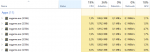
Thank you very much, for the fast creation of a running system again
Edit: the plugin Mq2Say seemingly caused the lags I experienced. While I was moving my team some minutes ago, it felt right like the lags I see, when some "Say" is done within the range of my toon.
This time there was no say around, and there was not mq2Say-window shown stating so, but the lag felt identic like i see, when there is some "Say" around.
After "/dgaexecute /plugin mq2say unload" all run as good, as I can imagine. Happy player here
Feels like something creates "microlags". Writing these post, the letters appear like half a second later than I type them.
Swapping the focus from one account to another as well seems like half a second "retarded". But the groups dps is in the same range like befor the patch.
Nevertheless the workload, looking at the task-manager, doesn't seem higher than it has been.
Thank you very much, for the fast creation of a running system again
Edit: the plugin Mq2Say seemingly caused the lags I experienced. While I was moving my team some minutes ago, it felt right like the lags I see, when some "Say" is done within the range of my toon.
This time there was no say around, and there was not mq2Say-window shown stating so, but the lag felt identic like i see, when there is some "Say" around.
After "/dgaexecute /plugin mq2say unload" all run as good, as I can imagine. Happy player here
Last edited:

Kyver
New member
I'm getting an error when trying to run Redguides Launcher. This started a week or 2 ago, but MQ2 and ISBoxer were still working, so I put it in the "save for later" file.
Now that EQ has been updated, I need the Redguides launcher again. I tried uninstalling and reinstalling, but that didn't change anything.
I've attached the error logs, has anyone experienced this? I was hoping there was a simple uninstall, delete x file, reinstall solution.
Thanks in advance!
Now that EQ has been updated, I need the Redguides launcher again. I tried uninstalling and reinstalling, but that didn't change anything.
I've attached the error logs, has anyone experienced this? I was hoping there was a simple uninstall, delete x file, reinstall solution.
Thanks in advance!
Attachments
Redbot updated Very Vanilla MQ2 (Live Servers) with a new update entry:
20210218
Read the rest of this update entry...
20210218
Feb 18 2021 by RedGuides
- MQ2Melee (BigDorf, Knightly) fix warrior 2H bash with AA Two-Handed Bash
Feb 18 2021
- Some Label fixes - brainiac/swiftymuse
Read the rest of this update entry...

Katiekaboom
Well-known member
I ask my machine to do A LOT with what little it has, this just seems to add to the confusion and delay as well as
Unfortunately this is something new which started with the February patch, perhaps the tolerance check to execute the stuckgems code was edited and it is now checking for a stuck gem with too tight a tolerance.
Supposedly the Lag issues are being generated by the procs that are being executed and DP is looking to ease that a bit, but no amount of spamming Origin is ever going to fix it.
Highly Embarassingif someone is running KA with unsuspecting players in an instanced raid and then they all of a sudden see you casting origin over and over.
Unfortunately this is something new which started with the February patch, perhaps the tolerance check to execute the stuckgems code was edited and it is now checking for a stuck gem with too tight a tolerance.
Supposedly the Lag issues are being generated by the procs that are being executed and DP is looking to ease that a bit, but no amount of spamming Origin is ever going to fix it.
Redbot updated Very Vanilla MQ2 (Live Servers) with a new update entry:
20210222
Read the rest of this update entry...
20210222
Feb 22 2021 by RedGuides
- MQ2Melee (BigDorf, Knightly) - Stop unecessary item swaps in combat (Equip same ID from bags already in target slot)
- MQ2MoveUtils (Knightly) - Reverse Snaproll Left and Right
- Bazaar.mac (JerkChicken) - Setting your SellPriceMax to -1 will skip the item during seller updates, allowing manual pricing. Show the merchant value in BuyerReview mode. Show the Tribute value in BuyerReview mode.
Feb 22 2021
- Fix for FreeInventory (and other spots where...
Read the rest of this update entry...
Redbot updated Very Vanilla MQ2 (Live Servers) with a new update entry:
20210227
Read the rest of this update entry...
20210227
Feb 27 2021 by RedGuides
- MQ2Main (brainiac) fix for camera zoom distance, helps with MQ2Camera
Feb 27 2021
- Added sorting capability to the /buyer buy lines list - Feature suggestion: Ladon
- Added sorting capability to the /barter inventory list
- Added a Value column to the /barter inventory list so we can sort by merchant value.
- Added Rightclick on item feature to /barter inventory list so it opens up the inspect item window on click.
Read the rest of this update entry...
I don't know if this is the right place to post this, but after today's update I'm noticing that using the "Follow me" and "Mimic Me" buttons are not working always. In my group, only about 5/6 of the characters are responding to those buttons, and it seems to be intermittent or laggy. Also, some /bcaa commands don't seem to be received or enacted upon by all players in the group either. I'm not sure if this is relevant to the recent update, or if I'm just experiencing something weird on my machine. Any ideas on how to troubleshoot this or attempt to resolve it if it is just me?
For example, I just clicked "Come to Me" and only 5/6 of my characters moved. The one just stood there with these messages in the MQ2 window:
//squelch /afollow off
//squelch /stick off
//squelch /nav stop
For example, I just clicked "Come to Me" and only 5/6 of my characters moved. The one just stood there with these messages in the MQ2 window:
//squelch /afollow off
//squelch /stick off
//squelch /nav stop

the patch didn't change any of that functionality.I don't know if this is the right place to post this, but after today's update I'm noticing that using the "Follow me" and "Mimic Me" buttons are not working always. In my group, only about 5/6 of the characters are responding to those buttons, and it seems to be intermittent or laggy. Also, some /bcaa commands don't seem to be received or enacted upon by all players in the group either. I'm not sure if this is relevant to the recent update, or if I'm just experiencing something weird on my machine. Any ideas on how to troubleshoot this or attempt to resolve it if it is just me?
For example, I just clicked "Come to Me" and only 5/6 of my characters moved. The one just stood there with these messages in the MQ2 window:
//squelch /afollow off
//squelch /stick off
//squelch /nav stop
this sounds like the issue using eqbcs which is why i frequently recommend folks use eqbcs2 --- this issue doesn't happen for everyone, but it definitely happened to me until i swapped to 2
the patch didn't change any of that functionality.
this sounds like the issue using eqbcs which is why i frequently recommend folks use eqbcs2 --- this issue doesn't happen for everyone, but it definitely happened to me until i swapped to 2
Yea, from the update notes I didn't think it was related, but today is the first day I ever noticed it. I'll try eqbcs2.
Thanks!
Redbot updated Very Vanilla MQ2 (Live Servers) with a new update entry:
20210303
Read the rest of this update entry...
20210303
Mar 03 2021
- Updated for TEST
Feb 27 2021
- Added pMarketplaceWnd and pPurchaseGroupWnd
Read the rest of this update entry...
Redbot updated Very Vanilla MQ2 (Live Servers) with a new update entry:
20210310
Read the rest of this update entry...
20210310
Mar 10 2021 by RedGuides
- New Plugin! MQ2Boxr (Sidien, dannuic) MQ2Boxr provides a command to control boxes running CWTN plugins, KissAssist, and rgmercs. The idea is to have one common command, which can be broadcast to all boxed characters regardless of what they are running.
- MQ2AutoClaim (brainiac, ChatWithThisName, Knightly, dannuic) Fix check for cash when it isn't populated
- MQ2Melee (BigDorf) fix low level AA tests for 2H Bash, dont try to bash with 2H without AA
- MQ2FeedMe...
Read the rest of this update entry...

WTH!!!! Everything was working great. I log in and cannot update the launcher. After spending hours deleting and reinstalling MQ2 I get my toons logged in, set up, and now they will not fight. Was working perfectly the day before the patch...now it is all screwed up. I have the settings correct, I have the MA selected, I have the toons using CWTN plugins selected to assist...But they will not fight. WTH!!!!
since you re-installed everything - did you nuke your mq2nav meshes and not reinstall them?WTH!!!! Everything was working great. I log in and cannot update the launcher. After spending hours deleting and reinstalling MQ2 I get my toons logged in, set up, and now they will not fight. Was working perfectly the day before the patch...now it is all screwed up. I have the settings correct, I have the MA selected, I have the toons using CWTN plugins selected to assist...But they will not fight. WTH!!!!

- Commits
- 191
WTH!!!! Everything was working great. I log in and cannot update the launcher. After spending hours deleting and reinstalling MQ2 I get my toons logged in, set up, and now they will not fight. Was working perfectly the day before the patch...now it is all screwed up. I have the settings correct, I have the MA selected, I have the toons using CWTN plugins selected to assist...But they will not fight. WTH!!!!
Also, if you had toons using KA or something else that requires an INI, you likely deleted the INI's, so they might not know what to do.
For the class plugins, make sure you load them again if you haven't yet.
then I would just check all your settings as normal. campradius, autoassist at etc.I redownloaded all the navmeshes.
also make sure you loaded the plugins if you did a full reinstall
no issues here on multiple pcs
Last time this happened it was the mq2nav window ....and a few missed navmeshes. I fixed those and it was working great. Now I reinstalled everthing, the navmeshes the INI, all autoassist setting...but when puller comes in with mob...no action....Unless I manually place them, and hit auto attack.
if you mean the cwtn class inis - these don't go in your macro folder if that is what you were referring to chat's post before. mq2classname_toonname.ini go in your release folder.the INI
but yeah.
assuming you have meshes, and your ma is assigned as ma - if the mob is in your campradius, your ma is within fighting range of the mob, and the mob is at/under your assistat value - you're going to assist if you are in assist mode.
make sure you have your settings correct, including your mode
I would double check that mq2nav is actually loaded and workingAlso I noticed the yellow line is missing when I move. I used find to have one character go to another and no yellow line that is usually there
if you do a
/nav reload nad it doesn't say that it successfully loaded mesh for xxx then you have an issueOK...I will admit that when I am wrong ...I am wrong. I checked the actual folders and found that the mesh updater was putting the mesh files in another directory. <Shrug> So I manually placed them in the correct folder. I had a folder labeled meshes-updated that I put the mesh files in whenever the meshes are updated from the updater. Then if I have to reinstall MQ2, I put the meshes in the MQ2NAV folder and then run the updater to update any files. I did this tonight twice. But somehow the last time ....It got wonky. Thank you again guys....
sweet, glad to hear you're all good to go again! thanks for the followup stregg, have a good oneOK...I will admit that when I am wrong ...I am wrong. I checked the actual folders and found that the mesh updater was putting the mesh files in another directory. <Shrug> So I manually placed them in the correct folder. I had a folder labeled meshes-updated that I put the mesh files in whenever the meshes are updated from the updater. Then if I have to reinstall MQ2, I put the meshes in the MQ2NAV folder and then run the updater to update any files. I did this tonight twice. But somehow the last time ....It got wonky. Thank you again guys....
if you try and go into an assist mode without a mesh you actually get kicked out of assist mode and a msg about needing meshes. because, yup, to navigate to mobs we use mq2navdidnt realize just how much CWTN's plugins depend so much on MQ2NAV meshes....Well live and learn. Thank you all for your patience....All good to go.
as mentioned - you can't be in an assist mode without a mesh.OK....I guess I should mention that without the meshes and in assist mode when the toons do move...they do very weird things like act as if they are very drunk or very high depending....Thank you
Assist Mode requires a mesh for the zone you're in. Make one and try again. Switching to Manual Mode
if you're referring to your stickhow behavior and you want your stick to be something different, you can adjust this.
but none of these things have to do with the recent mq2 patch or updates to any of those mentioned plugins
- Status
- Not open for further replies.
Users who are viewing this thread
Total: 2 (members: 0, guests: 2)
Share: