They don’tDo these not count toward the kill count?

-
 Hail, we're RedGuides. We want you to play six (yes, 6!) EverQuest characters at once. We have scripts and a friendly community to help, please join our playstyle and say hello! 👋
You are using an out of date browser. It may not display this or other websites correctly.
You should upgrade or use an alternative browser.
You should upgrade or use an alternative browser.

Release LDON.mac - LDON Adventures v6.0
- Thread starter Cannonballdex
- Start date

for using a mix of CWTN and KA I changed the macro in a way that works for me.
In the GroupPlugin section I added /changed
and in the EndGroupPlugin I added/changed
This works for me.
Im still otm to find a good way how to use my tank. Still not sure if I use CWTN in "huntertank" or just let the macro handle all the farming stull and keep CWTN in manual or unload it.
ATM I have the feeling the movement inside the instance is more smooth with just the macro controlling my tank. But not sure tho.
In the GroupPlugin section I added /changed
INI:
Sub GroupPlugin
    /if (${UseKissAssist}) {
        /delay 30s
        /if (${Debugging}) /echo Starting KissAssist if enabled
        /if (${UseEQBC}) {
            /noparse /bcg //docommand /${Me.Class.ShortName} mode 2
                        /noparse /bcg //if (${Select[${Me.Class.ShortName},BRD,DRU]}) /mac kissassist assist ${Group.MainTank} 98
                        /delay 10s
                        /noparse /bcg //if (${Select[${Me.Class.ShortName},BRD,DRU]}) /chaseon
        }
and in the EndGroupPlugin I added/changed
INI:
Sub EndGroupPlugin
    /if (${Debugging}) /echo Ending Plugin
        /if (${UseKissAssist} || ${UseMuleAssist}) {
            /if (${UseEQBC}) {
                /noparse /bcg //docommand /${Me.Class.ShortName} mode 0
                                /noparse /bcg //if (${Select[${Me.Class.ShortName},BRD,DRU]}) /end
                                /delay 3s
                                /noparse /bcg //if (${Me.Class.ShortName.Equal[BRD]}) /twist off
            }
This works for me.
Im still otm to find a good way how to use my tank. Still not sure if I use CWTN in "huntertank" or just let the macro handle all the farming stull and keep CWTN in manual or unload it.
ATM I have the feeling the movement inside the instance is more smooth with just the macro controlling my tank. But not sure tho.

- Commits
- 2
Which tasks are you running? Some zones have doors behind walls that make it difficult to get to.Anyone randomly had characters just not be able to click on doors when exiting a dungeon? Just started happening today, and neither of my healers will leave when everyone else does, I end up having to do it manually.

@Cannonballdex Could you swap up the code just a little and use the boxr plugin? That would allow people to run macro and plugins together and you only have to issue a single command to pause / resume them. /bcaa //boxr pause /bcaa //boxr chase, etc.
Some people that use the plugins also run a bard which there are no plugins for atm. Being able to run the plugin and a macro together would be sweet! As always awesome macro and awesome work! Can't say enough.
Some people that use the plugins also run a bard which there are no plugins for atm. Being able to run the plugin and a macro together would be sweet! As always awesome macro and awesome work! Can't say enough.

Just started using this and it is amazing! The only edit I'd like to make is changing the Alt Activate for the CheckInvis - I run a 115 Necro and at least in North Ro, swapping it to "Alt Activate 37" (Innate Invis vs Undead) would prevent bunch of stupid zombie fights along the way, ha ha!cannonballdex updated LDON.mac - LDON Adventures with a new update entry:
Updates & Additions
Read the rest of this update entry...
That didn't work for me, though. I think it has something to do with this command set:
INI:
/if (!${Me.Invis}) {
        /echo \arNeed to make myself invisible!
        /if (${Me.Class.ShortName.Equal[NEC]} || ${Me.Class.ShortName.Equal[SHD]}) {
            /if (${Me.AltAbility[Cloak of Shadows]}) {
                /alt act ${Me.AltAbility[Cloak of Shadows]}
I'm sorry, but I'm not much of a programmer - how do I change that to work? Is it as simple as changing the name?
Again, great job!!
Last edited:
- Commits
- 2
Yes, This would be for running the Necro as the leader. You can change the sub checkinvis
/if (${Me.Class.ShortName.Equal[NEC]} || ${Me.Class.ShortName.Equal[SHD]}) {
/if (${Me.AltAbility[Cloak of Shadows]}) {
/alt act ${Me.AltAbility[Cloak of Shadows ]}
to
/if (${Me.Class.ShortName.Equal[NEC]} || ${Me.Class.ShortName.Equal[SHD]}) {
/if (${Me.AltAbility[Innate Invis to Undead]}) {
/alt act ${Me.AltAbility[Innate Invis to Undead]}
or
/if (${Me.Class.ShortName.Equal[NEC]} || ${Me.Class.ShortName.Equal[SHD]}) {
/if (${Me.AltAbility[Group Perfected Invisibility to Undead]}) {
/alt act ${Me.AltAbility[Group Perfected Invisibility to Undead]}
If you have the necro in the group and he is not the leader then you want
in the sub checkinvis replace
/alt act 531
with
/alt act 1212
The thing with this is you cant activate one without breaking the other. (invis and invis undead) Bard is nice they cast both at once.
/if (${Me.Class.ShortName.Equal[NEC]} || ${Me.Class.ShortName.Equal[SHD]}) {
/if (${Me.AltAbility[Cloak of Shadows]}) {
/alt act ${Me.AltAbility[Cloak of Shadows ]}
to
/if (${Me.Class.ShortName.Equal[NEC]} || ${Me.Class.ShortName.Equal[SHD]}) {
/if (${Me.AltAbility[Innate Invis to Undead]}) {
/alt act ${Me.AltAbility[Innate Invis to Undead]}
or
/if (${Me.Class.ShortName.Equal[NEC]} || ${Me.Class.ShortName.Equal[SHD]}) {
/if (${Me.AltAbility[Group Perfected Invisibility to Undead]}) {
/alt act ${Me.AltAbility[Group Perfected Invisibility to Undead]}
If you have the necro in the group and he is not the leader then you want
in the sub checkinvis replace
/alt act 531
with
/alt act 1212
The thing with this is you cant activate one without breaking the other. (invis and invis undead) Bard is nice they cast both at once.
Last edited:
***EXACTLY*** what I was looking for! Thanks a ton! (ran out of Red Cents to offer to you today, ha ha!)Yes, This would be for running the Necro as the leader. You can change the sub checkinvis
/if (${Me.Class.ShortName.Equal[NEC]} || ${Me.Class.ShortName.Equal[SHD]}) {
/if (${Me.AltAbility[Cloak of Shadows]}) {
/alt act ${Me.AltAbility[Cloak of Shadows ]}
to
/if (${Me.Class.ShortName.Equal[NEC]} || ${Me.Class.ShortName.Equal[SHD]}) {
/if (${Me.AltAbility[Innate Invis to Undead ]}) {
/alt act ${Me.AltAbility[Innate Invis to Undead ]}
or
/if (${Me.Class.ShortName.Equal[NEC]} || ${Me.Class.ShortName.Equal[SHD]}) {
/if (${Me.AltAbility[Group Perfected Invisibility to Undead ]}) {
/alt act ${Me.AltAbility[Group Perfected Invisibility to Undead ]}
If you have the necro in the group and he is not the leader then you want
in the sub checkinvis replace
/alt act 531
with
/alt act 1212
The thing with this is you cant activate one without breaking the other. (invis and invis undead) Bard is nice they cast both at once.

That didn't work for me. I completely replaced the three original lines with the three changed lines you provided, but now it is going straight to Cloudy Potions. Not sure what I messed up...Yes, This would be for running the Necro as the leader. You can change the sub checkinvis
/if (${Me.Class.ShortName.Equal[NEC]} || ${Me.Class.ShortName.Equal[SHD]}) {
/if (${Me.AltAbility[Cloak of Shadows]}) {
/alt act ${Me.AltAbility[Cloak of Shadows ]}
to
/if (${Me.Class.ShortName.Equal[NEC]} || ${Me.Class.ShortName.Equal[SHD]}) {
/if (${Me.AltAbility[Innate Invis to Undead ]}) {
/alt act ${Me.AltAbility[Innate Invis to Undead ]}
or
/if (${Me.Class.ShortName.Equal[NEC]} || ${Me.Class.ShortName.Equal[SHD]}) {
/if (${Me.AltAbility[Group Perfected Invisibility to Undead ]}) {
/alt act ${Me.AltAbility[Group Perfected Invisibility to Undead ]}
If you have the necro in the group and he is not the leader then you want
in the sub checkinvis replace
/alt act 531
with
/alt act 1212
The thing with this is you cant activate one without breaking the other. (invis and invis undead) Bard is nice they cast both at once.
- Commits
- 2
You are running necro as group leader or group member? Do you have the AA?That didn't work for me. I completely replaced the three original lines with the three changed lines you provided, but now it is going straight to Cloudy Potions. Not sure what I messed up...
As the leader; actually the only one doing it (others are in Guild Hall). I have most all AAs, but yes, I have those.You are running necro as group leader or group member? Do you have the AA?

This is what my file looks like now:
Does that help any?
INI:
| --------------------------------------------------------------------------------------------
| SUB: CheckInvis
| --------------------------------------------------------------------------------------------
Sub CheckInvis
    /if (${Debugging}) /echo Sub CheckInvis
    /if (${UseEQBC}) {
        /squelch /bcg //alt act 280
        /squelch /bcg //alt act 8301
        /squelch /bcg //alt act 1212
        /squelch /bcg //alt act 630
        /squelch /bcg //alt act 1212
        /squelch /bcg //alt act 518
        /squelch /bcg //alt act 1210
        /squelch /bcg //alt act 231
        }
    /if (${UseDanNet}) {
        /squelch /dgge /alt act 280
        /squelch /dgge /alt act 8301
        /squelch /dgge /alt act 1212
        /squelch /dgge /alt act 630
        /squelch /dgge /alt act 1212
        /squelch /dgge /alt act 518
        /squelch /dgge /alt act 1210
        /squelch /dgge /alt act 231
        }
        /delay 5s
    /if (!${Me.Invis}) {
        /echo \arNeed to make myself invisible!
            /if (${Me.Class.ShortName.Equal[NEC]} || ${Me.Class.ShortName.Equal[SHD]}) {
                /if (${Me.AltAbility[Innate Invis to Undead ]}) {
                /alt act ${Me.AltAbility[Innate Invis to Undead ]}
            } else /if (${FindItemCount[Cloudy Potion]}) {
                /casting "Cloudy Potion|Item"
            } else {
                /echo \ayYou are out of \at[\apCloudy Potions\at]\ay. \agFighting my way through if a group member doens't have invis!
            }
Does that help any?
- Commits
- 2
Check the spacing after invis undead and remove it, looks like there might be a space in there.As the leader; actually the only one doing it (others are in Guild Hall). I have most all AAs, but yes, I have those.
Actually both places.
INI:
| --------------------------------------------------------------------------------------------
| SUB: CheckInvis
| --------------------------------------------------------------------------------------------
Sub CheckInvis
    /if (${Debugging}) /echo Sub CheckInvis
    /if (${UseEQBC}) {
        /squelch /bcg //alt act 280
        /squelch /bcg //alt act 8301
        /squelch /bcg //alt act 1212
        /squelch /bcg //alt act 630
        /squelch /bcg //alt act 1212
        /squelch /bcg //alt act 518
        /squelch /bcg //alt act 1210
        /squelch /bcg //alt act 231
        }
    /if (${UseDanNet}) {
        /squelch /dgge /alt act 280
        /squelch /dgge /alt act 8301
        /squelch /dgge /alt act 1212
        /squelch /dgge /alt act 630
        /squelch /dgge /alt act 1212
        /squelch /dgge /alt act 518
        /squelch /dgge /alt act 1210
        /squelch /dgge /alt act 231
        }
        /delay 5s
    /if (!${Me.Invis}) {
        /echo \arNeed to make myself invisible!
            /if (${Me.Class.ShortName.Equal[NEC]} || ${Me.Class.ShortName.Equal[SHD]}) {
                /if (${Me.AltAbility[Innate Invis to Undead]}) {
                /alt act ${Me.AltAbility[Innate Invis to Undead]}
            } else /if (${FindItemCount[Cloudy Potion]}) {
                /casting "Cloudy Potion|Item"
            } else {
                /echo \ayYou are out of \at[\apCloudy Potions\at]\ay. \agFighting my way through if a group member doens't have invis!
}Nevermind, I got it!
There was a space between the "d" of Undead and the bracket. Removed the space and works perfectly!
Thanks again!
There was a space between the "d" of Undead and the bracket. Removed the space and works perfectly!
Thanks again!
Check the spacing after invis undead and remove it, looks like there might be a space in there.
Yep, that was it!
- Commits
- 2
cannonballdex updated LDON.mac - LDON Adventures with a new update entry:
RGMercs
Read the rest of this update entry...
RGMercs
LDON.mac v4.7 by Cannonballdex
08.05.2021
RGMercs support added. /LDON UseRGMercs On - Only group members - Does not mix and match with kissassist or cwtn - all or none
Untested - Need RGMerc testers.
Read the rest of this update entry...
- Commits
- 2
cannonballdex updated LDON.mac - LDON Adventures with a new update entry:
Kill This spam
Read the rest of this update entry...
Kill This spam
LDON.mac v4.8 by Cannonballdex
08.10.2021
Removed the killthis spam when using RGMercs as to let RGMercs do their own thing.
Read the rest of this update entry...

NadoSorc
New member
Having a similar issue with LFayUsing the supplied meshes, my guys have problems getting into South Ro and some of the Less Fay instances.
Anyone have some updated meshes, or having similar issues with the supplied meshes?
Thanks
- Commits
- 2
Are they getting stuck or not zoning into the instance? Or not zoning into Lesser Faydark?
I'm running the missions out of South Ro at the moment and am not having any issues getting in.Having a similar issue with LFay
On a side note, I've twice had issues getting BACK OUT, but I think those were simply glitches.
Sooooo....
In the Guk adventures, I seem to randomly get a "You are too far away from the door" message and my toon just sits there. If I'm in the room, no biggie; I just Gate back to South Ro and restart the LDON Mac when I get there. If I'm not here, he just sits there until I finally come back.
My question is: Is there a line to tweak that would get him to move closer without me being there?
Thanks again for all of the hard work you put into this, Cannonballdex! Awesome work!
In the Guk adventures, I seem to randomly get a "You are too far away from the door" message and my toon just sits there. If I'm in the room, no biggie; I just Gate back to South Ro and restart the LDON Mac when I get there. If I'm not here, he just sits there until I finally come back.
My question is: Is there a line to tweak that would get him to move closer without me being there?
Thanks again for all of the hard work you put into this, Cannonballdex! Awesome work!
pcpioneer06
Member
Is it possible to add support for AKA Kissassist? Thank you for this amazing Mac!

- Commits
- 2
Wll or will not? Rujarkian tasks start in commonlands, so the leader would go to commonlands to get another task?So not sure why, after leaving Ruj my toon will go to commonlands via Magus...

Kasino7
Well-known member
Is it possible to add support for AKA Kissassist? Thank you for this amazing Mac!
Open the macro with notepad.
Go to edit -- replace
Key in `/mac kissassist' and replace with '/mac aka'
Hit replace all.
Here is a photo:
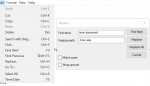
This will change all the commands issued from kissassist, to aka
So I've been running this ***INCREDIBLE*** Macro for a couple of days now and have achieved these stats:
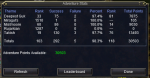
However, my Achievements aren't updating:
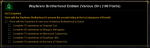
Do I have to run all of the different types of Adventures in order to get the credits to update?
However, my Achievements aren't updating:
Do I have to run all of the different types of Adventures in order to get the credits to update?
- Commits
- 2
I think you have to hail one of the NPC's at camp and you will get an emote about learning the ways of wayfarer or something like that.Do I have to run all of the different types of Adventures in order to get the credits to update?
Yep, it is actually a combination of NPCs, depending on each Adventure set.I think you have to hail one of the NPC's at camp and you will get an emote about learning the ways of wayfarer or something like that.
Thanks again for getting me pointed in the right direction!

- Commits
- 2
The group should only be in CL once when you start the first time. They should go to South Ro and stay there while the leader goes back and forth to commonlands to get the task.It looks like when doing the CL > Sro missions, the box I run the mac on doesn't hang out at the CL magus to wait for the rest of the group to show up, so sometimes the group gets split up.
everquestmann
Member
Is there a way to have someone other than the tank go and get the ldons? Like if I make the tank the leader, run the macro, and then make my bard the leader and have him run for the missions?
- Commits
- 2
Whoever you run the script with will be the tank and the leader.Is there a way to have someone other than the tank go and get the ldons? Like if I make the tank the leader, run the macro, and then make my bard the leader and have him run for the missions?
The group should only be in CL once when you start the first time. They should go to South Ro and stay there while the leader goes back and forth to commonlands to get the task.
I'm running this with a wizard in my group and discovered this by porting my group to the CL wizard spires, starting the mac on a different character, and then noticing he was long gone by the time the rest of the group started receiving instructions to do anything.
Not a problem to get them all to the adventure camp before starting; but pointing this out in case it was an oversight.
- Commits
- 2
The macro isn't set up to move the whole group while the macro is running. This would work if you restarted the macro every time you ported to Commonlands, but not when teleporting in the middle of the macro running.I'm running this with a wizard in my group and discovered this by porting my group to the CL wizard spires, starting the mac on a different character, and then noticing he was long gone by the time the rest of the group started receiving instructions to do anything.
I wanted to make a suggestion, that there be a trigger added to initiate the search for the next mob and start running, thus breaking the med cycle early. A couple of times now I've got down to only needing 3 mobs left to finish a kill cycle, but the leader makes everyone med to full, because the cleric's low. I would like to be able to say "no, start going now" once the cleric has enough mana I feel we can finish those last few kills, rather than waste time waiting for a full mana bar. which for my particular group is more like 25-30% mana. I realize there's a med setting in the ini, but I'm not wanting to change every med cycle to that percentage, just that one off situation at the end of every run that may or may not fit the above scenario.
Additionally, it allows us to use clickies, but I've not found a way to specify a particular clicky I want it to always keep on. In my particular case, my SK tank is an ogre, I don't have a shrink capable toon in my group, but I do have a guise of the deceiver that I would like to always keep enabled, so my ogre's fat behind can be shrunk down to a DE instead, lessening the hangups, but with only a 30 min effect, and it doesn't seem to autoclick it currently, I don't know how I can keep that automatically on my toon. After a death I'd lose that, as well as the cobalt bracer shrink effect on my ogre war.
Additionally, it allows us to use clickies, but I've not found a way to specify a particular clicky I want it to always keep on. In my particular case, my SK tank is an ogre, I don't have a shrink capable toon in my group, but I do have a guise of the deceiver that I would like to always keep enabled, so my ogre's fat behind can be shrunk down to a DE instead, lessening the hangups, but with only a 30 min effect, and it doesn't seem to autoclick it currently, I don't know how I can keep that automatically on my toon. After a death I'd lose that, as well as the cobalt bracer shrink effect on my ogre war.
Users who are viewing this thread
Total: 1 (members: 0, guests: 1)
Share: