
-
 Hail, we're RedGuides. We want you to play six (yes, 6!) EverQuest characters at once. We have scripts and a friendly community to help, please join our playstyle and say hello! 👋
You are using an out of date browser. It may not display this or other websites correctly.
You should upgrade or use an alternative browser.
You should upgrade or use an alternative browser.

KissAssist Release KissAssist (2 Viewers) 12.002.40
- Thread starter ctaylor22
- Start date

Thats what I ended up trying to do, but could not seem to get it to work. My necro is farming in an area with high FR mobs so really just need to put up a few poi dots. Still lowish level. Would be nice if he could spam that extra mana around the group. Or have some time of "medding" setting where he spams out mana.I am not sure how to approach using twitch. I am not sure if you can set it up using the mana tag in the buffs section will work or not. I have never tried to use twitch from KA.
So I am running a x2 mage caster group with tank/druid/clr/x2mag and ench
How can i setup my enchanter to buff JUST the mage pets with a buff like boon or dark terror (illusion buff with proc / attack etc)
I've looked at the wiki over and over and over, i see that i can buff certain classes only, melee / casters etc but nothing about other people's pets. Would they count as "melee"? but i dont want that buff on my warrior.
Any help is much appreciated!
How can i setup my enchanter to buff JUST the mage pets with a buff like boon or dark terror (illusion buff with proc / attack etc)
I've looked at the wiki over and over and over, i see that i can buff certain classes only, melee / casters etc but nothing about other people's pets. Would they count as "melee"? but i dont want that buff on my warrior.
Any help is much appreciated!
 i could search the posted ini.s in the library and hope i find one for this tho
im on https://www.redguides.com/community/resources/conditions-and-you-coding-tutorial-information.219/
trying to learn! lol man this is a bit much but ill keep tryin
trying to learn! lol man this is a bit much but ill keep tryin

There are plenty of other members that are way more versed than myself when it come to being creative with this kind of issue. Here let me tag a few of them. @deathlock , @B_I_G__D_A_D_D_Y , and lets see @kadce.
Thanks for the referral but I can't figure it out!
${Target.Master.Class} will return a class type in text format (only when a pet is targeted!). So if the OP just wants to cast Nights Dark Terror on ALL pets in the group that will work by itself as a suitable condition.But when try to specifically check that the pet owner's class is Mage via
${Target.Master.Class.Equal[Magician]} it returns an error No such 'class' member 'Equal' And I can't remember how to do a text equality check when it's not built into the TLO and I don't need to do an /if statement.${Target.Master.Class.Name.Equal[mage]} or ${Target.Master.Class.Name.Equal[magician]} might work.
Thanks for the idea,
${Target.Master.Class.Name.Equal[Magician]}works perfectly!

Something odd going on with the /addpull command....
I normally use a hotkey with
, and I'm not gettting the proper results anymore.
So I targeted something and issued
, and got the proper results. Then hit the hotkey, and then manually typed the command (just in case!), Hotkey again, Echo'd again. Change targets and tried again.
and it results look like this....
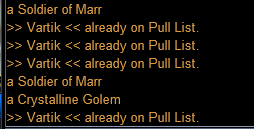
I normally use a hotkey with
Code:
/addpull ${Target.CleanName}So I targeted something and issued
Code:
/echo ${Target.CleanName}and it results look like this....
With "a Soldier of Marr" targeted,
I then changed target to "A Crystalline Golem"
That's the sequence that produced the window in my previous post. If I just run the macro for a bit and interject a random /addpull ${Target.CleanName} it will produce various results, unlike the above test. which just shows Vartik. But it is rarely producing the proper result of my actual target.
Code:
/echo ${Target.CleanName}
/addpull ${Target.CleanName} (via hotkey)
/addpull ${Target.CleanName}
/addpull ${Target.CleanName} (via hotkey)
/echo ${Target.CleanName}
I then changed target to "A Crystalline Golem"
Code:
/echo ${Target.CleanName}
/addpull ${Target.CleanName} (via hotkey)
That's the sequence that produced the window in my previous post. If I just run the macro for a bit and interject a random /addpull ${Target.CleanName} it will produce various results, unlike the above test. which just shows Vartik. But it is rarely producing the proper result of my actual target.
The only thing I can find in the code is where there is a local variable getting defined s_SpawnName that is being set based on several checks. Is it posable you are using something that also declares s_SpawnName.
While running KA try /echo ${s_SpawnName} and see what you get. You should get an error.
While running KA try /echo ${s_SpawnName} and see what you get. You should get an error.
The only thing I can find in the code is where there is a local variable getting defined s_SpawnName that is being set based on several checks. Is it posable you are using something that also declares s_SpawnName.
While running KA try /echo ${s_SpawnName} and see what you get. You should get an error.
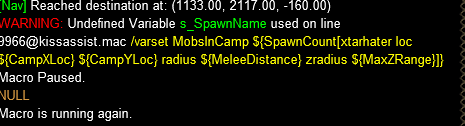
I got the above error with that command.
tried a couple more times, a different line number each time, but also showing "Undefined Variable s_SpawnName used on line...


Last edited:
I am sorry, I somehow overlooked that this was a question, and not that I am aware of. I am just using Kissassist on my pullers, with required plugins. I am using LeRogue with/KA for Rogue, and MQ2Heals with my Cleric. Will be more than happy to provide a list if it would help.Is it posable you are using something that also declares s_SpawnName.
Some other things of note.
The
Code:
/addignore ${Target.CleanName}With a mob targeted,
Code:
/addpullThanks to @ctaylor22 my issue was resolved! I needed quotes arount my ${Target.CleanName}.... ieSomething odd going on with the /addpull command....
I normally use a hotkey with, and I'm not gettting the proper results anymore.Code:/addpull ${Target.CleanName}
So I targeted something and issued, and got the proper results. Then hit the hotkey, and then manually typed the command (just in case!), Hotkey again, Echo'd again. Change targets and tried again.Code:/echo ${Target.CleanName}
and it results look like this....
View attachment 50622
Code:
/addpull "${Target.CleanName}"Many Thanks!
Got another question for you guys. I've looked over the threads/forums to find my answer before coming once again to you. I've figured out everything and have made everything work flawlessly. EXCEPT for when my Main tank grabs mobs from my bard pulling he only focus's on one and doesn't pull the adds off other group members. Is there a way to do this?

You can change the setting for TargetSwitchingOn to =1, and then just change your target to the one you want to targetGot another question for you guys. I've looked over the threads/forums to find my answer before coming once again to you. I've figured out everything and have made everything work flawlessly. EXCEPT for when my Main tank grabs mobs from my bard pulling he only focus's on one and doesn't pull the adds off other group members. Is there a way to do this?
Silverspaceman
Seasoned veteran member
Are the mobs inside of your melee radius? With KA, I like to run melee with a slightly higher melee distance than my tank in case of any weird situations and I give set my healers' melee distance far enough to hit my puller, keep my casters' melee distance pretty far so they can start debuffs/cc stuff early. I keep the wiki page open to iron out anything that happens outside of my expectations/hopes/dreams for my group.
Role=Tank - Sets up tanking feature and will target and attack any aggressive mob that comes into defined melee range. Target (or declare) yourself as MA
Role=Tank - Sets up tanking feature and will target and attack any aggressive mob that comes into defined melee range. Target (or declare) yourself as MA
| MeleeDistance | 75 | Any # | Mobs outside this radius will not be engaged. Tank modes will use this distance to decide if mobs should be engaged. This distance applies to casters engaging with spells as well and will be checked even when MeleeOn=0.NOTE: Setting this entry to the same value as CampRadius will keep the Tank from taking that initial Jump at the mob on incoming. |
Last edited:

if you're asking if there is a way for your tank to automatically switch to multiple mobs in camp to ensure it has aggro on each of them, the answer is no. The best bet would to be use AE threat abilities in your AE section. Or CC with a bard or chanter.
Exactly so! And it can help to ensure the puller's "camp" location is actually a few feet deeper inside the camp so that it pulls all the mobs close enough to register on the tank's melee distance setting.
My bard is set to AE mez when 2 mobs are in camp. And my SK's AE section has AE Hate with 2 mobs in camp and again with 3 and 4.
120 SK AE section which has worked very well!
Code:
[AE]
AEOn=1
AESize=18
AERadius=70
AE1=Repudiate|2
AE2=Explosion of Spite|2
AE3=Innoruuk's Dark Blessing|2
AE4=Scourge Skin|3
AE5=Fyrthek Mantle|3
AE6=${InvSlot[Chest].Item.Name}|3
AE7=Diplomatic Papers|3
AE8=Shield Flash|3
AE9=Antipathy|3
AE10=Ignominious Influence|4
AE11=Bloody Orc Signet|4|Me
AE12=Visage of Death|4|Me
AE13=Explosion of Hatred|4
AE14=Leechcurse Discipline|4
AE15=Xetheg's Carapace|4
AE16=Chattering Bones|4
AE17=Deflection Discipline|5
AE18=Corrupted Guardian Discipline|5
Rare Spawn
Well-known member
[GoM]
GoMSize=1
GoMSpell1=
GoMSHelp=Format - Spell|Target, MA Me or Mob, i.e. Rampaging Servant Rk. II|Mob
Can the GOM section use conditions? The GOMSHelp and wiki don't indicate that it can. It would be very useful if we could use conditions, such as the ability to see if a DOT is already on the MOB before using GOM to overwrite it.
Can the GOM section use conditions? The GOMSHelp and wiki don't indicate that it can. It would be very useful if we could use conditions, such as the ability to see if a DOT is already on the MOB before using GOM to overwrite it.
Short answer is YES!
One caveat is that the GOM triggers in the macro do not differentiate between "Gift of Mana" and "Gift of Magic". And they aren't the same thing. Here's an example from my Mage..
GOM and/or GOM + Haze procs
Code:
Cond10=${Me.Song[Gift of Mana].ID} || ${Me.Song[Gracious Gift of Mana].ID}
Cond11=${Me.Song[Gift of Mana].ID} || ${Me.Song[Gracious Gift of Mana].ID} || ${Me.Song[Gift of Chromatic Haze VI].ID}

[GoM]
GoMSHelp=Format - Spell|Target, MA Me or Mob, i.e. Rampaging Servant Rk. II|Mob
GoMSize=6
GoMSpell1=Ecliptic Companion|Mob|Cond10
GoMSpell2=Roiling Servant|Mob|Cond10
GoMSpell3=Spear of Molten Luclinite|Mob|Cond11
GoMSpell4=Barrage of Many|Mob|Cond11
GoMSpell5=Spear of Molten Komatiite|Mob|Cond11
GoMSpell6=Chaotic Calamity|Mob|Cond11
PS. "Gift of Mana" reduces the mana cost of a spell. "Gift of Magic" is the enchanter short duration DPS boost provided by Chromatic Haze. (And to muddy the waters there is also a low level "Gift of Magic" that increases Mana Pool, but that one doesn't trigger the GOM section in the macro.)
So in my macro when I get a true gift of mana I try and cast a mana costly spell. Whereas when I get Chromatic Haze proc I want to cast the biggest nuke that's available.
Last edited:
Rare Spawn
Well-known member
Hello all. I am trying to KA in manual mode for the first time, when I turn "/dpson 2" and start getting busy with a mob I get the following error:
Any ideas?
Code:
WARNING: Undefined Variable DPSTimer1 used on line [email protected]
/if (${Select[${DPSPart3},Me,MA,maonce]}==0 && ${DPSTimer${i}}     && (${Me.CombatAbility[${DPSPart1}]} || ${Me.Skill[${DPSPart1}]})) /break
Any ideas?

I could be totally off base here or completely misunderstanding you but I have never seen that command used to facilitate combat, which is what I am reading from your post. You can change the setting in your ini either manually (which I have only done once when setting up the ini) or with an edit or by the /dpson X(which I have never tried) but if you are trying to run KA in manual mode and drive with that toon, why not use the dpson=2 in your ini and then simply /mqp on/off if you want to pause and restart KA?Hello all. I am trying to KA in manual mode for the first time, when I turn "/dpson 2" and start getting busy with a mob I get the following error:
Code:WARNING: Undefined Variable DPSTimer1 used on line [email protected] /if (${Select[${DPSPart3},Me,MA,maonce]}==0 && ${DPSTimer${i}} && (${Me.CombatAbility[${DPSPart1}]} || ${Me.Skill[${DPSPart1}]})) /break
Any ideas?
Afaik, if you run KA in manual mode, it should attack when you target the mob and tell it to attack, and then stop attacking when the mob dies. The DPS section should only be active when actively dps'ng.
Also, if you start the macro with DPSOn=0 then none of the DPTimers get created, so turning /dpson on will cause the macro to crash. Best thing to do is to start the macro with DPSOn=2 and then use /dpson off to pause DPS, then use /dpson 2 to activate the DPS routine when needed.
Rare Spawn
Well-known member
My Ini is set to /DPSon 2, but if I read this correctly - manual MODE starts with everything off. So I am in a bit of double jeopardy, as you stated ctaylor22 starting macro with dpson=0 (aka off) will not create the timers, yet manual mode does exactly that.
Miscellaneous[edit]
Manual mode[edit]
/mac kissassist manual - starts kissassist with everything turned off. You may then use In Game Commands to turns certain things on, such as /buffson, /healson, /dpson, etc.
Last edited:
Rare Spawn
Well-known member
Found a bug on line 1915 of kissassist.mac
${DPSAdv.ElapsedTime} should be ${DPSAdv.TimeElapsed}
Error can be seen when /dpsmeter and /dpswrite are on.
${DPSAdv.ElapsedTime} should be ${DPSAdv.TimeElapsed}
Error can be seen when /dpsmeter and /dpswrite are on.
Rare Spawn
Well-known member
Also, if you start the macro with DPSOn=0 then none of the DPTimers get created,
Thanks for that bit of info @ctaylor22. I found what I need. Changing the /varset line in the script made it work for me.
kissassist.mac Manual option
Code:
        } else /if (${Role.Equal[manual]}) {
            /if (${UseMQ2Melee}) /squelch /melee aggro=0
            /varset MeleeOn 0
            /varset ReturnToCamp 0
            /varset ChaseAssist 0
            /varset DPSOn 0
            /varset BuffsOn 0
            /varset DebuffAllOn 0
            /if (${Defined[HealsOn]}) /varset HealsOn 0
/if (${Defined[MezOn]}) /varset MezOn 0I made a change to fix this. Will post an update later.Found a bug on line 1915 of kissassist.mac
${DPSAdv.ElapsedTime} should be ${DPSAdv.TimeElapsed}
Error can be seen when /dpsmeter and /dpswrite are on.
ctaylor22 updated KissAssist with a new update entry:
Some functionality control changes and some fixes.
Read the rest of this update entry...
Some functionality control changes and some fixes.
The big change for this version is that you can now use MQ2SpawnMaster for determining Named mobs. The Macro does not need MQ2SpawnMaster loaded to work. KissAssist reads the MQ2SpawnMaster.ini file for the current zones entries and adds them to an alert list that is used to match Spawns names to the list. To use this new feature. Just run the macro and then /end. Edit your character.ini file and turn on UseSpawnMaster=1 in the [General] section.
See MQ2SpawnMaster for directions on how to...
Read the rest of this update entry...
Users who are viewing this thread
Total: 3 (members: 0, guests: 3)
Share: