• You've discovered RedGuides, an EverQuest multi-boxing and scripting community 🧙‍♀️⚙️. We want you to play several EQ characters at once, come join us and say hello! 👋

  • A TLP without truebox has thawed (Very Vanilla ready)
    Frostreaver
KissAssist

KissAssist Release KissAssist (1 Viewer) 12.002.039

No permission to download
I always replace Ninjadvloot.inc code with the below code after every update, then it does nothing. This was in another post by BigDaddy.


[CODE highlight="Updated: Stripped file to render it useless 7/27/2020 by BigDaddy"]| Ninjadvloot.inc v6.2 07/27/2020 Redguides.com
| Updated: Stripped file to render it useless 7/27/2020 by BigDaddy
|
| Usage: add the following to your macro for looting
| #include Ninjadvloot.inc
| /call SetupAdvLootVars
| /call LootMobs or /call UseAdvLoot

Sub SetupAdvLootVars(string ChangeIniFile)
/echo BD_NINJALOOT: Ninja Loot got called for intial setup!
/return

Sub LootMobs
/echo BD_NINJALOOT: Ninja Loot got called for looting mobs!
/return

Sub UseAdvLoot
/echo BD_NINJALOOT: Ninja Loot got called for using Advanced Loot!
/return[/CODE]
 
I still use some other macros that require ninjadvloot, so I have been avoiding changing that file only for that reason. Two simple changes to kissassist file give me the results that I can live with. Other than that, Kissassist does what it needs to do and I have no complaints about it at all. Of all the automations I have been and I am still a big fan of Kissassist. Great work went into this. Much appreciated.
 
Since the burn routine is a 1 and done routine. Should I treat the TwistBurn in the same manner? When you start Burn, the Bard would start the TwistBurn until it is finished, and then revert to MeleeTwistWhat? Remember that burn is in place to trigger AA's and skills that will enhance your DPS, should the Bard still do the standard Burn, and then just force MeleeTwistWhat == TwistBurn until the mob is dead, or after the standard burn routine is finished, then do TwistBurn once and then revert back to MeleeTwistWhat?

When trying to add a step/change to the Burn routine, it might be a good idea to do it in a way that other classes can take advantage of. Bards are special when it comes to being able to tell Twist to do something, while the macro continues. They don't refer to Bards as being Monsters for nothing.
For my feeling the Bard should do the standard burn and then force MeleeTwistWhat==TwistBurn until mob is dead. Once the actual Mob is dead he should go back to normal. So at named-encounters when state ”burn” is activated, the bard can do the melody providing max damage, despite it may drain much more than he can sustain. After the fight the usual MeleeTwistWhat - melody will be ust and one can set in a manner, that the bard plays the melody he can sustain or even slightly recover.

Many thanks @ctaylor22 that you really consider, to implement it 👍
 
I'm having a positional problem with my bard. I noticed it a few months ago but haven't done much about it since then.

The problem is that the bard will get behind the mob and then take to vibrating side to side like crazy. If I move him a slight amount in any direction or if I just type /stick with no parameters, he will stop the vibration until the next mob comes into camp.

I did some troubleshooting and figured it had to be mq2moveutils so I tried adjusting my mq2moveutils.ini file but it really didn't fix it. Not to mention my other characters are doing melee and they use the same configuration but don't seem to ever get the vibrating problem. I also tried many variations on StickHow and none of them seemed to matter.

It's not a major issue but in case someone else has already solved this I thought I'd ask here.

Here's my current Melee section:
Code:
[Melee]
AssistAt=99
MeleeOn=1
FaceMobOn=1
MeleeDistance=42
StickHow=!front 35% loose
AutoFireOn=0
UseMQ2Melee=0
MeleeTwistOn=1
MeleeTwistWhat=12 7 8 9 10 6 5 4 3 2 1 11
TargetSwitchingOn=0
PetTauntOverride=0

And here's my current MoveUtils...
[CODE title="MQ2MoveUtils.INI"][Defaults]
AutoPause=on
BreakOnWarp=on
BreakDist=250.0
BreakOnGate=on
Verbosity=off
stuckDist=0.3
turnDirection=-10.0
stuckCheck=5
StuckLogic=on
LeashLength=100.0
CampRadius=25.0
MinDelay=3000
MaxDelay=8000
AllowMove=32.00
AutoPauseMsg=off
AutoSave=on
AutoUW=off
BreakKeyboard=on
BreakMouse=off
BreakOnGM=on
BreakOnSummon=off
DistSummon=8.00
FeignSupport=off
Heading=fast
HideHelp=off
KeyboardPause=off
MousePause=off
LockPause=off
PauseMinDelay=500
PauseMaxDelay=5000
SaveByChar=off
TurnRate=14.00
UseWindow=off
FullVerbosity=off
TotalSilence=on
VerbosityFlags=0
WinEQ=on

[Stick]
AlwaysUW=off
AwareNotAggro=off
ArcBehind=45.00
ArcNotFront=135.00
BreakOnGate=on
BreakOnHit=off
BreakOnTarget=off
BreakOnWarp=on
PauseOnWarp=off
DelayStrafe=on
DistBackup=10.00
DistBreak=300.00
DistFlex=5.00
DistMod=3.00
DistMod%=1.00
DistSnaproll=10.00
RandomArc=on
StrafeMinDelay=1500
StrafeMaxDelay=3000
UseBackward=on
UseFleeing=on
UseFlex=on
UseWalk=on

[MakeCamp]
CampRadius=40.00
MinDelay=500
MaxDelay=1500
RealtimePlayer=off
ReturnHaveTarget=off
ReturnNoAggro=off
ReturnNotLooting=off
UseLeash=off
LeashLength=50.00
UseScatter=off
Bearing=0.00
ScatDist=10.00
ScatSize=10.00

[MoveTo]
AlwaysUW=off
ArrivalDist=10.00
ArrivalDistX=6.00
ArrivalDistY=6.00
BreakOnAggro=off
BreakOnHit=off
DistBackup=30.00
MoveToMod=0.00
UseBackward=on
UseWalk=on

[Circle]
Backward=off
CCW=off
Drunken=off
RadiusSize=30.00

[StuckLogic]
StuckLogic=off
DistStuck=0.08
PulseCheck=6
PulseUnstuck=10
TryToJump=on
TurnHalf=on
[/CODE]
 
I'm having a positional problem with my bard. I noticed it a few months ago but haven't done much about it since then.

The problem is that the bard will get behind the mob and then take to vibrating side to side like crazy. If I move him a slight amount in any direction or if I just type /stick with no parameters, he will stop the vibration until the next mob comes into camp.

I did some troubleshooting and figured it had to be mq2moveutils so I tried adjusting my mq2moveutils.ini file but it really didn't fix it. Not to mention my other characters are doing melee and they use the same configuration but don't seem to ever get the vibrating problem. I also tried many variations on StickHow and none of them seemed to matter.

It's not a major issue but in case someone else has already solved this I thought I'd ask here.

Here's my current Melee section:
Code:
[Melee]
AssistAt=99
MeleeOn=1
FaceMobOn=1
MeleeDistance=42
StickHow=!front 35% loose
AutoFireOn=0
UseMQ2Melee=0
MeleeTwistOn=1
MeleeTwistWhat=12 7 8 9 10 6 5 4 3 2 1 11
TargetSwitchingOn=0
PetTauntOverride=0

And here's my current MoveUtils...
[CODE title="MQ2MoveUtils.INI"][Defaults]
AutoPause=on
BreakOnWarp=on
BreakDist=250.0
BreakOnGate=on
Verbosity=off
stuckDist=0.3
turnDirection=-10.0
stuckCheck=5
StuckLogic=on
LeashLength=100.0
CampRadius=25.0
MinDelay=3000
MaxDelay=8000
AllowMove=32.00
AutoPauseMsg=off
AutoSave=on
AutoUW=off
BreakKeyboard=on
BreakMouse=off
BreakOnGM=on
BreakOnSummon=off
DistSummon=8.00
FeignSupport=off
Heading=fast
HideHelp=off
KeyboardPause=off
MousePause=off
LockPause=off
PauseMinDelay=500
PauseMaxDelay=5000
SaveByChar=off
TurnRate=14.00
UseWindow=off
FullVerbosity=off
TotalSilence=on
VerbosityFlags=0
WinEQ=on

[Stick]
AlwaysUW=off
AwareNotAggro=off
ArcBehind=45.00
ArcNotFront=135.00
BreakOnGate=on
BreakOnHit=off
BreakOnTarget=off
BreakOnWarp=on
PauseOnWarp=off
DelayStrafe=on
DistBackup=10.00
DistBreak=300.00
DistFlex=5.00
DistMod=3.00
DistMod%=1.00
DistSnaproll=10.00
RandomArc=on
StrafeMinDelay=1500
StrafeMaxDelay=3000
UseBackward=on
UseFleeing=on
UseFlex=on
UseWalk=on

[MakeCamp]
CampRadius=40.00
MinDelay=500
MaxDelay=1500
RealtimePlayer=off
ReturnHaveTarget=off
ReturnNoAggro=off
ReturnNotLooting=off
UseLeash=off
LeashLength=50.00
UseScatter=off
Bearing=0.00
ScatDist=10.00
ScatSize=10.00

[MoveTo]
AlwaysUW=off
ArrivalDist=10.00
ArrivalDistX=6.00
ArrivalDistY=6.00
BreakOnAggro=off
BreakOnHit=off
DistBackup=30.00
MoveToMod=0.00
UseBackward=on
UseWalk=on

[Circle]
Backward=off
CCW=off
Drunken=off
RadiusSize=30.00

[StuckLogic]
StuckLogic=off
DistStuck=0.08
PulseCheck=6
PulseUnstuck=10
TryToJump=on
TurnHalf=on
[/CODE]
Never messed with MoveUtils, but
never had an issue with bards using snaproll or snaprollrear
 
However, if there isn't a nearby mob to target, then the whole group begins to race toward whatever new location the warping mob has taken up residence. I'm thinking this is the Stick function in mq2moveutils trying to get back to its calculated position.

My spastic bard, and anyone else running KA, will do this. The CWTN guys will path ahead properly and be there to re-engage before I will, but KA will bee-line into buildings trying to get the target. I have to mash my Come To Me button for all 5 boxes to behave.
The camp radius for everything is a normal 30-45, not the 500+ that Jak ports away to.
 
My spastic bard, and anyone else running KA, will do this. The CWTN guys will path ahead properly and be there to re-engage before I will, but KA will bee-line into buildings trying to get the target. I have to mash my Come To Me button for all 5 boxes to behave.
The camp radius for everything is a normal 30-45, not the 500+ that Jak ports away to.

Yes, this is a common. I have the same issue. Because jack stays on aggro, and ports so far away, MQ2Nav is not used, instead KA uses stick, not realizing he ported so far away.
 
My spastic bard, and anyone else running KA, will do this. The CWTN guys will path ahead properly and be there to re-engage before I will, but KA will bee-line into buildings trying to get the target. I have to mash my Come To Me button for all 5 boxes to behave.
The camp radius for everything is a normal 30-45, not the 500+ that Jak ports away to.
Oh BTW.. this works better than smashing come to me.

[CODE title="Track Me Down "]/bcg //multi ; /stopcast ; /trackmedown[/CODE]
 
Oh BTW.. this works better than smashing come to me.

[CODE title="Track Me Down "]/bcg //multi ; /stopcast ; /trackmedown[/CODE]
Ok, I had no idea this existed, and I've been going over the KA wiki for a few months now picking up bits to make my groups work better together.
Just brilliant. Thank you.

Ran out of redcents to give today, so thumb up instead ¯\_(ツ)_/¯
 
Question for folks who have been using /trackmedown

Having just discovered it, thanks @deathlock, I'm quite excited about the possibilities.
I see two common and one uncommon scenarios to account for, and I'm curious how others have approached their configuration.
  1. You're in group and engage in combat, one of your toons for whatever reason stopped following you a short time back and is now a fair distance away. This is probably the easiest to configure, dps setting, if distance is more than blah, engage trackmedown.
  2. You're in combat and your tank gets punted 100 feet away by the mob because it has a proc which launches you. If youve configured for scenario 1, all your toons will run to you. But what you actually want is that tank to run back to the rest of the group.
  3. The mob you are fighting teleports you to another part of the zone, think of the In Irons proc from the Praesertums in Sanctus Seru. In this scenario I'm thinking you would like to switch it off.
Scenario 1 conflicts with scenarios 2 and 3.
If you use /trackmedown how did you approach your configuration? And is it possible to toggle on and off?
 
Question for folks who have been using /trackmedown

Having just discovered it, thanks @deathlock, I'm quite excited about the possibilities.
I see two common and one uncommon scenarios to account for, and I'm curious how others have approached their configuration.
  1. You're in group and engage in combat, one of your toons for whatever reason stopped following you a short time back and is now a fair distance away. This is probably the easiest to configure, dps setting, if distance is more than blah, engage trackmedown.
  2. You're in combat and your tank gets punted 100 feet away by the mob because it has a proc which launches you. If youve configured for scenario 1, all your toons will run to you. But what you actually want is that tank to run back to the rest of the group.
  3. The mob you are fighting teleports you to another part of the zone, think of the In Irons proc from the Praesertums in Sanctus Seru. In this scenario I'm thinking you would like to switch it off.
Scenario 1 conflicts with scenarios 2 and 3.
If you use /trackmedown how did you approach your configuration? And is it possible to toggle on and off?

Track me down is a one time command.

Whomever issues the command, the other group members will try to Nav to them.

In my heals section of Healers, because they love to fall behind:
Code:
#track Me Down
Heals1=command:/multiline ; /Stopcast ; /Nav target ${Group.Leader}|100|Cond28
Cond28=${Me.CombatState.Equal[COMBAT]} && ${Me.XTarget} > 0 && ${Group.Leader.Distance3D} > 15 && !${Navigation.Active}

To switch it off (Stop dead in your tracks if you are in a track me down command)?
/bcg //Nav Stop

The issue will still remain with Kiss for Scenario 3, because your melee ini section is trying to run your dps people back to a mob 100 miles away, no matter how many time you call them back. You have to pause the macro then restart it to prevent this or use the back off command possibly.

[CODE title="Melee Off"]/noparse /bcg //if (!${Select[${Me.Class.ShortName},CLR, SHM, DRU]}) /multi ; /attack off; /twist off ; /mqpause on; /pet back off[/CODE]
 
What we really be nice is if the Melee group members would stop trying to run to mobs that you are say COH'ing away from or got ported away from. Clean their target and wait for the next engage. Specially when they are no longer on your extended target. I would love a hot key that would do that.
 
Track me down is a one time command.

Whomever issues the command, the other group members will try to Nav to them.

In my heals section of Healers, because they love to fall behind:
Code:
#track Me Down
Heals1=command:/multiline ; /Stopcast ; /Nav target ${Group.Leader}|100|Cond28
Cond28=${Me.CombatState.Equal[COMBAT]} && ${Me.XTarget} > 0 && ${Group.Leader.Distance3D} > 15 && !${Navigation.Active}

To switch it off (Stop dead in your tracks if you are in a track me down command)?
/bcg //Nav Stop

The issue will still remain with Kiss for Scenario 3, because your melee ini section is trying to run your dps people back to a mob 100 miles away, no matter how many time you call them back. You have to pause the macro then restart it to prevent this or use the back off command possibly.

[CODE title="Melee Off"]/noparse /bcg //if (!${Select[${Me.Class.ShortName},CLR, SHM, DRU]}) /multi ; /attack off; /twist off ; /mqpause on; /pet back off[/CODE]
Great, that gives me a headstart.
Would be nice to have it configured in the KA ini as per your heals section example, and also be able to issue a command that disables it until you want to reenable it.
At this point I think I'll makeup hotkeys to try out different scenarios before putting it in my ini's.
 
In the ini for the toon that is presenting the error
[General]
KissAssistVer=12.002
Role=Assist
CampRadius=5
CampRadiusExceed=400
ReturnToCamp=0
ChaseAssist=1
ChaseDistance=5
MedOn=1
MedStart=10
MedCombat=1
LootOn=0
RezAcceptOn=1
AcceptInvitesOn=1
GroupWatchOn=1
CastingInterruptOn=0
EQBCOn=0
IRCOn=0
MiscGem=8
HoTTOn=0
CampfireOn=0
CharInfo=Ranger|108|SILVER
MedStop=100
GroupWatchCheck=FALSE
CorpseRecoveryOn=0
DanNetOn=0
DanNetDelay=20
DefaultUI=TRUE
DPSMeter=0
ScatterOn=0
LOSBeforeCombat=0
[SpellSet]
LoadSpellSet=0
SpellSetName=KissAssist
[Buffs]
BuffsOn=1
Buffs1=flaming arrows
Buffs2=Copsestalker's Enrichment|Melee
Buffs3=Shout of the Copsestalker|Dual|Strength of the Copsestalker
Buffs4=NULL
Buffs5=Devastating Swords|ME
Buffs6=Summoned: Large Modulation Shard|Mana|75
Buffs7=NULL
Buffs8=NULL
Buffs9=NULL
Buffs10=NULL
Buffs11=NULL
Buffs12=NULL
Buffs13=NULL
Buffs14=NULL
Buffs15=NULL
Buffs16=NULL
Buffs17=NULL
Buffs18=NULL
Buffs19=NULL
Buffs20=NULL
RebuffOn=1
CheckBuffsTimer=10
PowerSource=NULL
BuffsSize=20
[Melee]
AssistAt=98
MeleeOn=1
FaceMobOn=1
MeleeDistance=75
StickHow=snaproll rear
AutoFireOn=0
UseMQ2Melee=1
TargetSwitchingOn=0
PetTauntOverride=0
[GoM]
GoMSHelp=Format - Spell|Target, MA Me or Mob, i.e. Rampaging Servant Rk. II|Mob
GoMSpell1=NULL
GoMSpell2=NULL
GoMSpell3=NULL
GoMSize=3
[AE]
AEOn=1
AERadius=50
AE1=Auspice of the Hunter|3
AE2=Guardian of the Forest|3
AE3=NULL
AE4=Outrider's Accuracy|3
AE5=Spire of the Pathfinders|3
AE6=Empowered Blades|3
AE7=NULL
AE8=NULL
AE9=NULL
AE10=NULL
AESize=10
[DPS]
DPSOn=1
DPSSkip=10
DPSInterval=3
DPS1=Anticipated Shots|99
DPS2=Focused Arrowrain|99
DPS3=Dichotomic Fusillade|99
DPS4=Summer's Cyclone Rk. II|99
DPS5=Aurora, the Heartwood Blade|99
DPS6=NULL
DPS7=NULL
DPS8=NULL
DPS9=NULL
DPS10=NULL
DPS11=NULL
DPS12=NULL
DPS13=NULL
DPS14=NULL
DPS15=NULL
DPS16=NULL
DPS17=NULL
DPS18=NULL
DPS19=NULL
DPS20=NULL
DebuffAllOn=0
DPSSize=20
[Aggro]
AggroOn=0
Aggro1=NULL
Aggro2=NULL
Aggro3=NULL
Aggro4=NULL
Aggro5=NULL
AggroSize=5
[Heals]
Help=Format Spell|% to heal at i.e. Devout Light Rk. II|50
HealsOn=0
Heals1=NULL
Heals2=NULL
Heals3=NULL
Heals4=NULL
Heals5=NULL
XTarHeal=0
XTarHeal2=0
HealGroupPetsOn=0
HealsSize=5
HealInterval=0
AutoRezOn=0
XTarHealList=Xtar slots here Example: 5|6|7
RezMeLast=0
[Cures]
CuresOn=0
Cures1=NULL
Cures2=NULL
Cures3=NULL
Cures4=NULL
Cures5=NULL
CuresSize=5
[Burn]
BurnAllNamed=1
BurnText=Decepticons Attack
Burn1=Aurora, the Heartwood Blade
Burn2=NULL
Burn3=Copsestalker's Discipline Rk. II
Burn4=Scarlet Cheetah's Fang
Burn5=Group Guardian of the Forest
Burn6=NULL
Burn7=NULL
Burn8=NULL
Burn9=Outrider's Accuracy
Burn10=Spire of the Pathfinders
Burn11=Auspice of the Hunter
Burn12=NULL
Burn13=NULL
Burn14=NULL
Burn15=NULL
UseTribute=0
BurnSize=15
[Pull]
PullWith=0
MaxRadius=10000
MaxZRange=50
PullWait=5
PullRoleToggle=0
ChainPull=0
ChainPullHP=90
ChainPullPause=30|2
PullLevel=0|0
PullMeleeStick=0
UseWayPointZ=0
PullRadiusToUse=90
PullPause=30|2
PullArcWidth=0
PullOnReturn=0
[AFKTools]
AFKHelp=AFKGMAction=0 Off, 1 Pause Macro, 2 End Macro, 3 Unload MQ2, 4 Quit Game
AFKToolsOn=0
AFKGMAction=1
AFKPCRadius=150
CampOnDeath=0
ClickBacktoCamp=0
[Merc]
Help=To use: Turn off Auto Assist in Manage Mercenary Window
MercOn=0
MercAssistAt=92
[GMail]
GMailHelp=Events currently support - Dead,GM,Level,Named,Leftgroup
GMailOn=0
GMail1=NULL
GMail2=NULL
GMail3=NULL
GMail4=NULL
GMail5=NULL
GMailSize=5
[MySpells]
Gem1=Cloudfont Rk. III
Gem2=Blusterbolt
Gem3=Flusterbolt
Gem4=Vinelash Assault
Gem5=Desperate Dousing Rk. II
Gem6=Copsestalker's Enrichment Rk. II
Gem7=Bosquestalker's Alliance
Gem8=Ro's Burning Cloak Rk. III
Gem9=Dichotomic Fusillade
Gem10=Focused Arrowrain Rk. III
Gem11=Summer's Cyclone Rk. III
Gem12=Anticipated Shots Rk. III
[SpellS]
MiscGem=8
MiscGemLW=0
MiscGemRemem=1
LoadSpellSet=0
SpellSetName=KissAssist
CastingInterruptOn=1
CheckStuckGem=1
[PullAdvanced]
PullLocsOn=0
[KConditions]
ConOn=0
CondSize=5
Cond1=TRUE
Cond2=TRUE
Cond3=TRUE
Cond4=TRUE
Cond5=TRUE
 
[General]
KissAssistVer=12.002
Role=Assist
CampRadius=5
CampRadiusExceed=400
ReturnToCamp=0
ChaseAssist=1
ChaseDistance=5
MedOn=1
MedStart=10
MedCombat=1
LootOn=0
RezAcceptOn=1
AcceptInvitesOn=1
GroupWatchOn=1
CastingInterruptOn=0
EQBCOn=0
IRCOn=0
MiscGem=8
HoTTOn=0
CampfireOn=0
CharInfo=Ranger|108|SILVER
MedStop=100
GroupWatchCheck=FALSE
CorpseRecoveryOn=0
DanNetOn=0
DanNetDelay=20
DefaultUI=TRUE
DPSMeter=0
ScatterOn=0
LOSBeforeCombat=0
[SpellSet]
LoadSpellSet=0
SpellSetName=KissAssist
[Buffs]
BuffsOn=1
Buffs1=flaming arrows
Buffs2=Copsestalker's Enrichment|Melee
Buffs3=Shout of the Copsestalker|Dual|Strength of the Copsestalker
Buffs4=NULL
Buffs5=Devastating Swords|ME
Buffs6=Summoned: Large Modulation Shard|Mana|75
Buffs7=NULL
Buffs8=NULL
Buffs9=NULL
Buffs10=NULL
Buffs11=NULL
Buffs12=NULL
Buffs13=NULL
Buffs14=NULL
Buffs15=NULL
Buffs16=NULL
Buffs17=NULL
Buffs18=NULL
Buffs19=NULL
Buffs20=NULL
RebuffOn=1
CheckBuffsTimer=10
PowerSource=NULL
BuffsSize=20
[Melee]
AssistAt=98
MeleeOn=1
FaceMobOn=1
MeleeDistance=75
StickHow=snaproll rear
AutoFireOn=0
UseMQ2Melee=1
TargetSwitchingOn=0
PetTauntOverride=0
[GoM]
GoMSHelp=Format - Spell|Target, MA Me or Mob, i.e. Rampaging Servant Rk. II|Mob
GoMSpell1=NULL
GoMSpell2=NULL
GoMSpell3=NULL
GoMSize=3
[AE]
AEOn=1
AERadius=50
AE1=Auspice of the Hunter|3
AE2=Guardian of the Forest|3
AE3=NULL
AE4=Outrider's Accuracy|3
AE5=Spire of the Pathfinders|3
AE6=Empowered Blades|3
AE7=NULL
AE8=NULL
AE9=NULL
AE10=NULL
AESize=10
[DPS]
DPSOn=1
DPSSkip=10
DPSInterval=3
DPS1=Anticipated Shots|99
DPS2=Focused Arrowrain|99
DPS3=Dichotomic Fusillade|99
DPS4=Summer's Cyclone Rk. II|99
DPS5=Aurora, the Heartwood Blade|99
DPS6=NULL
DPS7=NULL
DPS8=NULL
DPS9=NULL
DPS10=NULL
DPS11=NULL
DPS12=NULL
DPS13=NULL
DPS14=NULL
DPS15=NULL
DPS16=NULL
DPS17=NULL
DPS18=NULL
DPS19=NULL
DPS20=NULL
DebuffAllOn=0
DPSSize=20
[Aggro]
AggroOn=0
Aggro1=NULL
Aggro2=NULL
Aggro3=NULL
Aggro4=NULL
Aggro5=NULL
AggroSize=5
[Heals]
Help=Format Spell|% to heal at i.e. Devout Light Rk. II|50
HealsOn=0
Heals1=NULL
Heals2=NULL
Heals3=NULL
Heals4=NULL
Heals5=NULL
XTarHeal=0
XTarHeal2=0
HealGroupPetsOn=0
HealsSize=5
HealInterval=0
AutoRezOn=0
XTarHealList=Xtar slots here Example: 5|6|7
RezMeLast=0
[Cures]
CuresOn=0
Cures1=NULL
Cures2=NULL
Cures3=NULL
Cures4=NULL
Cures5=NULL
CuresSize=5
[Burn]
BurnAllNamed=1
BurnText=Decepticons Attack
Burn1=Aurora, the Heartwood Blade
Burn2=NULL
Burn3=Copsestalker's Discipline Rk. II
Burn4=Scarlet Cheetah's Fang
Burn5=Group Guardian of the Forest
Burn6=NULL
Burn7=NULL
Burn8=NULL
Burn9=Outrider's Accuracy
Burn10=Spire of the Pathfinders
Burn11=Auspice of the Hunter
Burn12=NULL
Burn13=NULL
Burn14=NULL
Burn15=NULL
UseTribute=0
BurnSize=15
[Pull]
PullWith=0
MaxRadius=10000
MaxZRange=50
PullWait=5
PullRoleToggle=0
ChainPull=0
ChainPullHP=90
ChainPullPause=30|2
PullLevel=0|0
PullMeleeStick=0
UseWayPointZ=0
PullRadiusToUse=90
PullPause=30|2
PullArcWidth=0
PullOnReturn=0
[AFKTools]
AFKHelp=AFKGMAction=0 Off, 1 Pause Macro, 2 End Macro, 3 Unload MQ2, 4 Quit Game
AFKToolsOn=0
AFKGMAction=1
AFKPCRadius=150
CampOnDeath=0
ClickBacktoCamp=0
[Merc]
Help=To use: Turn off Auto Assist in Manage Mercenary Window
MercOn=0
MercAssistAt=92
[GMail]
GMailHelp=Events currently support - Dead,GM,Level,Named,Leftgroup
GMailOn=0
GMail1=NULL
GMail2=NULL
GMail3=NULL
GMail4=NULL
GMail5=NULL
GMailSize=5
[MySpells]
Gem1=Cloudfont Rk. III
Gem2=Blusterbolt
Gem3=Flusterbolt
Gem4=Vinelash Assault
Gem5=Desperate Dousing Rk. II
Gem6=Copsestalker's Enrichment Rk. II
Gem7=Bosquestalker's Alliance
Gem8=Ro's Burning Cloak Rk. III
Gem9=Dichotomic Fusillade
Gem10=Focused Arrowrain Rk. III
Gem11=Summer's Cyclone Rk. III
Gem12=Anticipated Shots Rk. III
[SpellS]
MiscGem=8
MiscGemLW=0
MiscGemRemem=1
LoadSpellSet=0
SpellSetName=KissAssist
CastingInterruptOn=1
CheckStuckGem=1
[PullAdvanced]
PullLocsOn=0
[KConditions]
ConOn=0
CondSize=5
Cond1=TRUE
Cond2=TRUE
Cond3=TRUE
Cond4=TRUE
Cond5=TRUE

Are you sure your toon is using this ini? The error shows an issue parsing a condition with Bullseye Disciple Rk II in it.
And this ini has conditions turned off.

There are some less that ideal settings in there (CampRadius, ChaseDistance and no EQBC or DanNet) but we'll leave those until we 're sure we're working on the correct file.
You mentioned that you cannot create an ini for this toon, then copy the one above in. can you clarify?

In the ..\MacroQuest\Release\config folder is there one or more ini files that have your toons name in them?
 
Are you sure your toon is using this ini? The error shows an issue parsing a condition with Bullseye Disciple Rk II in it.
And this ini has conditions turned off.

There are some less that ideal settings in there (CampRadius, ChaseDistance and no EQBC or DanNet) but we'll leave those until we 're sure we're working on the correct file.
You mentioned that you cannot create an ini for this toon, then copy the one above in. can you clarify?

In the ..\MacroQuest\Release\config folder is there one or more ini files that have your toons name in them?
like the other 3 toons i had their ini saved but hadn't played for about 2 years but today i started again and just copy/pasted these files into the ini area and the 3 others worked but this one doesn't
 
like the other 3 toons i had their ini saved but hadn't played for about 2 years but today i started again and just copy/pasted these files into the ini area and the 3 others worked but this one doesn't
If they're 2 years old, you probably want to start from scratch.
Find the ini that it's using and rename it.
Then on the toon, run /mac kissassist manual, this will create a new KissAssist ini for that character.
Then start editing it, it'll be the ini that has your toons name in it, that is the most recently modified (windows file explorer, sort by data modified).

Every time you are about to make a change to a setting, refresh your understanding of that setting here: https://www.redguides.com/docs/projects/kissassist/
It takes time, but gaining an understanding of the how and why things are set becomes invaluable, even if you are cribbing settings from other ini's.
 
can someone help me because my toon buffs every 2 seconds and only uses 14th catalyst as a heal spell and can't do much so if anyone can retype it or something for a 108 cleric that'd be good thanks.

[General]
KissAssistVer=12.002
Role=Assist
CampRadius=30
CampRadiusExceed=400
ReturnToCamp=0
ChaseAssist=0
ChaseDistance=25
MedOn=1
MedStart=20
MedCombat=0
LootOn=0
RezAcceptOn=1|90
AcceptInvitesOn=1
GroupWatchOn=0
GroupWatchCheck=FALSE
EQBCOn=0
DanNetOn=0
DanNetDelay=20
IRCOn=0
CampfireOn=0
CharInfo=Cleric|108|GOLD
DefaultUI=TRUE
DPSMeter=1
ScatterOn=0
XTSlot=0
MedStop=100
CorpseRecoveryOn=0
LOSBeforeCombat=0
[Spells]
MiscGem=8
MiscGemLW=0
MiscGemRemem=1
CastingInterruptOn=0
LoadSpellSet=0
SpellSetName=KissAssist
CheckStuckGem=1
Gem1=Unity of the Triumvirate
Gem2=Promised Restitution
Gem3=Fervent Renewal
Gem4=Fourteenth Catalyst
Gem5=Blood of the Adherent
Gem6=Pacifying Glow Rk. II
Gem7=Flash of Light
Gem8=Unified Credence
Gem9=Reviviscence
Gem10=Gate
Gem11=NULL
Gem12=NULL
[Buffs]
BuffsOn=1
BuffsSize=20
Buffs1=NULL
Buffs2=NULL
Buffs3=NULL
Buffs4=NULL
Buffs5=NULL
Buffs6=NULL
Buffs7=NULL
Buffs8=NULL
Buffs9=NULL
Buffs10=NULL
Buffs11=NULL
Buffs12=NULL
Buffs13=NULL
Buffs14=NULL
Buffs15=NULL
Buffs16=NULL
Buffs17=NULL
Buffs18=NULL
Buffs19=NULL
Buffs20=NULL
RebuffOn=1
CheckBuffsTimer=10
PowerSource=NULL
[Melee]
AssistAt=95
MeleeOn=0
FaceMobOn=1
MeleeDistance=75
StickHow=snaproll
AutoFireOn=0
UseMQ2Melee=1
TargetSwitchingOn=0
PetTauntOverride=0
[GoM]
GoMSHelp=Format - Spell|Target, MA Me or Mob, i.e. Rampaging Servant Rk. II|Mob
GoMSize=3
GoMSpell1=NULL
GoMSpell2=NULL
GoMSpell3=NULL
[GMail]
GMailHelp=Events currently support - Dead,Drag,GM,Level,Named,Leftgroup,Tells
GMailOn=0
GMailSize=5
GMail1=NULL
GMail2=NULL
GMail3=NULL
GMail4=NULL
GMail5=NULL
[AE]
AEOn=0
AESize=10
AERadius=50
AE1=NULL
AE2=NULL
AE3=NULL
AE4=NULL
AE5=NULL
AE6=NULL
AE7=NULL
AE8=NULL
AE9=NULL
AE10=NULL
[DPS]
DPSOn=0
DPSSize=20
DPSSkip=20
DPSInterval=2
DPS1=NULL
DPS2=NULL
DPS3=NULL
DPS4=NULL
DPS5=NULL
DPS6=NULL
DPS7=NULL
DPS8=NULL
DPS9=NULL
DPS10=NULL
DPS11=NULL
DPS12=NULL
DPS13=NULL
DPS14=NULL
DPS15=NULL
DPS16=NULL
DPS17=NULL
DPS18=NULL
DPS19=NULL
DPS20=NULL
DebuffAllOn=0
[Aggro]
AggroOn=0
AggroSize=5
Aggro1=NULL
Aggro2=NULL
Aggro3=NULL
Aggro4=NULL
Aggro5=NULL
[Heals]
Help=Format Spell|% to heal at i.e. Devout Light Rk. II|50
HealsOn=1
HealsSize=15
Heals1=Fervent Renewal95
Heals2=Fourteenth Catalyst|35
Heals3=NULL
Heals4=NULL
Heals5=NULL
Heals6=NULL
Heals7=NULL
Heals8=NULL
Heals9=NULL
Heals10=NULL
Heals11=NULL
Heals12=NULL
Heals13=NULL
Heals14=NULL
Heals15=NULL
XTarHeal=0
XTarHealList=Xtar slots here Example: 5|6|7
HealGroupPetsOn=0
AutoRezOn=1
HealInterval=0
RezMeLast=0
[Cures]
CuresOn=0
CuresSize=5
Cures1=Promised Restitution|99
Cures2=NULL
Cures3=NULL
Cures4=NULL
Cures5=NULL
[Burn]
BurnSize=15
BurnAllNamed=0
Burn1=NULL
Burn2=NULL
Burn3=NULL
Burn4=NULL
Burn5=NULL
Burn6=NULL
Burn7=NULL
Burn8=NULL
Burn9=NULL
Burn10=NULL
Burn11=NULL
Burn12=NULL
Burn13=NULL
Burn14=NULL
Burn15=NULL
UseTribute=0
[Pull]
PullWith=Melee
PullMeleeStick=0
MaxRadius=350
MaxZRange=50
UseWayPointZ=0
PullWait=5
PullRadiusToUse=90
PullRoleToggle=0
ChainPull=0
ChainPullHP=90
PullPause=30|2
PullLevel=0|0
PullArcWidth=0
PullOnReturn=0
[AFKTools]
AFKHelp=AFKGMAction=0 Off, 1 Pause Macro, 2 End Macro, 3 Unload MQ2, 4 Quit Game
AFKToolsOn=1
AFKGMAction=1
AFKPCRadius=500
CampOnDeath=0
ClickBacktoCamp=1
[KConditions]
ConOn=0
CondSize=5
Cond1=TRUE
Cond2=TRUE
Cond3=TRUE
Cond4=TRUE
Cond5=TRUE
[Merc]
Help=To use: Turn off Auto Assist in Manage Mercenary Window
MercOn=0
MercAssistAt=92
[KissError]
LastCMD:=/endmacro
ErrorDateTime:=06/12/2023 13:00:51
ErrorMsg:=NULL
DataError:=NULL
SyntaxError:=NULL
RunningTime:=1608602
BuildDate:=20230610
CurrentUI:=Default
[PullAdvanced]
PullLocsOn=0
 
can someone help me because my toon buffs every 2 seconds and only uses 14th catalyst as a heal spell and can't do much so if anyone can retype it or something for a 108 cleric that'd be good thanks.

[General]
KissAssistVer=12.002
Role=Assist
CampRadius=30
CampRadiusExceed=400
ReturnToCamp=0
ChaseAssist=0
ChaseDistance=25
MedOn=1
MedStart=20
MedCombat=0
LootOn=0
RezAcceptOn=1|90
AcceptInvitesOn=1
GroupWatchOn=0
GroupWatchCheck=FALSE
EQBCOn=0
DanNetOn=0
DanNetDelay=20
IRCOn=0
CampfireOn=0
CharInfo=Cleric|108|GOLD
DefaultUI=TRUE
DPSMeter=1
ScatterOn=0
XTSlot=0
MedStop=100
CorpseRecoveryOn=0
LOSBeforeCombat=0
[Spells]
MiscGem=8
MiscGemLW=0
MiscGemRemem=1
CastingInterruptOn=0
LoadSpellSet=0
SpellSetName=KissAssist
CheckStuckGem=1
Gem1=Unity of the Triumvirate
Gem2=Promised Restitution
Gem3=Fervent Renewal
Gem4=Fourteenth Catalyst
Gem5=Blood of the Adherent
Gem6=Pacifying Glow Rk. II
Gem7=Flash of Light
Gem8=Unified Credence
Gem9=Reviviscence
Gem10=Gate
Gem11=NULL
Gem12=NULL
[Buffs]
BuffsOn=1
BuffsSize=20
Buffs1=NULL
Buffs2=NULL
Buffs3=NULL
Buffs4=NULL
Buffs5=NULL
Buffs6=NULL
Buffs7=NULL
Buffs8=NULL
Buffs9=NULL
Buffs10=NULL
Buffs11=NULL
Buffs12=NULL
Buffs13=NULL
Buffs14=NULL
Buffs15=NULL
Buffs16=NULL
Buffs17=NULL
Buffs18=NULL
Buffs19=NULL
Buffs20=NULL
RebuffOn=1
CheckBuffsTimer=10
PowerSource=NULL
[Melee]
AssistAt=95
MeleeOn=0
FaceMobOn=1
MeleeDistance=75
StickHow=snaproll
AutoFireOn=0
UseMQ2Melee=1
TargetSwitchingOn=0
PetTauntOverride=0
[GoM]
GoMSHelp=Format - Spell|Target, MA Me or Mob, i.e. Rampaging Servant Rk. II|Mob
GoMSize=3
GoMSpell1=NULL
GoMSpell2=NULL
GoMSpell3=NULL
[GMail]
GMailHelp=Events currently support - Dead,Drag,GM,Level,Named,Leftgroup,Tells
GMailOn=0
GMailSize=5
GMail1=NULL
GMail2=NULL
GMail3=NULL
GMail4=NULL
GMail5=NULL
[AE]
AEOn=0
AESize=10
AERadius=50
AE1=NULL
AE2=NULL
AE3=NULL
AE4=NULL
AE5=NULL
AE6=NULL
AE7=NULL
AE8=NULL
AE9=NULL
AE10=NULL
[DPS]
DPSOn=0
DPSSize=20
DPSSkip=20
DPSInterval=2
DPS1=NULL
DPS2=NULL
DPS3=NULL
DPS4=NULL
DPS5=NULL
DPS6=NULL
DPS7=NULL
DPS8=NULL
DPS9=NULL
DPS10=NULL
DPS11=NULL
DPS12=NULL
DPS13=NULL
DPS14=NULL
DPS15=NULL
DPS16=NULL
DPS17=NULL
DPS18=NULL
DPS19=NULL
DPS20=NULL
DebuffAllOn=0
[Aggro]
AggroOn=0
AggroSize=5
Aggro1=NULL
Aggro2=NULL
Aggro3=NULL
Aggro4=NULL
Aggro5=NULL
[Heals]
Help=Format Spell|% to heal at i.e. Devout Light Rk. II|50
HealsOn=1
HealsSize=15
Heals1=Fervent Renewal95
Heals2=Fourteenth Catalyst|35
Heals3=NULL
Heals4=NULL
Heals5=NULL
Heals6=NULL
Heals7=NULL
Heals8=NULL
Heals9=NULL
Heals10=NULL
Heals11=NULL
Heals12=NULL
Heals13=NULL
Heals14=NULL
Heals15=NULL
XTarHeal=0
XTarHealList=Xtar slots here Example: 5|6|7
HealGroupPetsOn=0
AutoRezOn=1
HealInterval=0
RezMeLast=0
[Cures]
CuresOn=0
CuresSize=5
Cures1=Promised Restitution|99
Cures2=NULL
Cures3=NULL
Cures4=NULL
Cures5=NULL
[Burn]
BurnSize=15
BurnAllNamed=0
Burn1=NULL
Burn2=NULL
Burn3=NULL
Burn4=NULL
Burn5=NULL
Burn6=NULL
Burn7=NULL
Burn8=NULL
Burn9=NULL
Burn10=NULL
Burn11=NULL
Burn12=NULL
Burn13=NULL
Burn14=NULL
Burn15=NULL
UseTribute=0
[Pull]
PullWith=Melee
PullMeleeStick=0
MaxRadius=350
MaxZRange=50
UseWayPointZ=0
PullWait=5
PullRadiusToUse=90
PullRoleToggle=0
ChainPull=0
ChainPullHP=90
PullPause=30|2
PullLevel=0|0
PullArcWidth=0
PullOnReturn=0
[AFKTools]
AFKHelp=AFKGMAction=0 Off, 1 Pause Macro, 2 End Macro, 3 Unload MQ2, 4 Quit Game
AFKToolsOn=1
AFKGMAction=1
AFKPCRadius=500
CampOnDeath=0
ClickBacktoCamp=1
[KConditions]
ConOn=0
CondSize=5
Cond1=TRUE
Cond2=TRUE
Cond3=TRUE
Cond4=TRUE
Cond5=TRUE
[Merc]
Help=To use: Turn off Auto Assist in Manage Mercenary Window
MercOn=0
MercAssistAt=92
[KissError]
LastCMD:=/endmacro
ErrorDateTime:=06/12/2023 13:00:51
ErrorMsg:=NULL
DataError:=NULL
SyntaxError:=NULL
RunningTime:=1608602
BuildDate:=20230610
CurrentUI:=Default
[PullAdvanced]
PullLocsOn=0
There is a typo in this line [CODE lang="ini" title="Fervent Renewal typo"]Heals1=Fervent Renewal95[/CODE]
It should be
[CODE lang="ini" title="Fervent Renewal typo"]Heals1=Fervent Renewal|95[/CODE]

Also, you will probably want to set up either EQBC or DanNet so the toons can talk to each other. and set one of the following to 1.
[CODE lang="ini" title="Getting Toons to Talk to each other"]EQBCOn=0
DanNetOn=0[/CODE]
 
Last edited:
There is a typo in this line [CODE lang="ini" title="Fervent Renewal typo"]Heals1=Fervent Renewal95[/CODE]
It should be
[CODE lang="ini" title="Fervent Renewal typo"]Heals1=Fervent Renewal|95[/CODE]
ok and for buffs using unified assurance it was getting casted every 6 seconds
 
ok and for buffs using unified assurance it was getting casted every 6 seconds
Not sure about that one, you have buffs set to 0, so it should not be processing any buffs, and that spell is not even on the spell list.
Are you sure this is the ini that is being used by the toon?
 
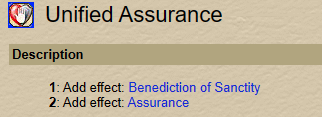
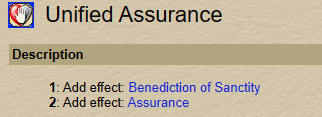
This spell has 2 effects...
Unified Assurance.png
and could be set up in your INI as

Code:
Buffs11=Unified Assurance|Dual|Assurance

The "Unified Assurance" being the name of the spell, then Dual designates that the buff window has a different name than the spell, and the "Assurance" being the name displayed in the buff window.
 

Attachments

  • 1686618672207.png
    1686618672207.png
    25.1 KB · Views: 0
This spell has 2 effects...
View attachment 49109
and could be set up in your INI as

Code:
Buffs11=Unified Assurance|Dual|Assurance

The "Unified Assurance" being the name of the spell, then Dual designates that the buff window has a different name than the spell, and the "Assurance" being the name displayed in the buff window.
ahh i was doing
Buffs11=Unified Assurance|Assurance without the |dual| HAHA
 
1686680793928.png
As far as I know, the "Spires of the Ministrel" buffs only beneficial effects to bard and groupmembers. Therefore I would not expect it to aggro mobs. Am I wrong?
 
View attachment 49112
As far as I know, the "Spires of the Ministrel" buffs only beneficial effects to bard and groupmembers. Therefore I would not expect it to aggro mobs. Am I wrong?

This is due to in-macro coding which uses Spawn.ID to check for the radius. As Deathlock mentioned above, this is better setup as a DPS with conditions.
${Me.XTarget} > 3 or 4
for starters, among other things, that's what I would put.
 
Question about CastingInterruptOn.
Given that Buffs = 2, Heals = 4, DPS = 8, and Mez = 16. Means that the setting gives the ok to interrupt the type of cast that is nominated, not everything other than what is nominated.
I.e. the setting for a
  • cleric prioritising heals would be 10? (interrupt buffs and dps. Not 4; interrupt everything except for heals)
  • enchanter prioritising mezzing would be 14? (interrupt buffs, heals and dps. Not 16; interrupt everything except for mezzes)
Just want confirm I'm understanding correctly.
 
KissAssist Release KissAssist

Users who are viewing this thread

Back
Top
Cart