
-
 Hail, we're RedGuides. We want you to play six (yes, 6!) EverQuest characters at once. We have scripts and a friendly community to help, please join our playstyle and say hello! 👋
-
 We've added LLM sections to our Terms & Rules and Resource Rules, for everyone's sanity & in-game safety.
Read more
a. Do not replace your voice with an LLM. This goes for your posts and your scripts. Drafting and editing with a tool is fine, but don't take you out of what you share.
b. Do not replace your EQ character's voice with an LLM. We don't want scripts that speak over/ooc,/shoutor other public channels. This has been an unwritten rule that's kept casino scripts off the site for decades, but we're now compelled to make it clear: keep automated communication private.
Why Does RG Review Scripts?
Nearly every LLM-written Lua script we see is making your character do impossible things, and rarely in a way that's beneficial to you. We've seen heavy server hammering,/targetover impossible distances when/nav spawnwould passively accomplish the same thing, a spawn search that fires 20+ times per second, and other pointless actions that are likely annoying GMs.
You are welcome to use LLMs as a tool to structure, draft, and edit your work, but please read critically before hitting/lua run
You are using an out of date browser. It may not display this or other websites correctly.
You should upgrade or use an alternative browser.
You should upgrade or use an alternative browser.

Release ItemDisplay (core plugin)
- Thread starter Teichou
- Start date
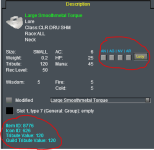

Would it be possible to add an option to attempt to auto-size the item display window up to a user-defined maximum height/width to fit the description?
After tinkering around with the UI file + window inspector, I'm fairly convinced the display window size is computed when the window itself is opened by the client.
After tinkering around with the UI file + window inspector, I'm fairly convinced the display window size is computed when the window itself is opened by the client.
truculent1
Member
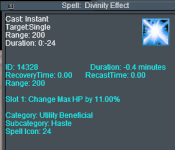
Having an issue after today's patch where spell info doesn't display on most buffs/spells, and if it does work it displays an incorrect spell.
Spell info on items appears to function as usual. I've never actually changed any settings, and everything is checked in the mqsettings.
I've tried reloading the plugin, reloading UI, relogging all toons. No joy.
Spell info on items appears to function as usual. I've never actually changed any settings, and everything is checked in the mqsettings.
I've tried reloading the plugin, reloading UI, relogging all toons. No joy.

Having an issue after today's patch where spell info doesn't display on most buffs/spells, and if it does work it displays an incorrect spell.
Spell info on items appears to function as usual. I've never actually changed any settings, and everything is checked in the mqsettings.
I've tried reloading the plugin, reloading UI, relogging all toons. No joy.
will look into it
no, not really -- you are correct, eq has a lot of custom code for resizing the item display window, i don't want to touch it.Would it be possible to add an option to attempt to auto-size the item display window up to a user-defined maximum height/width to fit the description?
After tinkering around with the UI file + window inspector, I'm fairly convinced the display window size is computed when the window itself is opened by the client.
Here's a Lua script to do this if anyone else is bothered by it like me:Would it be possible to add an option to attempt to auto-size the item display window up to a user-defined maximum height/width to fit the description?
After tinkering around with the UI file + window inspector, I'm fairly convinced the display window size is computed when the window itself is opened by the client.
Lua:
local MAX_HEIGHT = 800
local mq = require('mq')
local idw_history = {}

function resize_wnd(wnd)
  local x = wnd.X()
  local y = wnd.Y()
  local width = wnd.Width()
  local height = wnd.Height()

  local item_desc = wnd.Child('IDW_ItemDescription')
  local vscroll = item_desc.VScrollMax()

  local new_height = math.min(height + vscroll, MAX_HEIGHT)

  wnd.Move(x, y, width, new_height)
end


function poll()

  for i=1,6 do
    local wnd = mq.TLO.DisplayItem(i).Window
    if wnd() == nil or not wnd.Open() then
      idw_history[i] = nil
      goto continue
    end

    local wnd_name = wnd.Text()
    if idw_history[i] == wnd_name then
      goto continue
    end

    idw_history[i] = wnd_name
    resize_wnd(wnd)

    ::continue::
  end
end

while true do
  mq.delay(100)
  poll()
end
I couldn't find any events or callbacks for windows opening/closing so it does polling.

Lord Sivion
Ultimate seasoned veteran member
I have noticed my Lucy button hasn't worked for a long time now as well.


HunterX44
Member
How did you tie the button to the website, or which plugin did you activate besides MQ2ItemDisplay?I use it daily
Last edited:
havent done anything, always workedHow did you tie the button to the website, or which plugin did you activate besides MQ2ItemDisplay?
HunterX44
Member
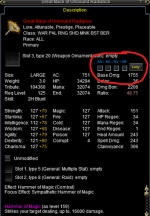
Maybe we are talking about 2 different things? When you right click an item and bring up it's information then click the "Lucy" button, it takes you to the LUCY website and gives you the information about the item, quests, stats, etc.? I might be wrong, but I thought this was how it is supposed to function?havent done anything, always worked
That’s exactly what mine does.Maybe we are talking about 2 different things? When you right click an item and bring up it's information then click the "Lucy" button, it takes you to the LUCY website and gives you the information about the item, quests, stats, etc.? I might be wrong, but I thought this was how it is supposed to function?
HunterX44
Member
Well I'm at a loss. I can't figure out why mine doesn't work.That’s exactly what mine does.
Damn, I’m not in game rn (still christmasing) but, check in the Mqsettings console. Where the settings for say, map, item colour etc are. Is there one for this and does it have a tick box?Well I'm at a loss. I can't figure out why mine doesn't work.
I really can’t remember, but there’s a tickle in my memory that there was something in there.
HunterX44
Member
I think I did do that.. so it would stop spamming the Daybreak website 12 times on exit. Dang, I forgot what setting I changed to block it. I'll have to research it again. THANKS!I have something in memory that you could do something to prevent the game from opening the eq website when exiting with a FTP char. Did you do that? maybe you blocket the possibility to open a website from EQ.
Glad I could (possible) help =)I think I did do that.. so it would stop spamming the Daybreak website 12 times on exit. Dang, I forgot what setting I changed to block it. I'll have to research it again. THANKS!
HunterX44
Member
Here is the link on how to undo it. https://www.redguides.com/community...rom-opening-browser-after-exiting-game.85106/Glad I could (possible) help =)
incase it helps anyone else.
I haven't tried it, yet, but hopefully this fixes the issue.
The above did correct the issue. Lucy is now working as intended. Thanks, Robban.


Utility - ItemDisplay (core plugin)
MQ2ItemDisplay - This plugin allows you to add extra information to the item info windows. Commands /inote [add|del] - Add a custom note to an item /itemdisplay [ [ lootbutton | lucybutton ] [on|off] ] | [reload] - Controls...
 www.redguides.com
Awesome, thank you!Utility - ItemDisplay (core plugin)
MQ2ItemDisplay - This plugin allows you to add extra information to the item info windows. Commands /inote [add|del] - Add a custom note to an item /itemdisplay [ [ lootbutton | lucybutton ] [on|off] ] | [reload] - Controls...

Users who are viewing this thread
Total: 1 (members: 0, guests: 1)
Share: