
Install the app
How to install the app on iOS
Follow along with the video below to see how to install our site as a web app on your home screen.
Note: This feature may not be available in some browsers.
-
 You've discovered RedGuides, an EverQuest multi-boxing and scripting community 🧙♀️⚙️. We want you to play several EQ characters at once, come join us and say hello! 👋
You are using an out of date browser. It may not display this or other websites correctly.
You should upgrade or use an alternative browser.
You should upgrade or use an alternative browser.

Release InvisDisplay (1 Viewer) 7-12-2022
No permission to download
- Thread starter Sic
- Start date

- Joined
- Oct 31, 2019
- RedCents
- 1,865¢
probably because not anyone is using dannet jet

probably because not anyone is using dannet jet
because it adds additional layers needed when folks don't have dannet configured correctly or use dannet at all.Thank you for the fix! I don't want to open a can of worms but
Is there an easy explanation of why you want to avoid dannet functionality? Time? Too much code? Just curious. Thanks again.

Nope, no idea. You sure you are?On emu server using this lua shows when the other toons in my group are invis but does not show the toon I'm on being invis even though they are. Any ideas on why and how I can address this?
Have you unlocked the window and ensured you have enough size to display everything?
Yes the toon I am on and checking is invis and does not show in the window as invis. I have resized the window to make sure it's big enough.Nope, no idea. You sure you are?
Have you unlocked the window and ensured you have enough size to display everything?
 Commits
So I am having the issue where the UI is not staying put.
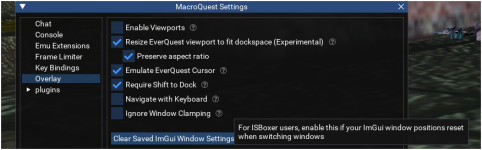
I think that it may be something with my IsBoxer set up (Below) and interaction with ImGUI.
But I am not familiar enough with the ImGUI windowing to understanding the interaction between It and the IS boxer regions.
Steps to Recreate.
1) /invisdisplay unlock
2) position the invisdisplay window where I want it to be (Main toon in region 1)
3) /invisdisplay lock (happens with or without lock actually)
4) Switch toon (Any toon in region 3-7)
This puts my main toon in region 2
5) Switch back to main toon
Puts Main toon back into region 1
Invis display window is moved.
After playing around with it to me it seems that there is some odd bounds checking that is moving the invisdisplay window.
As long as I keep the top left of the invisdisplay in the red bounded region in the image the UI stays put.
If I the invisdisplay window outside of the red bounds the location of the window is adjusted so that the top left is within the red bounds.
I realize this is probably less about the script and more about IsBoxer/ImGUI interaction but since someone else posted a similar issue (2022) Id add this here, also this is the only thing I use that this happens to.
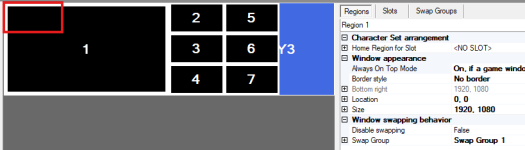
Active region 1
Reset region 1
I think that it may be something with my IsBoxer set up (Below) and interaction with ImGUI.
But I am not familiar enough with the ImGUI windowing to understanding the interaction between It and the IS boxer regions.
Steps to Recreate.
1) /invisdisplay unlock
2) position the invisdisplay window where I want it to be (Main toon in region 1)
3) /invisdisplay lock (happens with or without lock actually)
4) Switch toon (Any toon in region 3-7)
This puts my main toon in region 2
5) Switch back to main toon
Puts Main toon back into region 1
Invis display window is moved.
After playing around with it to me it seems that there is some odd bounds checking that is moving the invisdisplay window.
As long as I keep the top left of the invisdisplay in the red bounded region in the image the UI stays put.
If I the invisdisplay window outside of the red bounds the location of the window is adjusted so that the top left is within the red bounds.
I realize this is probably less about the script and more about IsBoxer/ImGUI interaction but since someone else posted a similar issue (2022) Id add this here, also this is the only thing I use that this happens to.
Active region 1
Reset region 1


Did you try the unlock command shown in the commands section Here?I use two monitors and My invisdisplay has somehow gotten put off the screen on my second monitor. I can barely see the corner of it and I cant seem to move it. How do I move it to a location I can manipulate?
Yes, I did and it does not work for me. The only part of the invisdisplay window that I can see is the bottom left of it. It does not allow me to grab it and move it around.Did you try the unlock command shown in the commands section Here?
you can't know that without utilizing something like dannet or actors which is why it is how it isAny chance of adding different colors for group members for double invis? They are green no matter what invis they have. The driver toon is either the default, blue for ivu and green when they have both.
i do have plans on adding actor usage in this sometime in the future
Q. Does this differentiate different invis types?
A. Only for the character's screen it is visible on.
Ok cool! Ive been using /dgga /status invis to double check when I need double invis. It works for now.you can't know that without utilizing something like dannet or actors which is why it is how it is
i do have plans on adding actor usage in this sometime in the future
Q. Does this differentiate different invis types?
A. Only for the character's screen it is visible on.
Users who are viewing this thread
Total: 2 (members: 0, guests: 2)
Share: