• Hail, we're RedGuides. We want you to play six (yes, 6!) EverQuest characters at once. We have scripts and a friendly community to help, please join our playstyle and say hello! 👋
  • We've added LLM sections to our Terms & Rules and Resource Rules, for everyone's sanity & in-game safety.
    Read more
    a. Do not replace your voice with an LLM. This goes for your posts and your scripts. Drafting and editing with a tool is fine, but don't take you out of what you share.
    b. Do not replace your EQ character's voice with an LLM. We don't want scripts that speak over /ooc, /shout or other public channels. This has been an unwritten rule that's kept casino scripts off the site for decades, but we're now compelled to make it clear: keep automated communication private.

    Why Does RG Review Scripts?
    Nearly every LLM-written Lua script we see is making your character do impossible things, and rarely in a way that's beneficial to you. We've seen heavy server hammering, /target over impossible distances when /nav spawn would passively accomplish the same thing, a spawn search that fires 20+ times per second, and other pointless actions that are likely annoying GMs.

    You are welcome to use LLMs as a tool to structure, draft, and edit your work, but please read critically before hitting /lua run

Question - I ended up getting the new computer

I bought a new computer. Quick Question. I want to copy my screen layot with all the hot buttons.
1. How do I do that? I went to /C, Userfiles, Daybreak games, Everquest.....after that im not sure. is it Ui files???? Can I copy the entire folder or the toon names?

2. I downloaded EQ on the new computer....should i copy the files before installing RG? or install RG first??? does that even matter?

Redcents for the help....and thanks

howdy sid,

1. I always just copy the whole thing - and then i *do* run the eq launcher and do a file check just-in-case
2. do you mean copy over RG files/folder? That's up to you, doesn't make a huge difference - if you copy it first, make sure you direct your VV launcher to that folder.

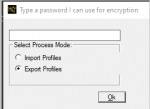
Keep in mind if you use autologin on computer1, you will have to "export" on computer1 and then "import" them on computer2
from your macroquest2 icon:
1628308684288.png
then import/export
type in a password and with "Export Profiles" selected, click ok
1628308701344.png
it will ask you where to save the file - this is the file you will want to "import profiles" with on computer2 (with your password put in)
 
Backup your entire EQ folder. I make monthly backups of my EQ folder and then email it to myself. Specifically, the information about screen layouts is stored in your eqclient.ini file, UI_charactername.ini and charactername_servername.ini files.
 
Backup your entire EQ folder. I make monthly backups of my EQ folder and then email it to myself. Specifically, the information about screen layouts is stored in your eqclient.ini file, UI_charactername.ini and charactername_servername.ini files.
I use FreeFileSync, it let's me exclude or include specific files or directories easily and can be setup as a batch job through Task Scheduler, I have it back up to my OneDrive so they all stay backed up there.
 
Hey guys I am having a problem, recently I just got my 2nd PC up and running, I installed RG Launcher on PC #2 so i can play with MQ2 on both computers.
My problem is that I am trying to export all of my profile lists from PC#1 to PC#2. I did the import/export with the password and put the PW in correctly, copied the autologin file it generated to the correct folder. I can right click on the MQ2 icon to go to profiles and my profile lists are all there but it doesnt show any of my characters, it only shows the server name. Any help and ideas so I dont have to manually go back and put all this info in again? Thanks in advance guys
 
I have all my equi files set as symlinks to a Google drive folder, it works nicely to keep my UIs across my main computer, laptop, and backup computer the same. Then I manually copy my VV files as I need them as I've read that due to how MQ writes to the ini files trying to keep them off your drive is not realistic
 
Backup your entire EQ folder. I make monthly backups of my EQ folder and then email it to myself. Specifically, the information about screen layouts is stored in your eqclient.ini file, UI_charactername.ini and charactername_servername.ini files.
@Many_Whelps Even all the Gnome Cyber Pics? ewww....

Virtual Reality Love GIF by Trippyogi
 
What I did is the most simplistic thing possible.

Get a USB backup drive (they are inexpensive). Copy the entire EQ folder and sub-folder as in right onto the drive.

Then Copy everything back into the NEW computer - and Bingo you have EQ fully restored with all your settings


Btw - for all those DIE hard EQ players - everyone should backup EQ like this , if anything were to go wrong you got everything saved
 
Or you can set up a backup routine, having an auto copy occur to a google drive or other online backup resource periodically. Keeping at least three different versions of the backup before overwrites. Then you don't even have to find that flash drive (or risk losing / damaging it). Or even remember to do it manually at all. :D 🍻
 
Or you can set up a backup routine, having an auto copy occur to a google drive or other online backup resource periodically. Keeping at least three different versions of the backup before overwrites. Then you don't even have to find that flash drive (or risk losing / damaging it). Or even remember to do it manually at all. :D 🍻
How is this done?
 
Question - I ended up getting the new computer

Users who are viewing this thread

Back
Top
Cart