
Install the app
How to install the app on iOS
Follow along with the video below to see how to install our site as a web app on your home screen.
Note: This feature may not be available in some browsers.
-
 You've discovered RedGuides, an EverQuest multi-boxing and scripting community 🧙♀️⚙️. We want you to play several EQ characters at once, come join us and say hello! 👋
You are using an out of date browser. It may not display this or other websites correctly.
You should upgrade or use an alternative browser.
You should upgrade or use an alternative browser.
Question - How to remove new hotkeys added to group window?
- Thread starter jdkars
- Start date


Sum1
Warriors are inferior (read: crybaby) tanks
- Joined
- Jul 30, 2006
- RedCents
- 6,332¢
Yes what Ladon said, drag the bottom of your group window down some. These are great additions!
I’ve had the same UI setup for all my toons since 2010 or so... moving stuff around to make room for buttons that could be stuck on a normal hotbar isn’t really something I’m interested in doing.

If you dont like how they are arranged, it takes a little bit of experimenting, but this is what i came up with:
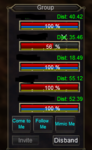
This is what I changed the settings to:
This is what I changed the settings to:
Code:
[Default]
UsePerCharSettings=0
ShowMimicMeButton=1
ShowComeToMeButton=1
ShowFollowMeButton=1
ShowHotButton=0
ShowDistance=1
ComeToMeTop=64
ComeToMeBottom=31
ComeToMeLeft=6
ComeToMeRight=44
FollowMeTop=64
FollowMeBottom=31
FollowMeLeft=48
FollowMeRight=88
MimicMeTop=64
MimicMeBottom=31
MimicMeLeft=92
MimicMeRight=132Users who are viewing this thread
Total: 1 (members: 0, guests: 1)
Share: