• You've discovered RedGuides, an EverQuest multi-boxing and scripting community 🧙‍♀️⚙️. We want you to play several EQ characters at once, come join us and say hello! 👋

  • A TLP without truebox has thawed (Very Vanilla ready)
    Frostreaver

Question - How to Extend LUA to a second monitor??

Joined
Nov 22, 2018
RedCents
439¢
Good day all.
I am returning from 1+year break.
I had a new install, new pc etc, and am trying to remember how I set things up.
I cannot seem to remember how I extended my LUAs onto my second monitor.
If anyone can assist it would be greatly appreciated.
Cheers
 
Good day all.
I am returning from 1+year break.
I had a new install, new pc etc, and am trying to remember how I set things up.
I cannot seem to remember how I extended my LUAs onto my second monitor.
If anyone can assist it would be greatly appreciated.
Cheers
Lua is a programming lanuage.

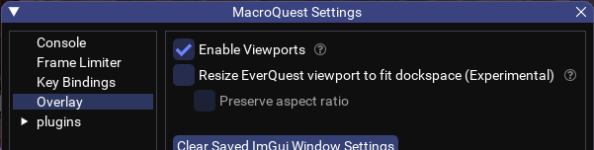
I suspect you are asking if your imgui based UI windows can be. Yes they can be moved if you allow view ports in your mqoverlay settings
 
Good day all.
I am returning from 1+year break.
I had a new install, new pc etc, and am trying to remember how I set things up.
I cannot seem to remember how I extended my LUAs onto my second monitor.
If anyone can assist it would be greatly appreciated.
Cheers
I hear you! Although I've been playing EQ, I was away from MQ for almost two years after having a bunch of toons almost banned. I just started a couple of box accounts running MQ and it feels like I'm a Newbie all over again!
 
Lua is a programming lanuage.

I suspect you are asking if your imgui based UI windows can be. Yes they can be moved if you allow view ports in your mqoverlay settings
Wait...what?! Are you saying I can move all MQ plugin GUIs out of the EQ window and over to another monitor? Freeing up playable visibility?
 
Imgui supports this. It’s not a Lua thing. However note that it wcan get really wierd if you’re using more than one account so be aware. I will not be fixing any issues related to viewports
 
I experimented with it when I first found out, and it was pretty confusing when you are 6 or 12 boxing. I still occasionally do it when I am playing a single character in a raid., and want to free the screen space.
 
Wait...what?! Are you saying I can move all MQ plugin GUIs out of the EQ window and over to another monitor? Freeing up playable visibility?
even eq windows, pull your eq instance over, then set viewport so your first monitor or second monitor or 3rd, etc is the viewable for the action
 
The trick there is to set up a control panel of sorts on your driver and your driver is the only one with any imgui windows. No confusion then. I have a rather nice docked assortment with alertmaster, mychat, buttonmaster, boxhud, console, and other assorted things tabbed to get to it when needed. I run MySEQ/discord on a 3rd monitor!

This is the way.

The only pain point is boxhud doesn't remember its docked location from one play session to the next so i have to dock that one myself every time.
 
The trick there is to set up a control panel of sorts on your driver and your driver is the only one with any imgui windows. No confusion then. I have a rather nice docked assortment with alertmaster, mychat, buttonmaster, boxhud, console, and other assorted things tabbed to get to it when needed. I run MySEQ/discord on a 3rd monitor!

This is the way.

The only pain point is boxhud doesn't remember its docked location from one play session to the next so i have to dock that one myself every time.
I would love to see a screenshot of the layout. I mainly drive from the warrior, so that would probably work. Since I have 4 monitors, I have the extra screen real estate.
 
I am not going to screenshot for obvious reasons but i can describe it in detail:

  • Make sure viewports is on in the settings.
  • By default, have the imgui MQ console window NOT start up automatically so you don't get one for each toon.
  • Start with one window and drag it to another monitor (if you can't drag it to another monitor, you got the viewports setting wrong)
    • Stretch it out to fill the entire monitor.
    • I suggest something easy that you use a lot like alertmaster (/am show), or the MQ console.
  • Introduce another imgui window and drag it over to your other monitor, you should see indicators to suggest where you can dock this window into the other.
    • Repeat introducing them and docking them as you want/need
    • Resize them as you like
    • Don't forget you can drag a window to the title bar of one you already have docked and it will tab that pane.
    • Play with this til you get it right.
  • Success!
  • Now to repeat this reliably, make a button to launch your dashboard.
    • /Lua start something
    • /timed 10 /Lua start something else
    • /timed 20 /Lua start this other thing
    • etc.
Give that a go. Mine fills my entire second monitor and I can't play without it.
 
Question - How to Extend LUA to a second monitor??

Users who are viewing this thread

Back
Top
Cart