• Hail, we're RedGuides. We want you to play six (yes, 6!) EverQuest characters at once. We have scripts and a friendly community to help, please join our playstyle and say hello! 👋
  • We've added LLM sections to our Terms & Rules and Resource Rules, for everyone's sanity & in-game safety.
    Read more
    a. Do not replace your voice with an LLM. This goes for your posts and your scripts. Drafting and editing with a tool is fine, but don't take you out of what you share.
    b. Do not replace your EQ character's voice with an LLM. We don't want scripts that speak over /ooc, /shout or other public channels. This has been an unwritten rule that's kept casino scripts off the site for decades, but we're now compelled to make it clear: keep automated communication private.

    Why Does RG Review Scripts?
    Nearly every LLM-written Lua script we see is making your character do impossible things, and rarely in a way that's beneficial to you. We've seen heavy server hammering, /target over impossible distances when /nav spawn would passively accomplish the same thing, a spawn search that fires 20+ times per second, and other pointless actions that are likely annoying GMs.

    You are welcome to use LLMs as a tool to structure, draft, and edit your work, but please read critically before hitting /lua run

Question - How do I bind multiple buttons to a keystroke?

If I want to bind 4 spells not the gems but that I have on buttons to the let's say the letter Z

Or 3 AA actions to the number 2 on my buttons how do I do that?

Thanks in advance.
 
This sounds more like making a Social key to perform the multiple actions to a single key press. Doing multiple actions to a single key press usually involves binding multiple hotkeys to the same keypress. Typically A bound to turn left and hotbar 1 hotkey 1 so that when you turn left you also always activate say Forage or Track something like that.

So you have Two options:

  1. Make your hotkeys for your spells and place them on hotbar 1 hotkey 1, 2, 3, & 4 and than you need to go into your key bindings and set 1 key press to activate all 4 of those hotkey buttons or
    1. hotbar.PNG
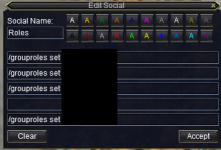
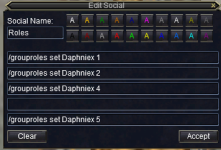
  2. Create a social key with 4 lines to activate all the abilities you want at the same time or with a very small pause and hotkey this to a single key press.
    1. Social.PNG
 

Attachments

  • Social.PNG
    Social.PNG
    49 KB · Views: 0
I have certain hotbars that I assign to either O or L and that way I can press either of those letters and it will try to fire any on the bar that can be active from 1 to 12. Comes in handy with spell gems, AA's and short in-game macros. Couple this with ISB and you can do some pretty nifty things.

Example:

Cleric hot bar O has /target maintank hotkey, spell gems for heals that I want and AA's that I want.
Cleric hot bar L has divine arb, epic shield and group heals.
This is pretty nifty indeed! Do you press L and then the entire hotbar for the cleric fires off, or do you have the 1-10 keys memorized and fire them off from your driver toon manually?
 
This is pretty nifty indeed! Do you press L and then the entire hotbar for the cleric fires off, or do you have the 1-10 keys memorized and fire them off from your driver toon manually?
They all fire but for spells on left to right order. If a spell isn't ready it gets skipped.
 
Question - How do I bind multiple buttons to a keystroke?

Users who are viewing this thread

Back
Top
Cart