• Hail, we're RedGuides. We want you to play six (yes, 6!) EverQuest characters at once. We have scripts and a friendly community to help, please join our playstyle and say hello! 👋
  • We've added LLM sections to our Terms & Rules and Resource Rules, for everyone's sanity & in-game safety.
    Read more
    a. Do not replace your voice with an LLM. This goes for your posts and your scripts. Drafting and editing with a tool is fine, but don't take you out of what you share.
    b. Do not replace your EQ character's voice with an LLM. We don't want scripts that speak over /ooc, /shout or other public channels. This has been an unwritten rule that's kept casino scripts off the site for decades, but we're now compelled to make it clear: keep automated communication private.

    Why Does RG Review Scripts?
    Nearly every LLM-written Lua script we see is making your character do impossible things, and rarely in a way that's beneficial to you. We've seen heavy server hammering, /target over impossible distances when /nav spawn would passively accomplish the same thing, a spawn search that fires 20+ times per second, and other pointless actions that are likely annoying GMs.

    You are welcome to use LLMs as a tool to structure, draft, and edit your work, but please read critically before hitting /lua run

Gina

Raidien1

CrankyPants
The guild is obsessed with Gina.

I just got a new comp that came with windows 11 installed. I can not for the life of me get gina to run on this comp. I don't know what is blocking it for running.

I put in a request on the Gina boards but I am not sure that is super active.

Thanks in advance.
Raidein
 
Last edited:
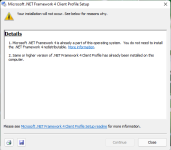
I am not getting any visible errors. I click the thinking wheel goes and then nothing. I do have a bunch of crash dump files. I am not sure if i can share that here but papa @Sic will correct me.
 

Attachments

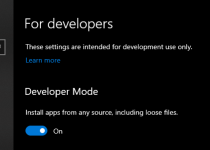
I just experimented, attempting to run gina's setup.exe from my download folder is blocked by Windows UAC security. I then right-clicked on the setup.exe file and chose the option to Check Compatibility and then it installed just fine. One caveat, in Advanced Settings for my machine I have Dev Mode turned on with the option to install files from any source...

1645827091487.png
 
@Sic was more of, if it was a file that had information that shouldnt be public.

@B_I_G__D_A_D_D_Y So i am able to install it on the comp even as admin but when i click the shortcut on the desktop it doesn't run. I also dug down to where the .exe file is and tried to run from there with no luck. It also creates a crashfile like the one above there is so many in that folder now. Like 137 of them.
 
Processor AMD Ryzen 9 5950X 16-Core Processor, 3401 Mhz, 16 Core(s), 32 Logical Processor(s)

This is what i am running but going to get that work around a try. I will update on the results.
 
c:\windows\system32\cmd.exe /C start /affinity 16 C:\Users\<name here>\AppData\Local\Apps\2.0\2T11TL5H.Q1D\HG9Q89X3.9RJ\gina..tion_d03ba0016bff7a04_0001.0000_01c7bcb8e29f5572\GINA.exe

this is what i got to get at least the UI to come up now
 
Gina

Users who are viewing this thread

Back
Top
Cart