• You've discovered RedGuides, an EverQuest multi-boxing and scripting community 🧙‍♀️⚙️. We want you to play several EQ characters at once, come join us and say hello! 👋

  • A TLP without truebox has thawed (Very Vanilla ready)
    Frostreaver

Gina

Raidien1

CrankyPants
Joined
Oct 14, 2015
RedCents
1,347¢
The guild is obsessed with Gina.

I just got a new comp that came with windows 11 installed. I can not for the life of me get gina to run on this comp. I don't know what is blocking it for running.

I put in a request on the Gina boards but I am not sure that is super active.

Thanks in advance.
Raidein
 
Last edited:
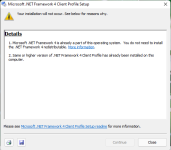
I am not getting any visible errors. I click the thinking wheel goes and then nothing. I do have a bunch of crash dump files. I am not sure if i can share that here but papa @Sic will correct me.
 

Attachments

I am not getting any visible errors. I click the thinking wheel goes and then nothing. I do have a bunch of crash dump files. I am not sure if i can share that here but papa @Sic will correct me.
@Raidien1 i don't know what you're asking from me

this isn't a MQ dmp
 
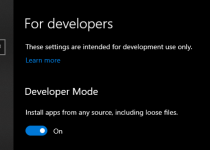
I just experimented, attempting to run gina's setup.exe from my download folder is blocked by Windows UAC security. I then right-clicked on the setup.exe file and chose the option to Check Compatibility and then it installed just fine. One caveat, in Advanced Settings for my machine I have Dev Mode turned on with the option to install files from any source...

1645827091487.png
 
@Sic was more of, if it was a file that had information that shouldnt be public.

@B_I_G__D_A_D_D_Y So i am able to install it on the comp even as admin but when i click the shortcut on the desktop it doesn't run. I also dug down to where the .exe file is and tried to run from there with no luck. It also creates a crashfile like the one above there is so many in that folder now. Like 137 of them.
 
Processor AMD Ryzen 9 5950X 16-Core Processor, 3401 Mhz, 16 Core(s), 32 Logical Processor(s)

This is what i am running but going to get that work around a try. I will update on the results.
 
c:\windows\system32\cmd.exe /C start /affinity 16 C:\Users\<name here>\AppData\Local\Apps\2.0\2T11TL5H.Q1D\HG9Q89X3.9RJ\gina..tion_d03ba0016bff7a04_0001.0000_01c7bcb8e29f5572\GINA.exe

this is what i got to get at least the UI to come up now
 
I need to follow this. I've never gotten GINA to run. I had to reverse engineer the app and even then I can't access the downloads.
 
Gina

Users who are viewing this thread

Back
Top
Cart