
-
 Hail, we're RedGuides. We want you to play six (yes, 6!) EverQuest characters at once. We have scripts and a friendly community to help, please join our playstyle and say hello! 👋
You are using an out of date browser. It may not display this or other websites correctly.
You should upgrade or use an alternative browser.
You should upgrade or use an alternative browser.

Release Explore.Mac - An Explorer / Traveler Achievement Macro 1.3.1
- Thread starter Denethor
- Start date




- Seller
- #763
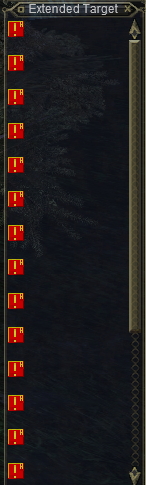
I'll DM you to set up a time to look at this on your system. We'll get it sorted. Sorry for the trouble.I've nothing in the extended target window. Not Grouped. No Targets. I attached a pic of my Xtarget window, I also clicked each slot all the way down the list to be sure they were all on "*Auto".
- Seller
- #765
The macro doesn't store the AA in the INI. Is scans for it each time the macro starts (Explore.mac, line 619):
If there was a name change to the Cloak of Shadows AA, that would account for the problem. I cannot test myself as I do not have a necro.
Can you verify that the AA your character needs to use is "Cloak of Shadows"?
Oh, wait... Is the necro a persona of the rogue?
Sorry, trying to understand what's going on here...
/varset invisAbility ${Select[TRUE,${Me.AltAbilityReady[Cloak of Shadows]},${Me.AltAbilityReady[Shauri's Sonorous Clouding]},${Me.AltAbilityReady[Group Perfected Invisibility]},${Me.AltAbilityReady[Perfected Invisibility]},${Me.AltAbilityReady[Natural Invisibility]},${Me.AltAbilityReady[Shared Camouflage]},${Me.AltAbilityReady[Camouflage]},${Me.AltAbilityReady[Group Silent Presence]},${Me.AltAbilityReady[Silent Presence]}]}If there was a name change to the Cloak of Shadows AA, that would account for the problem. I cannot test myself as I do not have a necro.
Can you verify that the AA your character needs to use is "Cloak of Shadows"?
Oh, wait... Is the necro a persona of the rogue?
Sorry, trying to understand what's going on here...
Char 1 Neco

Char 2 not a persona Rouge
 everquest.allakhazam.com
Char 2 not a persona Rouge
Shroud of Stealth :: Skills :: EverQuest :: ZAM
- Seller
- #767
Is it the rogue or the necro having the issue? Or both? Sorry, but the minimal punctuation and the speech-to-text program you're using (or whatever is effecting your word choice) is confusing.
Regardless, to answer your original question: You can't put an AA into the INI for the invis clickie. That's not how the code works.
AA Invis abilities are detected via the code I posted for casters. The actual invis routine is in DeneCore-Utils.inc, Lines 1039-1182. Of interest for the Necro is lines 1056-1061. That's where Cloak of Shadow is case.
For the rogue, it's a little more spread out, but the bulk of the code is in DeneCore-Utils.inc, lines 1557-1579:
As you can see, it's directly trying to use rogue hide/sneak.
If you can explain the question a little better, I want to try to solve this for you. I'm just not understanding yet.
Regardless, to answer your original question: You can't put an AA into the INI for the invis clickie. That's not how the code works.
AA Invis abilities are detected via the code I posted for casters. The actual invis routine is in DeneCore-Utils.inc, Lines 1039-1182. Of interest for the Necro is lines 1056-1061. That's where Cloak of Shadow is case.
For the rogue, it's a little more spread out, but the bulk of the code is in DeneCore-Utils.inc, lines 1557-1579:
Code:
Sub rogueInvis
    |Don't need to check if I'm rogue, because we did that before calling the sub
    |Check to see if we are sneaking and hiding
    |If I'm already SoS, we can exit this sub early
     /if (!${Me.Sneaking} && !${Me.Invis}) /message Let's get dangerous!
    :checkagain
    /if (${Me.Sneaking} && ${Me.Invis}) /return
    /while (!${Me.AbilityReady[Hide]}) {
        /delay 1s
    }
    /if (${Me.Sneaking}) {
        /doability Hide
        /delay 3s ${Me.Invis[SOS]}
        /message Hiding
    } else {
        /doability Sneak
        /delay 3s ${Me.Sneaking}
        /message Sneaking
    }
    /goto :checkagain
/returnIf you can explain the question a little better, I want to try to solve this for you. I'm just not understanding yet.
Heya - I ran an LDoN Loop today and got the following:
[01/21/2024 18:29:31.8117631] Missing INI Entry for Deepest_Guk, Boss: , Adventure Text: "The power of the curse in Deepest Guk grows stronger every day as the souls of adventurers fall to it. Several creatures in the slimy surroundings are brimming with the curse and their only occupation is to blight any living being that enters Deepest Guk. There is one creature called Jinta Archwizard Zxixri that must be killed so we can slow the proliferation of the curse. You can find your way to him through a barricaded door in Upper Guk."
[01/21/2024 18:33:25.1582366] Missing INI Entry for Deepest_Guk, Boss: , Adventure Text: "The power of the curse in Deepest Guk grows stronger every day as the souls of adventurers fall to it. Several creatures in the slimy surroundings are brimming with the curse and their only occupation is to blight any living being that enters Deepest Guk. There is one creature called Uhiur the Fallen that must be killed so we can slow the proliferation of the curse. You can find your way to him through a rotting tree trunk in Innothule Swamp."
[01/21/2024 18:34:34.2410256] Missing INI Entry for Deepest_Guk, Boss: , Adventure Text: "The power of the curse in Deepest Guk grows stronger every day as the souls of adventurers fall to it. Several creatures in the slimy surroundings are brimming with the curse and their only occupation is to blight any living being that enters Deepest Guk. There is one creature called Uhiur the Fallen that must be killed so we can slow the proliferation of the curse. You can find your way to him through a rotting tree trunk in Innothule Swamp."
[01/21/2024 18:38:30.6564913] Missing INI Entry for Takish-Hiz, Boss: , Adventure Text: "The elves in Takish-Hiz are mere shadows of their former selves. Much to our surprise they continually attack anything or anyone that is foreign to them -- no matter how often we try to communicate with them and offer a hand of friendship. As a result, we need strong adventurers to move among them to gather information for us. I wonder if you could survive in there..."
[01/21/2024 18:42:49.7416797] Missing INI Entry for Deepest_Guk, Boss: Numleou the Learned, Adventure Text: "The power of the curse in Deepest Guk grows stronger every day as the souls of adventurers fall to it. Several creatures in the slimy surroundings are brimming with the curse and their only occupation is to blight any living being that enters Deepest Guk. There is one creature called Jinta Archwizard Zxixri that must be killed so we can slow the proliferation of the curse. You can find your way to him through a rotting tree trunk in Innothule Swamp."
[01/21/2024 19:20:50.0301040] Missing INI Entry for Rujarkian_Hills, Boss: , Adventure Text: "Fancy yourself a little on the tougher side, do you? I see a glimmer of experience in your eye! I could use you. One of the orcs in Takish-Hiz is bent on destruction and needs to be put down. Orut Egne and a fair compliment of orcs have been ransacking the area lately. Go find Orut Egne through a cave in Southern Ro. You can take on this mission, I am sure. Hurry along now!"
[01/21/2024 19:56:34.4051472] Missing INI Entry for Takish-Hiz, Boss: , Adventure Text: "The elves in Takish-Hiz are mere shadows of their former selves. Much to our surprise they continually attack anything or anyone that is foreign to them -- no matter how often we try to communicate with them and offer a hand of friendship. As a result, we need strong adventurers to move among them to gather information for us. I wonder if you could survive in there..."
[01/21/2024 18:29:31.8117631] Missing INI Entry for Deepest_Guk, Boss: , Adventure Text: "The power of the curse in Deepest Guk grows stronger every day as the souls of adventurers fall to it. Several creatures in the slimy surroundings are brimming with the curse and their only occupation is to blight any living being that enters Deepest Guk. There is one creature called Jinta Archwizard Zxixri that must be killed so we can slow the proliferation of the curse. You can find your way to him through a barricaded door in Upper Guk."
[01/21/2024 18:33:25.1582366] Missing INI Entry for Deepest_Guk, Boss: , Adventure Text: "The power of the curse in Deepest Guk grows stronger every day as the souls of adventurers fall to it. Several creatures in the slimy surroundings are brimming with the curse and their only occupation is to blight any living being that enters Deepest Guk. There is one creature called Uhiur the Fallen that must be killed so we can slow the proliferation of the curse. You can find your way to him through a rotting tree trunk in Innothule Swamp."
[01/21/2024 18:34:34.2410256] Missing INI Entry for Deepest_Guk, Boss: , Adventure Text: "The power of the curse in Deepest Guk grows stronger every day as the souls of adventurers fall to it. Several creatures in the slimy surroundings are brimming with the curse and their only occupation is to blight any living being that enters Deepest Guk. There is one creature called Uhiur the Fallen that must be killed so we can slow the proliferation of the curse. You can find your way to him through a rotting tree trunk in Innothule Swamp."
[01/21/2024 18:38:30.6564913] Missing INI Entry for Takish-Hiz, Boss: , Adventure Text: "The elves in Takish-Hiz are mere shadows of their former selves. Much to our surprise they continually attack anything or anyone that is foreign to them -- no matter how often we try to communicate with them and offer a hand of friendship. As a result, we need strong adventurers to move among them to gather information for us. I wonder if you could survive in there..."
[01/21/2024 18:42:49.7416797] Missing INI Entry for Deepest_Guk, Boss: Numleou the Learned, Adventure Text: "The power of the curse in Deepest Guk grows stronger every day as the souls of adventurers fall to it. Several creatures in the slimy surroundings are brimming with the curse and their only occupation is to blight any living being that enters Deepest Guk. There is one creature called Jinta Archwizard Zxixri that must be killed so we can slow the proliferation of the curse. You can find your way to him through a rotting tree trunk in Innothule Swamp."
[01/21/2024 19:20:50.0301040] Missing INI Entry for Rujarkian_Hills, Boss: , Adventure Text: "Fancy yourself a little on the tougher side, do you? I see a glimmer of experience in your eye! I could use you. One of the orcs in Takish-Hiz is bent on destruction and needs to be put down. Orut Egne and a fair compliment of orcs have been ransacking the area lately. Go find Orut Egne through a cave in Southern Ro. You can take on this mission, I am sure. Hurry along now!"
[01/21/2024 19:56:34.4051472] Missing INI Entry for Takish-Hiz, Boss: , Adventure Text: "The elves in Takish-Hiz are mere shadows of their former selves. Much to our surprise they continually attack anything or anyone that is foreign to them -- no matter how often we try to communicate with them and offer a hand of friendship. As a result, we need strong adventurers to move among them to gather information for us. I wonder if you could survive in there..."
Last edited:
you can do /explore ros tssIs there a way to skip an expansion? House of Thule is done, but it keeps going back and trying to redo it.
that would do only ros and tss expansion for example...choose what you like instead of all.

joeywd82
Member
awesome, ty, ill give that a tryyou can do /explore ros tss
that would do only ros and tss expansion for example...choose what you like instead of all.
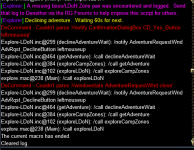
is there a fix to this issue? im running into the same issueHaving an error where my toon is unable to leave LDoN missions themselves. I receive the error message "Couldn't parse '//windowstate AdventureRequestWnd close' and "Couldn't parse '//notify ConfirmationDialogBox CD_Yes_Button leftmouseup'
- Seller
- #777
Please try the workaround posted here:
Fixed the eqbc stuff by jchanging line 35-37 to look at dannet only in the explore mac
That stopped the eqbc stuff
#define /commTell "/docommand /dgt"
#define /commGroup "/docommand /dgga"
#define /commCommand "/docommand /noparse /dgga"
#define /commEXEC "/docommand /noparse /dgga "
for the blnWait, I just changed it to local instead of outer. Not sure if that screwed up something but I couldn't find blnWait anywhere else in the mac so not sure
If you still have issues, let me know.
I may need to forego supporting EQBC and just make Dannet the single comms mechanism for the macro.
is this something i need to modify the macroeo?Please try the workaround posted here:
If you still have issues, let me know.
I may need to forego supporting EQBC and just make Dannet the single comms mechanism for the macro.
xxraptorxx
RG Karen
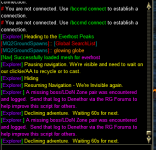
I am not sure why I am getting this issue on a 125 iksar war but for what ever reason it wont use the cloudy potions in his bags and just moves 3 feet and saying pausing waiting on clicky or AA to recycle, recently ran this for several alts and didnt have an issue till now, not sure what to do, thanks
xxraptorxx
RG Karen
to add if I click the invis potion it works fine, till invis drops but why the war wont use invis pots is the problem when all others seem to.

Rare Spawn
Well-known member
For the dannet folks, Line 37 of explore.mac needs a fix, has an extra "/" in it.
Broken
Fixed
Broken
Code:
#define /commEXEC "/docommand ${If[${Bool[${Plugin[mq2eqbc]}]},/noparse /bcga /,${If[${Bool[${Plugin[mq2dannet]}]},/noparse /dgga /,/echo \ar NO NETWORK COMMUNICATION LOADED]}]}"Fixed
Code:
#define /commEXEC "/docommand ${If[${Bool[${Plugin[mq2eqbc]}]},/noparse /bcga /,${If[${Bool[${Plugin[mq2dannet]}]},/noparse /dgga ,/echo \ar NO NETWORK COMMUNICATION LOADED]}]}"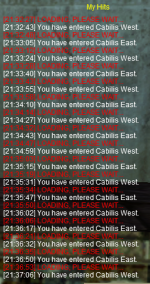
I've run this on a couple characters a month or two ago without hitting that issue but running one this past weekend got into that same loop back and forth. Kept trying to run an /end command between the zoning but eventually just did an unload from the MQ icon.This has happened on a couple toons now
- Seller
- #788
This is a known issue caused by using different / unsupported meshes. The mesh requirement is mentioned in the Requirements section of the macro, This exact issue mentioned in the FAQ:(Image removed)
This has happened on a couple toons now
It's only the East Cabilis mesh that needs replacement, IIRC, but I'd just replace both. You can always overwrite them later using the updater again.Q: It keep looping between East and West Cabilis. Why?
A: Wired420 has updated his meshes since this macro was first published. The new mesh provided by the Updater is the issue. The meshes in my repo will work. https://github.com/BDeakins/DeneCore-Meshes
shadowfall
Active member
after finishing planes and returning to pok via drunkard stine ogre got stuck trying to leave building then when trying to do special events i would get task would not target npc and stand a good distance away just spamming the enter phrase.
re ran mac and it did special events no issues i must have been bugged out or something.
re ran mac and it did special events no issues i must have been bugged out or something.
Last edited:
xxraptorxx
RG Karen
I have a cleric that when I run this he just does not move the mac does not end or give errors acts like its working but does not move, have run this many times on many toons, have all the pre reqs if I use find nav works to get there so puzzled any ideas? I deleted the dencor ini and explore ini and ran it again and same thing, has invis pots and being invis does not change anything.
thank you
thank you
Getting this error when trying to run it.
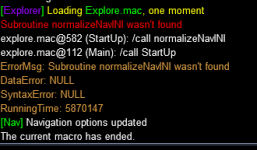
Did you start it in PoK?Just tried to run this today... I run the macro, I get no errors, she says going to first person... The macro echo's "Let's get Dangerous" - but nothing happens at all.
DeneCore is installed.
Did you do /mac explore or a single route like /mac explore tss?

I have used the macro 2-3 times in the last week, with no problems. There is one bug I found while running from East/West Cabilis to Field of Bone where the toon will keep going back and forth between the zones, but still works really well.

RedQueen
Member
/mac exploreDid you start it in PoK?
Did you do /mac explore or a single route like /mac explore tss?
Started in the tavern where you stein in from.
Do note; One of my toons runs it with no problems.
- Seller
- #799
Set all of your extended targets to Auto. You have something hard-set in there and the macro is seeing a target on the list and thinking we have agro. So it is jumping into the combat handler.Just tried to run this today... I run the macro, I get no errors, she says going to first person... The macro echo's "Let's get Dangerous" - but nothing happens at all.
DeneCore is installed.
- Seller
- #800
That isn't a bug in the macro. It's an issue with the mesh (E/W Cab is the big stand-out example of this). Use the meshes I provide from my repo (https://github.com/BDeakins/DeneCore-Meshes) instead of the one from the downloader. This is also mentioned in the FAQ for the macro. (You can probably get away with just replacing E/W Cab and use the rest of the ones from the downloader.)I have used the macro 2-3 times in the last week, with no problems. There is one bug I found while running from East/West Cabilis to Field of Bone where the toon will keep going back and forth between the zones, but still works really well.
Users who are viewing this thread
Total: 1 (members: 0, guests: 1)
Share: