• Hail, we're RedGuides. We want you to play six (yes, 6!) EverQuest characters at once. We have scripts and a friendly community to help, please join our playstyle and say hello! 👋
  • We've added LLM sections to our Terms & Rules and Resource Rules, for everyone's sanity & in-game safety.
    Read more
    a. Do not replace your voice with an LLM. This goes for your posts and your scripts. Drafting and editing with a tool is fine, but don't take you out of what you share.
    b. Do not replace your EQ character's voice with an LLM. We don't want scripts that speak over /ooc, /shout or other public channels. This has been an unwritten rule that's kept casino scripts off the site for decades, but we're now compelled to make it clear: keep automated communication private.

    Why Does RG Review Scripts?
    Nearly every LLM-written Lua script we see is making your character do impossible things, and rarely in a way that's beneficial to you. We've seen heavy server hammering, /target over impossible distances when /nav spawn would passively accomplish the same thing, a spawn search that fires 20+ times per second, and other pointless actions that are likely annoying GMs.

    You are welcome to use LLMs as a tool to structure, draft, and edit your work, but please read critically before hitting /lua run

Problem - EQGraphicsDX9.dll - Crashed

lowrider1064

New member
Hey Yall,

I am newer to the MQ2 setup and running into an issue that is driving me crazy. MQ2 and EQ run fine when I am only running one client, but when I load two or more, I am getting an EQGraphicsDX9.dll crash. It is random at best, sometime it may work fine for thirty minutes, other times maybe three minutes. I unloaded all of the plugins and reloaded them on by one, but still nothing. I have attached the associated dmp file. Any help would be greatly appreciated.
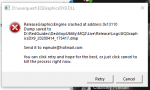

EQGraphicDX9.PNG
 

Attachments

Last edited:
@lowrider1064

Not a whole lot on your call stack. Did you already send this to eqmule per that popup? he looks at .dmp files daily, and if this is mq2 related he could potentially track it down.


In the meantime i would double check you have a good directx 9.0c version (the june 2010 version) --- some versions of windows come with a stripped down version and it has been know to cause issues and/or straight inability to function

Direct X 9.0c HERE

1586896568112.png


in the meantime, I would /plugin mq2debuffs unload and /plugin mq2missing unload and /plugin mq2exchange unload and /plugin mq2itemdisplay unload - for any of those that you don't specifically use --- this isn't to say those plugins are causing you issues, we just usually reocmmend unloading some if you're not specifically using them (especially mq2debuffs)
 
just a question if he is on win 10 why would he need dx 9 ? mine never installs says I have better
everquest is a directx 9 game - 11/12 does not natively come with some 9 libraries stuff and it isn't fully backwards compatible - and things like mq2nav need some of the specific things inside the "legit" directx 9.0c and not the bullshit stripped down one that sometimes come with newer versions of windows. you don't *replace* your 11/12, you just add additional stuff to your "direct x toolbox"

Some Convo on Official Forums
 
Thanks @Sic. Especially for the DirectX link. I updated all of them and disable the plugins. So Far So Good. I am still waiting to here from EqMule, but hopefully it was just the DirectX problem.
 
Thanks @Sic. Especially for the DirectX link. I updated all of them and disable the plugins. So Far So Good. I am still waiting to here from EqMule, but hopefully it was just the DirectX problem.
sometimes its an eq related thing, or something related to your hardware and not an mq2 specific thing - I wouldn't expect a response from mule if it is something like that.
I would also just doublt check you have all your bits and bots updated with latest windows updates, video drivers, etc
 
Problem - EQGraphicsDX9.dll - Crashed

Users who are viewing this thread

Back
Top
Cart