
• Hail, we're RedGuides. We want you to play six (yes, 6!) EverQuest characters at once. We have scripts and a friendly community to help, please join our playstyle and say hello! 👋
  • We've added LLM sections to our Terms & Rules and Resource Rules, for everyone's sanity & in-game safety.
    Read more
    a. Do not replace your voice with an LLM. This goes for your posts and your scripts. Drafting and editing with a tool is fine, but don't take you out of what you share.
    b. Do not replace your EQ character's voice with an LLM. We don't want scripts that speak over /ooc, /shout or other public channels. This has been an unwritten rule that's kept casino scripts off the site for decades, but we're now compelled to make it clear: keep automated communication private.

    Why Does RG Review Scripts?
    Nearly every LLM-written Lua script we see is making your character do impossible things, and rarely in a way that's beneficial to you. We've seen heavy server hammering, /target over impossible distances when /nav spawn would passively accomplish the same thing, a spawn search that fires 20+ times per second, and other pointless actions that are likely annoying GMs.

    You are welcome to use LLMs as a tool to structure, draft, and edit your work, but please read critically before hitting /lua run
Epic Laziness

Release Epic Laziness (6 Viewers) v0.4.25

I have scoured the RG page and this discussion thread. When using the Lua, how does it automatically open a trade window with an npc and give stuff from the inventory? I'm doing partisan quests for a dozen toons, and this would make life much easier. I can't find the commands anywhere. Any help would be appreciated :)
 
From Sic's Hotkeys:

"Give - this button picks up the item on your cursor, and turns it into your target
-- intention is for driver to hold item and pic a target and then /give
- this is an alias you will want to add it in your macroquest.ini"

"/give=/dgga /multiline ; /nomodkey /shiftkey /itemnotify #${Cursor.ID} leftmouseup; /timed 5 /target ${Target.Name}; /timed 10 /usetarget; /timed 15 /usetarget; /timed 20 /notify GiveWnd GVW_Give_Button leftmouseup; /timed 25 /autoinventory"
 
Getting this error. anytime there is a /travelto portion or nav in any form, it pauses and I have to manually run or do the /travelto myself. MQ2nav works fine. my xtar list is completely clean. But still pausing with this:

1784523310685.png

1784523389314.png
 
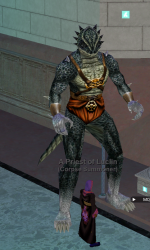
When viewed from an alt, Im normal size, when shrunk from an alt I appear shrunk. But when viewed from the toon Im still 20 feet tall and cant fit through doors in PoK.

1791813703294.png
 
It's unfinished, there's a bug report link on the Instructions page. I'm hoping it gets finished
I've used Epiclaziness several time before, and have been using it for the last week to wrap up some epics. This is the first time this has ever happened to me. It started yesterday. Now it's persisting to today.

1791814771398.png
LOL Viewing myself.


1791814806875.png

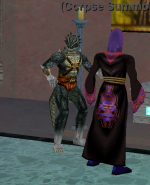
When I view from an alt.

IM HUGE I TELL YOU!! HUUUGE :)

The bothersome problem is. It wont let me go through doors or arches.
 
I've used Epiclaziness several time before, and have been using it for the last week to wrap up some epics. This is the first time this has ever happened to me. It started yesterday. Now it's persisting to today.

View attachment 78995
LOL Viewing myself.


View attachment 78996

When I view from an alt.

IM HUGE I TELL YOU!! HUUUGE :)

The bothersome problem is. It wont let me go through doors or arches.
It’s autosize. Just /autosize sizeself 3
 
Not on my own though. Epiclaziness uses it when you start it. Never before has it autosized me to what ever size that is.

Thanks Joakhan!! Thats exactly what I needed. I've never used autosize myself and wasnt sure the command to adjust it.
The Lua is great, but there’s a few settings that get changed and saved here and there or if it hangs in the wrong spot.
 
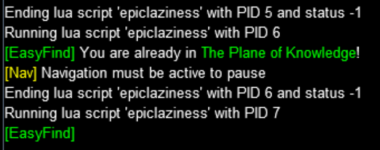
Doesn't seem to be working for the Rogue. I ran it previously without issue on another Rogue a few months back, and had completed the pre 1.5 a month or so ago on this new Rogue. Now when I try to run the next step (1.5) my character just stands in the same spot and MQ shows the output below. Zoning to PoK to try and help it to the next step did not fix the issue, nor did multiple restarts. It keeps saying Nav must be active to pause after running the Lua. Thank you in advance for any help.
1794199775008.png
 
Doesn't seem to be working for the Rogue. I ran it previously without issue on another Rogue a few months back, and had completed the pre 1.5 a month or so ago on this new Rogue. Now when I try to run the next step (1.5) my character just stands in the same spot and MQ shows the output below. Zoning to PoK to try and help it to the next step did not fix the issue, nor did multiple restarts. It keeps saying Nav must be active to pause after running the lua. Thank you in advance for any help.
View attachment 79329
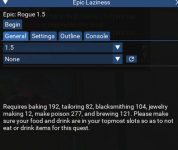
Do you have the trade skill you need to proceed?
Before you start, it will tell you you need a certain trade skill level. If you dont have it, it doesnt start.
 
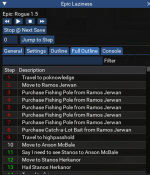
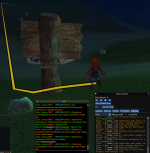
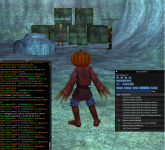
@JustaDad Thanks for replying and trying to help! Skill levels are good. I have 300 baking, 150 tailoring, 150 blacksmithing, 150 Jewelry Making, 300 make poison, and150 brewing. It seems to be an issue with navigation. Even when I buy fishing poles and bait and manually skip to step 9 (Travel to Highpasshold) while in PoK results in the navigation message. I've also tried the following: manually zoned to Crescent Reach/Blightfire Moors/Butcherblock while the Lua running. Stopped Lua and restarted at different stages/zones that matched the steps. Fully rebooted my computer. But the character just stands there. In the last image you can see I'm in zone with Anson and on step 10 (Move to Anson McBale) and far enough away that I should nav over and say the phrase and continue to progress through the steps, but nothing happens. Thanks in advance for any help.
1794234903930.png

1794234918850.png

1794236406081.png

1794237306112.png
 
Release Epic Laziness

Users who are viewing this thread

  • DreddOwns
  • M
  • G
Back
Top
Cart