• Hail, we're RedGuides. We want you to play six (yes, 6!) EverQuest characters at once. We have scripts and a friendly community to help, please join our playstyle and say hello! 👋
  • We've added LLM sections to our Terms & Rules and Resource Rules, for everyone's sanity & in-game safety.
    Read more
    a. Do not replace your voice with an LLM. This goes for your posts and your scripts. Drafting and editing with a tool is fine, but don't take you out of what you share.
    b. Do not replace your EQ character's voice with an LLM. We don't want scripts that speak over /ooc, /shout or other public channels. This has been an unwritten rule that's kept casino scripts off the site for decades, but we're now compelled to make it clear: keep automated communication private.

    Why Does RG Review Scripts?
    Nearly every LLM-written Lua script we see is making your character do impossible things, and rarely in a way that's beneficial to you. We've seen heavy server hammering, /target over impossible distances when /nav spawn would passively accomplish the same thing, a spawn search that fires 20+ times per second, and other pointless actions that are likely annoying GMs.

    You are welcome to use LLMs as a tool to structure, draft, and edit your work, but please read critically before hitting /lua run

Question - Discord Server?

Status
Not open for further replies.

dwilder6

Member
Want to join chat for Discord. Looks like I need to enter a link to a Discord server...but I'm not seeing the link to enter.

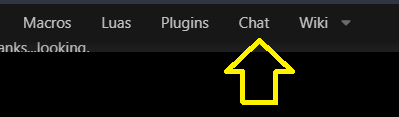
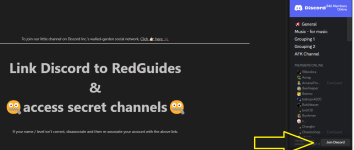
I select the "Chat" menu option, it brings up a page with huge letters "Link Discord to Redguides and Access Secret Channels". I click that but see no link. It does say my account is Connected. What am I doing wrong?
 
Solution
Want to join chat for Discord. Looks like I need to enter a link to a Discord server...but I'm not seeing the link to enter.

I select the "Chat" menu option, it brings up a page with huge letters "Link Discord to Redguides and Access Secret Channels". I click that but see no link. It does say my account is Connected. What am I doing wrong?

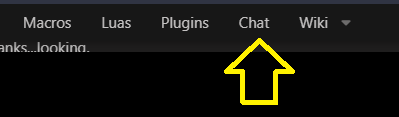
Click the "Chat" link

1684415349021.png
Want to join chat for Discord. Looks like I need to enter a link to a Discord server...but I'm not seeing the link to enter.

I select the "Chat" menu option, it brings up a page with huge letters "Link Discord to Redguides and Access Secret Channels". I click that but see no link. It does say my account is Connected. What am I doing wrong?

Click the "Chat" link

1684415349021.png
 
Solution
Hello again, back at the game, after being away for about 4 years or so.

Could someone send me an invite to Discord?

Having difficulty getting my bard working. Running Sic's ini but it is saying I don't have eqbc or dannet.

Not sure where to go from here to fix it.

Thanks,

Brandon
Did you click "chat" on the RG banner menu?
 
Hello again, back at the game, after being away for about 4 years or so.

Could someone send me an invite to Discord?

Having difficulty getting my bard working. Running Sic's ini but it is saying I don't have eqbc or dannet.

Not sure where to go from here to fix it.

Thanks,

Brandon
is the discord working ??? I am getting this ERROR MESSAGE "
Clyde
BOT
— Today at 5:52 AM
Your message could not be delivered. This is usually because you don't share a server with the recipient or the recipient is only accepting direct messages from friends. You can see the full list of reasons here: https://support.discord.com/hc/en-us/articles/360060145013"
yes the discord server is working. If i remember correctly you were removed from it from your unhinged nasty rants and people, but as the discord message says, the person you are trying to msg requires you to be their friend, or on a server you both share.

checking bans, you are not currently banned from discord - so you can join it any time, but considering your behavior last time you were around if that even hints at happening again, you will have those privileges removed.
 
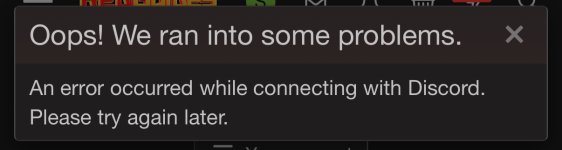
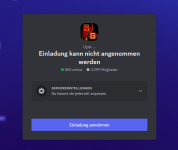
Issue when associating to discord to chat in the channels. I just get an error that says Opps, try again. Was associated before but lost it when I had to re-up level 2. Any ideas or best to wait it out?
 

Attachments

  • IMG_2457.jpeg
    IMG_2457.jpeg
    175.7 KB · Views: 0
Question - Discord Server?
Status
Not open for further replies.

Users who are viewing this thread

Back
Top
Cart