
-
 Hail, we're RedGuides. We want you to play six (yes, 6!) EverQuest characters at once. We have scripts and a friendly community to help, please join our playstyle and say hello! 👋
You are using an out of date browser. It may not display this or other websites correctly.
You should upgrade or use an alternative browser.
You should upgrade or use an alternative browser.
Guide - CWTN UI Vid (2024)
- Thread starter Sic
- Start date

MacroQuest overlay position/information is stored in the MacroQuest_Overlay.ini in your config folder. This is something that MacroQuest does automatically for all of the overlay placement/positions (this is all things imgui - like the new cwtn ui window, or any of the other overlays that you find now like boxhud, buttonmaster, portalsetter window, or guildclicky, etc.)
what appears to be happening for some folks, is an issue creating entries for all of your toons when they all enter the game at the same time. when that happens - for some folks - there ends up being a "file locking" issue, where the file is busy being written to by something else, so it can't be written to by the other toons coming in.
Using ISBoxer to launch, which launches toons 1 by 1 appears to help avoid this because each toon entering the game is staggered.
if you have an old hard drive or do file scanning (like AV), or file syncing, this can exacerbate this issue - but unfortunately not something that we can do about that either. :'(
Another thing that has been happening to folks who use ISBoxer with window tiling - is when you swap which tile has focused, it does something where the other tile gets resized which causes imgui to mess with the position of the window you just had as if you moved it - unfortunately this is ISBoxer doing that, and not something that MQ can do anything about.
what appears to be happening for some folks, is an issue creating entries for all of your toons when they all enter the game at the same time. when that happens - for some folks - there ends up being a "file locking" issue, where the file is busy being written to by something else, so it can't be written to by the other toons coming in.
Using ISBoxer to launch, which launches toons 1 by 1 appears to help avoid this because each toon entering the game is staggered.
if you have an old hard drive or do file scanning (like AV), or file syncing, this can exacerbate this issue - but unfortunately not something that we can do about that either. :'(
Another thing that has been happening to folks who use ISBoxer with window tiling - is when you swap which tile has focused, it does something where the other tile gets resized which causes imgui to mess with the position of the window you just had as if you moved it - unfortunately this is ISBoxer doing that, and not something that MQ can do anything about.
Wrong forum
Ok 1st off Im NO computer guy so speak to me in Layman terms ,so you know my skills :-( I cant even download and put maps in my EQ folder ,so I have not had maps forever (no big deal to me )
Problem Im having is the New Window you use to set your charector,IT Moves around as I switch windows and sometimes its stuck to my mouse Pointer and If I dont react intime I wipe,very annoying ,so how do I lock it down like old 1 did.
Problem Im having is the New Window you use to set your charector,IT Moves around as I switch windows and sometimes its stuck to my mouse Pointer and If I dont react intime I wipe,very annoying ,so how do I lock it down like old 1 did.
MacroQuest overlay position/information is stored in the MacroQuest_Overlay.ini in your config folder. This is something that MacroQuest does automatically for all of the overlay placement/positions (this is all things imgui - like the new cwtn ui window, or any of the other overlays that you find now like boxhud, buttonmaster, portalsetter window, or guildclicky, etc.)Ok 1st off Im NO computer guy so speak to me in Layman terms ,so you know my skills :-( I cant even download and put maps in my EQ folder ,so I have not had maps forever (no big deal to me )
Problem Im having is the New Window you use to set your charector,IT Moves around as I switch windows and sometimes its stuck to my mouse Pointer and If I dont react intime I wipe,very annoying ,so how do I lock it down like old 1 did.
what appears to be happening for some folks, is an issue creating entries for all of your toons when they all enter the game at the same time. when that happens - for some folks - there ends up being a "file locking" issue, where the file is busy being written to by something else, so it can't be written to by the other toons coming in.
Using ISBoxer to launch, which launches toons 1 by 1 appears to help avoid this because each toon entering the game is staggered.
if you have an old hard drive or do file scanning (like AV), or file syncing, this can exacerbate this issue - but unfortunately not something that we can do about that either. :'(
Another thing that has been happening to folks who use ISBoxer with window tiling - is when you swap which tile has focused, it does something where the other tile gets resized which causes imgui to mess with the position of the window you just had as if you moved it - unfortunately this is ISBoxer doing that, and not something that MQ can do anything about.

Is there a way to prevent the new gui window from always being over other windows. For example, If I open my inventory window it opens underneath the MQ2War window rather than on top as a new open window ordinarily would.
This has only started happening with the new MQ2War GUI. Before it was just a normal EQ window and I could put the active window over the top of.
Now, nomatter what, the MQ2WAR window will be on top. For example if I dragged the top level window, like my inventory window over to the MQ2WAR window it now slides behind it whereas before it used to slide over the top of it and I could let it overlap.
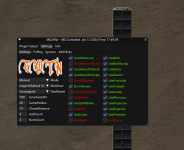
that is an EQ issue its been an issue since TOL where the window will overlap
This has only started happening with the new MQ2War GUI. Before it was just a normal EQ window and I could put the active window over the top of.
Now, nomatter what, the MQ2WAR window will be on top. For example if I dragged the top level window, like my inventory window over to the MQ2WAR window it now slides behind it whereas before it used to slide over the top of it and I could let it overlap.
imgui, the library for the interface is an "overlay" it overlays on top of eq. just like every other imgui overlay - meaning anything utilizing imgui, portalsetter, mqconsole, mq2nav window, mq2easyfind, guildclicky, invisdisplay, everything.This has only started happening with the new MQ2War GUI. Before it was just a normal EQ window and I could put the active window over the top of.
Now, nomatter what, the MQ2WAR window will be on top. For example if I dragged the top level window, like my inventory window over to the MQ2WAR window it now slides behind it whereas before it used to slide over the top of it and I could let it overlap.
View attachment 55908
this isn't a bug, there is just no way to place this type of overlay somewhere not on top of the game.
the previous UI was not an overlay - it used in-game xml windows (which everquest is moving away from with their ui updates). they actually have the exact same situation with their new ui being on top of old ui pieces.

- Commits
- 191
It's technically a limitation of imgui, which is used as an OVERlay, so it lays over Everquest. This is not an EQ issue. Just a limitation of using an overlay instead of a window that is built into EQ such as our old XML window.that is an EQ issue its been an issue since TOL where the window will overlap
We've transitioned away from the old XML window due to it's own technical limitations. While I know it can be a bit of an annoyance at first the idea is that it has allowed us to incorporate new features, as well as it has made the features a bit easier to manage moving forward.
Firstly I just wanted to say that the new overlay and functionality is amazing, its great being able to make lasting changes in the GUI on the fly so thank you for that!
However, I was toying around with it the other night and accidently docked the GUI to the top of my screen (moved it over the little blue squares that appear). I thought I'd just close the window down by hitting the [X] and reloading it however that just got rid of the task bar (that lets you minimise the GUI into just a bar etc. Currently I'm stuck with the GUI docked to the top of my screen and even though I can shrink it down, I really wanted to undock it and move it around freely.
I apologise, I've watched the video on the new UI and looked around the forums but havent seen anything about doing this. I know its probably a super simple fix but I'm a bit lost.
Apologise and thanks again for the update.
However, I was toying around with it the other night and accidently docked the GUI to the top of my screen (moved it over the little blue squares that appear). I thought I'd just close the window down by hitting the [X] and reloading it however that just got rid of the task bar (that lets you minimise the GUI into just a bar etc. Currently I'm stuck with the GUI docked to the top of my screen and even though I can shrink it down, I really wanted to undock it and move it around freely.
I apologise, I've watched the video on the new UI and looked around the forums but havent seen anything about doing this. I know its probably a super simple fix but I'm a bit lost.
Apologise and thanks again for the update.
grab the button in the top left corner and drag it off of being docked (either on the arrow or on the name)Firstly I just wanted to say that the new overlay and functionality is amazing, its great being able to make lasting changes in the GUI on the fly so thank you for that!
However, I was toying around with it the other night and accidently docked the GUI to the top of my screen (moved it over the little blue squares that appear). I thought I'd just close the window down by hitting the [X] and reloading it however that just got rid of the task bar (that lets you minimise the GUI into just a bar etc. Currently I'm stuck with the GUI docked to the top of my screen and even though I can shrink it down, I really wanted to undock it and move it around freely.
I apologise, I've watched the video on the new UI and looked around the forums but havent seen anything about doing this. I know its probably a super simple fix but I'm a bit lost.
Apologise and thanks again for the update.
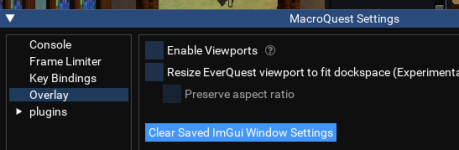
alternatively, you can also go into MQ Settings -> Overlay -> Clear Saved ImGui Window Settings


Mattheux
Member
The MQ2Ranger window is locked off screen. When trying to find where it was, I first typed /reload and did not see it. Then, I typed /rng show and I did not see any changes. Then, I typed /rng hide and I saw the bottom right of a window disappear in my upper left corner. I typed /rng show to bring it back up. From what I can tell in the UI Video of Sic's, that just fixed it essentially off screen. I can drag the corner for resizing it, but that does not show the grabbable portion of the window. It does not matter if the EQ client is in full or windowed screen.
In doing searches to try to find a way to clear the fixed location, I cannot find anything except for the MQ2Chat window. Any suggestions?
In doing searches to try to find a way to clear the fixed location, I cannot find anything except for the MQ2Chat window. Any suggestions?

EQ button, MQ button, settings, overlay "disable viewports" (uncheck the box) and then under that, reset ImGui layout. It should reset them all back to the window that they are called from.
Gilltee007
Member
So, I was messing with my UI and was moving some of the widows and stuff around. I selected the CWTN window and noticed that a bunch of blue shaded boxes popped up along the sides and top of the screen...I inadvertently put the CTWN UI inside of one of those boxes on the far right hand side (someplace i did not want it) and now I am unable to unanchor the UI from the side window pane. I can resize the pane horizontally but i simply do not want to have stuff in these panes.
I am pretty new to this stuff, so any assistance would be greatly appreciated.
I also tried a few searches but I honestly did not know what to call those things (window panes??) so my search was either far to vague or no results were found.
I am pretty new to this stuff, so any assistance would be greatly appreciated.
I also tried a few searches but I honestly did not know what to call those things (window panes??) so my search was either far to vague or no results were found.
Gilltee007
Member
Awesome!
Thanks for the info!!!
Mental note made
Thanks for the info!!!
Mental note made
I am running usually 6 chars when boxing. The positions of all eq-window-positions on screen are managed by ISBoxer.
I use a dual-monitor setting, where each monitor as 1 eq-instance using 80% of the screen, and upto 3 instances are below this, so they are just small windows.
I use the feature to swap 2 instances in place on screen, in order to check if all on the "slave" chars is still ok.
Anytime I swap position of 2 eq-instances the window-position of the CWTN-plugins jups to a different position, seemingliy anytime to the same position. So my guess is, this position must be saved somwhere.
All mq-created UI-windows remain in place, like "Buttonmaster, Magellan,Chase,LEM, DPS Advanced 1.6 ..." but those of the CWTN-Plugins.
Is there someone else having had same effect and found a solution how to tell the CWTN-plugins to stay in place?
I use a dual-monitor setting, where each monitor as 1 eq-instance using 80% of the screen, and upto 3 instances are below this, so they are just small windows.
I use the feature to swap 2 instances in place on screen, in order to check if all on the "slave" chars is still ok.
Anytime I swap position of 2 eq-instances the window-position of the CWTN-plugins jups to a different position, seemingliy anytime to the same position. So my guess is, this position must be saved somwhere.
All mq-created UI-windows remain in place, like "Buttonmaster, Magellan,Chase,LEM, DPS Advanced 1.6 ..." but those of the CWTN-Plugins.
Is there someone else having had same effect and found a solution how to tell the CWTN-plugins to stay in place?

Any chance it's similar to this discussion? I posted about a similar/same issueI am running usually 6 chars when boxing. The positions of all eq-window-positions on screen are managed by ISBoxer.
I use a dual-monitor setting, where each monitor as 1 eq-instance using 80% of the screen, and upto 3 instances are below this, so they are just small windows.
I use the feature to swap 2 instances in place on screen, in order to check if all on the "slave" chars is still ok.
Anytime I swap position of 2 eq-instances the window-position of the CWTN-plugins jups to a different position, seemingliy anytime to the same position. So my guess is, this position must be saved somwhere.
All mq-created UI-windows remain in place, like "Buttonmaster, Magellan,Chase,LEM, DPS Advanced 1.6 ..." but those of the CWTN-Plugins.
Is there someone else having had same effect and found a solution how to tell the CWTN-plugins to stay in place?

Ohhh, that could be a game changer!Make your virtual eqclient inis( that ISB creates) read only
From my last question I understood, that the positions of the windows are stored within Macroquest_overlay.ini
Is it possible to get an confirmation if the section for the CWTN-Plugin is [Window][###server-CharnameClassPluginWnd]?
My intension is, to set the position of the CWTN Plugins to the postition where I want it to stay.
Tried to investigate what makes CWTN-Plugin-UIs behave different than all the others
If I move any UI, the file Macroquest_overlay.ini is immediately updated.
As an example I moved EasynavGui a little bit, compareing the file with itself saved as bu some seconds befor:v

one can see, that the possition within this file is updates as soon as a window is moved.
I tried again with Buttonmaster:

again seconds after I moved the window, the position is updated within Macroquest_overlay.ini
Changing focus and swapping windows do not change the values of any of the other tools from RG.
But the Pos-Values of [Window][###server-CharClassPluginWnd] do change, in my case in x-direction by about 700 ish, just changing focus to another char and back to this one.

I understood that all UI from tools from RG should behave similar, as they are based on the same core: mq2.
I don't understand why the ui from the CWTN Plugin behave different than any other tool here.
Is there anything I can do or provide to understand whats going on and how to fix it?
I read the FAQ and I watched the video. I found no information about why the CWTN-Plugin behave different than the other tools and if there is something I can do or provide, to change this behavior.
Is it possible to get an confirmation if the section for the CWTN-Plugin is [Window][###server-CharnameClassPluginWnd]?
My intension is, to set the position of the CWTN Plugins to the postition where I want it to stay.
Tried to investigate what makes CWTN-Plugin-UIs behave different than all the others
If I move any UI, the file Macroquest_overlay.ini is immediately updated.
As an example I moved EasynavGui a little bit, compareing the file with itself saved as bu some seconds befor:v
one can see, that the possition within this file is updates as soon as a window is moved.
I tried again with Buttonmaster:
again seconds after I moved the window, the position is updated within Macroquest_overlay.ini
Changing focus and swapping windows do not change the values of any of the other tools from RG.
But the Pos-Values of [Window][###server-CharClassPluginWnd] do change, in my case in x-direction by about 700 ish, just changing focus to another char and back to this one.
I understood that all UI from tools from RG should behave similar, as they are based on the same core: mq2.
I don't understand why the ui from the CWTN Plugin behave different than any other tool here.
Is there anything I can do or provide to understand whats going on and how to fix it?
I read the FAQ and I watched the video. I found no information about why the CWTN-Plugin behave different than the other tools and if there is something I can do or provide, to change this behavior.
please stop making new threads for things that get merged. ( i understand this thread is locked, but i've merged a few posts from you this evening)
using isb makes when you resize, it actually ends up smooching things together because it is resizing your window, this is an isb issue.
using isb makes when you resize, it actually ends up smooching things together because it is resizing your window, this is an isb issue.
How shall I be able to preview, which questions are worth to be discussed, and which are going to be merged without giving a chance that maybe one of the members of this board can help?
Are by default any questions which might suggest that there is a bug in the CWTN-plugins of the kind to not be worth to be discussed?
If one out of 7 tools I use contemporary from this site behaves different than the other 6, I dont understand why this only can be a problem of ISB.
If it is only a problem of ISB, why don't the other tools change their pos-values as soon as they loose focus but only the CWTN-plugins?
If you would tell me, I don't want to be bothered, because the amount of users having this problem is not sufficent to care about, it would be perfectly fine for me.
But I beg you to allow me to ask the other member on this site, if someone has the same issue and found a solution for it.
Surpressing any question immediatly does not feel right to me. May I not ask for help to the other members of this site, even if one of the creators of the tool doesn't want to be bothered?
My last question in correlation with ISB was about the autologin. I was not able to geet it to work together. I was guided to the thread where I could find a description how it is possible to make autologin work with ISB.
How can I know without asking, if someone has found a solution how to make the CWTN-plugins keep their position when loosing focus?
Yesterday, as far as I remember I posted a total of 2 questions and feel already threadened to shut up by the reaction of the moderator.
My first question was merged to a thread where I am not allowed to post another question.
So I saw no other possibillity than to create a new thread for my second question.
Even if it is an ISB-Problem maybe there is someone who has found a solution. Why am I not allowed to ask for help?
Reply befor it gets locked: By diving deeper into the issue I found a very simple solution for the issue.
The CWTN-Plugins do not loose there position in cooperation with IS-Boxer, if you can find a position for it in the upper left quadrant of the viewport.
So if you are used to have it's UI close to the top right corne, like me, you may be willing to swap 2 ui's and give the CWTN UI a position close to the top-left corner ... or atleast within the top left quadrant of the viewport of eq.
To the moderator:
You may be able to check, how long I am using CWTN-plugins.
I was using ISB continuously since and already before.
This behavior to loose position for me is a new behavior since the last eq-patch.
I don't know if its an ISB-thing or came with modifications done to eq because of the implementation of dx11.
But the simple solution to find a position in the upper-left quadrant for the CWTN-plugin could easily be found out already by any of the other users and would have been very helpful to me.
Are by default any questions which might suggest that there is a bug in the CWTN-plugins of the kind to not be worth to be discussed?
If one out of 7 tools I use contemporary from this site behaves different than the other 6, I dont understand why this only can be a problem of ISB.
If it is only a problem of ISB, why don't the other tools change their pos-values as soon as they loose focus but only the CWTN-plugins?
If you would tell me, I don't want to be bothered, because the amount of users having this problem is not sufficent to care about, it would be perfectly fine for me.
But I beg you to allow me to ask the other member on this site, if someone has the same issue and found a solution for it.
Surpressing any question immediatly does not feel right to me. May I not ask for help to the other members of this site, even if one of the creators of the tool doesn't want to be bothered?
My last question in correlation with ISB was about the autologin. I was not able to geet it to work together. I was guided to the thread where I could find a description how it is possible to make autologin work with ISB.
How can I know without asking, if someone has found a solution how to make the CWTN-plugins keep their position when loosing focus?
Yesterday, as far as I remember I posted a total of 2 questions and feel already threadened to shut up by the reaction of the moderator.
My first question was merged to a thread where I am not allowed to post another question.
So I saw no other possibillity than to create a new thread for my second question.
Even if it is an ISB-Problem maybe there is someone who has found a solution. Why am I not allowed to ask for help?
Reply befor it gets locked: By diving deeper into the issue I found a very simple solution for the issue.
The CWTN-Plugins do not loose there position in cooperation with IS-Boxer, if you can find a position for it in the upper left quadrant of the viewport.
So if you are used to have it's UI close to the top right corne, like me, you may be willing to swap 2 ui's and give the CWTN UI a position close to the top-left corner ... or atleast within the top left quadrant of the viewport of eq.
To the moderator:
You may be able to check, how long I am using CWTN-plugins.
I was using ISB continuously since and already before.
This behavior to loose position for me is a new behavior since the last eq-patch.
I don't know if its an ISB-thing or came with modifications done to eq because of the implementation of dx11.
But the simple solution to find a position in the upper-left quadrant for the CWTN-plugin could easily be found out already by any of the other users and would have been very helpful to me.
I do understand the thread was locked, i even put that in the merge. the reason i said that is because i had previously merged multiple things from you that evening and i was getting tired of cleaning up after you - you have had a habi in the past going off the rails at me, and i'm not really interested in that.
here is a snip of where i said

when ISB resizes your windows due to their tiling, it can bork up positioning of imgui windows, i explained this and has been explained previously
you have a valid point about the ui post and not being able to further reply - maybe pm me and ask me instead of dehumanizing me "tO tHe MoDeRaTor".
I'm sorry it felt like you were suppressed, that makes sense. I'm going to unlock the ui thread (and hopefully it doesn't get flooded with low effort / low value posts that have nothing to do with it
here is a snip of where i said
when ISB resizes your windows due to their tiling, it can bork up positioning of imgui windows, i explained this and has been explained previously
well this issue with isboxer resizing windows due to tiling and moving the windows has been present since imgui windows, so i don't know what is changed, but we didn't change anything that should impact that.you said:"This behavior to loose position for me is a new behavior since the last eq-patch."
you know my name - treat me like a person, because i am a person.you said:"To the moderator:"
either way, as mentioned in the replies and the previous discussions that you seem to have skipped, it is an ISB issue due to when the container resizes for tiling.you said:"I don't know if its an ISB-thing or came with modifications done to eq because of the implementation of dx11."
you have a valid point about the ui post and not being able to further reply - maybe pm me and ask me instead of dehumanizing me "tO tHe MoDeRaTor".
I'm sorry it felt like you were suppressed, that makes sense. I'm going to unlock the ui thread (and hopefully it doesn't get flooded with low effort / low value posts that have nothing to do with it
It was not my intension to dehumanzize you sic, but last time I wrote a moderators name in a for me seemingly simiar situation, were I felt to have been handled unfair, I got a ban.
For my 2 questions I posted yesterday you warned me to post further questions/ post where I did not understand, what has been my fault and why my questions where blocked for answwers.
It was just fear to be on the edge of a ban, which made me avoid to write your name on that post.
So sorry if it felt like I attemted to dehuminize you.
For my 2 questions I posted yesterday you warned me to post further questions/ post where I did not understand, what has been my fault and why my questions where blocked for answwers.
It was just fear to be on the edge of a ban, which made me avoid to write your name on that post.
So sorry if it felt like I attemted to dehuminize you.

I know I had to stop using ISBoxer because it was more important to me to have the windows not reset their positions every time I switched. It did that for any IMGui window. ButtonMaster being one of the main ones I really wanted working well and not having to go hunt for it every time, or have it reset positions every time.

fadedreplays
Member
I am getting started again after a bit of a break. Licenses are still active. It was a clean install. Everything is working fine. CWTN plugins are working, with the caveat that "/classhortname show" is not working. I can't get the windows to show up. I've reinstalled the plugins, loaded and unloaded. Nothing seems to have worked. Even reloaded UI. Could be a bug, could be missing something. Any help would be appreciated @Sic @ChatWithThisName
Last edited:

fadedreplays
Member
Correct.Just to clarify, when you say "/classhortname show" you are typing "/shd show" or "/enc show" right?
fadedreplays
Member
For whatever reason it is working again. Last thing I tried was a clean reinstall of the plugins. Didn't work. Then I disabled new UI, and it seems to have worked. Doesn't really make sense to me but I guess I'll roll with it. I'm sure it was just a coincidence because I don't see why they wouldn't work with the new UI.Ok, is it possible that the windows were minimized and tucked somewhere weird on your display?
you can also try "/shd Toggleui" with whatever class shortname is applicable
sounds like you had a conflicting overlay, which made imgui windows not able to work.For whatever reason it is working again. Last thing I tried was a clean reinstall of the plugins. Didn't work. Then I disabled new UI, and it seems to have worked. Doesn't really make sense to me but I guess I'll roll with it. I'm sure it was just a coincidence because I don't see why they wouldn't work with the new UI.
please make sure to look/read in the places where this type of information is already discussed - there is a thread for the cwtn ui stickied.
fadedreplays
Member
I looked through and searched and couldn't find anyone that had this similar issue.sounds like you had a conflicting overlay, which made imgui windows not able to work.
please make sure to look/read in the places where this type of information is already discussed - there is a thread for the cwtn ui stickied.
Is there a definitive way to fix this when it happens? Of all the troubleshooting I did I don't know which fixed it. I also don't know what would conflict with it because I have a very basic setup. VeryVanilla with the default plugins plus CWTN plugins, nothing extra. I did just get an Ultrawide monitor and am using custom Viewports as a result, could that be a factor?
if you have a conflicting overlay, making imgui not work, it means anything using imgui won't work.I looked through and searched and couldn't find anyone that had this similar issue.
Is there a definitive way to fix this when it happens? Of all the troubleshooting I did I don't know which fixed it. I also don't know what would conflict with it because I have a very basic setup. VeryVanilla with the default plugins plus CWTN plugins, nothing extra. I did just get an Ultrawide monitor and am using custom Viewports as a result, could that be a factor?
you'll have to determine what that is and correct it (i've posted about this a lot in all the various things that use imgui overlays - portalsetter, mq2grind, cwtn plugins, etc)
fadedreplays
Member
I see... I don't use "overlays" outside of RivaTunerSS for FPS and temps. That must be it.if you have a conflicting overlay, making imgui not work, it means anything using imgui won't work.
you'll have to determine what that is and correct it (i've posted about this a lot in all the various things that use imgui overlays - portalsetter, mq2grind, cwtn plugins, etc)
I see... I don't use "overlays" outside of RivaTunerSS for FPS and temps. That must be it.

Question - - Auto login and portal vendor ui not working
Hi guys, a couple weeks ago I noticed the ui for the portal guy in my guild hall wasn’t working anymore (doesn’t appear when I open the buy window), it wasn’t a big deal so I just did the buying and giving manually. Last week my auto login also stopped working. I can see the profiles I have...
 www.redguides.com
Plugin - - MQ2PortalSetter
It's the neighborhood GH, with the portal guy purchased through the neighborhood vendor. ok, so this sounds like the issue, we'll getcha fixed up
www.redguides.com
I wouldnt have viewports enable, Brainiac posted about possible instability when using that function (not a cwtn thing specifically, imgui thing).I looked through and searched and couldn't find anyone that had this similar issue.
Is there a definitive way to fix this when it happens? Of all the troubleshooting I did I don't know which fixed it. I also don't know what would conflict with it because I have a very basic setup. VeryVanilla with the default plugins plus CWTN plugins, nothing extra. I did just get an Ultrawide monitor and am using custom Viewports as a result, could that be a factor?
That being said, USED to run with viewports on, until i started to "lose" various interface cause they would pop up outside the game environment.
TL;DR make sure the interfaces arnt up, just in a oddball location due to viewports.
fadedreplays
Member
Im not using the Viewports enable function in MQ. I have /viewport set custom so my screen isn't stretched.I wouldnt have viewports enable, Brainiac posted about possible instability when using that function (not a cwtn thing specifically, imgui thing).
That being said, USED to run with viewports on, until i started to "lose" various interface cause they would pop up outside the game environment.
TL;DR make sure the interfaces arnt up, just in a oddball location due to viewports.
OK, so a little context. I'm a returning player from 3.5 years ago. At that time I was running 2 different 6-man crews very successfully. I took a break and picked up WoW classic for a bit. But now I'm back! I renewed my sub to RedGuides and repurchased licenses to all the CWTN plugins I want to use on my new, main crew.
I have now rewatched Sic's UI guide video about 6 times:
I cannot get the plugin UIs for any of my 6 toons to load. I will say that I simply patched over my original install of EQ and the plugins. I now have 2 different MQ2 dirs on my C drive:
C:\user\<name>\AppData\Local\VeryVanilla\Live
and
C:\user\<name>\AppData\Local\VeryVanilla\MacroQuest
I have verified the timestamps and the first dir is the OLD stuff and the second one is all new timestamps as of yesterday.
The odd thing is that when I unload the plugin and then reload it, I don't get all the usual output! (see the screenshots below)
Any and all help would be appreciate. It DOES seem like the plugins are loaded despite no UI. For example, my cleric and shaman ARE casting buffs automatically...
Thank to anyone and everyone in advance!
Kakgumu
I have now rewatched Sic's UI guide video about 6 times:
I cannot get the plugin UIs for any of my 6 toons to load. I will say that I simply patched over my original install of EQ and the plugins. I now have 2 different MQ2 dirs on my C drive:
C:\user\<name>\AppData\Local\VeryVanilla\Live
and
C:\user\<name>\AppData\Local\VeryVanilla\MacroQuest
I have verified the timestamps and the first dir is the OLD stuff and the second one is all new timestamps as of yesterday.
The odd thing is that when I unload the plugin and then reload it, I don't get all the usual output! (see the screenshots below)
Any and all help would be appreciate. It DOES seem like the plugins are loaded despite no UI. For example, my cleric and shaman ARE casting buffs automatically...
Thank to anyone and everyone in advance!
Kakgumu
Users who are viewing this thread
Total: 1 (members: 0, guests: 1)
Share: