• Hail, we're RedGuides. We want you to play six (yes, 6!) EverQuest characters at once. We have scripts and a friendly community to help, please join our playstyle and say hello! 👋
  • We've added LLM sections to our Terms & Rules and Resource Rules, for everyone's sanity & in-game safety.
    Read more
    a. Do not replace your voice with an LLM. This goes for your posts and your scripts. Drafting and editing with a tool is fine, but don't take you out of what you share.
    b. Do not replace your EQ character's voice with an LLM. We don't want scripts that speak over /ooc, /shout or other public channels. This has been an unwritten rule that's kept casino scripts off the site for decades, but we're now compelled to make it clear: keep automated communication private.

    Why Does RG Review Scripts?
    Nearly every LLM-written Lua script we see is making your character do impossible things, and rarely in a way that's beneficial to you. We've seen heavy server hammering, /target over impossible distances when /nav spawn would passively accomplish the same thing, a spawn search that fires 20+ times per second, and other pointless actions that are likely annoying GMs.

    You are welcome to use LLMs as a tool to structure, draft, and edit your work, but please read critically before hitting /lua run

Question - CWTN and Macro Integration

fleqfan

oblivious
Hi guys,

Using the plugins and absolutely loving them!

I have a macro setup using them and it is working great. I had a question that might improve the efficiency of it.

Right now I invoke the macro in have my group run to certain waypoints, setup camp, pull for a certain amount of time then move to another camp. I am very careful where I am doing this by the way.

Anyhow, right now in my macro it has this:


/noparse /bcga //docommand /${Me.Class.ShortName} mode 0
/delay 4s
/bcga //nav wp camp12
/delay 20s
/shd resetcamp
/delay 4s
/shd PullRadius 1000
/delay 4s
/shd mode 5
/delay 4s
/noparse /bcg //docommand /${Me.Class.ShortName} mode 1
/delay 1800s

What I would prefer to do is make it delay moving while there are valid targets within the pull radius instead of using a fixed delay. In other words, replace the /delay with a flow control command keeping the macro from advancing to the next step while valid targets are in the pull radius. (i.e. once the SK gets this message "Character is resting while waiting for valid targets or aggro" then have it move on to the next step in my macro.)

Is there any way to have this variable/event called from the plugin in the macro or a better way to do this?

btw in the snippet you posted you're turning eveyrone to mode 0, then trying to issue a shd resetcamp - but you're in mode 0 so there's no camp to reset when you do that. going mode 0 removes your camp, so upon setting mode 5 you are creating the camp where you are standing.

you'd need/want to use a ${SpawnCount[npc radius 1000]} or some such. (obviously this isn't the check that we use and woud return that you have spawncount if there are mobs in that radius even if the cwtn are not pulling them for any of the reasons they wouldn't pull a mob)

We don't currently have a TLO when there are no mobs
 
Last edited:
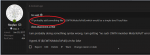
I am probably doing something syntax wrong, I am getting "no such CWTN member MobsToPull" error

I typed /if (${CWTN.MobsToPull}) /echo false
1612302401856.png

Correct - do you remember when before i said
"We don't currently have a TLO when there are no mobs"
and then later said
"I'll probably add something like..."
 
Question - CWTN and Macro Integration

Users who are viewing this thread

Back
Top
Cart