• Hail, we're RedGuides. We want you to play six (yes, 6!) EverQuest characters at once. We have scripts and a friendly community to help, please join our playstyle and say hello! 👋
  • We've added LLM sections to our Terms & Rules and Resource Rules, for everyone's sanity & in-game safety.
    Read more
    a. Do not replace your voice with an LLM. This goes for your posts and your scripts. Drafting and editing with a tool is fine, but don't take you out of what you share.
    b. Do not replace your EQ character's voice with an LLM. We don't want scripts that speak over /ooc, /shout or other public channels. This has been an unwritten rule that's kept casino scripts off the site for decades, but we're now compelled to make it clear: keep automated communication private.

    Why Does RG Review Scripts?
    Nearly every LLM-written Lua script we see is making your character do impossible things, and rarely in a way that's beneficial to you. We've seen heavy server hammering, /target over impossible distances when /nav spawn would passively accomplish the same thing, a spawn search that fires 20+ times per second, and other pointless actions that are likely annoying GMs.

    You are welcome to use LLMs as a tool to structure, draft, and edit your work, but please read critically before hitting /lua run

Problem - Crashing

Killertoxin

Well-known member
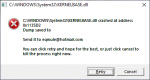
Sometimes when I zone i get a crash

1577337501555.png

anyone know the cause of this and how best to resolve ? everything is up to date and only occurs while mq2 or KA is running.
 
I get that from a memory leak in eq or mq2 havent figured out what plugin though. Basically after 2-3 days all my clients are using over 2.2 gbs of ram each which is 3 times as much as they should be using.
 
Hmm, that's interesting. I'm currently at nearly 3 days up time without any excess memory usage. All in the 200mb-400mb range.

1577340634466.png

These are my currently loaded plugins.
 
Well the .dmp files contains what caused the crash if it was part of mq2. Eqmule would need to open the dmp file in a debugger to potentially see what was on the stack at the time the crash occured, and potentially find a fix for it if one can be found from it. There is no one thing that will cause a specific module to cause a crash. So without the dmp file being sent there is no way to know.
 
Hmm, that's interesting. I'm currently at nearly 3 days up time without any excess memory usage. All in the 200mb-400mb range.

View attachment 19044

These are my currently loaded plugins.

You're probably using superfetch so windows 10 is compressing the memory. Check your memory in task manager for in use (compressed) I could go weeks if i only used 1 group on the PC. It starts to crash when the system runs out of memory all 128 gbs of it. It probably has something to do with zoning in and out of heroics and non instance zones so much.
 
Ahh yeah, zoning a lot causes spikes of memory. This is a common occurance with EQ. I'm unsure if it's got anything to do with mq2 though. I experienced this running a private macro that does a ton of zoning.
 
I sent the log file to EQmule just for clarification. I will have to start only running it when im in the zone I want to work in, if I have to zone I guess Ill just have to unload it.
 
I get that from a memory leak in eq or mq2 havent figured out what plugin though. Basically after 2-3 days all my clients are using over 2.2 gbs of ram each which is 3 times as much as they should be using.

Are you running MQ2DPSADV? I had issues where my toons would crash / be choppy as shit... I tracked it down to that plugin because it happened anytime I entered combat / had something on xtarget
Since disabling it crashing has been reduced, and some toons are now going DAYS on end with no lag/choppy instances.

nope
 
Problem - Crashing

Users who are viewing this thread

Back
Top
Cart