
Install the app
How to install the app on iOS
Follow along with the video below to see how to install our site as a web app on your home screen.
Note: This feature may not be available in some browsers.
-
 You've discovered RedGuides, an EverQuest multi-boxing and scripting community 🧙♀️⚙️. We want you to play several EQ characters at once, come join us and say hello! 👋
You are using an out of date browser. It may not display this or other websites correctly.
You should upgrade or use an alternative browser.
You should upgrade or use an alternative browser.
Problem - crashing on login
- Thread starter mikemike
- Start date

Can you describe the context or circumstances of the "crashing" a bit better?
Are you trying to log into a Live Server? Or.... a TLP server?
When you are "crashing", what kind of crashing are you talking about? Are you getting some type of an error stating that MQ has crashed? Or is this a crash to desktop? Or a bluescreen? Or something else?
Are you trying to log into a Live Server? Or.... a TLP server?
When you are "crashing", what kind of crashing are you talking about? Are you getting some type of an error stating that MQ has crashed? Or is this a crash to desktop? Or a bluescreen? Or something else?
Last edited:

your kernelbase crash shows mq2nav related, but, at least to my eyes, it doesn't really say why.when i get to the login screen, assuming i am running mq2, i get a message that says Raise exception crashed at address 0x12A850
then it says send dump to eqmule.
something about KERNELBASE.dll
I would suggest double-checking that you have the june 2010 directX 9.0c redist (the windows 10 version of dx9 is poo)
Directx 9.0c June 2010 Redist (Windows 10 comes with a stripped-down version) https://www.microsoft.com/en-us/download/details.aspx?id=8109
I would have the same type of problem when loging in multi accounts. Found some information that fixed and stoped the problem all most completely, I say all most cause it does sill happen but its rare now.
1. Goto your everquest dir and find your eqclient.ini file and open it in an editor.
2. find any listing of "CPUAffinityx=x" X being a number from 0-8 and change the "=0 =2 =3" to a "=-1" like "CPUAffinity0=-1" "this will tell the game to use all cores of your processor.
I run 6 accounts and have a intel i5 6600k 4cores, but when i would load up the 6 accounts it was only using 2 cores and split the accounts 3 on one core and 3 on the other with both running at 100% the other 2 cores not being used at all for the game.
After the change each game that I loaded was balanced between all cores and the cores were running 70-90% the crashing stoped.
1. Goto your everquest dir and find your eqclient.ini file and open it in an editor.
2. find any listing of "CPUAffinityx=x" X being a number from 0-8 and change the "=0 =2 =3" to a "=-1" like "CPUAffinity0=-1" "this will tell the game to use all cores of your processor.
I run 6 accounts and have a intel i5 6600k 4cores, but when i would load up the 6 accounts it was only using 2 cores and split the accounts 3 on one core and 3 on the other with both running at 100% the other 2 cores not being used at all for the game.
After the change each game that I loaded was balanced between all cores and the cores were running 70-90% the crashing stoped.
it looks like its kicking me after the daybreak launcher i think its right when the eq.exe is activated it happens. odd thing. if i dont click the tab it doesnt boot me every time. but most times it does. i havent been able to play for a few days
this dmp is the same crash as the one i looked at yesterday.maybe this will help
it is still crashing with mq2nav.
did you do the directx9 thing that i posted? your response appears to be that you were responding to bobbccatt and not to me
I would suggest double-checking that you have the june 2010 directX 9.0c redist (the windows 10 version of dx9 is poo)
Directx 9.0c June 2010 Redist (Windows 10 comes with a stripped-down version) https://www.microsoft.com/en-us/download/details.aspx?id=8109
I would also check basic computer maint things like ensuring your windows is up to date, and your drivers are up to date (in particular your video drivers).
this is your call stack:
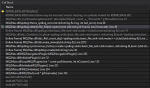
which appears to be ecrashing when mq2nav tries to create the default logger - the "MQ2Nav.log"
do you have something in a way that would make that not possible?
antivirus locking files?
mq2nav.log set to read only?
etc
Users who are viewing this thread
Total: 1 (members: 0, guests: 1)
Share: