• Hail, we're RedGuides. We want you to play six (yes, 6!) EverQuest characters at once. We have scripts and a friendly community to help, please join our playstyle and say hello! 👋
  • We've added LLM sections to our Terms & Rules and Resource Rules, for everyone's sanity & in-game safety.
    Read more
    a. Do not replace your voice with an LLM. This goes for your posts and your scripts. Drafting and editing with a tool is fine, but don't take you out of what you share.
    b. Do not replace your EQ character's voice with an LLM. We don't want scripts that speak over /ooc, /shout or other public channels. This has been an unwritten rule that's kept casino scripts off the site for decades, but we're now compelled to make it clear: keep automated communication private.

    Why Does RG Review Scripts?
    Nearly every LLM-written Lua script we see is making your character do impossible things, and rarely in a way that's beneficial to you. We've seen heavy server hammering, /target over impossible distances when /nav spawn would passively accomplish the same thing, a spawn search that fires 20+ times per second, and other pointless actions that are likely annoying GMs.

    You are welcome to use LLMs as a tool to structure, draft, and edit your work, but please read critically before hitting /lua run

Problem - crashing on login

Can you describe the context or circumstances of the "crashing" a bit better?

Are you trying to log into a Live Server? Or.... a TLP server?

When you are "crashing", what kind of crashing are you talking about? Are you getting some type of an error stating that MQ has crashed? Or is this a crash to desktop? Or a bluescreen? Or something else?
 
Last edited:
when i get to the login screen, assuming i am running mq2, i get a message that says Raise exception crashed at address 0x12A850

then it says send dump to eqmule.

something about KERNELBASE.dll
 
when i get to the login screen, assuming i am running mq2, i get a message that says Raise exception crashed at address 0x12A850

then it says send dump to eqmule.

something about KERNELBASE.dll
your kernelbase crash shows mq2nav related, but, at least to my eyes, it doesn't really say why.

I would suggest double-checking that you have the june 2010 directX 9.0c redist (the windows 10 version of dx9 is poo)

Directx 9.0c June 2010 Redist (Windows 10 comes with a stripped-down version) https://www.microsoft.com/en-us/download/details.aspx?id=8109
 
I would have the same type of problem when loging in multi accounts. Found some information that fixed and stoped the problem all most completely, I say all most cause it does sill happen but its rare now.

1. Goto your everquest dir and find your eqclient.ini file and open it in an editor.
2. find any listing of "CPUAffinityx=x" X being a number from 0-8 and change the "=0 =2 =3" to a "=-1" like "CPUAffinity0=-1" "this will tell the game to use all cores of your processor.

I run 6 accounts and have a intel i5 6600k 4cores, but when i would load up the 6 accounts it was only using 2 cores and split the accounts 3 on one core and 3 on the other with both running at 100% the other 2 cores not being used at all for the game.
After the change each game that I loaded was balanced between all cores and the cores were running 70-90% the crashing stoped.
 
it looks like its kicking me after the daybreak launcher i think its right when the eq.exe is activated it happens. odd thing. if i dont click the tab it doesnt boot me every time. but most times it does. i havent been able to play for a few days
 
maybe this will help
this dmp is the same crash as the one i looked at yesterday.

it is still crashing with mq2nav.

did you do the directx9 thing that i posted? your response appears to be that you were responding to bobbccatt and not to me

I would suggest double-checking that you have the june 2010 directX 9.0c redist (the windows 10 version of dx9 is poo)

Directx 9.0c June 2010 Redist (Windows 10 comes with a stripped-down version) https://www.microsoft.com/en-us/download/details.aspx?id=8109

I would also check basic computer maint things like ensuring your windows is up to date, and your drivers are up to date (in particular your video drivers).


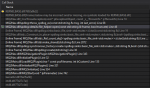
this is your call stack:
1617617705308.png

which appears to be ecrashing when mq2nav tries to create the default logger - the "MQ2Nav.log"

do you have something in a way that would make that not possible?

antivirus locking files?
mq2nav.log set to read only?
etc
 
Problem - crashing on login

Users who are viewing this thread

Back
Top
Cart