
-
 Hail, we're RedGuides. We want you to play six (yes, 6!) EverQuest characters at once. We have scripts and a friendly community to help, please join our playstyle and say hello! 👋
-
 We've added LLM sections to our Terms & Rules and Resource Rules, for everyone's sanity & in-game safety.
Read more
a. Do not replace your voice with an LLM. This goes for your posts and your scripts. Drafting and editing with a tool is fine, but don't take you out of what you share.
b. Do not replace your EQ character's voice with an LLM. We don't want scripts that speak over/ooc,/shoutor other public channels. This has been an unwritten rule that's kept casino scripts off the site for decades, but we're now compelled to make it clear: keep automated communication private.
Why Does RG Review Scripts?
Nearly every LLM-written Lua script we see is making your character do impossible things, and rarely in a way that's beneficial to you. We've seen heavy server hammering,/targetover impossible distances when/nav spawnwould passively accomplish the same thing, a spawn search that fires 20+ times per second, and other pointless actions that are likely annoying GMs.
You are welcome to use LLMs as a tool to structure, draft, and edit your work, but please read critically before hitting/lua run
You are using an out of date browser. It may not display this or other websites correctly.
You should upgrade or use an alternative browser.
Problem - Crashing Error
- Thread starter Myysterio
- Start date
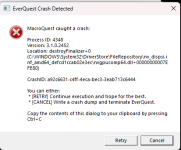

Seems to happen when I try and load up characters after the first group. Just started today.
View attachment 60809

no one wants to try and type out the crash ID. copy and pasting it is a courtesy
---------------------------View attachment 60810
no one wants to try and type out the crash ID. copy and pasting it is a courtesy
EverQuest Crash Detected
---------------------------
MacroQuest caught a crash:
Process ID: 21424
Version: 3.1.0.2452
Location: destroyFinalizer+0 (C:\WINDOWS\System32\DriverStore\FileRepository\nv_dispsi.inf_amd64_defcd1ccab02e3ec\nvgpucomp64.dll+00000000007EFE80)
CrashID: 7cc54d25-4883-4523-8fbe-4c02fc1ed5c0
You can either:
* [RETRY] Continue execution and hope for the best.
* [CANCEL] Write a crash dump and terminate EverQuest.
Copy the contents of this dialog to your clipboard by pressing Ctrl+C
---------------------------
Retry Cancel
---------------------------
Ive had this driver installed for a little over week now and its just now happening. Crashing if i have MQ unloaded or not, but I dont get an error when I load without MQ.I can almost say that's a Nvidia driver issue.
Edit: I can also load about 6 toons before it cuts out and i cannot load anything anymore.

looks like when you updated your driver, it wasnt able to clean up the old/incomplete packages, and is accidently pulling one (maybe due to ram/cpu (gpu's) loading?. one of the smart people can maybe give you a real answer off that CrashiD..

Lord Sivion
Ultimate seasoned veteran member
Remove your graphics driver from the device manager ensuring you select the option to delete all of the old files. Then, reboot. Then, install latest driver from scratch. Done.
Removed driver as you said, rebooted the computer, did a full clean reinstall, restarted again, same problem.Remove your graphics driver from the device manager ensuring you select the option to delete all of the old files. Then, reboot. Then, install latest driver from scratch. Done.
I am able to load anywhere from 4 to 7 characters before i start getting the error. Its never the same number or same characters.
Also, ive had these drivers installed for more than a week. I was able to even log in this morning fine at first. Only thing I did was swap keyboards on my computer.
I uninstalled the Razer Synapse software my keyboard installed on my computer when i swapped it out and now I can load up all my toons with only minor fanfare. 9 loaded first time, 3 error out but all loaded on the 2nd attempt. Its better, but def not fixed yet.
---------------------------
EverQuest Crash Detected
---------------------------
MacroQuest caught a crash:
Process ID: 4320
Version: 3.1.0.2452
Location: D:\everquest\eqgame.exe+00000000006D3B91
CrashID: ee7ccebd-367c-4468-897c-ca8c71e96028
You can either:
* [RETRY] Continue execution and hope for the best.
* [CANCEL] Write a crash dump and terminate EverQuest.
Copy the contents of this dialog to your clipboard by pressing Ctrl+C
---------------------------
Retry Cancel
---------------------------
---------------------------
EverQuest Crash Detected
---------------------------
MacroQuest caught a crash:
Process ID: 9432
Version: 3.1.0.2452
Location: destroyFinalizer+0 (C:\WINDOWS\System32\DriverStore\FileRepository\nv_dispsi.inf_amd64_defcd1ccab02e3ec\nvgpucomp64.dll+00000000007EFE80)
CrashID: 727e1147-a943-4981-acc3-7060d907f54b
You can either:
* [RETRY] Continue execution and hope for the best.
* [CANCEL] Write a crash dump and terminate EverQuest.
Copy the contents of this dialog to your clipboard by pressing Ctrl+C
---------------------------
Retry Cancel
---------------------------
---------------------------
EverQuest Crash Detected
---------------------------
MacroQuest caught a crash:
Process ID: 12544
Version: 3.1.0.2452
Location: destroyFinalizer+0 (C:\WINDOWS\System32\DriverStore\FileRepository\nv_dispsi.inf_amd64_defcd1ccab02e3ec\nvgpucomp64.dll+00000000007EFE80)
CrashID: f3beaa42-91d6-42ca-9093-4cf4ce322252
You can either:
* [RETRY] Continue execution and hope for the best.
* [CANCEL] Write a crash dump and terminate EverQuest.
Copy the contents of this dialog to your clipboard by pressing Ctrl+C
---------------------------
Retry Cancel
---------------------------
---------------------------
EverQuest Crash Detected
---------------------------
MacroQuest caught a crash:
Process ID: 6108
Version: 3.1.0.2452
Location: destroyFinalizer+0 (C:\WINDOWS\System32\DriverStore\FileRepository\nv_dispsi.inf_amd64_defcd1ccab02e3ec\nvgpucomp64.dll+00000000007EFE80)
CrashID: c4710913-5fca-496c-aeb5-ca0bfd8fb106
You can either:
* [RETRY] Continue execution and hope for the best.
* [CANCEL] Write a crash dump and terminate EverQuest.
Copy the contents of this dialog to your clipboard by pressing Ctrl+C
---------------------------
Retry Cancel
---------------------------
I've also used this in the past (older version) to do the total graphics drive cleanup.

 www.guru3d.com
Display Driver Uninstaller (DDU) download version 18.0.7.6
Download Display Driver Uninstaller (DDU) - Remove AMD/NVIDIA/INTEL Graphics Drivers Cleanly - DDU is a driver removal utility that helps you completely uninstall AMD/NVIDIA graphics card drivers and packages from your system, leaving no leftovers behind, including registry keys, folders, files...
www.guru3d.com
Users who are viewing this thread
Total: 1 (members: 0, guests: 1)
Share: