• Hail, we're RedGuides. We want you to play six (yes, 6!) EverQuest characters at once. We have scripts and a friendly community to help, please join our playstyle and say hello! 👋
  • We've added LLM sections to our Terms & Rules and Resource Rules, for everyone's sanity & in-game safety.
    Read more
    a. Do not replace your voice with an LLM. This goes for your posts and your scripts. Drafting and editing with a tool is fine, but don't take you out of what you share.
    b. Do not replace your EQ character's voice with an LLM. We don't want scripts that speak over /ooc, /shout or other public channels. This has been an unwritten rule that's kept casino scripts off the site for decades, but we're now compelled to make it clear: keep automated communication private.

    Why Does RG Review Scripts?
    Nearly every LLM-written Lua script we see is making your character do impossible things, and rarely in a way that's beneficial to you. We've seen heavy server hammering, /target over impossible distances when /nav spawn would passively accomplish the same thing, a spawn search that fires 20+ times per second, and other pointless actions that are likely annoying GMs.

    You are welcome to use LLMs as a tool to structure, draft, and edit your work, but please read critically before hitting /lua run

Question - communicating between 2 computers

Ninjapickle

Seasoned veteran member
How do I get toons in the same group but on 2 different computers to follow commands? I can have them logged into the EQBC server with the same IP and see in the MQ window what toons on the other computer are doing, but they won't assist or follow commands across computers. Hopefully I'm explaining this right.
 
Posted by Sic on another thread.

/bct name //command - this sents a box-chat tell to issue a command
/bcg - everyone in group not including yourself
/bcga - everyone in group including yourself
/bca - everyone on eqbc server not including yourself
/bcaa -- everyone on your eqbc server including yourself

examples:
/bct ToonName //sit
/bct ToonName //stand
/bct ToonName //mac macroname
/bct ToonName //endmacro


Examples to all on eqbcs not including yourself:
/bca //target id ${Me.ID}
/bca //timed 10 /stick 10
or
/bca //stick id ${Me.ID} 5 uw

example Sending commands to all clients including yourself:
/bcaa //camp desktop
 
I've used bca and bcaa commands, so I'm somewhat familiar with those. However, if I type /bcaa //sit on computer A, the toons on computer B don't do anything, even though all of the toons are grouped and on the same EQBC server. IF I had 3 toons on each computer, only the 3 on the one I issued the command from would follow the command.
 
For EQBC, here is the link to the overview which includes all the commands.


You should find
Code:
/bccmd connect 127.0.0.1 2112
located there. where
127.0.0.1 is the local computers IP address, and 2112 is the port number.

You can do an ipconfig to get the address for the computer running the EQBC Server (should only be running on one computer, not both)


Hit start, then type cmd Should be able to get the best match as follows.

1603517874382.png

Click that. Will open a dos prompt.

then type ipconfig which should give you something like the following, except the empty white boxes will have information in them.
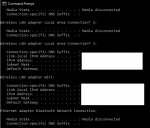
1603517988187.png

You want the Address for the IPv4. So if that happens to be 192.168.0.3 for example.
Then on the computer NOT running the EQBC server, you want to type

/bccmd connect 192.168.0.3 2112

This should attempt to connect over the local network, to the local ip address of the other computer on the network.

There is no need to repeat this command the next time you play once you have successfully connected, it's now the default connection address for that computer. The exception is if that computer's IP address changes. Which happens sometimes. I personally use static (assign it a specific IP address) address for the computer hosting the EQBC server.

The method of setting up a static IP address for a computer on the local network will vary by maker and model of the router you're using.

You can usually go look at the router and get the model number from it to look it up.

IE: google how to setup static local IP on LinkSys WRT 1900AC

 
MQ2EQBC.ini file you can adjust this to your setting.
[Settings]
AutoConnect=1 (THIS WILL AUTO CONNECT EACH TIME YOU LOG IN)
ReconnectRetrySeconds=15

[YourServer.YourTuneName] (YOUR SERVER AND TOON NAME
Server=192.168.0.2 (YOUR IP OF MAIN BOX)
Port=2112

[YourServer.AnotherTuneName]
Server=192.168.0.2
Port=2112

[YourServer.TOONTHREENAME]
Server=192.168.0.2
Port=2112
 
To answer the part about forming a group. Use MQ2Autogroup and MQ2autoaccept.

Check out this post where I asked a similar question on the group part.... Link Here

nutshell - there are several ways to do it. So which ever you are more comfortable with.
I setup a full 54 raid with 12 hotkeys. 1 to disband any partial groups, 1 to invite members to each of my 9 groups, 1 to invite to a raid, and 1 to disband the raid.
At some point I'll for this into a macro if I ever take the time to actually understand the matrix...
 
I invite my group with a hotkey.(with MQ2autoaccept)
Group1
/invite toon1
/invite toon2
/invite toon3
/invite toon4
/invite toon5

on my other box toon I use a hotkey similar in the #1 spot for hotkey
/bct grpleadertoonname //keypress 1
 
Question - communicating between 2 computers

Users who are viewing this thread

Back
Top
Cart