
Install the app
How to install the app on iOS
Follow along with the video below to see how to install our site as a web app on your home screen.
Note: This feature may not be available in some browsers.
-
 You've discovered RedGuides, an EverQuest multi-boxing and scripting community 🧙♀️⚙️. We want you to play several EQ characters at once, come join us and say hello! 👋
You are using an out of date browser. It may not display this or other websites correctly.
You should upgrade or use an alternative browser.
You should upgrade or use an alternative browser.
Problem - Characters not following
- Thread starter Myysterio
- Start date

- Joined
- Dec 17, 2016
- RedCents
- 40¢
Sounds like background FPS is to low maybe?
Sounds like background FPS is to low maybe?
Sic told me to set it to min, then i set it to 30, then i set it to 45... it doesn't help. Unless there's a setting i dont know about thats on/off which is preventing it from working.

I have absolutely never told anyone to set background fps to min. In fact, i tell people to NOT have it set to min. Sounds like some mis communication there.Sic told me to set it to min, then i set it to 30, then i set it to 45... it doesn't help. Unless there's a setting i dont know about thats on/off which is preventing it from working.
I suggest 60+ and strongly advise at least a 30 minimum.
the game's fps cycle is where everquest "does work" so if you have background toons set to min background fps, they skip "doing work" which is especially a problem if you are trying to have them do stuff in the background (automation).
I have absolutely never told anyone to set background fps to min. In fact, i tell people to NOT have it set to min. Sounds like some mis communication there.
I suggest 60+ and strongly advise at least a 30 minimum.
the game's fps cycle is where everquest "does work" so if you have background toons set to min background fps, they skip "doing work" which is especially a problem if you are trying to have them do stuff in the background (automation).
I have it currently set to 30 and its not working.... I've gone all the way to the top of the slider bar and still had the same issue.

- Joined
- Oct 13, 2020
- RedCents
- 4,709¢
FPS is one aspect, the other is cpu load balancing. Plus, windows may be throttling background apps.
Note: Read my post below for specifics.
On MQ2EQ2Wire set all clients to 30 fps
On MQ2CPULoad, set /cpu auto, THEN /cpu high
I bet that may do it, because if your eq clients are sharing one cpu, what you report is the outcome.
Note: Read my post below for specifics.
On MQ2EQ2Wire set all clients to 30 fps
On MQ2CPULoad, set /cpu auto, THEN /cpu high
I bet that may do it, because if your eq clients are sharing one cpu, what you report is the outcome.
Last edited:
FPS is one aspect, the other is cpu load balancing. Plus, windows may be throttling background apps.
On eq2wire set all clients to 30 fps
On eq2cpu, set /cpu auto, THEN /cpu high
I bet that may do it, because if your eq clients are sharing obe cpu, what you report is the outcome.
do i mod it in an INI or through the client?
- Joined
- Oct 13, 2020
- RedCents
- 4,709¢
Just in the chat window where you'd normally put in plugin commands. You only have to do it once. Here are specifics:
Assuming you run from a single install, do this first:
/plugin MQ2CPULoad
/plugin MQ2EQWire
Shut down and restart your eq clients. Then, for each char you box:
/cpu auto
/cpu high
/wire on
/wire BGRenderRate 30
Assuming you run from a single install, do this first:
/plugin MQ2CPULoad
/plugin MQ2EQWire
Shut down and restart your eq clients. Then, for each char you box:
/cpu auto
/cpu high
/wire on
/wire BGRenderRate 30
Just in the chat window where you'd normally put in plugin commands. You only have to do it once. Here are specifics:
Assuming you run from a single install, do this first:
/plugin MQ2CPULoad
/plugin MQ2EQWire
Shut down and restart your eq clients. Then, for each char you box:
/cpu auto
/cpu high
/wire on
/wire BGRenderRate 30
Did that and this is what Im getting
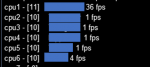
Note: I did not mess with wire cause sic said not to. also, i have not bought a liscense for it, so I dont actually have it.
Last edited:
- Joined
- Oct 13, 2020
- RedCents
- 4,709¢
Why?I would not suggest turning the wire mode on for mq2eqwire.
because the wire frame mode doesn't do anything, and can actually increase demand.Why?

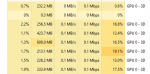
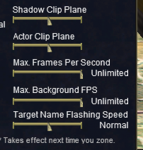

@Myysterio Try this. Go to some safe zone, start up kiss on all the characters now pause kiss on the MA and run him/her to the other side of the zone. Now you have to have MQ2Navigation loaded and a mesh for the zone. Also you need to have MQ2eqbc loaded. From your MA use the this command: /bca //trackmedown
Now what happens?
Now what happens?
I guess it acts a little less weird, but my cleric doesn't come to me regardless.@Myysterio Try this. Go to some safe zone, start up kiss on all the characters now pause kiss on the MA and run him/her to the other side of the zone. Now you have to have MQ2Navigation loaded and a mesh for the zone. Also you need to have MQ2eqbc loaded. From your MA use the this command: /bca //trackmedown
Now what happens?
IF i have no macros on they wont come to me at all with /bca //trackmedownI would unload all macros and just load the defaults and MQ2Navigation and MQ2eqbc and do the same test above and see if it makes a difference. it sounds like you have a plugin or something causing an issue.

yeah, they are auto set when i log in.Do you have your tank toon set to MA and main tank? I have trouble with my toons not coming to me if I don't have that set. Don't know why, but just throwing that out there for you.
Im pretty sure its not a plugin issue as its very clearly throttling my inactive clients, but I will bite. How do i tell which plugins i have on? I cant remember what the plugin manager app is called.What Plugins do you have Loaded?
- Joined
- Dec 17, 2016
- RedCents
- 40¢
Note: I did not mess with wire cause sic said not to. also, i have not bought a liscense for it, so I dont actually have it.
Are you apposed to buying the EQWire plugin?? It’s solved all my issues I’ve had like you are describing.
if I’m mistaken and you have a license my bad.
Are you apposed to buying the EQWire plugin?? It’s solved all my issues I’ve had like you are describing.
if I’m mistaken and you have a license my bad.
Note: I did not mess with wire cause sic said not to. also, i have not bought a liscense for it, so I dont actually have it.
Are you apposed to buying the EQWire plugin?? It’s solved all my issues I’ve had like you are describing.
if I’m mistaken and you have a license my bad.
Im not opposed, i jsut dont want to buy it unless it actually solved my problems. I havent seen any evidence other than a recommendation.
@Myysterio There are only 2 things that I have ever seen that affect frame rate drops when the client is in background. One is the actual client setting for background frame rate and the other is a plugin. I have never experienced a macro being the cause of low framerates when in the background.
Have you updated your video drivers lately? I wonder if you have something from the system level, that is limiting the frame rate on your background processes?
Have you updated your video drivers lately? I wonder if you have something from the system level, that is limiting the frame rate on your background processes?
Mine auto update. but that is very possible.@Myysterio There are only 2 things that I have ever seen that affect frame rate drops when the client is in background. One is the actual client setting for background frame rate and the other is a plugin. I have never experienced a macro being the cause of low framerates when in the background.
Have you updated your video drivers lately? I wonder if you have something from the system level, that is limiting the frame rate on your background processes?
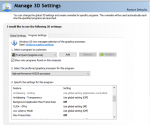
So, I figured out my issue, and kinda created another one. My eqgame.exe was booting up using my computers build in graphics card instead of my gforce video card.... When i switched the default program video card to my gforce my frame rate limit went away. Now im running a little laggy on my main, but not the background. They run just fine.
Now I just need to tweak my settings to run better overall or buy a better laptop... not sure which yet.
Now I just need to tweak my settings to run better overall or buy a better laptop... not sure which yet.
Users who are viewing this thread
Total: 1 (members: 0, guests: 1)
Share: