• Hail, we're RedGuides. We want you to play six (yes, 6!) EverQuest characters at once. We have scripts and a friendly community to help, please join our playstyle and say hello! 👋
  • We've added LLM sections to our Terms & Rules and Resource Rules, for everyone's sanity & in-game safety.
    Read more
    a. Do not replace your voice with an LLM. This goes for your posts and your scripts. Drafting and editing with a tool is fine, but don't take you out of what you share.
    b. Do not replace your EQ character's voice with an LLM. We don't want scripts that speak over /ooc, /shout or other public channels. This has been an unwritten rule that's kept casino scripts off the site for decades, but we're now compelled to make it clear: keep automated communication private.

    Why Does RG Review Scripts?
    Nearly every LLM-written Lua script we see is making your character do impossible things, and rarely in a way that's beneficial to you. We've seen heavy server hammering, /target over impossible distances when /nav spawn would passively accomplish the same thing, a spawn search that fires 20+ times per second, and other pointless actions that are likely annoying GMs.

    You are welcome to use LLMs as a tool to structure, draft, and edit your work, but please read critically before hitting /lua run

Problem - Can't navigate doors in ST... (1 Viewer)

I'm having some trouble with the doors in ST, where I primarily grind my box groups. I've tried everything I can think of, including messing with the mesh generator, but I can't seem to get my toons to navigate through these doors. They either open the door and get stuck trying to run through the still-closed side of the door, or they don't open the door at all.

Anyone able to help me troubleshoot this? It slows down my exping quite a bit, so I am willing to pay for some assistance if it's a bit of a project (no idea what it would entail really).

Thanks in advance!
 
There are a few ways to accomplish this - you could "mark off" the area you don't want to go or you could set a "preferred" area

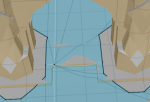
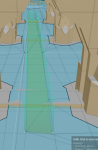
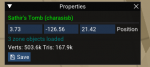
so one thing i do is open the zone in meshgen and find the location i'm looking at


1582394484697.png

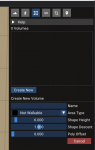
Then I want to add a "Not Walkable area"
by hitting the drop down for Area Type and selecting Not Walkable
I leave my height at 6, and then i select 4 points for it to block off
1582394515395.png

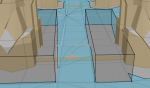
Then i will add an area on each side of the door like this:
1582394598760.png


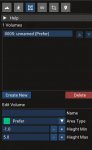
Or you could add a "Preferred"

1582394667945.png

1582394673848.png

Once you added those options you could just click SAVE (you don't need to regenerate the mesh)
1582394755664.png

And then to be sure you're clicking doors that you are next to

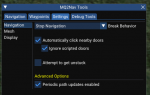
do a /nav ui while in game and make sure Automatically click nearby doors is checked

1582394827689.png
 
There are a few ways to accomplish this - you could "mark off" the area you don't want to go or you could set a "preferred" area

so one thing i do is open the zone in meshgen and find the location i'm looking at


View attachment 19914

Then I want to add a "Not Walkable area"
by hitting the drop down for Area Type and selecting Not Walkable
I leave my height at 6, and then i select 4 points for it to block off
View attachment 19915

Then i will add an area on each side of the door like this:
View attachment 19916


Or you could add a "Preferred"

View attachment 19917

View attachment 19918

Once you added those options you could just click SAVE (you don't need to regenerate the mesh)
View attachment 19919

And then to be sure you're clicking doors that you are next to

do a /nav ui while in game and make sure Automatically click nearby doors is checked

View attachment 19920

Alright, interesting new issue...

My pullertank will now click the doors behind him as he moves back into the end room from the middle room after he tags a couple mobs...the mobs can't follow him after that, so he just goes back to the group and waits until they de-aggro and tries again.

The doors aren't closing automatically, I can manually walk back and forth through them many times before they close automatically. It's only when MQ2Nav enters the picture that they get clicked shut automatically.

Any thoughts on this?
 
My toon closing the door behind it seems to throw the mobs off. If my toon weren't doing that, I don't think I'd be having any issue. Is there any way to change that? Looked into the doors/navmesh for Sathir's 2, not well versed enough to decipher it.
 
I think what the problem here is that as your puller runs back through it is seeing the doors as "trigger" points and retriggering them thereby closing the door. Not sure if there is a way to change that for MQ2NAV, I wasn't seeing a setting when I looked at the ini when we were talking before Yclep.
 
I think what the problem here is that as your puller runs back through it is seeing the doors as "trigger" points and retriggering them thereby closing the door. Not sure if there is a way to change that for MQ2NAV, I wasn't seeing a setting when I looked at the ini when we were talking before Yclep.

I didn't see a setting either; tried to mess with a couple things. Any way around it?
 
So i have the problem in the same room but he opens the door bug hangs a hard right and just goes into the corner trying to go through the door... Id like him to just not i even put a Avoid up in mesh generator and he still trying
 
So i have the problem in the same room but he opens the door bug hangs a hard right and just goes into the corner trying to go through the door... Id like him to just not i even put a Avoid up in mesh generator and he still trying
if you create a "preferred path" it will stay on that path if the path is available - i showed this in an earlier post in this thread - absolutely awesome way to make that happen, and you don't even need to re-generate the mesh - just add the preferred area and save
 
Problem - Can't navigate doors in ST...

Users who are viewing this thread

Back
Top
Cart