
-
 Hail, we're RedGuides. We want you to play six (yes, 6!) EverQuest characters at once. We have scripts and a friendly community to help, please join our playstyle and say hello! 👋
-
 We've added LLM sections to our Terms & Rules and Resource Rules, for everyone's sanity & in-game safety.
Read more
a. Do not replace your voice with an LLM. This goes for your posts and your scripts. Drafting and editing with a tool is fine, but don't take you out of what you share.
b. Do not replace your EQ character's voice with an LLM. We don't want scripts that speak over/ooc,/shoutor other public channels. This has been an unwritten rule that's kept casino scripts off the site for decades, but we're now compelled to make it clear: keep automated communication private.
Why Does RG Review Scripts?
Nearly every LLM-written Lua script we see is making your character do impossible things, and rarely in a way that's beneficial to you. We've seen heavy server hammering,/targetover impossible distances when/nav spawnwould passively accomplish the same thing, a spawn search that fires 20+ times per second, and other pointless actions that are likely annoying GMs.
You are welcome to use LLMs as a tool to structure, draft, and edit your work, but please read critically before hitting/lua run
You are using an out of date browser. It may not display this or other websites correctly.
You should upgrade or use an alternative browser.
You should upgrade or use an alternative browser.
Question - buttons below group box
- Thread starter spudz90
- Start date

howdy @spudz90When I load up MQ2 I get 6 boxes, first 3 empty the next 3 have this... "come to me" "Follow me" "mimic Me"
How can I use these buttons?
I run 6 toons on one computer, and my main tank is run by me.
that plugin is MQ2Targetinfo Located>> HERE << --- has all the information and how to use them etc
depending on your UI - you may have to "drag the group window" to make it large enough that the buttons don't overlap.
But basically you would be using mq2eqbc or mq2dannet and then those buttons would issue commands to your team

whytdrumer
Well-known member
Here's basically what they mean:
1. Come to me: your entire group will come to your location.
2. Follow me: your entire group will follow up until you turn it off.
3. Mimic me: your entire group will do exactly what you do (click, hail, etc.) until you turn it off. This is good when you want everyone to hail an NPC to start a quest or get an item.
Hope that helps.

For me, the 3 empty buttons mirror whatever I put in hotbar #10, buttons 1, 2 and 3. IDK if there is a way to alter that.
This is how i have my 6 buttons setup since I run a mix of cwtn and kiss
(keep in mind to have a ${Berzerker.Command} you must have MQ2Berzerker loaded on everyone)
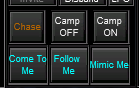
Chase
Camp Off
Camp On
(keep in mind to have a ${Berzerker.Command} you must have MQ2Berzerker loaded on everyone)
Chase
INI:
/bcg //chase on
/noparse /bcga //docommand /${Berzerker.Command} mode 2
Camp Off
INI:
/bcg //returntocamp 0
/noparse /bcga //docommand /${Berzerker.Command} mode 0
/noparse /bcg //if (${Me.Class.ShortName.Find[CLR]}) /dismount
Camp On
INI:
/bcg //camphere on
/war mode 7
/noparse /bcga //docommand /${Berzerker.Command} mode 1you need to be in a group for them to show upmq2target is already implemented, I put a 1 after eqbc in my ini. what else do I need to do for the 3 premade buttons to work?
i have no clue what sic commands are and dont need those.
you need to be connected to eqbc or dannet to communicate with your team
and you need mq2nav with a valid mesh for the come to me to work

spudz90
CASH GRAB
yes I box 6 in a group.
besides putting a 1 next to eqbcOn. so in my ini file I have this>>>>> EQBCOn=1 what else would I need to connect to eqbc?
how do I do a valid mesh?
sorry for being slow about this but I have only put spells in the ini files of my toons.
besides putting a 1 next to eqbcOn. so in my ini file I have this>>>>> EQBCOn=1 what else would I need to connect to eqbc?
how do I do a valid mesh?
sorry for being slow about this but I have only put spells in the ini files of my toons.
You're confusing the kiss ini file, that's a completely separate thing.yes I box 6 in a group.
besides putting a 1 next to eqbcOn. so in my ini file I have this>>>>> EQBCOn=1 what else would I need to connect to eqbc?
how do I do a valid mesh?
sorry for being slow about this but I have only put spells in the ini files of my toons.
EQBC has a stand-alone server application that runs outside of EQ/MQ2. The RG Launcher has a button to start the server that each character will connect to when you're in game. But there is some additional configuration that you will need to do and other resources here on redguides that you'll need to read up on. EQBC and KissAssist macro are completely separate. Putting EQBCOn=1 in your ini only tells KA that you have EQBC running and available for KA to use for messaging, it doesn't start it up for you.
DanNet has some similarities to EQBC and some overlap in functionality and can be used in lieu of EQBC. It has the benefit of not needing a out-of-game server application to run. All you need to do is load the plugin, MQ2Dannet, on each character and it auto-discovers all clients. There have been reports of crashes while using Dannet that go away if the plug-in is unloaded, but it seems as though these cases have been the result of anti-virus and firewall applications being over aggressive and closing off things that Dannet needs to operate. I use only Dannet and have not had problems. EQBC has extra support for boxing across multiple computers, but if you're using only 1 local computer, I'd recommend dannet.

howdy @spudz90
that plugin is MQ2Targetinfo Located>> HERE << --- has all the information and how to use them etc
depending on your UI - you may have to "drag the group window" to make it large enough that the buttons don't overlap.
But basically you would be using mq2eqbc or mq2dannet and then those buttons would issue commands to your team
Can we get a Dannet version!

Edit the mq2targetinfo.ini and change the bcaa to the command for dannet. not sure what that is, i don't use dannet. 
Users who are viewing this thread
Total: 1 (members: 0, guests: 1)
Share: