
Install the app
How to install the app on iOS
Follow along with the video below to see how to install our site as a web app on your home screen.
Note: This feature may not be available in some browsers.
-
 You've discovered RedGuides, an EverQuest multi-boxing and scripting community 🧙♀️⚙️. We want you to play several EQ characters at once, come join us and say hello! 👋
You are using an out of date browser. It may not display this or other websites correctly.
You should upgrade or use an alternative browser.
You should upgrade or use an alternative browser.

Release Button Master (4 Viewers) 2026-10-03
No permission to download
- Thread starter SpecialEd
- Start date

Get rid of the current file in the config directory, move one of the backups out of the folder, name it to the name of that original fileI logged in this morning and all my tabs/Buttons are gone. The backfiles are in the config folder with what looks like the correct info. Any idea how to get my buttons back without having to make them all again?
I don't think I said anything about getting rid of the old folder... Try rereading?Ok I took out the back file with the correct info. Got rid of the old folder and made a new one name exactly the same Buttonmaster-Backups and put the backup file in there and restarted button master. Still the same issue.

BlueBug
Seasoned veteran member
I'm trying to figure something out to make multi-command buttons.
I'd like to set something like this-
/dgae /useitem #1
/....pause a second...
/dgae /useitem #2
I've tried- /pause /delay and /timed for the second line in ButtonMaster and none have worked.
Input would be appreciated.
Thanks guys!
BB~
I'd like to set something like this-
/dgae /useitem #1
/....pause a second...
/dgae /useitem #2
I've tried- /pause /delay and /timed for the second line in ButtonMaster and none have worked.
Input would be appreciated.
Thanks guys!
BB~

You could use a single multilineI'm trying to figure something out to make multi-command buttons.
I'd like to set something like this-
/dgae /useitem #1
/....pause a second...
/dgae /useitem #2
I've tried- /pause /delay and /timed for the second line in ButtonMaster and none have worked.
Input would be appreciated.
Thanks guys!
BB~
/multiline ; /useitem "cool item in quotes"; /timed 10 /useitem "second cool item in quotes"
Would need to add the item cast time to the second pause in your /timed - so if Item 1 has a 3 second cast time, use /timed 40 before your second item starts.I'm trying to figure something out to make multi-command buttons.
I'd like to set something like this-
/dgae /useitem #1
/....pause a second...
/dgae /useitem #2
I've tried- /pause /delay and /timed for the second line in ButtonMaster and none have worked.
Input would be appreciated.
Thanks guys!
BB~
BlueBug
Seasoned veteran member
Sweet! This did it, thanks man.You could use a single multiline
/multiline ; /useitem "cool item in quotes"; /timed 10 /useitem "second cool item in quotes"
Does this work with commands? Like CWTN settings?
BB~
BlueBug
Seasoned veteran member
I'll give this a go man. Appreciate it!Would need to add the item cast time to the second pause in your /timed - so if Item 1 has a 3 second cast time, use /timed 40 before your second item starts.
BB~

Yep, its the way the /timed command and buttonmaster work. All commands pretty much fire at one time, with very little time between. So if you need things delayed because of timing issues, you have to put the /timed in there. For example, here is my Delayed GH button script: I use this when I am hitting throne and want to go to the GH after the toon lands. The first /timed is 5 seconds, the last one is 40 seconds. Basically every 10 in that timed number is 1 second.
Code:
-- lua
if (mq.TLO.Plugin('Easyfind').IsLoaded() ~= true) then mq.cmd('/plugin mq2easyfind') end
mq.cmd('/noparse /timed 50 /if (${Zone.ShortName.Equal["guildlobby"]}) /travelto guildhalllrg')
mq.cmd('/noparse /timed 100 /if (${Zone.ShortName.Equal["guildlobby"]}) /travelto guildhalllrg')
mq.cmd('/noparse /timed 150 /if (${Zone.ShortName.Equal["guildlobby"]}) /travelto guildhalllrg')
mq.cmd('/noparse /timed 200 /if (${Zone.ShortName.Equal["guildlobby"]}) /travelto guildhalllrg')
mq.cmd('/noparse /timed 250 /if (${Zone.ShortName.Equal["guildlobby"]}) /travelto guildhalllrg')
mq.cmd('/noparse /timed 300 /if (${Zone.ShortName.Equal["guildlobby"]}) /travelto guildhalllrg')
mq.cmd('/noparse /timed 350 /if (${Zone.ShortName.Equal["guildlobby"]}) /travelto guildhalllrg')
mq.cmd('/noparse /timed 400 /if (${Zone.ShortName.Equal["guildlobby"]}) /travelto guildhalllrg')Pretty sure it'll work with any valid MQ or EQ commands. Just remember the semi-colon after /multiline is stating that is what you are using as a divider, so must have space before/after. everything after that, semi-colon does not need spaces. Not sure if there is a length limit, have some really long /multilines. The other thing to remember is that the /timed xx commands are cumulative, in 1/10ths of a second - so if you want something to fire 1 second after first, then something else 5 seconds after second, it'd be /timed 10..../timed 60... and so on. The /timed xx is part of the command it is delaying, so no semi-colons after it.Sweet! This did it, thanks man.
Does this work with commands? Like CWTN settings?
BB~
The other thing with Buttonmaster is I tend to use the /multiline a lot less, as you are not limited to the amout of lines. So I can have a 50 line script on one button.
I agree with that - a many line hotbutton is much easier to read/comprehend, than a multiline. I generally use multiline if there is some reason to prefer an actual eq hotkey vs a buttonmaster one.The other thing with Buttonmaster is I tend to use the /multiline a lot less, as you are not limited to the amout of lines. So I can have a 50 line script on one button.
Hi, is it possible to map a buttonmaster button to a keyboard key?
So if I press for example "u" (or any other key I may care to map) it'll run the script on the mapped buttonmaster button.
So if I press for example "u" (or any other key I may care to map) it'll run the script on the mapped buttonmaster button.

/btn will do it for you.buttonmaster UI disappeared(may be because layout changed), think it hide in some place I can not find, how to fix this kind of problem?

I have had it reset itself to a little bitty square just big enough to see the drop arrow at top left and the size pullout angle thingy at bottom right - maybe 1/4" on a side. If that is the case, /btn 1 won't do anything for you, as it'll just toggle that little square on/off. I found it by pretty much closing/moving other windows around until I spotted it.

Derple updated Button Master with a new update entry:
12/22/2025
Read the rest of this update entry...
12/22/2025
Read the rest of this update entry...
Derple updated Button Master with a new update entry:
12/25/2025
Read the rest of this update entry...
12/25/2025
Read the rest of this update entry...
Derple updated Button Master with a new update entry:
12/26/2025
Read the rest of this update entry...
12/26/2025
Commits
(fd1d96a) ~DerpleFixed "Spell Gem" countdown timer type. (Tested on EMU If this breaks live someone come on discord and yell at me.)
Read the rest of this update entry...
Derple updated Button Master with a new update entry:
01/22/2026
Read the rest of this update entry...
01/22/2026
Bug Fixes
(c1b90bf) ~DerpleFixed a long standing issue with the Assign hotkey button keys not being unique.
Broke hotkeys into catgoies based on first letter for people with large button sets (looking at you Burdjizm)
Read the rest of this update entry...
Derple updated Button Master with a new update entry:
01/22/2026
Read the rest of this update entry...
01/22/2026
Read the rest of this update entry...

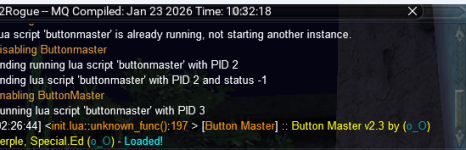
I've got somethig odd happening with my box group. I run buttonmaster on all six, I have one login where the interface does not show up. It tells me the Lua is running when I try to start another. Stop/Start does not resolve the issue. I've moved everything around, I don't see it hidden behind anything else. Works normally on the other 5 logins...any ideas?

Derple updated Button Master with a new update entry:
01/24/2026
Read the rest of this update entry...
01/24/2026
Read the rest of this update entry...
Derple updated Button Master with a new update entry:
01/25/2026
Read the rest of this update entry...
01/25/2026
(8053579) ~Derple- Fix for /btncopy to work
- Added ability to save window positions per character
Read the rest of this update entry...
Have you tried /btn 1? that is the command to show hidden hotbar. /btn 2, /btn 3, etc.
Getting this anytime I do anything with Buttonmaster ona toon on a different computer. All 3 clients on main computer close down buttonmaster with same error.
Using Dannet for broadcast.
Opened BM on a 3rd computer, first two did this - was just loading BM, but it seems that anything that updates will cause BM on connectec computers to crash
Code:
[11:41:11] <unknown_file::unknown_func():0   > [Button Master] :: Got Event from(AnotherToon) event(SaveSettings)
...Downloads\VanillaMQ_Live\lua\buttonmaster\bmSettings.lua:98: attempt to index a nil value
stack traceback:
    ...Downloads\VanillaMQ_Live\lua\buttonmaster\bmSettings.lua: in function 'GetCharacterWindow'
    ...nloads\VanillaMQ_Live\lua\buttonmaster\bmHotbarClass.lua:108: in function 'IsVisible'
    ...nager\Downloads\VanillaMQ_Live\lua\buttonmaster\init.lua:152: in function 'GiveTime'
    ...nager\Downloads\VanillaMQ_Live\lua\buttonmaster\init.lua:210: in main chunk
Ending lua script 'buttonmaster' with PID 15 and status -1dsOpened BM on a 3rd computer, first two did this - was just loading BM, but it seems that anything that updates will cause BM on connectec computers to crash
That Lua file replaces the original ini file.
Looking for how to make a button that contains logic within it.
I thought I had seen a post where when pressed the button would run Lua script, but cannot seem to find it.
The script would essentially run a
Any pointers please?
For clarity, currently the button does this:
Button Label set to evaluate:
The body of it currently does this:
I would like to change the body to a Lua script that is easy to read rather than a single line macroquest command that contains the kitchen sink
I thought I had seen a post where when pressed the button would run Lua script, but cannot seem to find it.
The script would essentially run a
if x then do code block x else y do alternate code block y .Any pointers please?
For clarity, currently the button does this:
Button Label set to evaluate:
return 'Mode: ' .. (tostring(mq.TLO.RGMercs.Config('Mode')()) == '1' and "Tank" or "DPS")The body of it currently does this:
/docommand ${If[${RGMercs.Config[Mode]} == 1,/multiline ; /rgl set mode 2 ; /echo set mode DPS; /rgl disableclicky "Forsaken Cobalt Gauntlets",/multiline ; /rgl set mode 1; /rgl enableclicky "Forsaken Cobalt Gauntlets"; /echo set mode Tank]}I would like to change the body to a Lua script that is easy to read rather than a single line macroquest command that contains the kitchen sink
Ok - found it.Looking for how to make a button that contains logic within it.
I thought I had seen a post where when pressed the button would run lua script, but cannot seem to find it.
The script would essentially run aif x then do code block x else y do alternate code block y.
Any pointers please?
For clarity, currently the button does this:
Button Label set to evaluate:return 'Mode: ' .. (tostring(mq.TLO.RGMercs.Config('Mode')()) == '1' and "Tank" or "DPS")
The body of it currently does this:
/docommand ${If[${RGMercs.Config[Mode]} == 1,/multiline ; /rgl set mode 2 ; /echo set mode DPS; /rgl disableclicky "Forsaken Cobalt Gauntlets",/multiline ; /rgl set mode 1; /rgl enableclicky "Forsaken Cobalt Gauntlets"; /echo set mode Tank]}
I would like to change the body to a lua script that is easy to read rather than a single line macroquest command that contains the kitchen sink
Simply ensuring than the first line in the body of the button is:
-- lua ensures that the interpreter(?) knows to process statements as Lua.I was using it in conjuction with MQ2EQBC and pausing whatever plugins I was using such as the CWTN or kissassist depending on which toon I was running, then adding a time to force whatever spell I wanted to cast then resume.I'm trying to figure something out to make multi-command buttons.
I'd like to set something like this-
/dgae /useitem #1
/....pause a second...
/dgae /useitem #2
I've tried- /pause /delay and /timed for the second line in ButtonMaster and none have worked.
Input would be appreciated.
Thanks guys!
BB~
So say I wanted my cleric to Complete Heal on my tank who was on xtar 5.
/bct Name //clr pause on
/bct Name //stopcast
/bct Name //xtar 5
/bct Name //timed 7 /cast 3
/bct Name //timed 107 /clr pause off
There may be a cleaner way to do it though it's been working great for when I really need something cast. It's great to be able to turn on/off functions of the plugins as well, getting them to swap spellsets then resume. Huge fan of the Buttonmaster!
I think that I should very much be using the silent command version /bcst and am going to switch that up on my buttons.
Derple updated Button Master with a new update entry:
04/16/2026
Read the rest of this update entry...
04/16/2026
(00b8230) ~DerpleSupport for moving tabs around that acutally saves.
Added as drag and drop and also context menu.
Read the rest of this update entry...
Users who are viewing this thread
Total: 5 (members: 0, guests: 5)
Share: