
-
 Hail, we're RedGuides. We want you to play six (yes, 6!) EverQuest characters at once. We have scripts and a friendly community to help, please join our playstyle and say hello! 👋
You are using an out of date browser. It may not display this or other websites correctly.
You should upgrade or use an alternative browser.
You should upgrade or use an alternative browser.

Release Button Master 2026-10-03
- Thread starter SpecialEd
- Start date
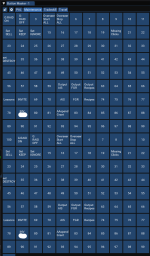
Try dragging whichever tab is the bottom half off the bar at top. Looks like maybe you docked a second window to the first one from the bottom. I wasn't able to replicate that with docking, but have ended up with some weird stuff involving docking (Unintentionally) ImGui windows.
Hello, I'm trying to create my buttons by dragging my old buttons from EQ UI to an unused button master button. So when I drag it and place it on button 11 which is empty, a blue box pops up, it populated the correct name, but in the command section of that button, the commands don't transfer over. What am I doing wrong?
Hey guys, Im running into a new problem. I have many buttons set up with multiple commands on them, they look and work fine. Recently I have tried making some new ones, and it will only give me a single line to work with. Did something change? Am I just missing something obvious? I push enter to go to the next command line and nothing happens. Any help would be appreciated.
It depends a bit on what the commands in the particular button do. I found when doing the same thing that - I think it was disciplines - would not work at all, and had to be done manually. Hotkeys I had that just combined several slash commands worked just fine.Hello, I'm trying to create my buttons by dragging my old buttons from EQ UI to an unused button master button. So when I drag it and place it on button 11 which is empty, a blue box pops up, it populated the correct name, but in the command section of that button, the commands don't transfer over. What am I doing wrong?
Sorry for the late reply… thank youIt depends a bit on what the commands in the particular button do. I found when doing the same thing that - I think it was disciplines - would not work at all, and had to be done manually. Hotkeys I had that just combined several slash commands worked just fine.
Had a crash while trying to edit a set name: ImGui paused, restarted it, BM loaded up fine, tried again, and same thing.
ImGui Failure:
...nloads\VanillaMQ_Live\Lua\buttonmaster\bmHotbarClass.Lua:313: bad argument #1 to 'ipairs' (table expected, got nil)
stack traceback:
[C]: in function 'ipairs'
...nloads\VanillaMQ_Live\Lua\buttonmaster\bmHotbarClass.Lua:313: in function 'RenderTabs'
...nloads\VanillaMQ_Live\Lua\buttonmaster\bmHotbarClass.Lua:201: in function 'RenderHotbar'
...nager\Downloads\VanillaMQ_Live\Lua\buttonmaster\init.Lua:103: in function <...nager\Downloads\VanillaMQ_Live\Lua\buttonmaster\init.Lua:85>
ImGui Critical Failure: Mismatched Begin/BeginChild vs End/EndChild calls: did you forget to call End/EndChild?
Plugin ImGui has been temporarily paused. To resume imgui, run: /mqoverlay resume
Ending Lua script 'buttonmaster' with PID 50 and status -1
ImGui Failure:
...nloads\VanillaMQ_Live\Lua\buttonmaster\bmHotbarClass.Lua:313: bad argument #1 to 'ipairs' (table expected, got nil)
stack traceback:
[C]: in function 'ipairs'
...nloads\VanillaMQ_Live\Lua\buttonmaster\bmHotbarClass.Lua:313: in function 'RenderTabs'
...nloads\VanillaMQ_Live\Lua\buttonmaster\bmHotbarClass.Lua:201: in function 'RenderHotbar'
...nager\Downloads\VanillaMQ_Live\Lua\buttonmaster\init.Lua:103: in function <...nager\Downloads\VanillaMQ_Live\Lua\buttonmaster\init.Lua:85>
ImGui Critical Failure: Mismatched Begin/BeginChild vs End/EndChild calls: did you forget to call End/EndChild?
Plugin ImGui has been temporarily paused. To resume imgui, run: /mqoverlay resume
Ending Lua script 'buttonmaster' with PID 50 and status -1

This means your Sets are some how empty - maybe roll back to your previous config? Somehow it seems like editing the Set name blew out all your sets but I am not sure why.Had a crash while trying to edit a set name: ImGui paused, restarted it, BM loaded up fine, tried again, and same thing.
ImGui Failure:
...nloads\VanillaMQ_Live\lua\buttonmaster\bmHotbarClass.lua:313: bad argument #1 to 'ipairs' (table expected, got nil)
stack traceback:
[C]: in function 'ipairs'
...nloads\VanillaMQ_Live\lua\buttonmaster\bmHotbarClass.lua:313: in function 'RenderTabs'
...nloads\VanillaMQ_Live\lua\buttonmaster\bmHotbarClass.lua:201: in function 'RenderHotbar'
...nager\Downloads\VanillaMQ_Live\lua\buttonmaster\init.lua:103: in function <...nager\Downloads\VanillaMQ_Live\lua\buttonmaster\init.lua:85>
ImGui Critical Failure: Mismatched Begin/BeginChild vs End/EndChild calls: did you forget to call End/EndChild?
Plugin ImGui has been temporarily paused. To resume imgui, run: /mqoverlay resume
Ending lua script 'buttonmaster' with PID 50 and status -1
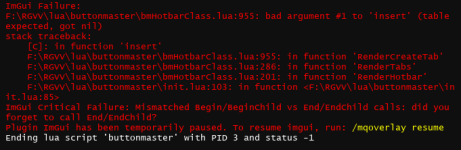
How do I get just buttonmaster? Not looking for my toons to move around automatically. This happens even after I exit RGMercs

I don't understand the question... button master does not move your characters around.How do I get just buttonmaster? Not looking for my toons to move around automatically. This happens even after I exit RGMercs
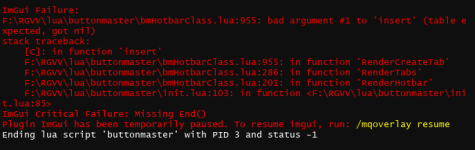

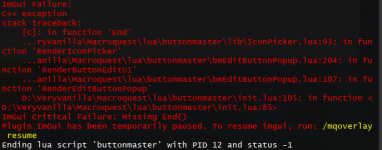
I was unable to reproduce this. Are you able to? I'm still playing around.
I'll submit a PR for this one when after I'm done playing around with the above.I broke it as well =) Right click to edit and existing button --> Left click the box next to"icon" and
View attachment 67934
I have not been able to reproduce it on my enchanter since I re-launched eq, after getting back.I was unable to reproduce this. Are you able to? I'm still playing around.
I was able to reproduce it on my wizard.
The character has BM running, but no sets or anything designated. So it is brand new. I click add set (even though there are already sets from my other characters), name is WIZ and click SAVE and get this error.
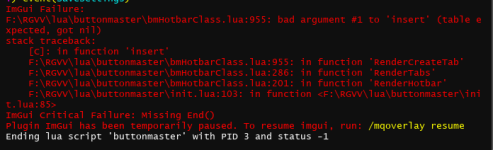
I cleared overlay error. Reloaded BM. Went through the same steps, and it created the tab without an error. Seems there might be something in the initial insert when the character doesn't have any settings maybe?
Got the following error, when right clicking tab, then clicking save. (happened on a necro).
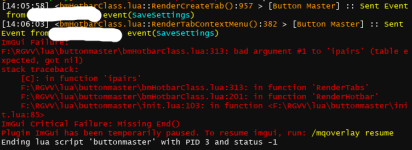
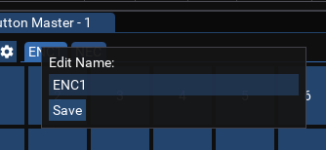


- Commits
- 2
Did the second toon always have buttons?So what would cause you to lose all your settings, logging out from one character into another. First character had buttons, second character looks like a new BM?
View attachment 68013
Today Buttonmaster didn't load as usual... I ran /Lua run buttonmaster and it had me run /Lua run buttonmaster upgrade that worked, but it reset my buttonmaster files to 10-24.
So I found the backup folder and found a backup from 1-21-25. I'm not sure where to put that file, and what to rename it. I tried a few things that didnt work, including copying the file to config, renaming it ButtonMaster.Lua and restarting mq from scratch.
So just wondering the correct way to fix the problem, Thanks in advance!
So I found the backup folder and found a backup from 1-21-25. I'm not sure where to put that file, and what to rename it. I tried a few things that didnt work, including copying the file to config, renaming it ButtonMaster.Lua and restarting mq from scratch.
So just wondering the correct way to fix the problem, Thanks in advance!
You had the correct file and name, did you ensure that buttonmaster was unloaded on all characters before moving/renaming the backup?Today Buttonmaster didn't load as usual... I ran /lua run buttonmaster and it had me run /lua run buttonmaster upgrade that worked, but it reset my buttonmaster files to 10-24.
So I found the backup folder and found a backup from 1-21-25. I'm not sure where to put that file, and what to rename it. I tried a few things that didnt work, including copying the file to config, renaming it ButtonMaster.lua and restarting mq from scratch.
So just wondering the correct way to fix the problem, Thanks in advance!
I will make sure I do that when I get home. Thanks
am wondering the same thing; copied the 'buttonmaster' folder, but did not transfer--that seemed too simple for it to work...any remedy?I'm looking for the file that saves the button set I've made. Where would I find that file so I can share it on my other computer?
thanks
Configuration and settings files for MQ addons are typically found in your MQ config folder.am wondering the same thing; copied the 'buttonmaster' folder, but did not transfer--that seemed too simple for it to work...any remedy?
thanks
Figured this out - I was trying to rename set to the same name as an existing set that was in a different btn window.... silly me.Had a crash while trying to edit a set name: ImGui paused, restarted it, BM loaded up fine, tried again, and same thing.
ImGui Failure:
...nloads\VanillaMQ_Live\lua\buttonmaster\bmHotbarClass.lua:313: bad argument #1 to 'ipairs' (table expected, got nil)
stack traceback:
[C]: in function 'ipairs'
...nloads\VanillaMQ_Live\lua\buttonmaster\bmHotbarClass.lua:313: in function 'RenderTabs'
...nloads\VanillaMQ_Live\lua\buttonmaster\bmHotbarClass.lua:201: in function 'RenderHotbar'
...nager\Downloads\VanillaMQ_Live\lua\buttonmaster\init.lua:103: in function <...nager\Downloads\VanillaMQ_Live\lua\buttonmaster\init.lua:85>
ImGui Critical Failure: Mismatched Begin/BeginChild vs End/EndChild calls: did you forget to call End/EndChild?
Plugin ImGui has been temporarily paused. To resume imgui, run: /mqoverlay resume
Ending lua script 'buttonmaster' with PID 50 and status -1
Hey
This is one of my "Go To" Lua for sure - brilliant resource
However, playing on Emus a lot these days - and finding the list of created buttons is getting LONG
Is there any way to be able to put the keys into subfolders in the lists? If not could I humbly submit it as an idea?
Many thanks for this resource regardless
This is one of my "Go To" Lua for sure - brilliant resource
However, playing on Emus a lot these days - and finding the list of created buttons is getting LONG
Is there any way to be able to put the keys into subfolders in the lists? If not could I humbly submit it as an idea?
Many thanks for this resource regardless


I did not know that! Do we know what it searches on? And does it only search the tab that is in focus? Or all hotkeys? It probably makes more sense if it only searches the current tab.

Can you humor me and try entering the commandIt's been a while since I've loaded buttonmaster, but I'm getting this message and it won't open.
/btn 1 to see if you had previously closed your button bar?A little tired and can't remember if that persists.
If it doesnt, the message you linked means its working, so perhaps it is shrunk down or behind another window.
Derple updated Button Master with a new update entry:
03/15/2025
Read the rest of this update entry...
03/15/2025
 Commits
Read the rest of this update entry...

I'm attempting to send out raid assignments via /shout but
when I use buttons with multiple lines (upwards to 20) of /shout or /ooc not
all of them are showing up on other people's screens.
It shows up just fine for me, but it will be missing many lines for other people.
Is there a limit to how many lines I can use in a single button?
It seems to be around 15 lines that go through without issue then the rest is lost to the aether
I tried adding a /timed in front of each line and that didn't help.
I used
/timed 1 /shout INFO
/timed 2 /shout INFO
then I also tried
/timed 5 /shout INFO
/timed 10 /shout INFO
Is it possibly just a latency issue?
I was using the same method without fail since T1 raids came out for ToB.
Now suddenly it's an issue
when I use buttons with multiple lines (upwards to 20) of /shout or /ooc not
all of them are showing up on other people's screens.
It shows up just fine for me, but it will be missing many lines for other people.
Is there a limit to how many lines I can use in a single button?
It seems to be around 15 lines that go through without issue then the rest is lost to the aether
I tried adding a /timed in front of each line and that didn't help.
I used
/timed 1 /shout INFO
/timed 2 /shout INFO
then I also tried
/timed 5 /shout INFO
/timed 10 /shout INFO
Is it possibly just a latency issue?
I was using the same method without fail since T1 raids came out for ToB.
Now suddenly it's an issue
Derple updated Button Master with a new update entry:
04/06/2025
Read the rest of this update entry...
04/06/2025
Read the rest of this update entry...
Thanks that helped with that part. I am getting this when I try to rename a tabDerple updated Button Master with a new update entry:
04/06/2025
Read the rest of this update entry...
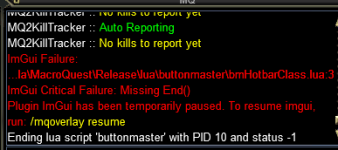

0ptic
Member
Can you humor me and try entering the command/btn 1to see if you had previously closed your button bar?
A little tired and can't remember if that persists.
If it doesnt, the message you linked means its working, so perhaps it is shrunk down or behind another window.
sorry for the late reply, I didn't have lvl 2 access for a while. typing /btn 1 does bring up a window now, but none of the hot buttons I have are there.

Hi all, out of curiosity, do you know if it's possible to re-order the tabs in Button Master? In the example of my screenshot, I want to move the 'New Tank' tab to the far left. Is that kind of thing possible? I did search through the documentation and forums but wasn't able to find anything on this (sorry if I am missing it somewhere!)

Ah, thanks! I did that, but the changes didn't save. Because of some UI weirdness I've experienced, I've set the MacroQuest_Overlay.ini to read-only. Any idea if the tab placement settings saved there? I feel like I've tried clearing the read-only option and trying to rearrange the tabs before, only to have it not save, but I could try it again.
Users who are viewing this thread
Total: 1 (members: 0, guests: 1)
Share: