• You've discovered RedGuides, an EverQuest multi-boxing and scripting community 🧙‍♀️⚙️. We want you to play several EQ characters at once, come join us and say hello! 👋

  • A TLP without truebox has thawed (Very Vanilla ready)
    Frostreaver
Button Master

Release Button Master 05/09/2026

No permission to download
So I want to have some generic buttons that I can share between my tank / puller classes and I found that I was getting errors trying to use /noparse (or commands with (${Me.Class.ShortName}) for example) so I used this as a work-around:

I made these aliases:
/cwtnwar=/noparse /dgga /if (${Me.Class.ShortName.Equal[WAR]})
/cwtnsk=/noparse /dgga /if (${Me.Class.ShortName.Equal[SHD]})
/cwtnpal=/noparse /dgga /if (${Me.Class.ShortName.Equal[PAL]})

Then I made a Goto Camp button I can share between characters:
['Cmd'] = '/cwtnwar /war GotoCamp\n/cwtnsk /shd GotoCamp\n/cwtnpal /pal GotoCamp',

So it works but I am wondering if there is another way of doing this?
This is the wrong way to use DanNet.

/dgga /if ($\{Me.Class.ShortName.Equal[PAL]})

would be the right way. TL;DR:

To tell DanNet not to parse you send it as $\{ instead of ${
 
Doing this would likely require we start breaking out bm configs on a per char basis. I've already been considering this, but I hesitate to make such a change as it has a lot of implications (like buttons not auto updating across toons etc).
Ahh I see. Yeah that makes sense... Is there no way to have all hotbuttons and sets update across all chars, but just save the hotbutton/set locations on a per char basis, or is it all tied together?
 
Ahh I see. Yeah that makes sense... Is there no way to have all hotbuttons and sets update across all chars, but just save the hotbutton/set locations on a per char basis, or is it all tied together?
I think the real solution is a better configuration model. I am considering converting it to SQLite which will solve many of these issues. I am still brewing on the right solution though.
 
This is the wrong way to use DanNet.

/dgga /if ($\{Me.Class.ShortName.Equal[PAL]})

would be the right way. TL;DR:

To tell DanNet not to parse you send it as $\{ instead of ${

I guess I worded my question wrong as I have used that way and the noparse way and they both work.

What I want to do is create a command button that will pick the characters class short name.

So technically I want a Goto Camp button that on the button would be:

/$\{Me.Class.ShortName} GotoCamp

So if I have a WAR, SHD or PAL then they would execute /WAR GotoCamp or /SHD GotoCamp or /PAL GotoCamp

I am guessing it can be done with a Lua script on the button?
 
I guess I worded my question wrong as I have used that way and the noparse way and they both work.

What I want to do is create a command button that will pick the characters class short name.

So technically I want a Goto Camp button that on the button would be:

/$\{Me.Class.ShortName} GotoCamp

So if I have a WAR, SHD or PAL then they would execute /WAR GotoCamp or /SHD GotoCamp or /PAL GotoCamp

I am guessing it can be done with a lua script on the button?
Code:
--lua
local class = mq.TLO.Me.Class.ShortName()

mq.cmdf("/%s GotoCamp", class)
 
I have this button:

Code:
local spellName = "Necrotic Pustules"
local petName = mq.TLO.Me.Pet.CleanName()
mq.cmdf('/multiline ;  /timed 1 /dgae /stand; /timed 2 /dgae /target "%s"; /timed 7 /dgae /cast "%s"; /timed 7 /dgae /g Casting -> %s"', PetName, spellName, spellName)

The idea is that each member of the group target their respective own pet, and cast spellName onto them. When I parse the command mq.TLO.Me.Pet.CleanName() into the Lua Expression Evaluator, the pet is correctly output. However, when I trigger the button, the variable petName comes out as Nil, and therefore any random nearby mob is targeted instead.

Any idea what the problem might be?
 
I have this button:

Code:
local spellName = "Necrotic Pustules"
local petName = mq.TLO.Me.Pet.CleanName()
mq.cmdf('/multiline ;  /timed 1 /dgae /stand; /timed 2 /dgae /target "%s"; /timed 7 /dgae /cast "%s"; /timed 7 /dgae /g Casting -> %s"', PetName, spellName, spellName)

The idea is that each member of the group target their respective own pet, and cast spellName onto them. When I parse the command mq.TLO.Me.Pet.CleanName() into the Lua Expression Evaluator, the pet is correctly output. However, when I trigger the button, the variable petName comes out as Nil, and therefore any random nearby mob is targeted instead.

Any idea what the problem might be?
You’re evaluating the pet name of the sender
 
You’re evaluating the pet name of the sender

Oh damn it, I thought that by sending it through /dgae, every receptor would evaluate their own pet. I stand corrected!

If mq.TLO.Me.Pet.CleanName() is not the right command in this case, what would it be?

Thanks!
 
Weird question: I have a separate Lua script in my Lua folder. Is there a way for a button to call and run that script upon click?
 
Although all my buttons are still there i cannot see the labels unless i go in and edit every buttons text colour. IS there a quick fix here or do i need to reset and start over.
 
Ahh sorry about that. Just edit and save should enable them.
Only buttons with icons actually held the show labels setting.
They should default back to enabled when you click save.
 
No biggie :) It just took a little bit of clicking to reset all of them. I found some old ones I could delete while I was doing it also, so its probably a good idea to go through all of them every once in a while.
 
For some reason, copying and pasting to edit and create new buttons stopped working for me. Is it working for everyone else?
 
For some reason, copying and pasting to edit and create new buttons stopped working for me. Is it working for everyone else?
There was some chat in discord about the ctrl key having issues since the last update. Not sure if that's the issue here but if so, the dev's are aware of it and I'm sure working on it.
 
A couple other things I've run into. If you have a button and delete the contents of a line you end up with an empty line that throws an invalid command error

View attachment 31762

Also, if you do Clear and Save you can end up creating extra button entries.

Code:
[Button_386]
Label=16

[Button_387]
Label=16

[Button_388]
Label=16

[Button_389]
Label=16

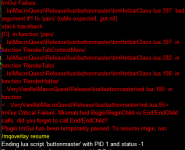
Something that I was doing in the process of editing buttons, clearing them, and saving them would eventually cause the lua to crash like below. The only way I could get the lua to load again was to go into the ini and clear out all of those button entries.

From what I remember this crash was while switching tabs:

View attachment 31764

These two were from right clicking on the buttons.

View attachment 31768

View attachment 31769

This is what I deleted to get it to stop crashing:

Code:
[Button_383]
Cmd1=/loc
Cmd2=

Label=16-Test
[Button_386]
Label=16

[Button_387]
Label=16

[Button_388]
Label=16

[Button_389]
Label=16

[Button_390]
Cmd1=/loc
Label=16

[Button_391]
Label=16

[Button_392]
Label=16

[Button_393]
Label=16

[Button_394]
Cmd1=/loc
Label=Test

[Button_395]
Label=16

[Button_396]
Label=16

[Button_397]
Cmd1=/loc
Cmd2=
Label=Testloc

[Button_399]
Label=16
what folder and file is this in i too need to delete something to get the interface to work again
 
Howdy,
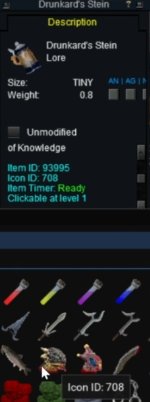
Just wondering if it is normal that the icon ID's in button master aren't agreeing with other sources?

Thanks!
 

Attachments

  • Screenshot_20240523_142002.jpg
    Screenshot_20240523_142002.jpg
    83.3 KB · Views: 0
Howdy,
Just wondering if it is normal that the icon ID's in button master aren't agreeing with other sources?

Thanks!
you keep an iksar's severed head in your Stein? Man, you drink a rough brew. Don't wanna piss you off in a bar.
 
Howdy,
Just wondering if it is normal that the icon ID's in button master aren't agreeing with other sources?

Thanks!
Ill check in a fix for this now. For some reason that I have forgotten Item Icons start at 500 instead of 0 so they are all off by 500.
 
Hi Derple,
any chance to have Copy & Paste function back for BM please? Thanks.
 
Whenever I save a set, and then copy it to a new character, anytime I edit hotkeys on the new toon, it will overwrite the original toons hotkeys as well. Is there a way to not do this, and have it only save the edited hotkeys on the new toon?
 
Whenever I save a set, and then copy it to a new character, anytime I edit hotkeys on the new toon, it will overwrite the original toons hotkeys as well. Is there a way to not do this, and have it only save the edited hotkeys on the new toon?
Can you be more specific on exactly what you are doing?
 
Whenever I save a set, and then copy it to a new character, anytime I edit hotkeys on the new toon, it will overwrite the original toons hotkeys as well. Is there a way to not do this, and have it only save the edited hotkeys on the new toon?
Derple will likely have a better answer, but I wanted to at least give you my thoughts to help. I do this to have 'individual' type needs. Use Tab groups.
JoeTank has General tab, Quest tab, and Joe Tab. Joe is main Tank (driver for me) for main group. Joe tab has specific thing for his group with names in the edits.
BobTank has the same 3 tabs, but his thrd tab is BobTank tab. Bob is main Tank for a second group and his Bob tab has his group guys names in the edits.
MikeTank, etc etc..
General can have things like Group Stein, and all in the group cast their stein, that can go in general. Some commands you may want are very group specific, so JoeTank has a Enc and cleric cast double invis with enc name (or class) in the edit. Bob Tank can have a new button and copy/paste the commands for Double invis, but add in SK and Shaman to do the same. MikeTank might have a Bard, so he wants the same type button, but different command only needed for his group.
 
Can you be more specific on exactly what you are doing?
I would "share set" and then import it on the new toon (same class, so same hotkeys, just different toon names). Whenever I would import the hotkey set on the new character and start changing the toon names inside the hotkeys (like invite all the toons to group, load all their plugins etc), it would then also change the toon names in the original toon that I shared it from.

I also get an imgui error when I try to delete sets.
1716582649275.png
 
I have been having some trouble with lockups and character running but not being able to alt-tab to get to them. I run 12 characters most of the time, evey few hrs. a few of them will lock.

Two days ago I stopped buttonmaster from every toon except my tanks, now the only toons that become non-responsive are the tanks.

Any thoughts to anything I can look at?

Before removing buttonmaster I did fresh install of EQ (didn't help)
Running windows 11. Normally about 80% cpu used and 60% memory GUP 30%
 
I would "share set" and then import it on the new toon (same class, so same hotkeys, just different toon names). Whenever I would import the hotkey set on the new character and start changing the toon names inside the hotkeys (like invite all the toons to group, load all their plugins etc), it would then also change the toon names in the original toon that I shared it from.

I also get an imgui error when I try to delete sets.
View attachment 61888
This is because the hotkeys are shared across toons on the same PC.

You aren't really importing anything just the same buttons. So editing on is changing the original since the are the same.

You would need to duplicate the hotkeys with new names for the new toon if you want them to have different data.

Otherwise you could use the macro TLO calls to fill in the names ${Me.Name} etc.

Or upgrade them to Lua based hotkeys where you can use TLO and variables to auto set the right names based on who is driving.
 
Release Button Master

Users who are viewing this thread

Back
Top
Cart