
They are rendered in config order I would need to implement rendering as just turning on the options probably wont work.How about the re-order?Code:if ImGui.BeginTabBar("Tabs", ImGuiTabBarFlags.Reorderable) then

-
 Hail, we're RedGuides. We want you to play six (yes, 6!) EverQuest characters at once. We have scripts and a friendly community to help, please join our playstyle and say hello! 👋
You are using an out of date browser. It may not display this or other websites correctly.
You should upgrade or use an alternative browser.
You should upgrade or use an alternative browser.

Release Button Master 2026-10-03
- Thread starter SpecialEd
- Start date
I tested this just now and it sorta-works. It will render in the right order but then I you go into compact mode it will actually display the one that is first in the config which will seem buggy and confusing IMO.They are rendered in config order I would need to implement rendering as just turning on the options probably wont work.
If people are passionate about this change I am happy to push it but it will feel weird when you use compact mode.
so, i didnt know i needed to add a button set first thing, and was wondering why i wasn't seeing any buttons. i hit compact mode and got this: 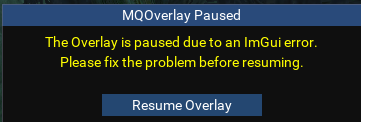
i loaded on a second char and figured out i needed to add the button set. how do i fix the first char? anytime i load the Lua now it instantly closes and gives the overlay paused warning.
i loaded on a second char and figured out i needed to add the button set. how do i fix the first char? anytime i load the Lua now it instantly closes and gives the overlay paused warning.
Ill push a fix.so, i didnt know i needed to add a button set first thing, and was wondering why i wasn't seeing any buttons. i hit compact mode and got this: View attachment 58326
i loaded on a second char and figured out i needed to add the button set. how do i fix the first char? anytime i load the lua now it instantly closes and gives the overlay paused warning.
Derple updated Button Master with a new update entry:
03/04/2024
Read the rest of this update entry...
03/04/2024
Read the rest of this update entry...
Derple updated Button Master with a new update entry:
03/05/2024
Read the rest of this update entry...
03/05/2024
Read the rest of this update entry...

Got it working. Also Special thanks to Grimmier for helping as well on Discord.You will also want to set the Cooldown which is the total time. It needs to do the math of total time - current time
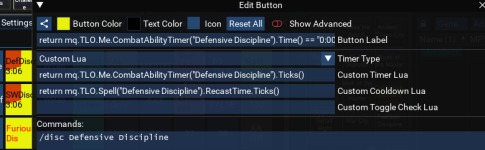


Not fond of the yellow button, but that cooldown / countdown / code is VERY sexy !Got it working. Also Special thanks to Grimmier for helping as well on Discord.
View attachment 58430
I like how you used the custom Button Label here to label the time left as well. very cool.Got it working. Also Special thanks to Grimmier for helping as well on Discord.
View attachment 58430
You should definitely put these buttons into the shared repo.
Updated but only under protest.@Derple Can the /btn command get added to the Overview page? I didn't know it existed until I saw your latest commit message. Was trying to figure out why buttonmaster was running but not showing any window
MetalJack, would you mind hitting the little share button next to Button Color and posting / pasting that here:Got it working. Also Special thanks to Grimmier for helping as well on Discord.
View attachment 58430
I tried it, but something is wrong, giving me forever spam in the MQ window. The Button Label line in your screenshot might be not showing the whole code for Button Label. I am guessing I don;t have something there.
Thank you !!
@Derple I think this is something that is 'buggish'. I got Metal Jack's cool Defensive button able to work, its hot. But I saw on anything other than War, it shows like this:

On a War, it shows 'properly' like this:

Easy Solution is keep it on Tab for War only abilities..but still I thought you may want to know.
On a War, it shows 'properly' like this:
Easy Solution is keep it on Tab for War only abilities..but still I thought you may want to know.

I'm at work so i can't see the actual line in the button. but you should be able to add somethng like:
if mq.TLO.Me.Class('WAR') then command line, else 'text to display for other classes' end
so if the class is warrior it will process the timers, or just display some text.
if mq.TLO.Me.Class('WAR') then command line, else 'text to display for other classes' end
so if the class is warrior it will process the timers, or just display some text.
Ty Grimmier, hot !if mq.TLO.Me.Class('WAR') then command line, else 'text to display for other classes'
Not working, but I think I'm getting closer.i guess it would be more like if mq.TLO.Me.Class.ShortName() == 'WAR' then ...
Code:
return mq.TLO.Me.CombatAbilityTimer("Defensive Discipline").Time() == "0:00" and if mq.TLO.Me.Class.ShortName() == 'WAR' then "Def Disc " or "Def: " .. mq.TLO.Me.CombatAbilityTimer("Defensive Discipline").Time()
Code:
return
if mq.TLO.Me.Class.ShortName() == 'WAR'  then (mq.TLO.Me.CombatAbilityTimer("Defensive Discipline").Time() == "0:00" and "Def Disc " or "Def: " .. mq.TLO.Me.CombatAbilityTimer("Defensive Discipline").Time()) else 'some text' end
Still at work doing this on the phone lol.
Does this work?
@grimmier
No it did not, Something works in this new fashion, in other tries, the button was not functional at all, in this manner it was some crazy text showing on the actual button, but it triggered and showed the cool down. I tried moving the War code around to see if it made any difference.
This is how I have it now (pre your above post): Normal button with shield icon, Mouseover shows Green, Depressed shows the cooldown and timer.

No it did not, Something works in this new fashion, in other tries, the button was not functional at all, in this manner it was some crazy text showing on the actual button, but it triggered and showed the cool down. I tried moving the War code around to see if it made any difference.
This is how I have it now (pre your above post): Normal button with shield icon, Mouseover shows Green, Depressed shows the cooldown and timer.
Not working, but I think I'm getting closer.
Code:return mq.TLO.Me.CombatAbilityTimer("Defensive Discipline").Time() == "0:00" and if mq.TLO.Me.Class.ShortName() == 'WAR' then "Def Disc " or "Def: " .. mq.TLO.Me.CombatAbilityTimer("Defensive Discipline").Time()
ok this one is tested to work.
Code:
return mq.TLO.Me.Class.ShortName() == 'WAR' and (mq.TLO.Me.CombatAbilityTimer("Defensive Discipline").Time() == "0:00" and "DefDisc: " or "DefDisc: " .. mq.TLO.Me.CombatAbilityTimer("Defensive Discipline").Time()) or 'NOT WAR'NOT WAR !! hahaha, that was great. Yes it works great !!! Thank you so much, gave me a smile. Conceptually this shows so much potential for buttons.ok this one is tested to work.
Code:return mq.TLO.Me.Class.ShortName() == 'WAR' and (mq.TLO.Me.CombatAbilityTimer("Defensive Discipline").Time() == "0:00" and "DefDisc: " or "DefDisc: " .. mq.TLO.Me.CombatAbilityTimer("Defensive Discipline").Time()) or 'NOT WAR'
so much you can do, just had to figure out the syntax.NOT WAR !! hahaha, that was great. Yes it works great !!! Thank you so much, gave me a smile. Conceptually this shows so much potential for buttons.
Code:
return mq.TLO.FindItem("Rubrae's Orb of Buffing").Charges() ~= '0' and "Rubrae's \t".. mq.TLO.FindItem("Rubrae's Orb of Buffing").Charges() or 'Its Dead Jim!'is another one similar i use for reporting charges left on my buff stick. or 'Its Dead Jim!' when its empty
Edit: Copy paste is your friend.
OMGOSH !! How do I get a little McCoy head pop up wagging his finger at me like Dennis in Jurassic Park'Its Dead Jim!'
OMGOSH !! How do I get a little McCoy head pop up wagging his finger at me like Dennis in Jurassic Park


I wanted to say thanks for the fix, (crashing with compact mode with no tabs.. ) happy i found some random thing that needed fixing 
I noticed the commands were set up for EQBC, i was under the impression there is a general push to migrate to DanNet. would it be too much to ask to have out of the box option for either? meanwhile ill edit what whats there, will force me to learn more how it works anyway.
Again thanks for your work.
I noticed the commands were set up for EQBC, i was under the impression there is a general push to migrate to DanNet. would it be too much to ask to have out of the box option for either? meanwhile ill edit what whats there, will force me to learn more how it works anyway.
Again thanks for your work.
Those are just some OG buttons SpecialEd made with the original build of buttonmaster. You can edit them out to anything you would like them to be, they were just some proof of concept but useful buttons to include.I noticed the commands were set up for EQBC,
Button Master itself doesn't rely on either dannet or eqbc. if that helps.

Swapped over to using button master for a lot of my hotkeys, not all yet but seems to be getting there for a lot of stuff.
It's been great! I especially love how easy it was to drag and drop existing socials!
It's also easy to edit on the fly and the fact that I can put way more information into one button vs a social is fantastic!
I am having trouble with it saving it's location and size. I've tried manual edits in the macroquest_overlay.ini to no avail.
If anyone else knows of a fix for my situation I'd appreciate some help.
It seems I'm not the only one who has experience this and not just this window but others as well like the xtargetx window,
However it seems other people are able to do a manual edit and not have issues. Something that still isn't working for me.
EDIT:
This resolved after logging every other character out and camping the one character running it out to desktop and logging back in.
Psy helped me with this on XtargetX discussion and it worked for this window as well.
Something to do with windows file locking with multiple characters logged in.
Thanks Psy!
It's been great! I especially love how easy it was to drag and drop existing socials!
It's also easy to edit on the fly and the fact that I can put way more information into one button vs a social is fantastic!
I am having trouble with it saving it's location and size. I've tried manual edits in the macroquest_overlay.ini to no avail.
If anyone else knows of a fix for my situation I'd appreciate some help.
It seems I'm not the only one who has experience this and not just this window but others as well like the xtargetx window,
However it seems other people are able to do a manual edit and not have issues. Something that still isn't working for me.
EDIT:
This resolved after logging every other character out and camping the one character running it out to desktop and logging back in.
Psy helped me with this on XtargetX discussion and it worked for this window as well.
Something to do with windows file locking with multiple characters logged in.
Thanks Psy!
Last edited:


I have had a few times when I went to add a section to a character's window, it would not ever show the tab for them. The only way I was able to fix it was to delete their section completely, while the window was closed, and then start over with their groups. It looks like one of the sets was removed, an that caused a gap in the set numbers below (notice the 5 is missing)
config
config
Code:
        ['server_Character'] = {
            ['Windows'] = {
                [1] = {
                    ['Sets'] = {
                        [1] = 'TS',
                        [2] = 'Mission',
                        [3] = 'Port',
                        [4] = 'Raid',
                        [6] = 'Loot',
                        [7] = 'Loot',
                        [8] = 'Loot',
                        [9] = 'Loot',
                        [10] = 'Loot',
                        [11] = 'Loot',
                    },
                    ['Locked'] = false,
                    ['Visible'] = true,
                    ['ButtonSize'] = 4,
                    ['CompactMode'] = false,
                    ['HideTitleBar'] = false,
                },
Derple updated Button Master with a new update entry:
03/21/2024
Read the rest of this update entry...
03/21/2024
Commits
(ed8c16d) ~derplePR # [6](https://github.com/DerpleMQ2/buttonmaster/pull/6): picker scroll adjustment
...Scroll icon picker
* made the contents of the tabs a child so you can scroll the icons and still have the page info on the top.
Read the rest of this update entry...

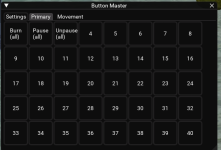
Will the themes be brought back? They don't seems to work on the new improvements. Was some good looking themes:Working on the look of the ImGui interface for BM. Here is what I have so far. Does anyone have any suggestions? Once I get the look down I will work on applying it to other LUA scripts
View attachment 53342
Is it possible to have a button appear to be depressed or a different color when an action is taking place? example, if I make a button for melee attack, i would like to be able to see action such as the normal melee button. I know my attack is on because the button is depressed. Thanks.
Lua:
if not mq.TLO.Me.Combat() then
    ImGui.PushStyleColor(ImGuiCol.Button, ImVec4(0.4, 1.0, 0.4, 0.4)) -- Green for enabled
    ImGui.Button(' ')
    ImGui.PopStyleColor(1)
    else
    ImGui.PushStyleColor(ImGuiCol.Button, ImVec4(0.9, 0.1, 0.1, 1)) -- Red for disabled
    ImGui.Button('Combat')
    ImGui.PopStyleColor(1)
end
not tested am at work but should work
for a button master button you could doLua:if not mq.TLO.Me.Combat() then ImGui.PushStyleColor(ImGuiCol.Button, ImVec4(0.4, 1.0, 0.4, 0.4)) -- Green for enabled ImGui.Button(' ') ImGui.PopStyleColor(1) else ImGui.PushStyleColor(ImGuiCol.Button, ImVec4(0.9, 0.1, 0.1, 1)) -- Red for disabled ImGui.Button('Combat') ImGui.PopStyleColor(1) end
not tested am at work but should work
Lua:
return (mq.TLO.Me.Combat()== true and 3997 or 3996), 'Item'
Last edited:
Running into... well, this issue below. Not sure what caused it, but it started happening a couple days ago. Basically only solution I can figure out currently is to unassign the hotbutton, create a new, identical hotbutton, then the timer behaves correctly until the next time I start up my machine/EQ. Then the same thing happens with a different hotbutton at random and I have to repeat the process.
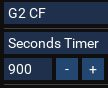

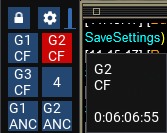
Are you saying that just a single button has the wrong countdown timer?Running into... well, this issue below. Not sure what caused it, but it started happening a couple days ago. Basically only solution I can figure out currently is to unassign the hotbutton, create a new, identical hotbutton, then the timer behaves correctly until the next time I start up my machine/EQ. Then the same thing happens with a different hotbutton at random and I have to repeat the process.
View attachment 59692View attachment 59693View attachment 59694
Users who are viewing this thread
Total: 1 (members: 0, guests: 1)
Share: