• You've discovered RedGuides, an EverQuest multi-boxing and scripting community 🧙‍♀️⚙️. We want you to play several EQ characters at once, come join us and say hello! 👋

  • A TLP without truebox has thawed (Very Vanilla ready)
    Frostreaver
Button Master

Release Button Master 05/09/2026

No permission to download
Derple updated Button Master with a new update entry:

Merged Beta into Mainline.

- Merged Beta into Mainline
- Mainline now includes all the latest from Beta which have been tested and stable for the last 7+ days
Updates:
- Configuration saved as Lua file now.
- Always displayed all defined buttons empty buttons shown if there is extra space.
- Color Wheel picker is fixed
- Naming buttons with numbers is fixed
- Fixed historical bugs:
- The way that buttons per row were calculated was wrong using a hard-coded value of 5 instead of the actual padding value
- Buttons will...

Read the rest of this update entry...
 
Derple updated Button Master with a new update entry:

01/29/2024

〰️Commits​


Push for website to pickup
(e5af56c) ~derple
- Merged Beta into Mainline
- Mainline now includes all the latest from Beta which have been tested and stable for the last 7+ days
Updates:
- Configuration saved as Lua file now.
- Always displayed all defined buttons empty buttons shown if there is extra space.
- Color Wheel picker is fixed
-...

Read the rest of this update entry...
 
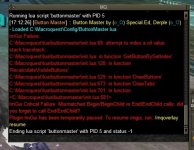
Getting this with latest update.
 

Attachments

  • EQ000002.jpg
    EQ000002.jpg
    67.9 KB · Views: 0
Hey @Derple
Trying to follow the instructions.
1706973529620.png
But utils.Lua and LIP.Lua are not in the zip download.
 
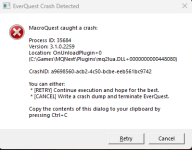
I started getting this error when starting the buttonmaster.Lua. I deleted the config/buttonmaster.Lua and rebuilt from the buttonmeaster.ini, but it still crashed. I saved copies of the Lua file so I can re-create my buttons manually
1706986142226.png
 
You only get this crash when using buttonmaster?

This is very odd in that your entire MQ2Lua is crashing and should not be. Which ButtonMaster version are you using? (when did you download it?)
 
I am liking everything you are doing. This is one button now, has a cooldown timer, and shows how many seconds are left in the hover popup. The red shade of the cooldown timer does make the text hard to read,, would it be possible to move the text layer above the cooldown timer layer?


1707074762139.png 1707075789472.png
 
I am liking everything you are doing. This is one button now, has a cooldown timer, and shows how many seconds are left in the hover popup. The red shade of the cooldown timer does make the text hard to read,, would it be possible to move the text layer above the cooldown timer layer?


View attachment 57142 View attachment 57144
Yes, it's acutally a bigger change than you would expect since the button renders the text and I will need to now render a new text layer on top of it. I am refactoring a ton of stuff in BM so once that is done I can look at doing this.
 
Hey Derple, with the launcher I have both ButtonMaster and Beta installed (forget which I "Watched" first) but since they've been consolidated I don't know which one I should let the launcher download / keep updated.

I haven't used it yet but it looks SWEEEEEETTTTT!

Anyways, can yah point me in the right direction of which one to use please?

Thanks man,

BB~
 
You can use either BM or BM-Beta.

BM-Beta gets multiple updates per week as I have time.

BM I am keeping stable for up to 1 week at a time.
At the end of the week if no one has complained about BM-Beta I take everything on the BM-Beta branch and move it to Main.

Further new Development goes back to happening on Beta.

TL;DR:
If you want slower more stable updates use BM
If you want to live on the edge of features with possible bugs: BM-Beta

But they are the same project just different update schemas.
 
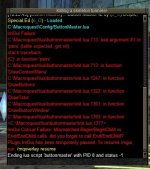
weird bug -run buttonmaster on my 3 tanks only and 2 it runs fine. the other it keeps crashing on load. can attach error message if helpful
 

Attachments

  • EQ000003.jpg
    EQ000003.jpg
    67.2 KB · Views: 0
You can use either BM or BM-Beta.

BM-Beta gets multiple updates per week as I have time.

BM I am keeping stable for up to 1 week at a time.
At the end of the week if no one has complained about BM-Beta I take everything on the BM-Beta branch and move it to Main.

Further new Development goes back to happening on Beta.

TL;DR:
If you want slower more stable updates use BM
If you want to live on the edge of features with possible bugs: BM-Beta

But they are the same project just different update schemas.
Gotcha gotcha. Thanks for the reply man and explaining.

BB~
 
weird bug -run buttonmaster on my 3 tanks only and 2 it runs fine. the other it keeps crashing on load. can attach error message if helpful
Do you have a Sets section in your Lua file or better yet can you send me your config Lua in discord?
 
Do you have a Sets section in your lua file or better yet can you send me your config lua in discord?
Thx for the response- yep the other toons had a secondary set called movement- deleted that and works well! Musta been leftover from original install.
 
Last edited:
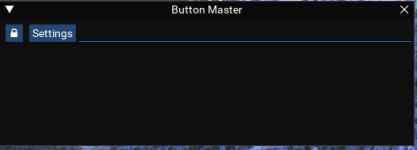
Hey guys. I had the LIP error but then you pushed the update and it is loading now but it is blank. Did I miss something? Sorry if I am retarded. lol

1707601684827.png
 
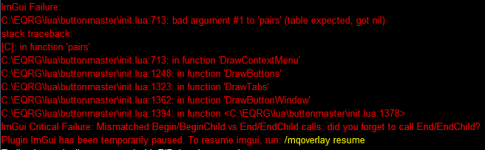
I am running 2 characters and get the following errors on my second character. I cannot get Buttonmaster to display on my second character and I assume it's due to these errors. Anyone able to assist me in figuring out why it's doing this and how to resolve it?


ImGui Failure.png
 
[CODE lang="Lua" highlight="6"]local function DrawContextMenu(Set, Index, buttonID)
local Button = GetButtonBySetIndex(Set, Index)

local unassigned = {}
local keys = {}
for _, v in pairs(settings.Sets[Set]) do keys[v] = true end
for k, v in pairs(settings.Buttons) do
if keys[k] == nil then
unassigned[k] = v
end
end[/CODE]

I'm not sure, as I have not used Buttonmaster, but it looks as if it is trying to iterate over the table settings.Sets, but it is not getting that table. Hopefully someone with more experience with this Lua can help. Sorry I was not able to provide a quick answer.
 
I am running 2 characters and get the following errors on my second character. I cannot get Buttonmaster to display on my second character and I assume it's due to these errors. Anyone able to assist me in figuring out why it's doing this and how to resolve it?


View attachment 57362
Bets way to get the attention from the creator or from people using it is defenitely to post this in the buttonmaster thread.

 
Each resource on RG has an Overview / Discussion Thread and either a link to their wiki or tabs with FAQ, Commands, Etc.
Please make sure to post in the respective discussion thread, and check the FAQ/Commands/Wiki for information before posting.
 
Hey guys. I had the LIP error but then you pushed the update and it is loading now but it is blank. Did I miss something? Sorry if I am retarded. lol

View attachment 57307
I had this same window when I tried to run BM after a long absence. After searching for a while, and deleting the Lua file and re-doing the upgrade thing, I just tried right clicking the settings tab, and had the options to able to add my old setups/tabs from ini file.
 
Just pushed v2.2 it should get picked up in the next build.

- Version bump 2.2!
- Multi Hotbar support
- Complete overhaul of rendering
- Timer clocks now render under text
- Text is render uniformilly across all button types
- Compact Mode!
- Hide Toolbar!
- Lots of new features!
 
I noticed after one of the latest updates, the colors of my buttons are darker/shaded then what is selected using the color picker? Is there a setting I am missing? Here is an example of what I mean, but it is a little more impactful on other background/font color combinations. This is using the Button Master, not the Beta

1708515619567.png
 
I noticed after one of the latest updates, the colors of my buttons are darker/shaded then what is selected using the color picker? Is there a setting I am missing? Here is an example of what I mean, but it is a little more impactful on other background/font color combinations. This is using the Button Master, not the Beta

View attachment 57627
This could be due to the layered rendering of buttons (the button is below the text layer and then the highlight layer and the countdown clock layer). I will see what I can do to fix it thanks for the report
 
If it is not causing issues for others, you do not have to change anything on my account. I just thought I would ask. I can go through and adjust my colors. Thank you
 
@Derple
1 - ok I have accidentally hidden my toolbar in the show/hide option, how do I show it since its gone? Lua shows as active.
2 - from my driver character, I set the size and position of my buttonmaster , once I know how to 'show' it, I want to copy or have my driver tell everyone to use his settings. I thought I saw that in a previous version. How do I do that?
 
@Derple
1 - ok I have accidentally hidden my toolbar in the show/hide option, how do I show it since its gone? lua shows as active.
2 - from my driver character, I set the size and position of my buttonmaster , once I know how to 'show' it, I want to copy or have my driver tell everyone to use his settings. I thought I saw that in a previous version. How do I do that?
1 - /btn # will toggle thta hotbar so /btn 1 should bring back bar 1
2 - i had to remove this because it causes all the toons to write to the ini at the same time which causes issues. I am thinking about a solution but its probably going to be a while before i implement it.
 
Release Button Master

Users who are viewing this thread

Back
Top
Cart