
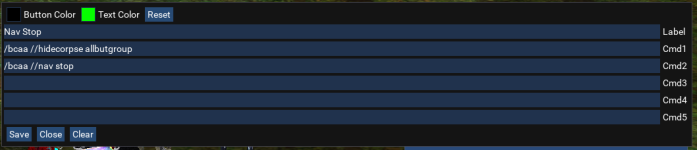
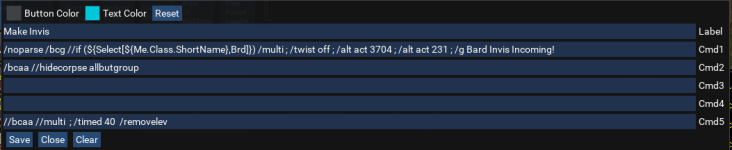
Some pretty kick ass stuff there!You have to apply a theme to it. It requires some minor edits to the buttonmaster init.lua and you need two "theme" files that go in the same folder as the init.lua.
Then when you run it you run as /lua run buttonmaster "themeName" For example the black is /lua run buttonmaster Deth
The theme name are case sensitive
I have attached my ButtonMaster folder is has the files and the edits
You can open the themes.lua file in a text editor to see the names of available themes

-
 Hail, we're RedGuides. We want you to play six (yes, 6!) EverQuest characters at once. We have scripts and a friendly community to help, please join our playstyle and say hello! 👋
 -
 We've added LLM sections to our Terms & Rules and Resource Rules, for everyone's sanity & in-game safety.
Read more
a. Do not replace your voice with an LLM. This goes for your posts and your scripts. Drafting and editing with a tool is fine, but don't take you out of what you share.
b. Do not replace your EQ character's voice with an LLM. We don't want scripts that speak over/ooc,/shoutor other public channels. This has been an unwritten rule that's kept casino scripts off the site for decades, but we're now compelled to make it clear: keep automated communication private.
Why Does RG Review Scripts?
Nearly every LLM-written Lua script we see is making your character do impossible things, and rarely in a way that's beneficial to you. We've seen heavy server hammering,/targetover impossible distances when/nav spawnwould passively accomplish the same thing, a spawn search that fires 20+ times per second, and other pointless actions that are likely annoying GMs.
You are welcome to use LLMs as a tool to structure, draft, and edit your work, but please read critically before hitting/lua run
You are using an out of date browser. It may not display this or other websites correctly.
You should upgrade or use an alternative browser.
You should upgrade or use an alternative browser.

Release Button Master 2026-10-29-9806f31
- Thread starter SpecialEd
- Start date

Derple updated Button Master with a new update entry:
01/19/2024
Read the rest of this update entry...
01/19/2024
Commits
(a28c488) ~DerpleMQ2Fixed a legacy bug with old INI files that could crash if a number was used as a label.
Read the rest of this update entry...
Derple updated Button Master with a new update entry:
01/19/2024
Read the rest of this update entry...
01/19/2024
Read the rest of this update entry...
So I guess I own this project now. Here are some updates in my personal version that I have brought over:
1) Settings are now stored in pickled Lua files - TL;DR: If you want to make changes look for buttonmaster.Lua instead of buttonmaster.ini in the configs folder.
2) The first time you run this version it will take your INI and convert it to a Lua pickle config.
3) Fixed some legacy bugs with naming buttons as numbers
4) Fixed an issue where when running on multiple characters the config could get corrupted if you made modifications across the different characters.
5) As part of #4, all updates are now instant across clients. That is to say if you have a Utils Tab across all your clients and you add a new button or change an existing one, the change takes effect across all clients immediately instead of requiring a manual reload.
6) There is a context menu option under Settings to replicate the size/position of the window across all clients if you have OCD like me.
7) There is probably a #7 thing but I can't think of it.
1) Settings are now stored in pickled Lua files - TL;DR: If you want to make changes look for buttonmaster.Lua instead of buttonmaster.ini in the configs folder.
2) The first time you run this version it will take your INI and convert it to a Lua pickle config.
3) Fixed some legacy bugs with naming buttons as numbers
4) Fixed an issue where when running on multiple characters the config could get corrupted if you made modifications across the different characters.
5) As part of #4, all updates are now instant across clients. That is to say if you have a Utils Tab across all your clients and you add a new button or change an existing one, the change takes effect across all clients immediately instead of requiring a manual reload.
6) There is a context menu option under Settings to replicate the size/position of the window across all clients if you have OCD like me.
7) There is probably a #7 thing but I can't think of it.

the change takes effect across all clients immediately instead of requiring a manual reload

I will go update MQ and this Lua soon, but I may as well ask while I'm here, Is the scrolling issue fixed, where I can have a window displaying 10 buttons (as example) and be able to scroll down to see the other 60 buttons?So I guess I own this project now. Here are some updates in my personal version that I have brought over:
1) Settings are now stored in pickled lua files - TL;DR: If you want to make changes look for buttonmaster.lua instead of buttonmaster.ini in the configs folder.
2) The first time you run this version it will take your INI and convert it to a lua pickle config.
3) Fixed some legacy bugs with naming buttons as numbers
4) Fixed an issue where when running on multiple characters the config could get corrupted if you made modifications across the different characters.
5) As part of #4, all updates are now instant across clients. That is to say if you have a Utils Tab across all your clients and you add a new button or change an existing one, the change takes effect across all clients immediately instead of requiring a manual reload.
6) There is a context menu option under Settings to replicate the size/position of the window across all clients if you have OCD like me.
7) There is probably a #7 thing but I can't think of it.
Congrats on having this as yours now! wtg!

Derple updated Button Master with a new update entry:
01/19/2024
Read the rest of this update entry...
01/19/2024
Read the rest of this update entry...
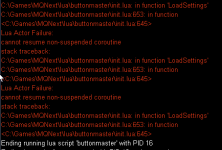
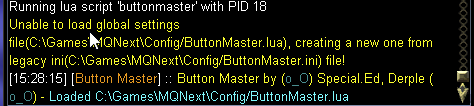
I pushed a fix for the first issue - basically if it was doing the convsion it could cause a retry storm across all clients - this shouldn't happen if the convert is working though. Is the ButtonMaster.Lua file getting created for you under your configs? Because from the second error it looks like maybe your configs dir is readonly or something?Still getting the second error when I load up the lua. Changes aren't synchronized.
@Derple If you know this issue, please ignore my post. 
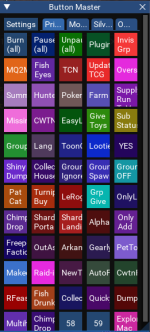
My buttons have to be like this, so I can scroll to have access :
 I would like it to be this size to save real estate, but it will not scroll down to have access to the lower buttons: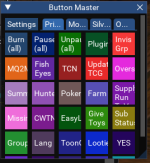
Post #180 by CannonballDex seems to have that issue solved, but I am unsure how to implement it. There is a init there.
My buttons have to be like this, so I can scroll to have access :
I would like it to be this size to save real estate, but it will not scroll down to have access to the lower buttons: Post #180 by CannonballDex seems to have that issue solved, but I am unsure how to implement it. There is a init there.
Thanks.Happens when you mess with the button size.
I use a 50 button box on 3.5, your welcome to try my init file.
View attachment 49036
Derple updated Button Master with a new update entry:
01/19/2024
Read the rest of this update entry...
01/19/2024
Read the rest of this update entry...
I rolled back the Lua-pickle-config changes because we discovered a bug in how mq serializes Lua strings. I have a PR submitted here: https://github.com/macroquest/macroquest/pull/815 and once that is pulled in I will re-push the Lua-pickle-configs.
Pushed a change where it will use the LARGER of the two:@Derple If you know this issue, please ignore my post.
My buttons have to be like this, so I can scroll to have access :
View attachment 56255 I would like it to be this size to save real estate, but it will not scroll down to have access to the lower buttons: View attachment 56256
Post #180 by CannonballDex seems to have that issue solved, but I am unsure how to implement it. There is a init there.
Thanks.
1) Number of buttons that have been defined
2) Number of buttons based on row/col count
This way it will always show buttons you have defined even if it has to draw a scroll bar for it.
Derple updated Button Master with a new update entry:
01/20/2024
Read the rest of this update entry...
01/20/2024
Read the rest of this update entry...
So popup windows in ImGui are not resizable. This could be done but essentially we would need to create a new edit window and it wouldn't behave as a modal - It would probably only close if you hit Save or Cancel - if folks arent opposed to that then yah I could add it.
Derple updated Button Master with a new update entry:
01/20/2024
Read the rest of this update entry...
01/20/2024
Read the rest of this update entry...
Yo, have tried multiple times to get the .ini to convert over to the Lua config. Have reinstalled the update, deleted the Lua config and started/stopped buttonmaster multiple times in game - each time it creates a new buttonmaster.Lua in the config folder with default settings. Not getting any conversions. Do you have any advice for me to get this working?
Derple updated Button Master with a new update entry:
01/20/2024
Read the rest of this update entry...
01/20/2024
Read the rest of this update entry...


I lost all my btn too, butall of my buttons are gone logging in today. any ideas?
I updated the newest version, backup my old ini and Lua config then delete them, stop current running btnmaster,
then restart btnmaster, it generated new Lua config automatically and now everything is back


0ptic
Member
I lost all my btn too, but
I updated the newest version, backup my old ini and lua config then delete them, stop current running btnmaster,
then restart btnmaster, it generated new lua config automatically and now everything is back
thanks! stopped button master, deleted buttonmaster.Lua (kept my buttonmaster.ini intact) and ran buttonmaster again and it's fixed.
Nice, thanks @delfnecthanks! stopped button master, deleted buttonmaster.lua (kept my buttonmaster.ini intact) and ran buttonmaster again and it's fixed.

Sic updated Button Master with a new update entry:
reverting to 5/10/23 build
Read the rest of this update entry...
reverting to 5/10/23 build
temporary revert to 5/10/23 build until issues are fixed
Read the rest of this update entry...
Afaik all the bugs are fixed in the latest pushes last night. The changes so far will never delete data - in that your .ini files will remain in tact and will be reconverted anytime a .Lua file doesn't exist in the config directory. So it is not possible to lose data (which is good). So if anyone has empty buttons all you need to do is go into the config directory and delete ButtonMaster.Lua and your ButtonMaster.ini will reconvert.
feel free to re-upload (or even delete the rollback), folks on discord this morning were having a bad time so i just posted a revertAfaik all the bugs are fixed in the latest pushes last night. The changes so far will never delete data - in that your .ini files will remain in tact and will be reconverted anytime a .lua file doesn't exist in the config directory. So it is not possible to lose data (which is good). So if anyone has empty buttons all you need to do is go into the config directory and delete ButtonMaster.lua and your ButtonMaster.ini will reconvert.
@Derple
I did this change, and it worked really nice. Helps to have a wider place to type long lines. Not actually sizable, but super easy addition. Posting the quote below (and I have tested it with your latest update that I mention in previous post).
Upon Edit, the typing area is much wider. Nice. Credit to CannonballDex post #161
I did this change, and it worked really nice. Helps to have a wider place to type long lines. Not actually sizable, but super easy addition. Posting the quote below (and I have tested it with your latest update that I mention in previous post).
Upon Edit, the typing area is much wider. Nice. Credit to CannonballDex post #161
This won't make it resizable but it will give you extra room. Find this section local HandleEdit = function(Set, Index, Key, Prop) and add the next two lines.
Code:local HandleEdit = function(Set, Index, Key, Prop) ImGui.SetCursorPosX(0) ImGui.PushItemWidth(1000) local txt, selected = ImGui.InputText(Prop, tmpButton[Key][Prop] or '', 0) if selected then -- if theres no value, nil the key so we don't save empty command lines if txt:len() > 0 then tmpButton[Key][Prop] = txt else tmpButton[Key][Prop] = nil end end end
I think people have a lot of setups that I would never think to check and it is exposing bugs in both how the script is written and within the core mq libraries.
Just to get to where we are today, I've had to push 2 changes to the mq c++ code.
SO!
To solve that problem I am going to make a test branch and let people play with it for a few weeks before pushing any more changes into the main branch.

 www.redguides.com
You wont be able to use this until RG does a push of some more core fixes though.
Just to get to where we are today, I've had to push 2 changes to the mq c++ code.
SO!
To solve that problem I am going to make a test branch and let people play with it for a few weeks before pushing any more changes into the main branch.
Check out the beta thread here:@Derple
I did this change, and it worked really nice. Helps to have a wider place to type long lines. Not actually sizable, but super easy addition. Posting the quote below (and I have tested it with your latest update that I mention in previous post).
Upon Edit, the typing area is much wider. Nice. Credit to CannonballDex post #161
Utility - ButtonMaster Beta
This is the testing resource for ButtonMaster. Since use-cases for BM are so varied this will act as a testing branch that will contain updates for at least 1 week before they are pushed to the mainline.
www.redguides.com
You wont be able to use this until RG does a push of some more core fixes though.

NipBiter
New member
I just came across this ButtonMaster today and I have been switching over from using basic ingame macros and hotbars to this. Very nice but I came across a use case that I wanted to do.
So, I prolly wasted too much time on this when I could of just copied and pasted a buttons previous commands into the new button but I wanted to see it through so.
The initial goal was to be able to reuse other button commands sort of being able to link them together, and if I need to update a button the changes are in one place vs if they were copied and pasted from other buttons.
My case study is I have a button macro that does a several commands that ends macro(kissassist), stops casting etc. Just clean up. I also have a button that for camping out that does the same thing but adds /dgae /camp.
I wanted to reuse the button I had already made, we shall call it cleanup for this example and not have to repaste the same command lines etc into the camp out button.
Below is my attempt at this and is based off the init.Lua that is modified by Deth24 on using the themes.
Usage is if you wish to link to another button the command you use is /pullbtncmd # where # is the button number in the ini.
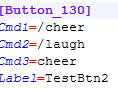
So for this example we will use button # 130, which is listed in the ini as Button_130 key.
You will need to look in your ini to get the correct button you want linked.
NOTE: I made this to be recursive so it really has no max on how many buttons can be linked. Infinite loops beware. You need to have a button eventually that does not call another button. :NOTE
This is the ini entry for 130 button in my example.
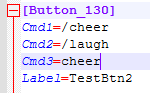
Main Button
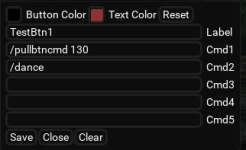
This will call the commands saved to button 130 in the ini and run them in order.
This is button 130.
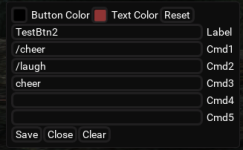
So we should see a cheer, laugh emote then MQ should register an invalid command as I am checking for those then a final dance coming from the first button.
Clicking TestBtn1 has this behavior

and in MQ window

So that is what we see.
I attached the Lua and a recommendation is I use a program called BeyondCompare, it does side by side comparison so it's useful to see the changes.
Code could use some work as I been out the coding game for a while but this was a fun project.
Some menu items could be added to look up buttons etc but yeah this needs some testing, but initial tests show promise.
So, I prolly wasted too much time on this when I could of just copied and pasted a buttons previous commands into the new button but I wanted to see it through so.
The initial goal was to be able to reuse other button commands sort of being able to link them together, and if I need to update a button the changes are in one place vs if they were copied and pasted from other buttons.
My case study is I have a button macro that does a several commands that ends macro(kissassist), stops casting etc. Just clean up. I also have a button that for camping out that does the same thing but adds /dgae /camp.
I wanted to reuse the button I had already made, we shall call it cleanup for this example and not have to repaste the same command lines etc into the camp out button.
Below is my attempt at this and is based off the init.Lua that is modified by Deth24 on using the themes.
Usage is if you wish to link to another button the command you use is /pullbtncmd # where # is the button number in the ini.
So for this example we will use button # 130, which is listed in the ini as Button_130 key.
You will need to look in your ini to get the correct button you want linked.
NOTE: I made this to be recursive so it really has no max on how many buttons can be linked. Infinite loops beware. You need to have a button eventually that does not call another button. :NOTE
This is the ini entry for 130 button in my example.
Main Button
This will call the commands saved to button 130 in the ini and run them in order.
This is button 130.
So we should see a cheer, laugh emote then MQ should register an invalid command as I am checking for those then a final dance coming from the first button.
Clicking TestBtn1 has this behavior
and in MQ window
So that is what we see.
I attached the Lua and a recommendation is I use a program called BeyondCompare, it does side by side comparison so it's useful to see the changes.
Code could use some work as I been out the coding game for a while but this was a fun project.
Some menu items could be added to look up buttons etc but yeah this needs some testing, but initial tests show promise.
Attachments
Last edited:
buttonmasters going through some significant changes so you might want to try and apply your changes on the new buttonmaster beta resource that was created today instead.I just came across this ButtonMaster today and I have been switching over from using basic ingame macros and hotbars to this. Very nice but I came across a use case that I wanted to do.
So, I prolly wasted too much time on this when I could of just copied and pasted a buttons previous commands into the new button but I wanted to see it through so.
The initial goal was to be able to reuse other button commands sort of being able to link them together, and if I need to update a button the changes are in one place vs if they were copied and pasted from other buttons.
My case study is I have a button macro that does a several commands that ends macro(kissassist), stops casting etc. Just clean up. I also have a button that for camping out that does the same thing but adds /dgae /camp.
I wanted to reuse the button I had already made, we shall call it cleanup for example and not have to repaste the same command lines etc into the camp out button.
Below is my attempt at this and is based off the init.lua that is modified by Deth24 on using the themes.
Usage is if you wish to link to another button the command you use is /pullbtncmd # where # is the button number in the ini. so for this example we will use button # 130, which is listed in the ini as Button_130 key.
You will need to look in your ini to get the correct button you want linked.
NOTE: I made this to be recursive so it really has no max on how many buttons can be linked. Infinite loops beware. You need to have a button eventually that does not call another button. :NOTE
This is the 130 button in my example.
View attachment 56352
Main Button
View attachment 56347
This will call the commands saved to button 130 in the ini and run then in order.
This is button 130
View attachment 56348
so we should see a cheer, laugh emote then MQ should register a invalid command as I am checking for those then a final dance coming from the first button.
Clicking TestBtn1 has this behavior
View attachment 56349
and in MQ window
View attachment 56350
So that is what we see.
I attached the lua and a recommendation is I use a program called BeyondCompare, it does side by side comparsion so its useful to see the changes.
Code could use some work as I been out the coding game for a while but this was a fun project. Some menu items could be added to look up buttons etc but yeah this needs some testing but initial tests show promise.
Recommend VSCode for majority of your needs btw, including comparing files. And grab the mq-defs extension if you don't have it.
NipBiter
New member
Yeah I'll have to check that out, prolly better then using Notepad++.buttonmasters going through some significant changes so you might want to try and apply your changes on the new buttonmaster beta resource that was created today instead.
Recommend VSCode for majority of your needs btw, including comparing files. And grab the mq-defs extension if you don't have it.
Deth24 version looked to be based off what was available in the patcher as of today so yeah it may need tweaked. I just stuck this together this afternoon.
I went ahead and removed the cmd count restriction in BM beta. You should be able to do as many commands as you like. Give it a look.Yeah I'll have to check that out, prolly better then using Notepad++.
Deth24 version looked to be based off what was available in the patcher as of today so yeah it may need tweaked. I just stuck this together this afternoon.
dustinisgod
Active member
Been using this for a while now, love it. The only minor issue I have is coming back from alt+tab my mouse grabs a random button or the panel its self and begins dragging it with my mouse. Would love a lock button similar to boxhud's so this does not happen.

Check out the beta version. many new features there.Been using this for a while now, love it. The only minor issue I have is coming back from alt+tab my mouse grabs a random button or the panel its self and begins dragging it with my mouse. Would love a lock button similar to boxhud's so this does not happen.
Utility - ButtonMaster Beta
This is the testing resource for ButtonMaster. Since use-cases for BM are so varied this will act as a testing branch that will contain updates for at least 1 week before they are pushed to the mainline.
www.redguides.com
dustinisgod
Active member
Much better, thanks.
Users who are viewing this thread
Total: 1 (members: 0, guests: 1)
Share: