• You've discovered RedGuides, an EverQuest multi-boxing and scripting community 🧙‍♀️⚙️. We want you to play several EQ characters at once, come join us and say hello! 👋

  • A TLP without truebox has thawed (Very Vanilla ready)
    Frostreaver
Button Master

Release Button Master (1 Viewer) 05/09/2026

No permission to download
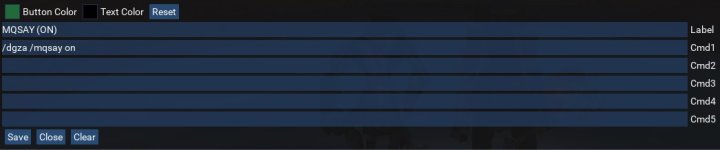
When you open up a button to type in text into the box, could that box be expandable. When typing or editing buttons with multilines, it is quite the hassle if you can not see all the line.
This won't make it resizable but it will give you extra room. Find this section local HandleEdit = function(Set, Index, Key, Prop) and add the next two lines.
Code:
local HandleEdit = function(Set, Index, Key, Prop)
    ImGui.SetCursorPosX(0)
    ImGui.PushItemWidth(1000)
    local txt, selected = ImGui.InputText(Prop, tmpButton[Key][Prop] or '', 0)
    if selected then
        -- if theres no value, nil the key so we don't save empty command lines
        if txt:len() > 0 then
            tmpButton[Key][Prop] = txt
        else
            tmpButton[Key][Prop] = nil
        end
    end
end
 

Attachments

  • Untitled.jpg
    Untitled.jpg
    38.6 KB · Views: 17
Sic updated Button Master with a new update entry:

update by fuddles

FIxed some stuff:

  • Fixed incorrect setting of nil when removing a tab. This caused indexes to be incorrect and adding a new tab and selecting it would cause the script to crash.
  • Fixed issue where the script would crash if you renamed the tab but didn't change the name and hit save.
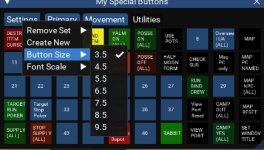
  • Added button size to settings (3-10)
  • Added checkmarks for current button size and font size value in menu.

Read the rest of this update entry...
 
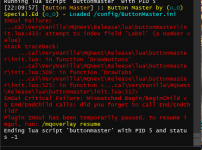
Just now starting to set up my team with this Lua (which is beautiful & brilliant). I set up my driver toon no problem. Load in my number two, fire up the Lua to get started and get this error. What am I doing wrong?

1678560066555.png
 
Just now starting to set up my team with this LUA (which is beautiful & brilliant). I set up my driver toon no problem. Load in my number two, fire up the LUA to get started and get this error. What am I doing wrong?

View attachment 47080
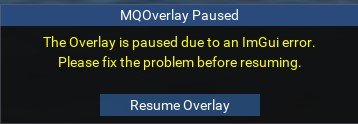
What happens when you type /mqoverlay resume ?

You are welcome to try this script, has a few custom modifications, but I've been using it for some time now with no issues. You would probably have to delete your old buttonmaster folder and your ButtonMaster.ini file in the config folder and then run it fresh.
 

Attachments

Thank you, I will give that a go!

I think the problem is actually my not understanding how this Lua was supposed to work. I was thinking it would allow you a customizable set of buttons for each loaded toon, but I guess that's not the case. If you have a tab for "Tradeskill" on Toon A and try to make the same tab on Toon B, it looks like it does not allow for that. This Lua looks to be meant only for the driver toon and that is where I believe I misunderstood.
 
Thank you, I will give that a go!

I think the problem is actually my not understanding how this LUA was supposed to work. I was thinking it would allow you a customizable set of buttons for each loaded toon, but I guess that's not the case. If you have a tab for "Tradeskill" on Toon A and try to make the same tab on Toon B, it looks like it does not allow for that. This LUA looks to be meant only for the driver toon and that is where I believe I misunderstood.
You can set tabs for individual toons. In the ini file under each toon name

Similar to this
[Char_test_YouToon_Config]
1=Primary
2=Movement
3=Utilities

This is what shows the tabs on each toon.

In the GUI you would need to right click Settings and select Create New or remove a set.

Once these are created in the ini file you do not need to recreate a set with an alt, but just add the set to the alt toons config by using Add Set.
 
I set a command like below and it said docommand cant parse this pause command,any suggestions plz thank you very much.

/pause 30
or
/pause 30, /othercommands
or
/Pause 30
 
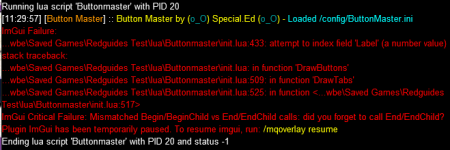
anyone has this problem? it was ok yesterday,but now i CANstart up my btnmaster,but
can not switch to my new created tab. the following dialog will popup and my btnmaster ended.


imgui error.jpg
 

Attachments

  • imgui error-red.jpg
    imgui error-red.jpg
    52 KB · Views: 20
Last edited:
Anyone seeing issues where buttons are cut off? I can't seem to size window without it cutting off buttons
 
yeah that didnt work- any updates for button issues?
Probably your config file. With the init file you may need to edit your config file as well. You can try this.

Or actually it was set up for a 50 button. I guess this might effect your files if you already have 100 button layout.
Code:
[Global]
ButtonCount=Your Button Count
ButtonSize=3.5
Font=0.6
 
yeah that didnt work- any updates for button issues?
If you are not using a set number, like 50, some will be cutoff if you are trying to squeeze it in an area while having other UI elements in place. Either shorten the other elements, or make this fit the way you want to.
 
If you are not using a set number, like 50, some will be cutoff if you are trying to squeeze it in an area while having other UI elements in place. Either shorten the other elements, or make this fit the way you want to.
changed global to 75 but still shows 100 buttons and cuts them off?
 
changed global to 75 but still shows 100 buttons and cuts them off?
Do you have buttons assigned to the higher numbers?

My advice? Wipe it completely. Keep a backup you can copy from. Set to 50 and adjust accordingly where you want it. Then assign hotkeys.
 
Hey guys not sure if this would help identify my problem or not.. but buttonmaster just stops working when i try to load up.. this is a SS of mq window after

1686950187777.png
 
Loving ButtonMaster so far. What I am seeing is the window moves back to a default location every time the EQ window loses focus (like when I switch to another window). Is there a way to make the window stay at a specific location once I move it? The size stays, just not the location. Thanks!
 
Ok idk what happen but i broke it

I broke it.PNG

Added new buttons and then i started to run other LUAs and then this freaked out.
 
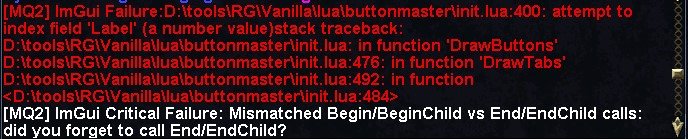
I think I saw something like this before. Did you add a number to a button label?

1693674994087.png
 
I think I saw something like this before. Did you add a number to a button label?

View attachment 50602
Yep

One of your buttons is labeled a number as previously stated. Likely cause is you cleared a button and hit save. I've done it and had to fix it.

Correct. Is there a way we can get this check added for it to display a NULL and not cause an error?

This took me almost 2 hours to fix cause i couldnt find the cleared button problem.
 
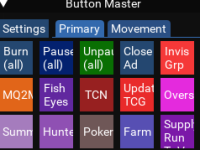
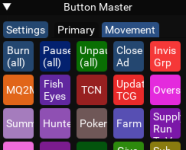
@SpecialEd By no means is this a complaint, but I was surprised to see some rounded buttons on two of my characters. Now I like it and am wondering how it may have happened and to make my other guys have it.

What all my guys have, square.
1693762167221.png
What 2 of my guys have, round (app like)
1693762242431.png
 
Feature request. I wonder if it is possible when editing a button to have a time= box(in seconds). When button is pressed and gradient would change as cooldown. This would be great for sending commands to use disciplines.
 
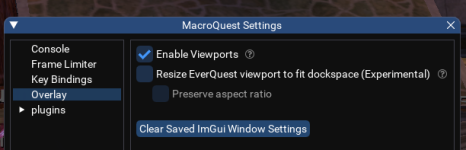
My apologies if I missed it...can you place the Button Master buttons on a second monitor by chance?

Also, @Redfrog what does your button labeled Close Ad do? I am hoping it is a way to kill the updrade pop up on all clients?

Edit: Is there someplace where people are sharing their buttons? Sic's Hotkey guide is the bible for me as a foundation but it would be great to see all the creative stuff everyone comes up with.
 
My apologies if I missed it...can you place the Button Master buttons on a second monitor by chance?

Also, @Redfrog what does your button labeled Close Ad do? I am hoping it is a way to kill the updrade pop up on all clients?
yes you can move it to another window

you would need "Enable Viewports" in your MacroQuest Settings

1696335339388.png
 
I don't know where to post this, haha so please if someone can make sure it goes where it should ? (Sorry for being bad at forums)!
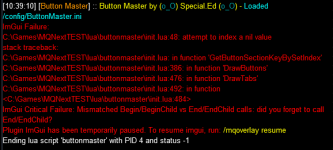
I got an error like that and it is replicable by attempting to make a different buttonmaster hud from a different character and adding a new tab. When I go into the settings, it is now under the "exited" area of the Lua section, throws the errors "ImGui Failure: init.Lua:48: attempt to index a nil value.. " & 517 ImGui Critical Failure: Mismatched Begin/BeginChild vs End/EndChild calls: did you forget to call End/EndChild? So exactly what I did was I played a different sk today, made a buttonmaster tab with his name (as oppossed to my normal sks), then when I logged onto my normal sk, that is when this error occured.
-Relogging completely out of the game and MQ did not work to fix this.
-Buttonmaster did reload when I logged on the secondary SK which was the account that I made the new window on.
-Though it reloaded for the 2nd character, logging back off and onto my original sk gave the same error.
-Tried /Lua stop on the original culprit (did not work), was still unable to load buttonmaster on the original sk after relogging again.
-Noticed at the bottom of the code the set of the original character wasn't listed under "sets" so added it to the array.. did not help.

I could delete the new character's buttons but I am not convinced that is the issue here. Suggestions?
~Continues to work on the second character and crash on the first, once I made that second characters profile the first one has not worked and keeps giving the begin/endchild error.
 
Last edited:
Release Button Master

Users who are viewing this thread

Back
Top
Cart