• Hail, we're RedGuides. We want you to play six (yes, 6!) EverQuest characters at once. We have scripts and a friendly community to help, please join our playstyle and say hello! 👋
  • We've added LLM sections to our Terms & Rules and Resource Rules, for everyone's sanity & in-game safety.
    Read more
    a. Do not replace your voice with an LLM. This goes for your posts and your scripts. Drafting and editing with a tool is fine, but don't take you out of what you share.
    b. Do not replace your EQ character's voice with an LLM. We don't want scripts that speak over /ooc, /shout or other public channels. This has been an unwritten rule that's kept casino scripts off the site for decades, but we're now compelled to make it clear: keep automated communication private.

    Why Does RG Review Scripts?
    Nearly every LLM-written Lua script we see is making your character do impossible things, and rarely in a way that's beneficial to you. We've seen heavy server hammering, /target over impossible distances when /nav spawn would passively accomplish the same thing, a spawn search that fires 20+ times per second, and other pointless actions that are likely annoying GMs.

    You are welcome to use LLMs as a tool to structure, draft, and edit your work, but please read critically before hitting /lua run

Question - boxes on my Group box

spudz90

CASH GRAB
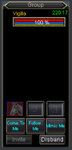
Ive been away from EQ for about 3months and I come to see I have 6 boxes on top of my Group box, which is covering my last 2 group members.

top 3 boxes are empty and the bottom 3 have come to me, follow me, and Mimic me.

what plugin controls them and how do I make them work but most importantly how do I move, or remove them??

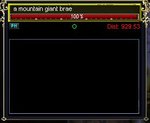
Also when I target an NPC to get a quest or instance, I have 2 of my boxes that want to attack, so they will do nothing till I manual turn off mq2, or ignore the npc.
 
Right click a group member and uncheck what you don’t want to see.
If you are using the default UI, you can just resize the window down a little and the buttons will not cover group members.

If you are not using the default UI, and need help to reposition stuff, post a zip here with your UI and I’ll post a reply with correct settings for it.
All settings are stored in mq2targetinfo.ini

Unloading the plugin is an option, but you lose the placeholder info and target distance and line of sight indicator by doing it, which are kinda nice, especially since there are hide options for all the stuff u may or may not want in the group window.

DF02BD7B-D785-442F-9DAB-0F72295A4C99.jpeg
DCBF1A97-7DD5-4630-989F-F9E013C6F2C6.jpeg
 
Last edited:
here are my issues when I try to right click and select or deselect options.

#You are not connected. Use /bccmd connect to establish a connection...…. when I do this it says I could not connect.

I do have mq2eqbc loaded
 
Not really a problem, but any chance the "Follow Me" button can deselect on zoning? Right now on zoning the button stays selected, but toons no longer are on follow. Just a matter of clicking it twice, more of an obsessive-compulsive thing than an actual problem.
 
Question - boxes on my Group box

Users who are viewing this thread

Back
Top
Cart