Robban
Ultimate seasoned veteran member
new text document. Rename to .LuaSorry to ask, but how do you create a new lua file ?



/ooc, /shout or other public channels. This has been an unwritten rule that's kept casino scripts off the site for decades, but we're now compelled to make it clear: keep automated communication private./target over impossible distances when /nav spawn would passively accomplish the same thing, a spawn search that fires 20+ times per second, and other pointless actions that are likely annoying GMs./lua run
new text document. Rename to .LuaSorry to ask, but how do you create a new lua file ?
It's what I did, but i got a *.Lua.txt. so i thought i got it wrong.new text document. Rename to .lua
I m gonna try, thank you.recommend using VSCode. its free. INI, LUA, and CFG are easier to read and such

def wrong. should not have the extra .txt on the end.It's what I did, but i got a *.lua.txt. so i thought i got it wrong.
Thanks.
Try starting it from eqbutton, macroquest, LuaI copied/past the script in a Aten Ha Ra.lua file in the Lua folder in Next, but when I type /lua run Aten Ha Ra on my bard i got a message saying it doesn't find such a file in the very folder where the file is. I hope this is clear enough. Any idea ?
I can't find it there. My file is a .Lua and is in Next>Lua. I don't understand. Maybe i should log off, restart something, i don't know...Try starting it from eqbutton, macroquest, lua
If you cant find it there, you have it in the wrong place or you didnt fix it to a .lua file
if your file isn't called "aten.Lua" then it isn't going to run it.I can't find it there. My file is a .lua and is in Next>Lua. I don't understand. Maybe i should log off, restart something, i don't know...
I should add that I don't have the .txt anymore. It's genuine Lua file (lua source file).
The message I get is : "could not find script at path D:\Progam..\Next\lua\Aten.lua".
I can't find it there. My file is a .lua and is in Next>Lua. I don't understand. Maybe i should log off, restart something, i don't know...
I should add that I don't have the .txt anymore. It's genuine Lua file (lua source file).
The message I get is : "could not find script at path D:\Progam..\Next\lua\Aten.lua".
try D:\Program..\Next\Release\Lua\AtenThe message I get is : "could not find script at path D:\Progam..\Next\lua\Aten.lua".

local mq = require("mq")

while mq.TLO.Task('Aten Ha Ra')()
do
    if mq.TLO.SpawnCount("a smirking guardian npc zradius 75")() > 0 then
        mq.cmd("/mqp on")
        mq.cmd("/twist 8")

        while mq.TLO.SpawnCount("a smirking guardian npc zradius 75")() > 0 do
            mq.cmd("/tar a smirking guardian npc zradius 75")
        end

        mq.cmd("/mqp off")
        mq.cmd("/chaseon")
    end

    mq.delay(10)
endI tried this script, but like with the old one I mezzed one gargoyle only, no achievement.I stole the script from @wmh and adjusted it for a bard on KA. This is what's working for me (again adjust your twist command to be the spell gem your mez is on).
aten.lua
Lua:local mq = require("mq") while mq.TLO.Task('Aten Ha Ra')() do if mq.TLO.SpawnCount("a smirking guardian npc zradius 75")() > 0 then mq.cmd("/mqp on") mq.cmd("/twist 8") while mq.TLO.SpawnCount("a smirking guardian npc zradius 75")() > 0 do mq.cmd("/tar a smirking guardian npc zradius 75") end mq.cmd("/mqp off") mq.cmd("/chaseon") end mq.delay(10) end
I just used this and it worked great. Now to work on the purple crap as that is the last for all missions for my gang. The only change made was to the spell gem for single mez song.I had started working on modifying the shei script for the gargoyles, I only spent 5 minutes on it or so, so it's not working yet, but it might give someone an idea of a direction to go in:
It was mezzing some of them, but not all of them. I didn't have time to diagnose why it was missing some, might have been range issues or something.Lua:local mq = require("mq") while true do if mq.TLO.SpawnCount("a smirking guardian npc zradius 75")() > 0 then mq.cmd("/boxr Pause") mq.cmd("/twist 10") while mq.TLO.SpawnCount("a smirking guardian npc zradius 75")() > 0 do mq.cmd("/tar a smirking guardian npc zradius 75") end mq.cmd("/boxr Unpause") mq.cmd("/keypress esc") end mq.delay(10) end
I've done the purple crap today, got two gargoyles mezzed before my bard died, so there is progressI just used this and it worked great. Now to work on the purple crap as that is the last for all missions for my gang. The only change made was to the spell gem for single mez song.

Does this mean you can set the waypoint in your events ini so the event can call the waypoint or does it NEED to be in your MQ2Nav?INI:Aten_SE=1195.81 15.9191 234.012
If your dps is high enough you can get it done before first lot of Golems spawn (or at least only have to deal with one pop of them).Is there a strategy that this mission can be completed by doing it by straight "Tank and Spank" ?
If so, what is required to do so and and specific points or location where the team needs to fight ?

You have to be very careful about where your characters are running, especially when responding to the silence emotes. It's also a bit precarious when the oozes spawn and you're trying to keep them apart and have golems coming through at the same time because the oozes can blind you and you won't the see the golems roflstomp you. If you can dps burn the oozes so that they're not alive long enough for golems to come through, that can help a bit.View attachment 40081
Any tip to complete this achievement??

First of all a hearty thank you for this.....So we got it down to one event. Thanks to Kaen, Hytiek, and Sic for this they all deserve credit for putting in work on it. This is still a WIP there could be some optimizing down the line.
This has to be in the events for all of your boxed toons in the mission including the tank, I've made an assumption here that people are using CTWN plugins for healers, so if your using a macro for yours I'd suggest doing some modifications. We have an iterated event coming up soon that might solve this.Code:[AtenRun] trigger=#*#Aten Ha Ra points at #1# with one arm#*# command=/docommand ${If[${EventArg1.Equal[${Me}]} && !${Group.Member[0].MainAssist},/multiline ; /docommand /${Me.Class.ShortName} mode 0; /mqp on; /twist off; /timed 5 /afollow off; /nav stop; /target clear; /timed 10 /nav locxyz 1186.12 0.932035 235.003; /timed 150 /docommand /${Me.Class.ShortName} mode 2; /timed 150 /mqp off; /timed 150 /twist on,/docommand ${If[${EventArg1.Equal[${Group.MainAssist}]} && !${Group.Member[0].MainAssist},/multiline ; /docommand /${Me.Class.ShortName} mode 0; /mqp on; /twist off; /timed 5 /afollow off; /nav stop; /target clear; /timed 10 /nav locxyz 1186.12 0.932035 235.003; /timed 150 /docommand /${Me.Class.ShortName} mode 2; /timed 150 /mqp off; /timed 150 /twist on,/echo BAD]}]}

I'm not OP, but my guess is just to let him know it ran, or something they forgot to take out when they were testing it. or both!First of all a hearty thank you for this.....
Why do you want to echo "bad"? What does this signify?
Where are you supposed to stand and fight to be the appropriate distance away from where this has them run to? Also does this one take care of removing zerk frenzy?So we got it down to one event. Thanks to Kaen, Hytiek, and Sic for this they all deserve credit for putting in work on it. This is still a WIP there could be some optimizing down the line.
This has to be in the events for all of your boxed toons in the mission including the tank, I've made an assumption here that people are using CTWN plugins for healers, so if your using a macro for yours I'd suggest doing some modifications. We have an iterated event coming up soon that might solve this.Code:[AtenRun] trigger=#*#Aten Ha Ra points at #1# with one arm#*# command=/docommand ${If[${EventArg1.Equal[${Me}]} && !${Group.Member[0].MainAssist},/multiline ; /docommand /${Me.Class.ShortName} mode 0; /mqp on; /twist off; /timed 5 /afollow off; /nav stop; /target clear; /timed 10 /nav locxyz 1186.12 0.932035 235.003; /timed 150 /docommand /${Me.Class.ShortName} mode 2; /timed 150 /mqp off; /timed 150 /twist on,/docommand ${If[${EventArg1.Equal[${Group.MainAssist}]} && !${Group.Member[0].MainAssist},/multiline ; /docommand /${Me.Class.ShortName} mode 0; /mqp on; /twist off; /timed 5 /afollow off; /nav stop; /target clear; /timed 10 /nav locxyz 1186.12 0.932035 235.003; /timed 150 /docommand /${Me.Class.ShortName} mode 2; /timed 150 /mqp off; /timed 150 /twist on,/echo BAD]}]}
[AtenRun]
trigger=#*#Aten Ha Ra points at #1# with one arm#*#
command=/docommand ${If[${EventArg1.Equal[${Me}]} && !${Group.Member[0].MainAssist},/multiline ; /docommand /${Me.Class.ShortName} mode 0; /mqp on; /if (${Me.ActiveDisc[Frenzied].ID}) /stopdisc; /twist off; /timed 5 /afollow off; /nav stop; /target clear; /timed 10 /nav locxyz 1186.12 0.932035 235.003; /timed 150 /docommand /${Me.Class.ShortName} mode 2; /timed 150 /mqp off; /timed 150 /twist on,/docommand ${If[${EventArg1.Equal[${Group.MainAssist}]} && !${Group.Member[0].MainAssist},/multiline ; /docommand /${Me.Class.ShortName} mode 0; /mqp on; /if (${Me.ActiveDisc[Frenzied].ID}) /stopdisc; /twist off; /timed 5 /afollow off; /nav stop; /target clear; /timed 10 /nav locxyz 1186.12 0.932035 235.003; /timed 150 /docommand /${Me.Class.ShortName} mode 2; /timed 150 /mqp off; /timed 150 /twist on,/echo BAD]}]}Thank you!It will run the character with Aura to the small room where you zone in. If you fight near aten or in the middle of the room it will move the characters out of range.
The below is updated to also stop disc if its active.
[AtenRun]
trigger=#*#Aten Ha Ra points at #1# with one arm#*#
command=/docommand ${If[${EventArg1.Equal[${Me}]} && !${Group.Member[0].MainAssist},/multiline ; /docommand /${Me.Class.ShortName} mode 0; /mqp on; /if (${Me.ActiveDisc[Frenzied].ID}) /stopdisc; /twist off; /timed 5 /afollow off; /nav stop; /target clear; /timed 10 /nav locxyz 1186.12 0.932035 235.003; /timed 150 /docommand /${Me.Class.ShortName} mode 2; /timed 150 /mqp off; /timed 150 /twist on,/docommand ${If[${EventArg1.Equal[${Group.MainAssist}]} && !${Group.Member[0].MainAssist},/multiline ; /docommand /${Me.Class.ShortName} mode 0; /mqp on; /if (${Me.ActiveDisc[Frenzied].ID}) /stopdisc; /twist off; /timed 5 /afollow off; /nav stop; /target clear; /timed 10 /nav locxyz 1186.12 0.932035 235.003; /timed 150 /docommand /${Me.Class.ShortName} mode 2; /timed 150 /mqp off; /timed 150 /twist on,/echo BAD]}]}
I have some issues still with the stomping giants. Anyone care to share how to avoid the large purple auras?
Ran this today for the first time and noticed my group ( and MA driver SK ) would lock target on the gargoyle and engage. Trying to switch target even on MA wouldn't work. Thoughts?I stole the script from @wmh and adjusted it for a bard on KA. This is what's working for me (again adjust your twist command to be the spell gem your mez is on).
aten.lua
Lua:local mq = require("mq") while mq.TLO.Task('Aten Ha Ra')() do if mq.TLO.SpawnCount("a smirking guardian npc zradius 75")() > 0 then mq.cmd("/mqp on") mq.cmd("/twist 8") while mq.TLO.SpawnCount("a smirking guardian npc zradius 75")() > 0 do mq.cmd("/tar a smirking guardian npc zradius 75") end mq.cmd("/mqp off") mq.cmd("/chaseon") end mq.delay(10) end
you would want to use a react or LEM for that, there are a few examples of how to achieve that in this thread, but you don't even need to wait for the emote, you can just see if they're spawned like the Lua examples in this thread have. check on page 2Is there a way to do a MQ2 React file for Bard?
"Aten Ha Ra Shouts. 'Awaken, Guardian!'
Bard pause, Bard target guardian, bard mez, bard restarts KA macro?
how would i change the location in this event , to a more none stressful location , the door the golems spawn with the purple aura where this runs and sometimes instant smash's my little wee ole cleric , id like to change it to where the lamps behind aten ra are ? i though i did by just swaping out the location numbers but it didnt workSo we got it down to one event. Thanks to Kaen, Hytiek, and Sic for this they all deserve credit for putting in work on it. This is still a WIP there could be some optimizing down the line.
This has to be in the events for all of your boxed toons in the mission including the tank, I've made an assumption here that people are using CTWN plugins for healers, so if your using a macro for yours I'd suggest doing some modifications. We have an iterated event coming up soon that might solve this.Code:[AtenRun] trigger=#*#Aten Ha Ra points at #1# with one arm#*# command=/docommand ${If[${EventArg1.Equal[${Me}]} && !${Group.Member[0].MainAssist},/multiline ; /docommand /${Me.Class.ShortName} mode 0; /mqp on; /twist off; /timed 5 /afollow off; /nav stop; /target clear; /timed 10 /nav locxyz 1186.12 0.932035 235.003; /timed 150 /docommand /${Me.Class.ShortName} mode 2; /timed 150 /mqp off; /timed 150 /twist on,/docommand ${If[${EventArg1.Equal[${Group.MainAssist}]} && !${Group.Member[0].MainAssist},/multiline ; /docommand /${Me.Class.ShortName} mode 0; /mqp on; /twist off; /timed 5 /afollow off; /nav stop; /target clear; /timed 10 /nav locxyz 1186.12 0.932035 235.003; /timed 150 /docommand /${Me.Class.ShortName} mode 2; /timed 150 /mqp off; /timed 150 /twist on,/echo BAD]}]}
I would use the nav waypoint systemhow would i change the location in this event , to a more none stressful location , the door the golems spawn with the purple aura where this runs and sometimes instant smash's my little wee ole cleric , id like to change it to where the lamps behind aten ra are ? i though i did by just swaping out the location numbers but it didnt work
/nav ui, go to the location you want to create a wp for and hit the /loc button, type in the waypoint name you want to use, then hit save.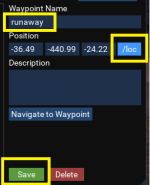
/nav locxyz # # # spot, change that to /nav wp runaway (or whatever you named it)/nav wp runaway manually outside of the eventFor those who asked about an Enchanter version of the script, here's what I use:
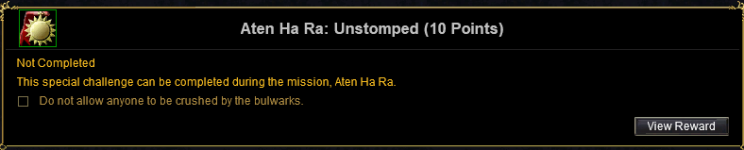
Aten Ha Ra: Calm the Stones
Lua:local mq = require("mq") while mq.TLO.Task('Aten Ha Ra')() do if mq.TLO.SpawnCount("a smirking guardian npc zradius 75")() > 0 then mq.cmd("/boxr Pause") while mq.TLO.SpawnCount("a smirking guardian npc zradius 75")() > 0 do mq.cmd("/tar a smirking guardian npc zradius 75") mq.cmd('/cast "Addle"') end mq.cmd("/boxr Unpause") end mq.delay(10) end
mq.event('gravity', "#*#on the floor around " .. mq.TLO.Me.Name() .. "#*#",
Event_RunAway)-- Aten Ha Ra event manager TOL Mission
-- jb321
-- 11/14/2022
-- upd
-- v1.0a
local mq = require('mq')
local function Event_RunAway()
local my_class = mq.TLO.Me.Class.ShortName()
mq.cmd('/gsay ' .. mq.TLO.Me.Name() .. " has run away!")
mq.cmd('/gu ' .. mq.TLO.Me.Name() .. " has run away!")
if not mq.TLO.Macro.Paused() then mq.cmd("/mqp on") end
if my_class == "BRD" then mq.cmd('/twist off') end
if my_class == "BER" then
if mq.TLO.Me.ActiveDisc.Name.Find('Frenzied Resolve Discipline')() then
mq.cmd('/stopdisc')
end
end
mq.delay(1000)
mq.cmd('/afollow off')
mq.cmd('/nav stop')
mq.cmd('/target clear')
mq.delay(100)
mq.cmd('/nav locxyz 1186.12 0.932035 235.003')
mq.delay(1500)
mq.delay(1500)
mq.delay(1500)
-- mq.delay(1500)
-- mq.delay(1500)
if my_class == "BRD" then mq.cmd('/twist on') end
-- when to run back? or never?
-- mq.cmd('nav spawn ' .. mq.TLO.Group.MainAssist())
-- mq.cmd('/mqp off')
end
-- Silence of Shadows
mq.event('runaway',
"#*#Aten Ha Ra points at " .. mq.TLO.Me.Name() .. " with one arm#*#",
Event_RunAway)
-- Fluctuating Gravity
mq.event('gravity', "#*#on the floor around " .. mq.TLO.Me.Name() .. "#*#",
Event_RunAway)
while true do
mq.doevents()
local my_class = mq.TLO.Me.Class.ShortName()
-- Bard Mez
if my_class == "BRD" then
local mobcount = mq.TLO
.SpawnCount("a smirking guardian npc zradius 100")()
if mobcount > 0 then
if not mq.TLO.Macro.Paused() then
mq.cmd("/mqp on")
mq.cmd("/stopsong")
mq.cmd("/stopcast")
end
if mq.TLO.Target.ID() ~=
mq.TLO.Spawn("a smirking guardian npc").ID() then
-- we need to delay before we try and do anything, they appear to not insta disappear if we insta mez them
mq.delay(500)
mq.cmd("/tar a smirking guardian npc zradius 100")
mq.delay(500)
end
if mobcount >= 1 then
mq.cmd("/twist 8")
mq.delay(3000)
end
end
if mq.TLO.Macro.Paused() then mq.cmd("/mqp off") end
mq.delay(1000)
end
-- Enchanter Mez
if my_class == "ENC" then
if mq.TLO.SpawnCount("a smirking guardian npc zradius 100")() > 0 then
if not mq.TLO.Macro.Paused() then mq.cmd("/mqp on") end
mq.cmd('/stopcast')
mq.delay(500)
while mq.TLO.SpawnCount("a smirking guardian npc zradius 100")() > 0 do
mq.cmd("/tar a smirking guardian npc zradius 100")
mq.delay(100)
-- if mq.TLO.Target() ~= nil then end
mq.cmd('/cast "Addle"')
mq.delay(1)
end
if mq.TLO.Macro.Paused() then mq.cmd("/mqp off") end
end
mq.delay(10)
end
-- Fluctuating Gravity
if mq.TLO.Me.State() == "FEIGN" then mq.cmd('/stand') end
mq.delay(100)
end