• You've discovered RedGuides, an EverQuest multi-boxing and scripting community 🧙‍♀️⚙️. We want you to play several EQ characters at once, come join us and say hello! 👋

  • A TLP without truebox has thawed (Very Vanilla ready)
    Frostreaver
AlphaBuff - The Ultimate Buff & Song Windows

Release AlphaBuff - The Ultimate Buff & Song Windows (1 Viewer) 3.5.4

No permission to download
Joined
Mar 19, 2021
RedCents
10,383¢
rawmotion submitted a new resource:

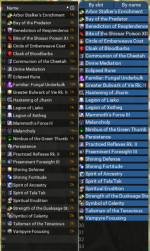
Alphabuff.lua - Sort your buffs alphabetically with this sortable buff window.

This is meant to replace the default EQ buff window entirely.

It let's you sort buffs by slot number, or alphabetically.

Click on a buff to remove it. Right-click to inspect it.

Detrimental buffs appear in red.

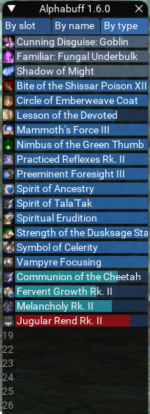
By slot: View attachment 46356 By name: View attachment 46357


Making it compact enough for practical use has been a challenge.
I'd welcome other contributers to help me improve this!

Read more about this resource...
 
Id really like a buff window that told me which buffs I should have that are missing. I will give this a whirl tonight.
I feel like this would be very subjective. Maybe a Lua that would be customizable to your needs where you pick what buffs you class as "needed" and would tell you if you have them or not.

Very cool Lua rawmotion! Thank you - cant wait to use this.
 
Id really like a buff window that told me which buffs I should have that are missing. I will give this a whirl tonight.
I'd like this too. Perhaps a feature where you can "pin" certain buffs to the top, and they will be "greyed out" if you don't have them up.
 
Thanks so much for this, rawmotion. The dream of an all Lua ui is getting closer! I'm already checking it out in the game and it looks amazing. A couple of quick thoughts: A toggle to collapse it would be cool. I also agree that having a system for showing missing buffs would be nice. One thing that comes to mind, if it would be possible to teach it a "favorites list", have a collapsed form that will show buffs from your list only if they are missing. Otherwise, it could just be fairly inconspicuous. Maybe it could also show debuffs in this form. Just some ideas based on the conversation so far. Either way, I'm already in!
 
Going to update this soon. I managed to make it significantly more compact, while doing away with the font-scaling that made it hard to read.
Also, adding background progress bars to see remaining time! You can still hover to get the exact time. Progress bar will be red for debuffs.

1677009709609.png
 
Since my stroke, I need something like this. I really appreciate your hard work on this project. Thank you!
 
omg, why wasn't this thought of sooner? Genius! I think this will be a huge help for many people, so thank you. I'm planning on trying it this evening because the buff window can be a PITA to work with when your messing with 6 toons. Nevermind those that run a raid force LOL.
 
Last edited:
Can this be done with the short term buff window, songs, etc?
 
Thanks for this beautiful masterpiece ui, can we

1. Sort by Duration plz? From longest to shortest, so the permanent buff will always on the top and we can more focus on the bottom for the short buffs.
2. Can we adjust the font size plz? :hfive:
 
1. Sort by Duration plz? From longest to shortest, so the permanent buff will always on the top and we can more focus on the bottom for the short buffs.

That's essentially what Sort by Type does—permanent on top (grey), >20min buffs underneath (blue), <20min buffs under that (turqoise/red).
Or do you mean sorting them by "time left"? ... I'm not sure that would be useful because you'd have short duration and long duration buffs all mixed together.

2. Can we adjust the font size plz?

Unfortunately, right now, the ImGui sytem pre-renders fonts and doesn't allow for different font sizes. It does allow "scaling" the font, but that makes it ugly and harder to read.
 
My suggestion, that but also able to combine the two windows into one.
It would make the window too tall for most people. I think if/when I create a song window, they would need to stay seperate.
Although, you know you can always drag any two Lua windows onto each other it will put them together in a tab group...
 
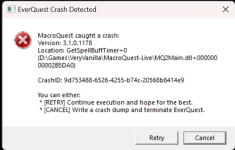
I'm getting a MQ BuffWindow crash under certain circumstances, which makes me think it's Alphabuff-related. It might not be but here are the steps to reproduce:

1. Log into a character and start Alphabuff.
2. Make sure the character has at least one buff on them.
3. /camp char. At the character select screen, Alphabuff will still be active but empty.
4. Load into any character. While the loadingscreen is up, MQ crashes. Error message below:

1677182101850.png

Happy to provide the crash dump if desired.
 
Last edited:
I'm getting a MQ BuffWindow crash under certain circumstances, which makes me think it's Alphabuff-related. It might not be but here are the steps to reproduce:

1. Log into a character and start Alphabuff.
2. Make sure the character has at least one buff on them.
3. /camp char. At the character select screen, Alphabuff will still be active but empty.
4. Load into any character. While the loadingscreen is up, MQ crashes. Error message below:


Happy to provide the crash dump if desired.
Just need to check if the character is in game and spawned at the beginning of your loop and either skip the loop while it's not true or end the Lua. Either works. I'd probably just skip the loop in case they log back in.
 
I'm getting a MQ BuffWindow crash under certain circumstances, which makes me think it's Alphabuff-related. It might not be but here are the steps to reproduce:

1. Log into a character and start Alphabuff.
2. Make sure the character has at least one buff on them.
3. /camp char. At the character select screen, Alphabuff will still be active but empty.
4. Load into any character. While the loadingscreen is up, MQ crashes. Error message below:

View attachment 46505

Happy to provide the crash dump if desired.
can you copy (ctrl+c) and paste the text contents of the dialog instead of posting a picture of it?
 
I'm getting a MQ BuffWindow crash under certain circumstances, which makes me think it's Alphabuff-related. It might not be but here are the steps to reproduce:

1. Log into a character and start Alphabuff.
2. Make sure the character has at least one buff on them.
3. /camp char. At the character select screen, Alphabuff will still be active but empty.
4. Load into any character. While the loadingscreen is up, MQ crashes. Error message below:

View attachment 46505

Happy to provide the crash dump if desired.
Hmm yeah I see it. I'll look at it tomorrow.
 
Rawmotion

Hey man great job. As soon as I saw this I downloaded it and installed. Love the look, although if I had my way with it, I would have the font be 1 size bigger. I can still read it just fine and it's a ton better than the EQ font.

I do have one problem with it though. I can't seem to get the buff window to stay where I put it. I have tried the thing where you put it in place then close it out and then re open it (with a /Lua run alphabuff) and it is where I put it. But when I switch to another character and come back the buff window reverts to the same place. Happens on all 6 characters. Funny thing is, is that it's not the default position. You know the position of all the windows when you first run them? Upper left corner of the screen. It's more like where I have all my other Lua bars parked and of course it's right in the way of everything else lol.

Anyways if you think of something by all means give a shout. And thanks for putting out another quality Lua.

Vrak
 
Rawmotion

Hey man great job. As soon as I saw this I downloaded it and installed. Love the look, although if I had my way with it, I would have the font be 1 size bigger. I can still read it just fine and it's a ton better than the EQ font.

I do have one problem with it though. I can't seem to get the buff window to stay where I put it. I have tried the thing where you put it in place then close it out and then re open it (with a /lua run alphabuff) and it is where I put it. But when I switch to another character and come back the buff window reverts to the same place. Happens on all 6 characters. Funny thing is, is that it's not the default position. You know the position of all the windows when you first run them? Upper left corner of the screen. It's more like where I have all my other LUA bars parked and of course it's right in the way of everything else lol.

Anyways if you think of something by all means give a shout. And thanks for putting out another quality LUA.

Vrak
Thanks.

- Unfortunately, right now, the ImGui sytem pre-renders fonts and doesn't allow for different font sizes. It does allow "scaling" the font, but that makes it ugly and harder to read.
- Yeah I have a bunch of Lua windows that don't always seem to remember their position. I'll look at it some more.

Edit: What I noticed is that if you run the same Lua on multiple toons, it seems to remember the position of the last toon on which you positioned the window. E.g. On toon1, I put the window on the left side of the screen, then on toon2, I put the window on the right side of the screen. Next time I log both toons in, they will both have the window on the right side. This seems to be default behavior for Lua GUI windows. I'll have to look into whether there is a way to override this.
 
Last edited:
It doesn't matter what else is released this year, I am voting this as the top Lua script for 2023. Sorry other contributors, not sorry.
 
Congrats on the 2.0 release! Adding the alphabuff treatment to the song window is so great. I love everything about this so far.
 
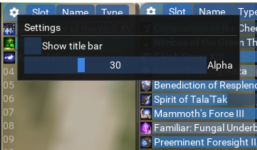
Incoming update: Settings panel
- Show/hide title bar for each window
- Adjust window transparency for each window

1677419036454.png
 
Release AlphaBuff - The Ultimate Buff & Song Windows

Users who are viewing this thread

Back
Top
Cart