
-
 Hail, we're RedGuides. We want you to play six (yes, 6!) EverQuest characters at once. We have scripts and a friendly community to help, please join our playstyle and say hello! 👋
You are using an out of date browser. It may not display this or other websites correctly.
You should upgrade or use an alternative browser.
You should upgrade or use an alternative browser.
Problem - 12/5/2023 EQ Windows Randomly Closing? (1 Viewer)
- Thread starter Kryp
- Start date

some folks are reporting this with mq2map and maybe a combination of mq2map and spawnmaster.Logged in with my 6 accounts and have had the windows of different accounts randomly close at different times. Seems to be no rhyme or reason for it. Anyone else experiencing this since the new patch?
try turning off maps and see if it stops

Logged in with my 6 accounts and have had the windows of different accounts randomly close at different times. Seems to be no rhyme or reason for it. Anyone else experiencing this since the new patch?
Same thing is happening to me right now too.

DEADCiTiES
Well-known member
I don't have the expansion, but decided to see what would happen when I clicked the portal to LS in the Plane of Tranquility. It ported my character to PoT entrance, but crashed one of my other clients.
For me it went like this. Logged 6 box, ported to guildlobby. Brd and Shm crashed. Ported to guildhall, Shd crashed. Ported to Maiden's eye. Rog and Mnk crashed. Took the Shei task, Brd crashed. etc etc. Now all this happened when zoning all characters at once. I am doing now with map disabled, no DC. Ported all to GuildLobby. No DC.
Edit: Took 2 more tasks, zoned 3 more areas and no DC. it could have been a coincidence that it only was like 30min after the server came back which also could have been the cause? Map is still disabled.
Edit2: Corrected from DC to crash. It was a crash to desktop.
Edit: Took 2 more tasks, zoned 3 more areas and no DC. it could have been a coincidence that it only was like 30min after the server came back which also could have been the cause? Map is still disabled.
Edit2: Corrected from DC to crash. It was a crash to desktop.
Last edited:
W 2023-12-05 15:12:59.375268 [mq] Tried to send a message with id 1004 on a null connection.
W 2023-12-05 15:13:11.977469 [mq] Tried to send a message with id 3 on a null connection.
I 2023-12-05 15:13:15.365395 [mq] MQ2Overlay: Resetting overlay
D 2023-12-05 15:13:15.365427 [mq] MQGraphicsEngine: InvalidateDeviceObjects
I 2023-12-05 15:13:16.702678 [mq] IDirect3DDevice9::EndScene: TestCooperativeLevel was successful, reacquiring device.
D 2023-12-05 15:13:16.702790 [mq] MQGraphicsEngine: InvalidateDeviceObjects
D 2023-12-05 15:13:16.702802 [mq] MQGraphicsEngine: CreateDeviceObjects
then
W 2023-12-05 15:21:25.621999 [mq] Tried to send a message with id 1004 on a null connection.
over and over
this is from the CRASH log
W 2023-12-05 15:13:11.977469 [mq] Tried to send a message with id 3 on a null connection.
I 2023-12-05 15:13:15.365395 [mq] MQ2Overlay: Resetting overlay
D 2023-12-05 15:13:15.365427 [mq] MQGraphicsEngine: InvalidateDeviceObjects
I 2023-12-05 15:13:16.702678 [mq] IDirect3DDevice9::EndScene: TestCooperativeLevel was successful, reacquiring device.
D 2023-12-05 15:13:16.702790 [mq] MQGraphicsEngine: InvalidateDeviceObjects
D 2023-12-05 15:13:16.702802 [mq] MQGraphicsEngine: CreateDeviceObjects
then
W 2023-12-05 15:21:25.621999 [mq] Tried to send a message with id 1004 on a null connection.
over and over
this is from the CRASH log

No crash report. Just the EQ window closed. So DC I guess.DC or crash?
Yes crash then.DC means disconnect, would send you to server or character select.
Sounds like a crash
Turned off spawnmaster in conjunction with map now and all 6 zoned into restless assault without a crash so sounds like Sic's fix is the trick.
Can you try it a few more times to be certain?Yes crash then.
Turned off spawnmaster in conjunction with map now and all 6 zoned into restless assault without a crash so sounds like Sic's fix is the trick.

Tons of crashes while zoning, wasn't happening yesterday, there's a problem with the build.
What would spawnmaster have to do with crashing?
What would spawnmaster have to do with crashing?

if you have the plugin manager open you can right click to unload.maybe a stupid question , how do i deactivate this ?
Alternatively you can type /plugin mq2map unload and /plugin mq2spawnmaster unload
mq2enchanter doesn't even use OnAddSpawn, so no, i think it is unrelated to chanterwell still having crashes on my enchanter , deactivated MQ2 enchanter , and all goes smooth for now
But did you actually try unloading mq2map and spawnmaster? Because you don't mention actually doing those two things before assuming it is mq2enchanter. But if you did unload both mq2map and spawnmaster, and also unloaded mq2enchanter, then you can't know that mq2enchanter was the answer, because you altered 3 things at once.well still having crashes on my enchanter , deactivated MQ2 enchanter , and all goes smooth for now

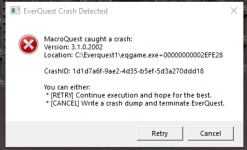
confirmed mq2map crashes while zoning or while just in-game
Did you try running the mesh updater and updating? That fixed it for me.confirmed mq2map crashes while zoning or while just in-game
how do you turn them off?Sic said:
some folks are reporting this with mq2map and maybe a combination of mq2map and spawnmaster.
try turning off maps and see if it stops.
I don't update meshes with the updater, since it would overwrite all of my custom meshes. I build my own and edit as needed.Did you try running the mesh updater and updating? That fixed it for me.
I've crashed while running no class plugin or macro, so it's definitely not automation or combat related.
I did /bcaa //plugin mq2map unload or single /plugin mq2map unloadhow do you turn them off?
it looks like there is an enchanter crash - but unrelated to all the other crashes folks have - it is a bug which im fixing now --- the reason it isn't happening for other folks is because you're likely very low levelagain , only MQ2enchanter makes me crash , im playing on ISboxer , its the only plugin leading to crashes for me
Not sure if this helps, but, Make sure to turn labels off on the map, or use /mapfilter named to limit how much data the map needs to show. The harder your device has to work, the more likely you are to have a device fail to reset when zoning multiple accounts at once.
try setting each of your instances of EQ to a different processor core. EQClient.ini, look for the section that looks like this:
CPUAffinity0=-1
CPUAffinity1=-1
CPUAffinity2=-1
CPUAffinity3=-1
CPUAffinity4=-1
CPUAffinity5=-1
This was OLD CODE!!! IT HAS BEEN CHANGED BUT NOT REMOVED!!!
Now, look for:
ClientCore0=-1
ClientCore1=-1
ClientCore2=-1
ClientCore3=-1
ClientCore4=-1
ClientCore5=-1
ClientCore6=-1
These are the lines that matter for individualizing your EQ client instances to individual processor cores. Default value is -1 = use all cores. Any value larger than your physical quantity of cores is the same as -1, it will use all cores. The value range = 0 to (max-1) if you have 12 cores, your values will range from 0 - 11. Just like addresses for hard drives.
Say you want to reserve your primary processor for windows, and use your other processes each for a game instance, you could type in something like this:
ClientCore0=1
ClientCore1=2
ClientCore2=3
ClientCore3=4
ClientCore4=5
ClientCore5=6
ClientCore6=7
Notice I did not use =0. This means that as long as I do not load more than 6 instances, each will have a dedicated processor. Now, if you EVER load more than 6 instances... your client file will get a new line of code for a new ClientCore7, ClientCore8, so on and so forth. Their values will always be initially set to -1, which is to use all processors.
Couple other things:
1. turn labels off on your map. That's a LOT of extra data to constantly update and visually represent, with locations, names, all that jazz. /mapfilter named if my favorite as it limits what shows. I only turn that to hide if I am zoomed in on the map, so it doesn't overwork the system.
2. Turn off your Chat Log. Yeah, you are running an active text logger for each instance of EQ. Meaning, everything you do on all accounts is constantly being monitored to write text to a file. This is a lot of work. Especially when you do it 6 times at once.
3. micromanage your framerates. If you are laggy, have your boxes turn actor clip plane down, or clip plane down, or both.
4. Social Animations... turn them off... holy mother of all that is unholy... turn them off...
5. MipMap filter: cut that shit off. Just, don't even listen to it. It's crap.
6. Texture Compression: if your computer is still needing texture compression... I wonder how it has electricity from the dump. Turn that crap off. Not needed, and it makes you load, and compress a zone, increasing workload and load in times, whenever you zone in somewhere, and bloats the size of EQ horribly. If you have 6 accounts up, and all load into a zone at the same time, your computer is trying to compress that zone 6 times. Stupid. Turn it off. Just turn it off.
7. never assume it is just that MQ has gone awry. Every time there is an update, and added features, it makes each client work harder. each client makes your PC work harder. Sometimes, beating the horse with a whip gets results... and sometimes it just lays there begging you to kill it. This is what you're doing to your PC when you overtax it. No sense beating it when you've made it want to die already.
8. Check what texture group you are using (high-low)
9. Check what your RAM usage settings are on from least used to most used. Balanced is good, but remember, less RAM means more HDD calls for data. more RAM means less HDD calls for data. Choose the setting to suit your system. If you have badass M.2 drives with crazy speeds, use least amount if you wanna. If your HDD is a clunker but you got great RAM, use most usage.
These are just some debugging tips that have worked well for me over the years. Usually it comes down to finding a nice marriage between visual quality and performance. yeah, 2.0 shaders are nice, but i can do without. screw shadows. advanced lighting is and always has been crap. like... pick and choose your experience through settings.
If none of this helps with the crashing... meh... sorry. I will have to leave that to better and more experienced people. I am just a random 20 year forum lurker. /nods
try setting each of your instances of EQ to a different processor core. EQClient.ini, look for the section that looks like this:
CPUAffinity0=-1
CPUAffinity1=-1
CPUAffinity2=-1
CPUAffinity3=-1
CPUAffinity4=-1
CPUAffinity5=-1
This was OLD CODE!!! IT HAS BEEN CHANGED BUT NOT REMOVED!!!
Now, look for:
ClientCore0=-1
ClientCore1=-1
ClientCore2=-1
ClientCore3=-1
ClientCore4=-1
ClientCore5=-1
ClientCore6=-1
These are the lines that matter for individualizing your EQ client instances to individual processor cores. Default value is -1 = use all cores. Any value larger than your physical quantity of cores is the same as -1, it will use all cores. The value range = 0 to (max-1) if you have 12 cores, your values will range from 0 - 11. Just like addresses for hard drives.
Say you want to reserve your primary processor for windows, and use your other processes each for a game instance, you could type in something like this:
ClientCore0=1
ClientCore1=2
ClientCore2=3
ClientCore3=4
ClientCore4=5
ClientCore5=6
ClientCore6=7
Notice I did not use =0. This means that as long as I do not load more than 6 instances, each will have a dedicated processor. Now, if you EVER load more than 6 instances... your client file will get a new line of code for a new ClientCore7, ClientCore8, so on and so forth. Their values will always be initially set to -1, which is to use all processors.
Couple other things:
1. turn labels off on your map. That's a LOT of extra data to constantly update and visually represent, with locations, names, all that jazz. /mapfilter named if my favorite as it limits what shows. I only turn that to hide if I am zoomed in on the map, so it doesn't overwork the system.
2. Turn off your Chat Log. Yeah, you are running an active text logger for each instance of EQ. Meaning, everything you do on all accounts is constantly being monitored to write text to a file. This is a lot of work. Especially when you do it 6 times at once.
3. micromanage your framerates. If you are laggy, have your boxes turn actor clip plane down, or clip plane down, or both.
4. Social Animations... turn them off... holy mother of all that is unholy... turn them off...
5. MipMap filter: cut that shit off. Just, don't even listen to it. It's crap.
6. Texture Compression: if your computer is still needing texture compression... I wonder how it has electricity from the dump. Turn that crap off. Not needed, and it makes you load, and compress a zone, increasing workload and load in times, whenever you zone in somewhere, and bloats the size of EQ horribly. If you have 6 accounts up, and all load into a zone at the same time, your computer is trying to compress that zone 6 times. Stupid. Turn it off. Just turn it off.
7. never assume it is just that MQ has gone awry. Every time there is an update, and added features, it makes each client work harder. each client makes your PC work harder. Sometimes, beating the horse with a whip gets results... and sometimes it just lays there begging you to kill it. This is what you're doing to your PC when you overtax it. No sense beating it when you've made it want to die already.
8. Check what texture group you are using (high-low)
9. Check what your RAM usage settings are on from least used to most used. Balanced is good, but remember, less RAM means more HDD calls for data. more RAM means less HDD calls for data. Choose the setting to suit your system. If you have badass M.2 drives with crazy speeds, use least amount if you wanna. If your HDD is a clunker but you got great RAM, use most usage.
These are just some debugging tips that have worked well for me over the years. Usually it comes down to finding a nice marriage between visual quality and performance. yeah, 2.0 shaders are nice, but i can do without. screw shadows. advanced lighting is and always has been crap. like... pick and choose your experience through settings.
If none of this helps with the crashing... meh... sorry. I will have to leave that to better and more experienced people. I am just a random 20 year forum lurker. /nods
Users who are viewing this thread
Total: 2 (members: 0, guests: 2)
Share: