• You've discovered RedGuides, an EverQuest multi-boxing and scripting community 🧙‍♀️⚙️. We want you to play several EQ characters at once, come join us and say hello! 👋

  • A TLP without truebox has thawed (Very Vanilla ready)
    Frostreaver

Problem - Windows 10 Defender detecting MacroQuest2.exe as a virus

Joined
Mar 9, 2013
RedCents
Installing on new computer, no other apps or programs installed previously except Everquest.

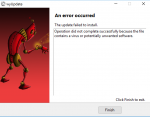
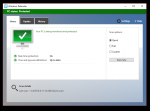
When installing through wyUpdate patcher, Windows Defender quarantines and deletes the exe file. Even the patcher fails and recognizes the file as a virus.
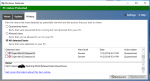
 

Attachments

  • virus.PNG
    virus.PNG
    197.1 KB · Views: 7
  • wyUpdate.PNG
    wyUpdate.PNG
    127.7 KB · Views: 5
Looks like I get to go through this bullshit again with Microsoft.

When we jailbreak MQ2, virus scanners flip the fuck out. It took about a week and several emails to get it cleared last time.

If you'd like to try it, or are worried we're secret russian haxx0rs, jailbreak Macroquest2.exe yourself (hex edit Macroquest2.exe, replace Microsoft with Microsoap) and you'll get the same virus warning.
 
Looks like I get to go through this bullshit again with Microsoft.

When we jailbreak MQ2, virus scanners flip the fuck out. It took about a week and several emails to get it cleared last time.

If you'd like to try it, jailbreak Macroquest2.exe yourself (there are guides here) and you'll get the same virus warning.

I don't think you used enough Microsoap Red...
 
Looks like I get to go through this bullshit again with Microsoft.

When we jailbreak MQ2, virus scanners flip the fuck out. It took about a week and several emails to get it cleared last time.

If you'd like to try it, or are worried we're secret russian haxx0rs, jailbreak Macroquest2.exe yourself (hex edit Macroquest2.exe, replace Microsoft with Microsoap) and you'll get the same virus warning.


Admit it, you and your very vanilla is the source of wiki-leaks!
 
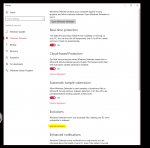
For anyone curious how to exclude files or folders temporarily


CLICK SETTINGS
slide 1.PNG


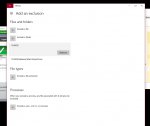
CLICK add an exclusion
slide 2.PNG


Under Files and Folders selection, you can choose to exclude a specific file or folder. Example shows both folder and file exclusions
slide 3.PNG

Hope that helps
 
Anyone can email Microsoft and they will whitelist it.
I have a couple people that has told me they have done it for other antivirus vendors so I know it doesn't have to be the author.
The problem is I add new features to it quite often so that makes the md5 change.
But... It is absolutely an option and they have been fairly quick to realize it's not malware in the past.
 
Last edited:
MS has cleared Macroquest2.exe. Please update Windows Defender and let me know if there are any issues.
 
Problem - Windows 10 Defender detecting MacroQuest2.exe as a virus

Users who are viewing this thread

Back
Top
Cart