• Hail, we're RedGuides. We want you to play six (yes, 6!) EverQuest characters at once. We have scripts and a friendly community to help, please join our playstyle and say hello! 👋
  • We've added LLM sections to our Terms & Rules and Resource Rules, for everyone's sanity & in-game safety.
    Read more
    a. Do not replace your voice with an LLM. This goes for your posts and your scripts. Drafting and editing with a tool is fine, but don't take you out of what you share.
    b. Do not replace your EQ character's voice with an LLM. We don't want scripts that speak over /ooc, /shout or other public channels. This has been an unwritten rule that's kept casino scripts off the site for decades, but we're now compelled to make it clear: keep automated communication private.

    Why Does RG Review Scripts?
    Nearly every LLM-written Lua script we see is making your character do impossible things, and rarely in a way that's beneficial to you. We've seen heavy server hammering, /target over impossible distances when /nav spawn would passively accomplish the same thing, a spawn search that fires 20+ times per second, and other pointless actions that are likely annoying GMs.

    You are welcome to use LLMs as a tool to structure, draft, and edit your work, but please read critically before hitting /lua run

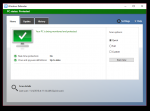
Problem - Windows 10 Defender detecting MacroQuest2.exe as a virus

Installing on new computer, no other apps or programs installed previously except Everquest.

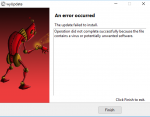
When installing through wyUpdate patcher, Windows Defender quarantines and deletes the exe file. Even the patcher fails and recognizes the file as a virus.
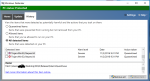
 

Attachments

  • virus.PNG
    virus.PNG
    197.1 KB · Views: 7
  • wyUpdate.PNG
    wyUpdate.PNG
    127.7 KB · Views: 5
Looks like I get to go through this bullshit again with Microsoft.

When we jailbreak MQ2, virus scanners flip the fuck out. It took about a week and several emails to get it cleared last time.

If you'd like to try it, or are worried we're secret russian haxx0rs, jailbreak Macroquest2.exe yourself (hex edit Macroquest2.exe, replace Microsoft with Microsoap) and you'll get the same virus warning.
 
Looks like I get to go through this bullshit again with Microsoft.

When we jailbreak MQ2, virus scanners flip the fuck out. It took about a week and several emails to get it cleared last time.

If you'd like to try it, jailbreak Macroquest2.exe yourself (there are guides here) and you'll get the same virus warning.

I don't think you used enough Microsoap Red...
 
Looks like I get to go through this bullshit again with Microsoft.

When we jailbreak MQ2, virus scanners flip the fuck out. It took about a week and several emails to get it cleared last time.

If you'd like to try it, or are worried we're secret russian haxx0rs, jailbreak Macroquest2.exe yourself (hex edit Macroquest2.exe, replace Microsoft with Microsoap) and you'll get the same virus warning.


Admit it, you and your very vanilla is the source of wiki-leaks!
 
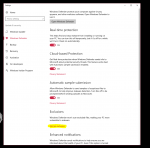
For anyone curious how to exclude files or folders temporarily


CLICK SETTINGS
slide 1.PNG


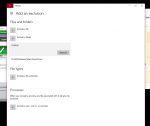
CLICK add an exclusion
slide 2.PNG


Under Files and Folders selection, you can choose to exclude a specific file or folder. Example shows both folder and file exclusions
slide 3.PNG

Hope that helps
 
Anyone can email Microsoft and they will whitelist it.
I have a couple people that has told me they have done it for other antivirus vendors so I know it doesn't have to be the author.
The problem is I add new features to it quite often so that makes the md5 change.
But... It is absolutely an option and they have been fairly quick to realize it's not malware in the past.
 
Last edited:
Problem - Windows 10 Defender detecting MacroQuest2.exe as a virus

Users who are viewing this thread

Back
Top
Cart