
-
 Hail, we're RedGuides. We want you to play six (yes, 6!) EverQuest characters at once. We have scripts and a friendly community to help, please join our playstyle and say hello! 👋
-
 We've added LLM sections to our Terms & Rules and Resource Rules, for everyone's sanity & in-game safety.
Read more
a. Do not replace your voice with an LLM. This goes for your posts and your scripts. Drafting and editing with a tool is fine, but don't take you out of what you share.
b. Do not replace your EQ character's voice with an LLM. We don't want scripts that speak over/ooc,/shoutor other public channels. This has been an unwritten rule that's kept casino scripts off the site for decades, but we're now compelled to make it clear: keep automated communication private.
Why Does RG Review Scripts?
Nearly every LLM-written Lua script we see is making your character do impossible things, and rarely in a way that's beneficial to you. We've seen heavy server hammering,/targetover impossible distances when/nav spawnwould passively accomplish the same thing, a spawn search that fires 20+ times per second, and other pointless actions that are likely annoying GMs.
You are welcome to use LLMs as a tool to structure, draft, and edit your work, but please read critically before hitting/lua run
You are using an out of date browser. It may not display this or other websites correctly.
You should upgrade or use an alternative browser.
You should upgrade or use an alternative browser.
Problem - When I try to log in a toon that uses macroquest, EQ crashes
- Thread starter RobRenfro
- Start date
- Status
- Not open for further replies.


2023C8COUPE
Member
Ditto
2023C8COUPE
Member
---------------------------
EverQuest Crash Detected
---------------------------
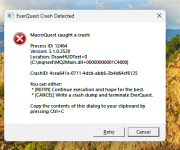
MacroQuest caught a crash:
Process ID: 23288
Version: 3.1.0.2520
Location: DrawHUDText+0 (C:\Users\harje\AppData\Local\VeryVanilla\MacroQuest\Release\MQ2Main.dll+00000000001C4800)
CrashID: e195123e-e588-4893-9b82-fd010b5b1fa4
You can either:
* [RETRY] Continue execution and hope for the best.
* [CANCEL] Write a crash dump and terminate EverQuest.
Copy the contents of this dialog to your clipboard by pressing Ctrl+C
---------------------------
Retry Cancel
---------------------------
---------------------------
EverQuest Crash Detected
---------------------------
MacroQuest caught a crash:
Process ID: 7808
Version: 3.1.0.2520
Location: DrawHUDText+0 (C:\Users\amand\AppData\Local\VeryVanilla\MacroQuest\Release\MQ2Main.dll+00000000001C4800)
CrashID: c7e0f8e4-b2ad-455b-b860-cb091f73102d
You can either:
* [RETRY] Continue execution and hope for the best.
* [CANCEL] Write a crash dump and terminate EverQuest.
Copy the contents of this dialog to your clipboard by pressing Ctrl+C
---------------------------
Retry Cancel
---------------------------

2023C8COUPE
Member
i just tried reinstalling everquest, that didn't help same issue
2023C8COUPE
Member
---------------------------
EverQuest Crash Detected
---------------------------
A crash dump has been written to:
C:\Users\harje\AppData\Local\VeryVanilla\MacroQuest\Release\Logs\Dumps\reports\eqgame_20240519_131427.dmp
---------------------------
OK
---------------------------
EverQuest Crash Detected
---------------------------
A crash dump has been written to:
C:\Users\harje\AppData\Local\VeryVanilla\MacroQuest\Release\Logs\Dumps\reports\eqgame_20240519_131427.dmp
---------------------------
OK
---------------------------

bundleofbones
New member
Having the same issue for my /cwtn plugin toons. The other ones seem to be working fine.---------------------------
EverQuest Crash Detected
---------------------------
A crash dump has been written to:
C:\Users\harje\AppData\Local\VeryVanilla\MacroQuest\Release\Logs\Dumps\reports\eqgame_20240519_131427.dmp
---------------------------
OK
---------------------------
I see there is a patch :View attachment 61712
Are you running the latest version? I did NOT yet patch, but I did load up two characters (with plugins).
Yep fully updated

- Commits
- 191
/xtarget auto on
is crashing. It's an EQ command. Anyone load up without MQ and try that command or any normal EQ command I suppose? Then with MQ but turn off any class plugins in your Macroquest.ini
The class plugins are in this particular case using that command once we've verified we're in game, are the correct class etc.

bundleofbones
New member
I was able to turn off my /mq2cleric in the ini and it loads up without the crash.yes.
for some reason the plugin issuing the eq command/xtarget auto onis causing mq to crash (which i can't replicate thus far --- I wonder if those crashing are using the new eq ui engine)
yes, if mq2cleric is unloaded then mq2cleric wouldn't be able to issue the everquest commandI was able to turn off my /mq2cleric in the ini and it loads up without the crash.
/xtarget auto on so since that is what is causing the crash, not doing the thing that crashes would stop it from doing that crash
nuggy
SUSPENDED
i didnt do the update and is fine here logged um all inI can log in Bard's just fine but anyone toon crashes when I try to log them in.
How do you Un update? Everything was perfect last night until the update. Did EQ update also, so need to update there to?
you cannot 'un-update' or roll back. Just hang tight, when the Crash IDs are posted and sent to the devs, they can see the issue with more info and fix it when they can. Sic is aware of the issue, so all is good. Before you know it, you'll see a red bot post with an update.How do you Un update? Everything was perfect last night until the update. Did EQ update also, so need to update there to?
Thank youyou cannot 'un-update' or roll back. Just hang tight, when the Crash IDs are posted and sent to the devs, they can see the issue with more info and fix it when they can. Sic is aware of the issue, so all is good. Before you know it, you'll see a red bot post with an update.
yes.
for some reason the plugin issuing the eq command/xtarget auto onis causing mq to crash (which i can't replicate thus far --- I wonder if those crashing are using the new eq ui engine)
It's the toons using the class plugins, for me it's warrior and cleric
Sic I can't get to the point where I choose the old UI it crashes way before that.yes.
for some reason the plugin issuing the eq command/xtarget auto onis causing mq to crash (which i can't replicate thus far --- I wonder if those crashing are using the new eq ui engine)
i, so far, can't replicate it with new/old ui on multiple pcs - self compiling or rg build.Sic I can't get to the point where I choose the old UI it crashes way before that.
i imagine it is something that @brainiac might have to look at since it happened with the changes from lasdt night
You can turn off the new UI engine without launching the game, navigate to your EQ folder and find eqclient.ini, open it and make sure it says > UseNewUIEngine=0 <

BlueBug
Seasoned veteran member
I logged in each toon and made sure the new (blah) UI was off. That didn't fix it. /shrugyes.
for some reason the plugin issuing the eq command/xtarget auto onis causing mq to crash (which i can't replicate thus far --- I wonder if those crashing are using the new eq ui engine)
BB
wyattdamnit
New member
mine crashes immediately after character select screen if I have mq2 running

Raelvictus
Well-known member
Same as the above i am afraid, i went into eqlclient and changed to usenewuiengine to 0 and the CWTN characters still crash but my bard is fine
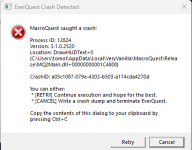
I'm not sure why i need to keep repeating as if it is not being read - but yes. there are some crashes, it is because the cwtn plugin is issuing an eq command
i said it *might* be due to new ui, and followed up with i can't reproduce it on either.
posting images of a crashid is unhelpful.
/xtarget auto on.i said it *might* be due to new ui, and followed up with i can't reproduce it on either.
posting images of a crashid is unhelpful.
i, so far, can't replicate it with new/old ui on multiple pcs - self compiling or rg build.
i imagine it is something that @brainiac might have to look at since it happened with the changes from lasdt night
yes.
for some reason the plugin issuing the eq command/xtarget auto onis causing mq to crash (which i can't replicate thus far --- I wonder if those crashing are using the new eq ui engine)
well - it turns out this is mq2xassist related (a plugin that later-on cwtn plugins unload due to conflicting behavior anyhow).
in the meantime you can skip the crashes by going in your macroquest.ini and turning mq2xassist to =0
I imagine either mq2xassist or mq's handling of "overtaken" aliases will have an update later
in the meantime you can skip the crashes by going in your macroquest.ini and turning mq2xassist to =0
I imagine either mq2xassist or mq's handling of "overtaken" aliases will have an update later
BlueBug
Seasoned veteran member
Cool deal.well - it turns out this is mq2xassist related (a plugin that later-on cwtn plugins unload due to conflicting behavior anyhow).
in the meantime you can skip the crashes by going in your macroquest.ini and turning mq2xassist to =0
I imagine either mq2xassist or mq's handling of "overtaken" aliases will have an update later
Thanks for the update man.
BB~
This indeed allowed me to log in, thanks man.well - it turns out this is mq2xassist related (a plugin that later-on cwtn plugins unload due to conflicting behavior anyhow).
in the meantime you can skip the crashes by going in your macroquest.ini and turning mq2xassist to =0
I imagine either mq2xassist or mq's handling of "overtaken" aliases will have an update later
not to be a jerk off, but make sure to save the change when you change it to 0, it worked for me.I can log in Bard's just fine but anyone toon crashes when I try to log them in.
- Status
- Not open for further replies.
Users who are viewing this thread
Total: 1 (members: 0, guests: 1)
Share: