• You've discovered RedGuides, an EverQuest multi-boxing and scripting community 🧙‍♀️⚙️. We want you to play several EQ characters at once, come join us and say hello! 👋

  • A TLP without truebox has thawed (Very Vanilla ready)
    Frostreaver
Very Vanilla MQ (Live Servers)

Vanilla - Very Vanilla MQ (Live Servers) (3 Viewers) 3.1.52471.11

No permission to download
Wrong forum
Just a question about patch day and wondering if I fubar'd my launcher. I updated just before patch and for 2 days its been stuck on "Patch day - Unavailable" is that normal? Otherwise, I actually was on Tarkov going through the new quest content they released with their patch. Gamer gonna game I guess :P.
 
Just a question about patch day and wondering if I fubar'd my launcher. I updated just before patch and for 2 days its been stuck on "Patch day - Unavailable" is that normal? Otherwise, I actually was on Tarkov going through the new quest content they released with their patch. Gamer gonna game I guess :P.
What to expect on patch days?
When eq patches MQ has to be rebuilt. (you also have to patch EQ --- this way you avoid "Version Mismatch" issues)

once mq is built RG can build - we now have an automated system that rebuilds RG as soon as it is updated - which means our previous method of "let's give it a quick test" is no longer there, and sometimes there ends up being another smaller patch later to correct if something got missed - so re-check on patch days if you are having issues.

eq could change literally anything and it would require the way MQ interacts with that portion of EQ to be completely reworked. It is normally just offsets, sometimes struct changes --- with the large changes eq has been making over the past few months (updates and backend improvements) there are more things than just offset changes that are happening, so it can certainly be a lot of work for the devs.

Curious when Very Vanilla will be updated?
You'll get a web notification (if we have permission), site notification, and email (optional)
Click to watch
MacroQuest for Live servers:
MacroQuest for Test server

EQ patches go like this: (in theory)
2nd* tue/wed = test "real" patch
3rd* wed = live patch
4th* tue/wed = test "true up

the tue over the wed is a more recent thing (I suspect klanderso has more to do with that, and having time to ensure working stuff before the weekend and upset people - klanderso is pretty awesome)
* holidays subject to cause shifts in days or even week

test is notorious for being like "oops we forgot the 'dont crash plz' file, gotta patch again", or "woops we added +1 to crashing, we meant -1", so "on paper" it is double the patches, but very frequently ends up being more than double the work (i imagine, I'm not doing the work - I'd love to learn enough at some point to help facilitate doing so, however)

Mq itself is open source and by volunteer(s) - RG which builds and distributes that is obviously paid for.
If you wanted to show your appreciation to the MQ devs for their volunteer work:

Tip the MQ Developers HERE:
brainiac:
https://www.redguides.com/tip/brainiac
Reply to this thread after donating for your 🧠


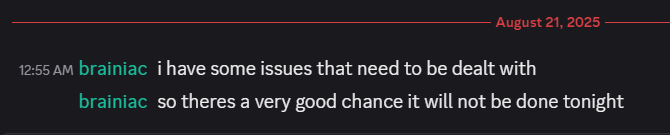
From brainiac last night (and posted in this thread a few times)
1755788885288.png
 
Sorry, was mostly thinking I might have messed something up when I reinstalled. Didn't know if it was normal or if I needed to uninstall/reinstall because of something I did. I did not mean for that to come out like I was complaining or asking for an update to the update. My bad.
 
Installed the new version and now when I launch a toon from macroquest, it seems mq isn't injecting into the eqgame. Autologin doesnt work, it just sits on the EULA screen. If I log all the way in there is no MQ window or plugins enabled.

edit: it looks like it is injecting given the MQ logs, but still no autologin or other in game feature of mq available. Also I did a fresh reinstall instead of a regular update from RedGuides launcher.

[2025-08-21 18:10:26.336] [MQ] [info] [MacroQuest.cpp:1433] New process detected: 13800
[2025-08-21 18:10:26.347] [MQ] [info] [ProcessList.cpp:694] Requesting injection into process id 13800
[2025-08-21 18:10:26.347] [MQ] [debug] [ProcessList.cpp:913] Injecting MQ into eqgame.exe: pid=13800
[2025-08-21 18:10:26.363] [MQ] [debug] [ProcessList.cpp:973] eqgame.exe version: Aug 14 2025 13:21:12 pid=13800
[2025-08-21 18:10:26.369] [MQ] [info] [ProcessList.cpp:1045] Injection completed on process id 13800
 
Refresh injections is no longer working for me, only thing I did was update :)

reinstalled and now working, I think.
@Smartiez did you try turning it off and back on?

pc GIF
 
Installed the new version and now when I launch a toon from macroquest, it seems mq isn't injecting into the eqgame. Autologin doesnt work, it just sits on the EULA screen. If I log all the way in there is no MQ window or plugins enabled.

edit: it looks like it is injecting given the MQ logs, but still no autologin or other in game feature of mq available. Also I did a fresh reinstall instead of a regular update from RedGuides launcher.

[2025-08-21 18:10:26.336] [MQ] [info] [MacroQuest.cpp:1433] New process detected: 13800
[2025-08-21 18:10:26.347] [MQ] [info] [ProcessList.cpp:694] Requesting injection into process id 13800
[2025-08-21 18:10:26.347] [MQ] [debug] [ProcessList.cpp:913] Injecting MQ into eqgame.exe: pid=13800
[2025-08-21 18:10:26.363] [MQ] [debug] [ProcessList.cpp:973] eqgame.exe version: Aug 14 2025 13:21:12 pid=13800
[2025-08-21 18:10:26.369] [MQ] [info] [ProcessList.cpp:1045] Injection completed on process id 13800
Still haven't been able to get it to work on my end... not sure what I did, was working great before patch and my reinstall
 
Still haven't been able to get it to work on my end... not sure what I did, was working great before patch and my reinstall
Resolved the issue, it was 100% my fault. Somehow MQ had been installed under the wrong windows user account from the user I was trying to launch it in.
 
Resolved the issue, it was 100% my fault. Somehow MQ had been installed under the wrong windows user account from the user I was trying to launch it in.
While MacroQuest correctly injects and starts running the autologin script, I am now running into two new issues.

1) When the game fires up, the autologin plugin goes to the sign in screen and 100% of the time I get the client says the wrong password was entered. I checked multiple times and the password is 100% correct and also works fine if I enter it manually. It clicks through so fast, to me it looks like nothing was even entered for the password before the script clicked login.

2) After I manually enter the password and get to the character select screen, I attempt to manually log in the character (or re-enable the autologin plugin) and then as the character signs in I get the following error:

---------------------------
EverQuest Crash Detected
---------------------------
MacroQuest caught a crash:

Process ID: 3896
Version: 3.1.1.3268
Location: RaiseException+0 (C:\WINDOWS\System32\KERNELBASE.dll+00000000000C7EF0)

CrashID: fc74787a-6f0c-4674-abb4-619bb7b6b12b

You can either:
* [RETRY] Continue execution and hope for the best.
* [CANCEL] Write a crash dump and terminate EverQuest.

Copy the contents of this dialog to your clipboard by pressing Ctrl+C

---------------------------
Retry Cancel
---------------------------


I've now gotten the above error 10+ times. I've tried rebooting, reinstalling redguides, macroquest and everything, and the result is always still the same. Any help would be appreciated, the last 5 days has been rough trying to get everything working again.

Thanks
 
While MacroQuest correctly injects and starts running the autologin script, I am now running into two new issues.

1) When the game fires up, the autologin plugin goes to the sign in screen and 100% of the time I get the client says the wrong password was entered. I checked multiple times and the password is 100% correct and also works fine if I enter it manually. It clicks through so fast, to me it looks like nothing was even entered for the password before the script clicked login.

2) After I manually enter the password and get to the character select screen, I attempt to manually log in the character (or re-enable the autologin plugin) and then as the character signs in I get the following error:

---------------------------
EverQuest Crash Detected
---------------------------
MacroQuest caught a crash:

Process ID: 3896
Version: 3.1.1.3268
Location: RaiseException+0 (C:\WINDOWS\System32\KERNELBASE.dll+00000000000C7EF0)

CrashID: fc74787a-6f0c-4674-abb4-619bb7b6b12b

You can either:
* [RETRY] Continue execution and hope for the best.
* [CANCEL] Write a crash dump and terminate EverQuest.

Copy the contents of this dialog to your clipboard by pressing Ctrl+C

---------------------------
Retry Cancel
---------------------------


I've now gotten the above error 10+ times. I've tried rebooting, reinstalling redguides, macroquest and everything, and the result is always still the same. Any help would be appreciated, the last 5 days has been rough trying to get everything working again.

Thanks

Ok solved again... the Windows account MUST be an administrator account. Once I fixed that, both issues above went away.
 
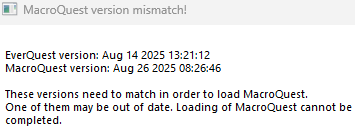
Good evening all. I am receiving this erorr message at this time.1756355223533.png I started VV, updated, reinstalled two macros (I only use two), launched MQ, pressed the launch Selected Group button. EQ will start all six characters in the profile and then stop at the EULA page. I have restart my laptop, redguides.com and the MQ directory are on the whitelist for my AV (Bitdefender). The RG launcher dropdown is set to Live. The MQ files in my directory have a modified date of Aug 26, 2025 Everything seems to be up to date but the software does not recognize the updated date of the MQ files.

I am not computer savy and do not know what steps to do after this. Any help would be appreciated. FYI, I played two or three days ago and nothing has changed since then except for the lastest update. I did read this thread and some of the things spoken of make no sense to me and seem to requre a basic level of knowledge I do not possess.
 
Last edited by a moderator:
Good evening all. I am receiving this erorr message at this time.View attachment 71375 I started VV, updated, reinstalled two macros (I only use two), launched MQ, pressed the launch Selected Group button. EQ will start all six characters in the profile and then stop at the EULA page. I have restart my laptop, redguides.com and the MQ directory are on the whitelist for my AV (Bitdefender). The RG launcher dropdown is set to Live. The MQ files in my directory have a modified date of Aug 26, 2025 View attachment 71376 Everything seems to be up to date but the software does not recognize the updated date of the MQ files.

I am not computer savy and do not know what steps to do after this. Any help would be appreciated. FYI, I played two or three days ago and nothing has changed since then except for the lastest update. I did read this thread and some of the things spoken of make no sense to me and seem to requre a basic level of knowledge I do not possess.

EQ had a new patch (since patch day). Did you re-patch EQ? I'd unload everything MQ related and patch EQ on a clean PC. Once done, close all EQ sessions completely - then update MQ to be sure you have the latest version. Try running autologin again once that has been done.
 
Good evening all. I am receiving this erorr message at this time.View attachment 71375 I started VV, updated, reinstalled two macros (I only use two), launched MQ, pressed the launch Selected Group button. EQ will start all six characters in the profile and then stop at the EULA page. I have restart my laptop, redguides.com and the MQ directory are on the whitelist for my AV (Bitdefender). The RG launcher dropdown is set to Live. The MQ files in my directory have a modified date of Aug 26, 2025 View attachment 71376 Everything seems to be up to date but the software does not recognize the updated date of the MQ files.

I am not computer savy and do not know what steps to do after this. Any help would be appreciated. FYI, I played two or three days ago and nothing has changed since then except for the lastest update. I did read this thread and some of the things spoken of make no sense to me and seem to requre a basic level of knowledge I do not possess.
As whodis said, you need to patch eq. VV was patched for the hotfix, so it doesn’t match the old exe you have.
 
Good evening all. I am receiving this erorr message at this time.View attachment 71375 I started VV, updated, reinstalled two macros (I only use two), launched MQ, pressed the launch Selected Group button. EQ will start all six characters in the profile and then stop at the EULA page. I have restart my laptop, redguides.com and the MQ directory are on the whitelist for my AV (Bitdefender). The RG launcher dropdown is set to Live. The MQ files in my directory have a modified date of Aug 26, 2025 View attachment 71376 Everything seems to be up to date but the software does not recognize the updated date of the MQ files.

I am not computer savy and do not know what steps to do after this. Any help would be appreciated. FYI, I played two or three days ago and nothing has changed since then except for the lastest update. I did read this thread and some of the things spoken of make no sense to me and seem to requre a basic level of knowledge I do not possess.
this tells you that eq is older (thus needs to be patched)

1756391659010.png
 

[2:07 PM] brainiac:

update for live patch is going to be done tonight, take the afternoon off and do some things you've been neglecting to do lately

brainiac:
https://www.redguides.com/tip/brainiac
Reply to this thread after donating for your 🧠
 
Vanilla - Very Vanilla MQ (Live Servers)

Users who are viewing this thread

  • TheDinkles
Back
Top
Cart