• You've discovered RedGuides, an EverQuest multi-boxing and scripting community 🧙‍♀️⚙️. We want you to play several EQ characters at once, come join us and say hello! 👋

  • A TLP without truebox has thawed (Very Vanilla ready)
    Frostreaver
Very Vanilla MQ (Live Servers)

Vanilla - Very Vanilla MQ (Live Servers) (5 Viewers) 3.1.52471.11

No permission to download
Hey, I hope this is in the right section of the forums. A few days ago I had to do a fresh install of windows and it deleted all of my files from macro quest and EverQuest so I had to do fresh install of those as well and after I set up macro quest, I set up the directory for eqgame.exe

Now when I go to launch a character nothing pops up at all. I am not running anything as admin. I have added mq and EQ folders to be excluded from antivirus .

I am lost on what else to do. Any help would be awesome. Thanks
 
When you say "launch a character" what method are you using to launch the character?
 
Can you manually launch a character from the standard login method? And does MQ inject and things function?
When I try launching directly using the EQ Launcher it completes the file check and then it gives me this error.


ERROR​

Unable to launch C:/Users/Public/Daybreak Game Company/Installed Games/EverQuest/eqgame.exe - 740: The requested operation requires elevation.
 
Can you manually launch a character from the standard login method? And does MQ inject and things function?
I opened up the Log Folder under MacroQuest/Release/Logs and found this just now as it failed again to load up one of my characters

D 2025-07-09 14:31:13.766072 [MQ] Logging Initialized (C:\agent\_work\1\s\src\loader\MacroQuest.cpp:372)
I 2025-07-09 14:31:13.766196 [MQ] Starting MacroQuest Loader (Elevated). Built Wed Mar 12 21:53:32 2025 (C:\agent\_work\1\s\src\loader\MacroQuest.cpp:1830)
I 2025-07-09 14:31:13.767177 [MQ] I am a spawned process (C:\agent\_work\1\s\src\loader\MacroQuest.cpp:1865)
I 2025-07-09 14:31:13.821051 [MQ] Initializing crashpad handler (C:\agent\_work\1\s\src\loader\Crashpad.cpp:111)
D 2025-07-09 14:31:13.821098 [MQ] Handler Path: C:\Users\User1\AppData\Local\VeryVanilla\MacroQuest\Release\crashpad_handler.exe (C:\agent\_work\1\s\src\loader\Crashpad.cpp:112)
I 2025-07-09 14:31:13.821753 [MQ] Crash report submission is: enabled (C:\agent\_work\1\s\src\loader\Crashpad.cpp:117)
I 2025-07-09 14:31:13.821901 [MQ] Crash report guid: 748a4192-3503-4f53-9438-cd7c77b25b37 (C:\agent\_work\1\s\src\loader\Crashpad.cpp:121)
I 2025-07-09 14:31:13.821917 [MQ] Using shared crash reporter for all MacroQuest instances (C:\agent\_work\1\s\src\loader\Crashpad.cpp:131)
I 2025-07-09 14:31:13.844124 [MQ] MQ2Main Path: C:\Users\User1\AppData\Local\VeryVanilla\MacroQuest\Release\MQ2Main.dll (C:\agent\_work\1\s\src\loader\MacroQuest.cpp:1447)
I 2025-07-09 14:31:13.849331 [MQ] Build: MacroQuest (Elevated) [Jun 16 2025 (Live)] (C:\agent\_work\1\s\src\loader\MacroQuest.cpp:1467)
I 2025-07-09 14:31:13.850223 [MQ] Starting NamedPipeServer thread for \\.\pipe\mqpipe (C:\agent\_work\1\s\src\routing\NamedPipes.cpp:611)
I 2025-07-09 14:31:13.870546 [MQ] AutoLogin Opening database at C:\Users\User1\AppData\Local\VeryVanilla\MacroQuest\Release\Config\login.db (C:\agent\_work\1\s\src\login\Login.cpp:2554)
I 2025-07-09 14:31:13.878502 [MQ] Process monitor using ToolHelp started (C:\agent\_work\1\s\src\loader\ProcessMonitor.cpp:432)
D 2025-07-09 14:31:13.878543 [MQ] Initializing injector (C:\agent\_work\1\s\src\loader\ProcessList.cpp:1158)
I 2025-07-09 14:31:13.885394 [MQ] Performing injections on any existing eqgame.exe processes (C:\agent\_work\1\s\src\loader\ProcessList.cpp:711)
D 2025-07-09 14:31:13.885512 [MQ] Injector thread started (C:\agent\_work\1\s\src\loader\ProcessList.cpp:1051)
I 2025-07-09 14:31:13.909338 [MQ] Waiting for events... (C:\agent\_work\1\s\src\loader\MacroQuest.cpp:2053)
E 2025-07-09 14:32:17.702869 [MQ] Failed to create new eqgame process: The requested operation requires elevation. (C:\agent\_work\1\s\src\login\AutoLogin.cpp:361)
 
More than likely you are going to have to manually add your accounts and character sets again.
Yes you are correct lol. I braced myself and knew that was coming for me. But I have already done that and added a group already.
When I right click on the mq icon in my taskbar and goto Profiles and then click on a character or a group nothing is happening.
 
I opened up the Log Folder under MacroQuest/Release/Logs and found this just now as it failed again to load up one of my characters

D 2025-07-09 14:31:13.766072 [MQ] Logging Initialized (C:\agent\_work\1\s\src\loader\MacroQuest.cpp:372)
I 2025-07-09 14:31:13.766196 [MQ] Starting MacroQuest Loader (Elevated). Built Wed Mar 12 21:53:32 2025 (C:\agent\_work\1\s\src\loader\MacroQuest.cpp:1830)
I 2025-07-09 14:31:13.767177 [MQ] I am a spawned process (C:\agent\_work\1\s\src\loader\MacroQuest.cpp:1865)
I 2025-07-09 14:31:13.821051 [MQ] Initializing crashpad handler (C:\agent\_work\1\s\src\loader\Crashpad.cpp:111)
D 2025-07-09 14:31:13.821098 [MQ] Handler Path: C:\Users\User1\AppData\Local\VeryVanilla\MacroQuest\Release\crashpad_handler.exe (C:\agent\_work\1\s\src\loader\Crashpad.cpp:112)
I 2025-07-09 14:31:13.821753 [MQ] Crash report submission is: enabled (C:\agent\_work\1\s\src\loader\Crashpad.cpp:117)
I 2025-07-09 14:31:13.821901 [MQ] Crash report guid: 748a4192-3503-4f53-9438-cd7c77b25b37 (C:\agent\_work\1\s\src\loader\Crashpad.cpp:121)
I 2025-07-09 14:31:13.821917 [MQ] Using shared crash reporter for all MacroQuest instances (C:\agent\_work\1\s\src\loader\Crashpad.cpp:131)
I 2025-07-09 14:31:13.844124 [MQ] MQ2Main Path: C:\Users\User1\AppData\Local\VeryVanilla\MacroQuest\Release\MQ2Main.dll (C:\agent\_work\1\s\src\loader\MacroQuest.cpp:1447)
I 2025-07-09 14:31:13.849331 [MQ] Build: MacroQuest (Elevated) [Jun 16 2025 (Live)] (C:\agent\_work\1\s\src\loader\MacroQuest.cpp:1467)
I 2025-07-09 14:31:13.850223 [MQ] Starting NamedPipeServer thread for \\.\pipe\mqpipe (C:\agent\_work\1\s\src\routing\NamedPipes.cpp:611)
I 2025-07-09 14:31:13.870546 [MQ] AutoLogin Opening database at C:\Users\User1\AppData\Local\VeryVanilla\MacroQuest\Release\Config\login.db (C:\agent\_work\1\s\src\login\Login.cpp:2554)
I 2025-07-09 14:31:13.878502 [MQ] Process monitor using ToolHelp started (C:\agent\_work\1\s\src\loader\ProcessMonitor.cpp:432)
D 2025-07-09 14:31:13.878543 [MQ] Initializing injector (C:\agent\_work\1\s\src\loader\ProcessList.cpp:1158)
I 2025-07-09 14:31:13.885394 [MQ] Performing injections on any existing eqgame.exe processes (C:\agent\_work\1\s\src\loader\ProcessList.cpp:711)
D 2025-07-09 14:31:13.885512 [MQ] Injector thread started (C:\agent\_work\1\s\src\loader\ProcessList.cpp:1051)
I 2025-07-09 14:31:13.909338 [MQ] Waiting for events... (C:\agent\_work\1\s\src\loader\MacroQuest.cpp:2053)
E 2025-07-09 14:32:17.702869 [MQ] Failed to create new eqgame process: The requested operation requires elevation. (C:\agent\_work\1\s\src\login\AutoLogin.cpp:361)


says right there

you're running something as admin
 
E 2025-07-09 14:32:17.702869 [MQ] Failed to create new eqgame process: The requested operation requires elevation. (C:\agent\_work\1\s\src\login\AutoLogin.cpp:361)

says right there

you're running something as admin
Im not running anything as admin though Ive triple checked. I dont even see where that file is at on my hdd C:\agent\_work\1\s\src\login\Autologin.cpp
 
Im not running anything as admin though Ive triple checked. I dont even see where that file is at on my hdd C:\agent\_work\1\s\src\login\Autologin.cpp
im not sure why the debugger shows the agent\_work etc - but that is where RG builds VV, i think it is just saying where that file came from.

but yeah, eq is getting launched as admin, and mq can't attach to it
 
im not sure why the debugger shows the agent\_work etc - but that is where RG builds VV, i think it is just saying where that file came from.

but yeah, eq is getting launched as admin, and mq can't attach to it
Yeah, so the only way that I’m able to get the character running successfully with macro quest running in the background is to run the EQ client as admin directly from the desktop and then it’s connected, but I cannot get the auto login to work if that makes sense to launch all of my characters. What am I doing wrong because if I set the request client to not use the admin settings then it won’t run.
 
Yeah, so the only way that I’m able to get the character running successfully with macro quest running in the background is to run the EQ client as admin directly from the desktop and then it’s connected, but I cannot get the auto login to work if that makes sense to launch all of my characters. What am I doing wrong because if I set the request client to not use the admin settings then it won’t run.
if one is running admin (mq/eq) then the other has to be also

you *should* not have *anything* running as admin

if you run ISBoxer and have that as admin, that is elevating eq
 
Yeah, so the only way that I’m able to get the character running successfully with macro quest running in the background is to run the EQ client as admin directly from the desktop and then it’s connected, but I cannot get the auto login to work if that makes sense to launch all of my characters. What am I doing wrong because if I set the request client to not use the admin settings then it won’t run.
I am not running isboxxer. I have tried both ways running both with admin privileges, and without .
 
I opened up the Log Folder under MacroQuest/Release/Logs and found this just now as it failed again to load up one of my characters


I 2025-07-09 14:31:13.849331 [MQ] Build: MacroQuest (Elevated) [Jun 16 2025 (Live)] (C:\agent\_work\1\s\src\loader\MacroQuest.cpp:1467)

E 2025-07-09 14:32:17.702869 [MQ] Failed to create new eqgame process: The requested operation requires elevation. (C:\agent\_work\1\s\src\login\AutoLogin.cpp:361)

Am I wrong in thinking that MQ thinks it is elevated and ran as admin?
 
im not sure what i should do. should i try reinstalling?

I also just noticed that whenever i hover over the MQ icon on my taskbar in the far right corner, it says (Elevated) .... I just checked and its not being ran as admin

{UPDATE SOLVED}

Sorry about all the messages but I wanted to give an update just incase anybody else runs into this problem again. When I went to do a system restore on my computer and backed up all of my personal settings I think what happened was that my Daybreak Games Folder was in a folder called "Public" so I just moved that over to my current account and I think that is what fixed my problem.
 
Last edited:
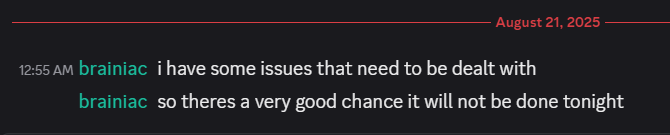
It varies form patch to patch. As this is a passion project for the devs it is when they have time. For this patch, anticpate tonight or tomorrow.
 
Tried to launch VV but not updated yet. How soon?
What to expect on patch days?
When eq patches MQ has to be rebuilt. (you also have to patch EQ --- this way you avoid "Version Mismatch" issues)

once mq is built RG can build - we now have an automated system that rebuilds RG as soon as it is updated - which means our previous method of "let's give it a quick test" is no longer there, and sometimes there ends up being another smaller patch later to correct if something got missed - so re-check on patch days if you are having issues.

eq could change literally anything and it would require the way MQ interacts with that portion of EQ to be completely reworked. It is normally just offsets, sometimes struct changes --- with the large changes eq has been making over the past few months (updates and backend improvements) there are more things than just offset changes that are happening, so it can certainly be a lot of work for the devs.

Curious when Very Vanilla will be updated?
You'll get a web notification (if we have permission), site notification, and email (optional)
Click to watch
MacroQuest for Live servers:
MacroQuest for Test server

EQ patches go like this: (in theory)
2nd* tue/wed = test "real" patch
3rd* wed = live patch
4th* tue/wed = test "true up

the tue over the wed is a more recent thing (I suspect klanderso has more to do with that, and having time to ensure working stuff before the weekend and upset people - klanderso is pretty awesome)
* holidays subject to cause shifts in days or even week

test is notorious for being like "oops we forgot the 'dont crash plz' file, gotta patch again", or "woops we added +1 to crashing, we meant -1", so "on paper" it is double the patches, but very frequently ends up being more than double the work (i imagine, I'm not doing the work - I'd love to learn enough at some point to help facilitate doing so, however)

Mq itself is open source and by volunteer(s) - RG which builds and distributes that is obviously paid for.
If you wanted to show your appreciation to the MQ devs for their volunteer work:

Tip the MQ Developers HERE:
brainiac:
https://www.redguides.com/tip/brainiac
Reply to this thread after donating for your 🧠
dannuic:
Reply to this thread after for your :dannuic:
 
Vanilla - Very Vanilla MQ (Live Servers)

Users who are viewing this thread

Back
Top
Cart