
-
 Hail, we're RedGuides. We want you to play six (yes, 6!) EverQuest characters at once. We have scripts and a friendly community to help, please join our playstyle and say hello! 👋
You are using an out of date browser. It may not display this or other websites correctly.
You should upgrade or use an alternative browser.
You should upgrade or use an alternative browser.

Vanilla - Very Vanilla MQ (Live Servers) (3 Viewers) 3.1.52471.42
- Thread starter Knightly
- Start date

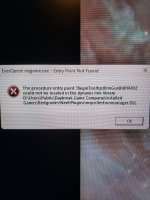

/Plugin Unload or simply delete MQcollectionmanager.dllI'm getting a strange error with eq loaded and launching using the everquest launcherView attachment 56915.


what Kaen said, EQ said do it as you can, so if you dont want a mismatch issue DONT PATCH YOUR EQ CLIENT!!!! 
how do you log in without patching (which happens when you open the launcher)?

Using the Patchme command to bypass the SOE Launcher
The following instructions will help you set up Everquest to Run with MacroQuest2 Using the Patchme command to bypass the SOE Launcher 1. Use the SOE Launcher to make sure your EverQuest is fully Patched. 2. Shut down EQ and the SOE Launcher...
 www.redguides.com
This is old, but still valid info, pretty much edit your EQ/MQ target to run the EQ exe, vice letting the launch check for updates, and then running the exe.
Hello,
I had to reinstal MQ and now I'm geting the following error's
[2024-02-01 14:20:43.788] [MQ] [debug] [MacroQuest.cpp:199] Logging Initialized
[2024-02-01 14:20:43.788] [MQ] [info] [MacroQuest.cpp:1006] Starting MacroQuest Loader. Built Mon Jan 29 12:29:01 2024
[2024-02-01 14:20:43.789] [MQ] [info] [Crashpad.cpp:100] Initializing crashpad handler
[2024-02-01 14:20:43.789] [MQ] [debug] [Crashpad.cpp:101] Handler Path: C:\Users\Mike\AppData\Local\VeryVanilla\MacroQuest\Release\crashpad_handler.exe
[2024-02-01 14:20:43.789] [MQ] [info] [Crashpad.cpp:106] Crash report submission is: enabled
[2024-02-01 14:20:43.790] [MQ] [info] [Crashpad.cpp:110] Crash report guid: 7f777d9a-dbbf-4165-89bd-efb86fa11465
[2024-02-01 14:20:43.790] [MQ] [info] [Crashpad.cpp:120] Using shared crash reporter for all MacroQuest instances
[2024-02-01 14:20:43.818] [MQ] [info] [NamedPipes.cpp:610] Starting NamedPipeServer thread for \\.\pipe\mqpipe
[2024-02-01 14:20:43.902] [MQ] [info] [ProcessMonitor.cpp:430] Process monitor using ToolHelp started
[2024-02-01 14:20:43.902] [MQ] [info] [MacroQuest.cpp:965] MQ2Main Path: C:\Users\Mike\AppData\Local\VeryVanilla\MacroQuest\Release\MQ2Main.dll
[2024-02-01 14:20:43.905] [MQ] [info] [MacroQuest.cpp:985] Build: MacroQuest [Jan 16 2024 (Live)]
[2024-02-01 14:20:43.906] [MQ] [debug] [ProcessList.cpp:1182] Initializing injector
[2024-02-01 14:20:43.909] [MQ] [info] [ProcessList.cpp:730] Performing injections on any existing eqgame.exe processes
[2024-02-01 14:20:43.910] [MQ] [debug] [ProcessList.cpp:1075] Injector thread started
[2024-02-01 14:20:43.915] [MQ] [info] [MacroQuest.cpp:1204] Waiting for events...
I had to reinstal MQ and now I'm geting the following error's
[2024-02-01 14:20:43.788] [MQ] [debug] [MacroQuest.cpp:199] Logging Initialized
[2024-02-01 14:20:43.788] [MQ] [info] [MacroQuest.cpp:1006] Starting MacroQuest Loader. Built Mon Jan 29 12:29:01 2024
[2024-02-01 14:20:43.789] [MQ] [info] [Crashpad.cpp:100] Initializing crashpad handler
[2024-02-01 14:20:43.789] [MQ] [debug] [Crashpad.cpp:101] Handler Path: C:\Users\Mike\AppData\Local\VeryVanilla\MacroQuest\Release\crashpad_handler.exe
[2024-02-01 14:20:43.789] [MQ] [info] [Crashpad.cpp:106] Crash report submission is: enabled
[2024-02-01 14:20:43.790] [MQ] [info] [Crashpad.cpp:110] Crash report guid: 7f777d9a-dbbf-4165-89bd-efb86fa11465
[2024-02-01 14:20:43.790] [MQ] [info] [Crashpad.cpp:120] Using shared crash reporter for all MacroQuest instances
[2024-02-01 14:20:43.818] [MQ] [info] [NamedPipes.cpp:610] Starting NamedPipeServer thread for \\.\pipe\mqpipe
[2024-02-01 14:20:43.902] [MQ] [info] [ProcessMonitor.cpp:430] Process monitor using ToolHelp started
[2024-02-01 14:20:43.902] [MQ] [info] [MacroQuest.cpp:965] MQ2Main Path: C:\Users\Mike\AppData\Local\VeryVanilla\MacroQuest\Release\MQ2Main.dll
[2024-02-01 14:20:43.905] [MQ] [info] [MacroQuest.cpp:985] Build: MacroQuest [Jan 16 2024 (Live)]
[2024-02-01 14:20:43.906] [MQ] [debug] [ProcessList.cpp:1182] Initializing injector
[2024-02-01 14:20:43.909] [MQ] [info] [ProcessList.cpp:730] Performing injections on any existing eqgame.exe processes
[2024-02-01 14:20:43.910] [MQ] [debug] [ProcessList.cpp:1075] Injector thread started
[2024-02-01 14:20:43.915] [MQ] [info] [MacroQuest.cpp:1204] Waiting for events...
Problem - - Unpublished patch today, breaks version check for Very Vanilla
See subject.
www.redguides.com
You patch EQ didnt you? MQ will have to be updated and rebuilt if you did (or can ask somebody to send you a old EQ .exe and roll back EQ patch)

If I didn’t already know what your problem is (eq patched) I’d say I have no idea because these logs you posted do t have any errors in them. So saying “the following errors would’ve just left me confused”Hello,
I had to reinstal MQ and now I'm geting the following error's
[2024-02-01 14:20:43.788] [MQ] [debug] [MacroQuest.cpp:199] Logging Initialized
[2024-02-01 14:20:43.788] [MQ] [info] [MacroQuest.cpp:1006] Starting MacroQuest Loader. Built Mon Jan 29 12:29:01 2024
[2024-02-01 14:20:43.789] [MQ] [info] [Crashpad.cpp:100] Initializing crashpad handler
[2024-02-01 14:20:43.789] [MQ] [debug] [Crashpad.cpp:101] Handler Path: C:\Users\Mike\AppData\Local\VeryVanilla\MacroQuest\Release\crashpad_handler.exe
[2024-02-01 14:20:43.789] [MQ] [info] [Crashpad.cpp:106] Crash report submission is: enabled
[2024-02-01 14:20:43.790] [MQ] [info] [Crashpad.cpp:110] Crash report guid: 7f777d9a-dbbf-4165-89bd-efb86fa11465
[2024-02-01 14:20:43.790] [MQ] [info] [Crashpad.cpp:120] Using shared crash reporter for all MacroQuest instances
[2024-02-01 14:20:43.818] [MQ] [info] [NamedPipes.cpp:610] Starting NamedPipeServer thread for \\.\pipe\mqpipe
[2024-02-01 14:20:43.902] [MQ] [info] [ProcessMonitor.cpp:430] Process monitor using ToolHelp started
[2024-02-01 14:20:43.902] [MQ] [info] [MacroQuest.cpp:965] MQ2Main Path: C:\Users\Mike\AppData\Local\VeryVanilla\MacroQuest\Release\MQ2Main.dll
[2024-02-01 14:20:43.905] [MQ] [info] [MacroQuest.cpp:985] Build: MacroQuest [Jan 16 2024 (Live)]
[2024-02-01 14:20:43.906] [MQ] [debug] [ProcessList.cpp:1182] Initializing injector
[2024-02-01 14:20:43.909] [MQ] [info] [ProcessList.cpp:730] Performing injections on any existing eqgame.exe processes
[2024-02-01 14:20:43.910] [MQ] [debug] [ProcessList.cpp:1075] Injector thread started
[2024-02-01 14:20:43.915] [MQ] [info] [MacroQuest.cpp:1204] Waiting for events...
The MacroQuest scene has two standout developers who have requested tips from RedGuides users: @brainiac and @dannuicFor those of us that unfortunately came home to our kids playing and patched clients.... little help
To keep our favorite software modernized and updated, please consider contributing.
brainiac's tip thread is here:
Donate to the MQ Dev "brainiac"
dannuic's tip thread is here:
Donate to the MQ Dev "dannuic"
Thank you!
The MQ dev team will work on it as soon as possible I am sure. They are real people, and do this in "spare" time, so if it takes a little time, please be patient!
I have a bit of a different issue in that EQ version is newer than MQ2 version, yet when I update using RG launcher there is no change.
Attaching a screenshot of what I see when I run EQ. I have also tried using the bypass patchme routine and still get the same error.
Any help would be much appreciated.
Attaching a screenshot of what I see when I run EQ. I have also tried using the bypass patchme routine and still get the same error.
Any help would be much appreciated.
Attachments
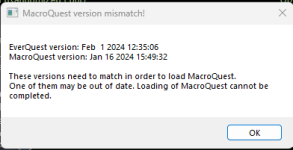
Brainiac, Dannuic and Knightly will update MQ, RG will pull that, recompile VV and then publish it. EQ just did this as a rando patch, on a thur afternoon. Lets give the MQ team time to dig into it.I have a bit of a different issue in that EQ version is newer than MQ2 version, yet when I update using RG launcher there is no change.
Attaching a screenshot of what I see when I run EQ. I have also tried using the bypass patchme routine and still get the same error.
Any help would be much appreciated.

Lord Sivion
Ultimate seasoned veteran member
What did those nerds at DBG do now.... 
Thanks, after I posted I saw some other responses took place. Appreciate the response. No worries, I'm addicted but I still have skills can deal with it the old fashioned way for a bit.Brainiac, Dannuic and Knightly will update MQ, RG will pull that, recompile VV and then publish it. EQ just did this as a rando patch, on a thur afternoon. Lets give the MQ team time to dig into it.

Why do they do random patches when everything is working well ? They never heard the phrase " If it not broken , then don't try to fix it"
This is a lot of expended energy on time and resources when they could do things to make the game better
Am I RIGHT or am I RIGHT ??
This is a lot of expended energy on time and resources when they could do things to make the game better
Am I RIGHT or am I RIGHT ??

519helvis
test server lobbyist
my guess is that often to make the game better they need to patch ....Why do they do random patches when everything is working well ? They never heard the phrase " If it not broken , then don't try to fix it"
This is a lot of expended energy on time and resources when they could do things to make the game better
Am I RIGHT or am I RIGHT ??


JudeauChop
Member
I did the same thing alas, it happens.
alas, it happens.
Lord Sivion
Ultimate seasoned veteran member
Only weirdos use the patcher to play...

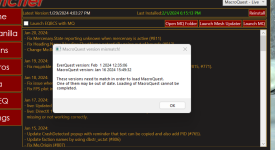
I tried running MQ today to find this. I rebooted/reinstalled many times. I then uninstalled and reinstalled launcher twice, the deleted MQ and folder and launcher and reinstall. I still have the exact same thing happening and I know others are not having this issue. Everything has been fine prior to today and didn't do anything out of the ordinary. Confused, any help would be appreciated!

Eq "optional patched" but mq isn't yet updated to match.View attachment 56998
I tried running MQ today to find this. I rebooted/reinstalled many times. I then uninstalled and reinstalled launcher twice, the deleted MQ and folder and launcher and reinstall. I still have the exact same thing happening and I know others are not having this issue. Everything has been fine prior to today and didn't do anything out of the ordinary. Confused, any help would be appreciated!
You're gonna have to wait
TY very much. I thought I was having a unique issue as I have talked to others not having the issue. I had thought about just waiting it out. Waiting it out

ColdSimon
Member
Can you please help me learn how to do this?Or restore the files the patched from a backup. =)

Howdy, before reading more on the forum about it being a hot-fix patch that broke MQ, i was trying various ways to get MQ to work.. i ended up deleting/uninstalling MQ and then Redguides.. And now im having trouble getting Redguides to install MQ.. it only gives me the "patch day unavailable" where install used to be for live. The launch MQ obviously doesnt work because there is no file location ect.
Is there a fix? (trying to at least get the profiles/other stuff setup for when MQ gets patched) Thanks!
Is there a fix? (trying to at least get the profiles/other stuff setup for when MQ gets patched) Thanks!
The patcher was most likely locked while MQ is rebuilt, and then RG will have to pull and compile VV.Howdy, before reading more on the forum about it being a hot-fix patch that broke MQ, i was trying various ways to get MQ to work.. i ended up deleting/uninstalling MQ and then Redguides.. And now im having trouble getting Redguides to install MQ.. it only gives me the "patch day unavailable" where install used to be for live. The launch MQ obviously doesnt work because there is no file location ect.
Is there a fix? (trying to at least get the profiles/other stuff setup for when MQ gets patched) Thanks!
ah, i see. Well hopefully it lets me install it once everything is patched.
DietCoke52
Well-known member
It's rarely down more than a day, we will survive.
Redbot updated Very Vanilla MQ (Live Servers) with a new update entry:
20240201
Read the rest of this update entry...
20240201
Feb 1, 2024
- live: Updated for latest patch
Jan 30, 2024:
- Disable jit when delaying so that delays are not optimized away (#822)
- /doability will now accept quoted or unquoted ability names
- /doability will now work for innate skills like slam (#371)
- mq.TLO.Me.Ability is now a boolean. It returns true or false based on whether you have the ability.
- mq.TLO.Me.AbilityReady will no longer say an ability is ready if you don't have that ability.
- Added mq.TLO.Me.AbilityTimerTotal which...
Read the rest of this update entry...

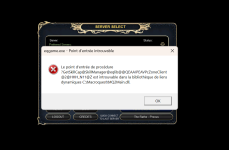
So I used my EQ Launcher for each of my accounts and checked that it was showing that All Files were up to date. I've logged in through the launcher to all my characters. But when I am using AutoLogin I'm getting the version mismatch error for all but my main.
EverQuest version: Jan 16 2024 15:49:32
MacroQuest version: Feb 1 2024 12:35:06
Trying to figure out why it is still thinking the EQ version is the old one.
EverQuest version: Jan 16 2024 15:49:32
MacroQuest version: Feb 1 2024 12:35:06
Trying to figure out why it is still thinking the EQ version is the old one.
They patched yesterday at 3pm. Try running the launcher again.So I used my EQ Launcher for each of my accounts and checked that it was showing that All Files were up to date. I've logged in through the launcher to all my characters. But when I am using AutoLogin I'm getting the version mismatch error for all but my main.
EverQuest version: Jan 16 2024 15:49:32
MacroQuest version: Feb 1 2024 12:35:06
Trying to figure out why it is still thinking the EQ version is the old one.
Users who are viewing this thread
Total: 4 (members: 0, guests: 4)
Share: